


What an AI Cover Actually Is
Search for "ai cover" right now and you'll find page after page of product listings and generator tools. What you won't find is a straightforward explanation of what the term actually means. Let's fix that.
An AI cover is a music track where artificial intelligence replaces the original vocalist with a cloned or synthesized voice, preserving the song's instrumental arrangement, timing, and structure while swapping only the vocal performance.
Think of it this way: when a human artist records a cover, they re-perform the entire song — new vocal delivery, personal interpretation, sometimes a completely different arrangement. An AI cover skips all of that. Instead, a trained voice model analyzes the original vocal track and transforms it so it sounds like someone else is singing — all without a single human note being recorded.
These voice models are the engine behind the whole process. They learn the unique characteristics of a target voice — pitch, timbre, vocal texture — from audio samples, much like neural networks learn vocal acoustics to produce natural-sounding transformations. Once trained, a model can make that voice "sing" virtually any song you feed it. The result? You could hear a beloved cartoon character belt out a power ballad, or a rapper deliver an opera aria — pairings that would never exist otherwise.
What Makes an AI Cover Different from a Traditional Cover
The core distinction is simple: human performance versus algorithmic voice replacement. A traditional cover involves a real person interpreting a song — choosing phrasing, adding emotion, maybe rearranging the chords. An AI cover keeps the original instrumental completely intact. The only thing that changes is whose voice you hear over it. No new musical decisions are made. The AI isn't performing; it's converting one voice into another, preserving every breath and syllable of the original timing.
Why AI Covers Have Captured Public Attention
Two things drive the fascination. First, there's the sheer novelty — hearing unexpected voice-and-song combinations scratches a curiosity itch that's hard to resist. It's the kind of content people share the way they'd share a quirky life hack, whether that's video editing tips for beginners or how to make coffee with unconventional methods. The surprise factor is built in.
Second, accessibility matters. You don't need to sing, play an instrument, or even understand music theory. If you can upload a file and click a button — skills no harder than logging into a portal like mypascoconnect for a school assignment — you can create something that sounds genuinely entertaining. That low barrier to entry has turned AI covers from a niche experiment into a participatory creative movement, and the technology powering it is evolving fast.
How AI Covers Became a Cultural Phenomenon
That creative movement didn't appear overnight. It grew out of decades of voice synthesis research, accelerated by a handful of open-source breakthroughs, and then exploded the moment short-form video got hold of it.
From Research Labs to Bedroom Producers
Voice conversion technology spent years locked inside academic papers and corporate R&D departments. Early systems needed massive datasets, expensive hardware, and deep technical knowledge — not exactly weekend craft ideas for curious musicians. The turning point came with Retrieval-Based Voice Conversion, better known as RVC. Unlike older methods that demanded hours of training data, RVC can create convincing voice models from just 5-10 minutes of clean audio and runs on consumer hardware. Free tools like the RVC WebUI on GitHub and Google Colab notebooks meant anyone with a laptop and a bit of patience could train a voice model in under an hour — no lab coat required.
Communities formed fast. Platforms like Hugging Face and Voice-Models.com became hubs where creators shared thousands of pre-trained models. It was grassroots in the truest sense: people training voices, swapping tips, and iterating on each other's work like an open-source music collective.
The Social Media Explosion
Great technology still needs a stage, and TikTok and YouTube Shorts provided exactly that. Short-form video turned AI covers into a participatory sport. Creators competed to produce the most surprising, funniest, or most emotionally striking voice-song pairings — and audiences rewarded them with shares. You could scroll for what feels like setting a 5 minute timer and end up deep in a rabbit hole of AI vocal mashups, each one more unexpected than the last.
The format was perfect. A 30-second clip of a familiar voice singing an unfamiliar song needs zero context to land. It hooks you the way a highlight reel from canelo vs crawford grabs a boxing fan — instant recognition, instant reaction. That frictionless shareability, combined with the online safety tips many platforms began issuing around AI-generated content labeling, kept the trend visible and in constant conversation.
Iconic AI Cover Moments
Certain pairings became cultural touchstones. Reimagined classics like a 1950s soul rendition of Evanescence's 'Bring Me To Life,' a reggae take on Michael Jackson's 'Smooth Criminal,' and a glam rock version of the Spice Girls' 'Wannabe' each demonstrated how radically a song's emotional character shifts when you change the vocal style and genre context. Some of these AI cover videos have accumulated millions of views across platforms, proving the concept has legs far beyond novelty.
What makes these moments stick isn't just the technical trick — it's the creative reinterpretation. A big band jazz version of Billie Eilish's 'BIRDS OF A FEATHER' doesn't just swap a voice; it reimagines the entire emotional landscape of the song, turning intimate pop into a show-stopping swing number. That kind of transformation is what separates a forgettable gimmick from something people genuinely want to listen to again.
The ecosystem that powers all of this — voice models, conversion pipelines, community sharing — sounds complex. But the technology under the hood is more approachable than you'd expect.
The Technology Powering AI Voice Conversion
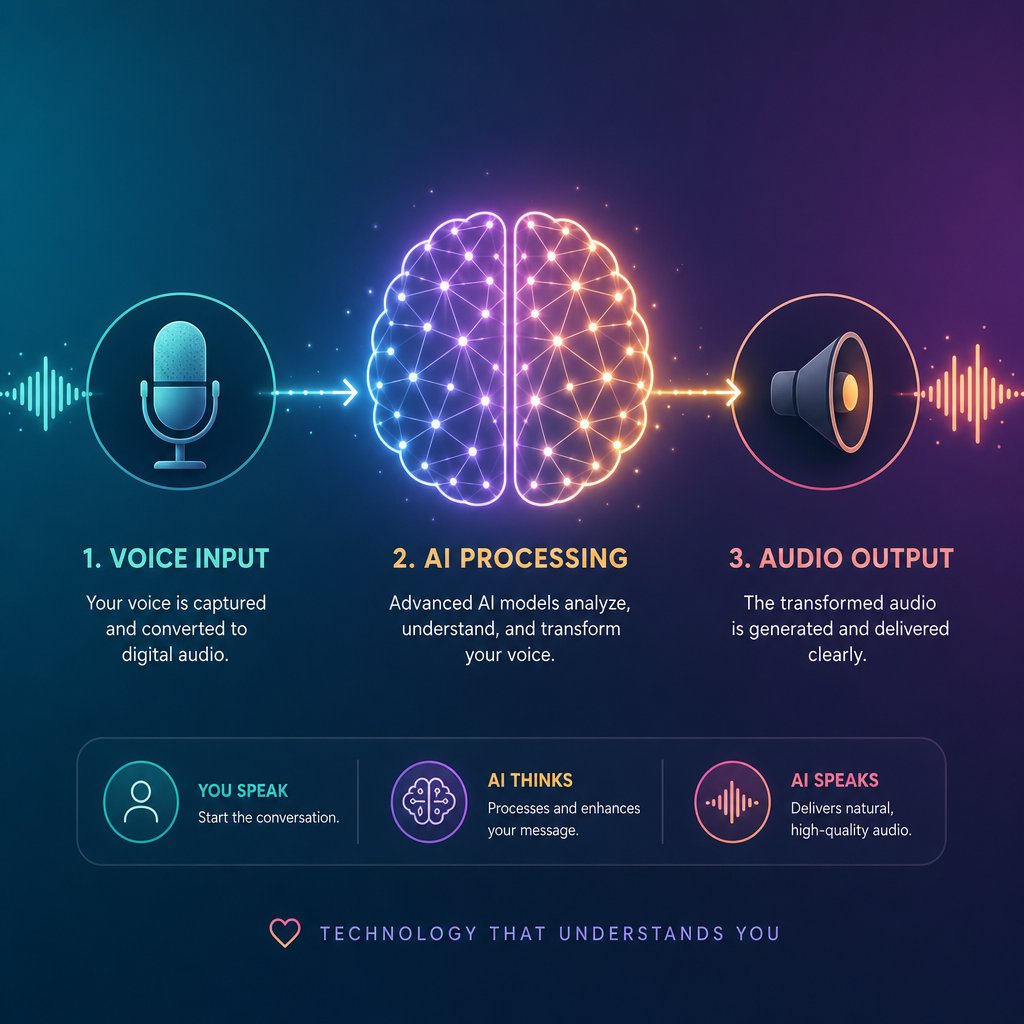
Every AI cover — no matter how polished or rough — passes through the same three-stage pipeline: voice model training, voice conversion, and post-processing. Sounds complex? It's really not. Imagine you're learning how to paint a room. You prep the surface, apply the paint, then clean up the edges. The AI cover process follows a similar logic, just with audio instead of walls.
Voice Model Training Simplified
A voice model is what teaches the AI to sound like a specific person. It's built by feeding clean audio samples of a target voice into a machine learning system, which then learns that voice's unique fingerprint — pitch range, timbre, vocal texture, even subtle habits like how consonants are shaped or how vibrato develops on held notes.
The quality and type of training data matter enormously. Models trained on singing voice data capture the higher registers, breath control, and melodic phrasing that singing demands. Models trained only on speaking voice — pulled from interviews or podcasts, for example — often struggle with musical performance. As research from Qosmo Lab notes, this cross-domain challenge (training on speech but expecting singing output) consistently produces lower naturalness and similarity scores compared to in-domain models trained on actual singing.
You'll encounter two categories in the wild: pre-built models and custom-trained models. Pre-built models — typically of celebrities or popular characters — are shared freely across community hubs and ready to use immediately. Custom-trained models require you to gather your own audio samples and run the training process yourself, giving you control but demanding more effort. Think of it like the difference between downloading a premade template and building one from scratch.
How Voice Conversion Transforms a Song
Voice conversion is where the actual magic happens, and it follows a clear sequence. First, the source track gets split into two layers: isolated vocals and the instrumental. Most platforms handle this separation automatically using AI-based stem splitters. Then the isolated vocal is fed through the trained voice model, which transforms the pitch and timbre characteristics while preserving the original timing, lyrics, and expression. Unlike traditional pitch shifting — which just moves frequencies up or down mathematically and creates that infamous chipmunk effect — AI voice conversion reconstructs the vocal performance, maintaining natural formant relationships and breath patterns.
Finally, the converted vocal gets layered back over the original instrumental. This recombination step is where volume balancing, reverb matching, and minor timing adjustments happen. It's the cleanup phase — making sure the new voice sits naturally in the mix rather than sounding pasted on top.
RVC, SVC, and Diffusion Models at a Glance
Three model architectures dominate the AI cover landscape right now. Each takes a different approach to the same problem, and knowing the basics helps you pick the right tool — the same way understanding geometry formulas helps you pick the right equation for the shape you're solving. Here's a quick breakdown:
- Retrieval-Based Voice Conversion (RVC) — The most popular choice for beginners and hobbyists. RVC keeps an index of vocal embeddings from the training data and mixes them back in during conversion to better preserve the target singer's style and delivery. It's fast, runs on consumer GPUs, and produces solid results with minimal setup — like using delta math to solve a problem efficiently rather than working through every step longhand.
- Singing Voice Conversion (SVC) — Frameworks like So-VITS-SVC combine variational autoencoders with neural source filters to model how the human voice actually produces sound. They tend to deliver higher fidelity output, especially for complex vocal performances, but require more computational resources and technical know-how. If RVC is the accessible entry point, SVC methods like So-VITS are the deeper toolkit for creators chasing studio-grade results.
- Diffusion-based models — These borrow the same denoising approach that revolutionized AI image generation. Rather than generating vocals from scratch, a technique called shallow diffusion takes a rough vocal output from a faster network and refines it over several denoising steps — improving naturalness without the full computational cost of running diffusion from pure noise. The tradeoff is speed: diffusion models produce some of the most natural-sounding conversions available, but they're typically too slow for real-time use.
Each approach has its sweet spot. RVC dominates the casual creator space — it's the deltamath shortcut that gets you a solid answer quickly. SVC frameworks reward patience with polish. Diffusion models push the quality ceiling higher at the cost of processing time. Many advanced creators actually layer these approaches, using RVC for quick drafts and diffusion refinement for final output.
The dandys world of AI voice models can feel overwhelming at first glance, but the underlying logic is consistent across all three: learn a voice, transform a vocal, blend it back in. What really separates a mediocre result from a convincing one isn't just the model architecture — it's the voice model you choose and how well it matches the song you're converting.
Popular Voice Models and Categories Explained
Matching a voice model to a song is a lot like picking the right component when you're figuring out how to build a pc — every piece needs to be compatible, or the whole thing underperforms. The model architecture gets you in the door, but the specific voice you choose determines whether your AI cover sounds convincing or cringe-worthy.
Most platforms organize their voice model libraries into distinct categories, each producing a very different sonic result. OpenMusic AI, for example, sorts its collection into Celebrity, Animation, and Game groupings — and that structure isn't arbitrary. Each category carries its own vocal characteristics, strengths, and quirks that directly affect how the final output sounds.
Celebrity Voice Models and Their Appeal
Celebrity models are the most popular category by a wide margin, and it's easy to see why. Hearing a famous singer's voice on a song they never actually recorded is the core thrill of the whole trend. These models are trained on real vocal performances, capturing the nuances that make a voice instantly recognizable — the rasp, the breath control, the way certain vowels are shaped.
Here's where most beginners trip up, though. A celebrity model trained on a baritone voice won't magically sound great on a soprano pop track. Vocal range compatibility is the single biggest factor in whether a celebrity model produces a natural result or a strained, glitchy mess. When the source song's melody sits comfortably within the model's trained range, the conversion engine has room to work. Push it too far outside that range, and you'll hear artifacts pile up fast — like trying to force a bass singer through a Mariah Carey whistle register.
Animation and Character Voice Models
Animation and anime character models play by different rules entirely. Realism isn't the goal — entertainment is. These models lean into exaggerated tones, stylized delivery, and the kind of over-the-top vocal personality that makes cartoon characters memorable in the first place. A SpongeBob model singing a trap anthem or a Goku model delivering a love ballad works precisely because it sounds absurd.
Game character models occupy a middle ground. They often blend speech-like qualities with musical performance, since most game voice acting involves dramatic delivery rather than singing. The result can feel like a block breaker of expectations — smashing through what you'd normally associate with that character's voice and reassembling it into something musical. These models tend to shine on spoken-word-heavy genres like rap and hip-hop, where rhythmic delivery matters more than sustained melodic range.
Choosing the Right Voice Model for Your Song
Picking a voice model isn't like browsing dinner ideas and grabbing whatever looks appealing. It requires thinking about compatibility. The wrong pairing produces the kind of output that sounds obviously synthetic, while the right one can genuinely fool casual listeners. Consider it a form of creative gardening tips for your audio — you're cultivating the right conditions for something to grow naturally.
Before you commit to a model, run through these factors:
- Pitch range match — Does the model's trained vocal range overlap with the melody of your source track? This is the most common make-or-break factor.
- Vocal style alignment — A breathy pop model on a screamo track will fight the source material. Match the energy and delivery style.
- Timbre compatibility — Bright voices pair better with bright mixes; warm, rich voices suit darker instrumentals. Mismatched timbre creates a "pasted on" feeling.
- Genre context — Celebrity models trained on R&B vocals handle melodic content well. Character models often work better for novelty genres or rhythmic tracks.
- Training data quality — Models built from clean, isolated singing samples consistently outperform those trained on noisy interview clips or compressed audio. Quality guidance from voice conversion platforms repeatedly emphasizes that cleaner reference audio produces more accurate models.
The category you choose sets the ceiling for what's possible. A well-matched voice model on a compatible song can produce results that genuinely surprise you. A poorly matched one — no matter how advanced the underlying technology — will sound off from the first note. Getting this pairing right is half the battle. The other half? Knowing how to build a pc-like workflow from start to finish: selecting your source track, isolating vocals, running the conversion, and mixing the final output into something worth sharing.
How to Create an AI Cover Step by Step
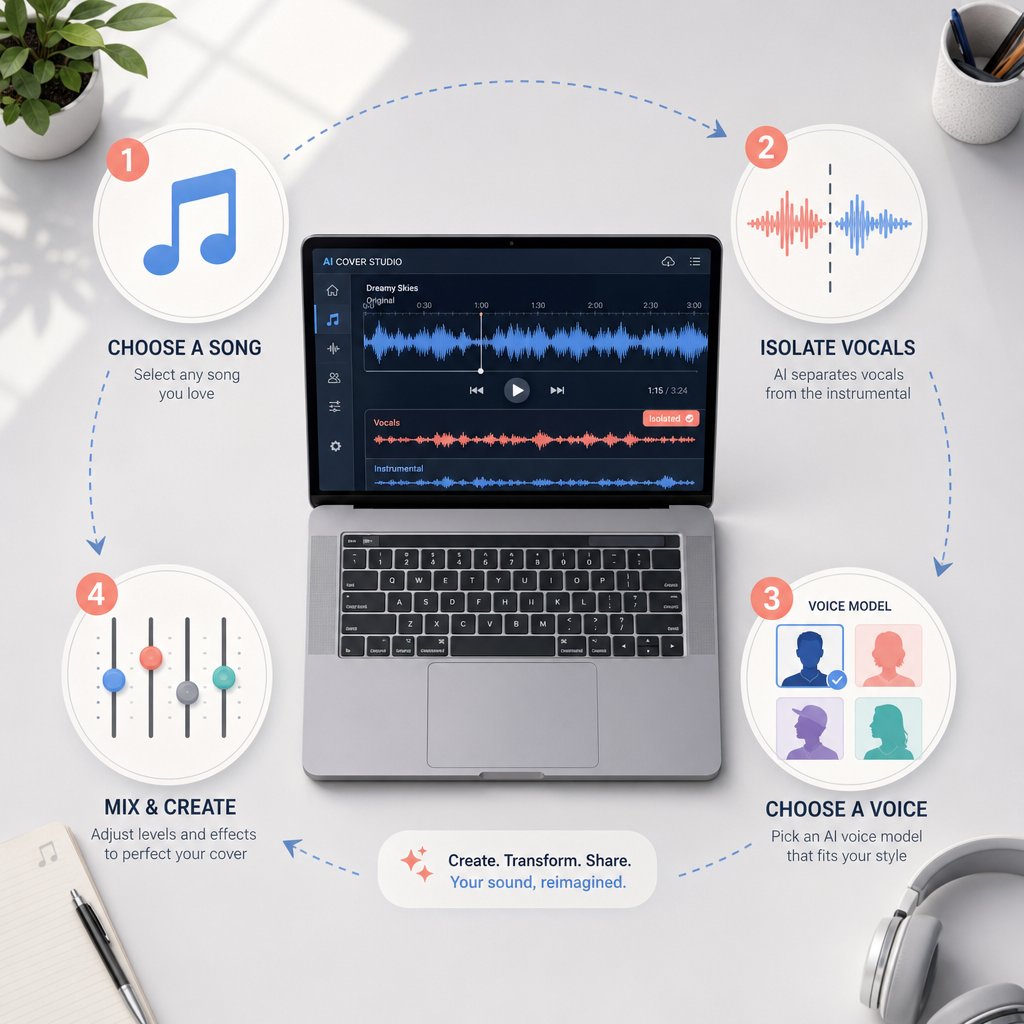
That start-to-finish workflow is more straightforward than it looks. The entire process breaks down into four stages, and once you've run through it a couple of times, it becomes almost as automatic as a night routine — something you can knock out without overthinking each step.
Here's the full sequence:
- Select and prepare your source track
- Isolate the vocals from the instrumental
- Run the voice conversion with your chosen model
- Mix the converted vocal back with the instrumental
Let's walk through each one.
Selecting and Preparing Your Source Track
Not every song converts equally well. Clean studio recordings with a single, clearly defined lead vocal produce the best results — think pop tracks, acoustic ballads, or straightforward hip-hop verses. Songs with heavy reverb, layered harmonies, or dense vocal effects give the separation algorithms a harder time, which cascades into lower-quality output at every stage downstream.
File format matters too. WAV or FLAC files preserve the transient and harmonic detail that voice conversion models rely on. Low-bitrate MP3s flatten subtle inflections and reduce pitch accuracy before the AI even touches the vocal. If you only have a compressed file, it'll still work — just expect a lower ceiling on quality.
Isolating Vocals and Instrumentals
The vocal needs to be separated from the instrumental before conversion can happen. Most AI cover platforms handle this automatically with built-in stem splitters that divide a track into layers — lead vocal, drums, bass, and harmonic content. If you're working outside a platform, standalone tools like UVR (Ultimate Vocal Remover) or Demucs accomplish the same thing. The cleaner the separation, the fewer artifacts you'll carry into the next step. Enabling reverb removal options during splitting, where available, helps strip spatial effects that can confuse pitch detection later.
Running the Voice Conversion
This is where the voice swap actually happens. You upload the isolated vocal, select your target voice model, and let the system process. Most platforms also offer a pitch shift setting — typically measured in semitones — that lets you nudge the vocal up or down to better match the model's natural range. If you're converting a female vocal through a male voice model (or vice versa), adjusting pitch by a few semitones can mean the difference between a convincing result and a strained, glitchy one. Processing usually takes under a minute for a standard-length track.
Mixing the Final AI Cover
The converted vocal comes back as a standalone audio file. The last step is layering it over the original instrumental and making sure everything sits together naturally. Volume balancing is the most immediate concern — the new vocal shouldn't overpower the mix or get buried beneath it. A quick A/B comparison between the original track and your version will reveal obvious imbalances fast.
For creators who want to go further, importing both stems into a DAW allows for finer adjustments: EQ matching to help the vocal blend with the instrumental's frequency profile, light compression to even out dynamics, and subtle reverb to glue everything together. But even without a DAW, most platforms export a combined file that's ready to share.
The whole process — from picking a song to exporting a finished file — can realistically fit inside a 15-minute night routine session once you're comfortable with the tools. Learning how to snowboard takes longer than learning this workflow. The real challenge isn't the steps themselves; it's getting the output to sound polished rather than obviously synthetic. That's where technique and attention to detail start to matter.
Tips for Making AI Covers Sound Professional
Technique and attention to detail — that's the gap between an AI cover that sounds like a fun experiment and one that genuinely impresses. The steps are identical for everyone. The difference is how deliberately you handle each variable along the way. Let's break down what actually moves the needle.
Why Source Audio Quality Matters Most
If there's one rule that overrides everything else, it's this: garbage in, garbage out. The cleanliness of your input vocal is the single biggest predictor of output quality. Studio-quality recordings with minimal reverb, low background noise, and clear articulation give the voice conversion model exactly what it needs to work accurately. Muddy, compressed, or reverb-drenched vocals force the AI to guess — and it guesses wrong more often than you'd like.
Research from Sonarworks confirms that AI algorithms examine pitch, timbre, formants, breathing patterns, and dynamic variations simultaneously. When the source signal is noisy or inconsistent, the algorithm makes incorrect assumptions about the input, and those errors show up as audible artifacts in your final output. Recording at peak levels between -12 dB and -6 dB, using a dry signal with no added effects, and capturing vocals with a pop filter all reduce the likelihood of problems downstream. Think of it like how to build a campfire — the quality of your kindling determines whether you get a steady flame or a smoky mess.
Matching Voice Models to Song Characteristics
Pitch range mismatch is the most common quality killer, and it's entirely avoidable. When the source vocal sits outside the trained range of your chosen voice model, the conversion engine strains to produce notes it was never designed to handle. The result is that unmistakable robotic warble that screams "AI-generated."
Most platforms offer a pitch shift parameter measured in semitones. If you're converting a high female vocal through a male model, shifting down 4-6 semitones can bring the melody into a comfortable zone. The reverse applies for male-to-female conversions. Staying within moderate adjustments — roughly plus or minus 4 semitones — preserves more of the original vocal quality than extreme shifts. Beyond that range, formant distortion starts creeping in and no amount of post-processing will fully fix it.
The index ratio setting, available in RVC-based tools, controls how much of the original training data's vocal character bleeds into the conversion. Higher values produce output that sounds closer to the target voice but can introduce buzzy artifacts on certain consonants. Lower values sound smoother but less distinctive. Finding the sweet spot usually takes a few test runs — not unlike learning how to start a conversation where you adjust your tone based on the response you're getting.
Common Artifacts and How to Minimize Them
Even with perfect source audio and a well-matched model, artifacts happen. Honesty matters here: no current tool eliminates them entirely. But understanding what causes each type helps you minimize or work around them.
The most frequent issues include:
- Metallic or robotic tones — Caused by over-quantized vocal characteristics that strip away natural micro-variations. A gentle parametric EQ cut in the 2-5 kHz range where most robotic artifacts reside can tame the harshness without dulling the vocal.
- Breath artifacts — AI models sometimes misinterpret breathing patterns, creating awkward gasps or unnatural silences. Manually trimming or replacing breath sounds in a DAW is the most reliable fix.
- Consonant distortion — Hard consonants like "T," "K," and "S" often get mangled during conversion. Multiband de-essing targeting the 5-8 kHz range catches the worst offenders without flattening the entire vocal.
- Timing glitches — Subtle rhythmic shifts where the converted vocal drifts slightly off the instrumental grid. These are most noticeable on fast, rhythmically dense passages and may require manual alignment in a DAW.
For post-processing, the order of operations matters. Start with EQ to handle frequency-based problems, apply light compression (2:1 to 3:1 ratio with a slow attack) to smooth dynamics, then add subtle harmonic enhancement — tape saturation or tube emulation — to restore the warmth that AI processing sometimes strips away. It's a layered approach, like coloring books where each pass adds depth without overwhelming what's already there.
Setting Realistic Expectations
Here's the honest truth: AI covers work best as entertainment and creative experimentation. Certain genres convert more cleanly than others. Pop and hip-hop — with their relatively straightforward vocal delivery and controlled dynamics — tend to produce the most convincing results. Opera, heavy vibrato styles, and highly melismatic singing push current models past their comfort zone, often producing output that sounds more like a do a barrel roll through a vocoder than a believable performance.
Use this checklist to maximize your chances of a clean result:
- Start with a high-quality, dry source vocal — WAV or FLAC, no reverb, no layered harmonies
- Match the voice model's pitch range to the song's melody before converting
- Keep pitch shift adjustments within plus or minus 4 semitones
- Test the index ratio setting in small increments rather than jumping to extremes
- Apply post-processing in the correct order: EQ first, then compression, then harmonic enhancement
- Listen on multiple playback systems — headphones, speakers, phone — to catch artifacts you might miss on one
- Accept that some songs and some voice models simply won't pair well, and move on rather than over-processing
Polishing an AI cover is a skill that improves with repetition. Each attempt teaches you something about how models respond to different source material, which settings matter most, and where to stop tweaking before you make things worse. The tools keep getting better, but right now, knowing which tool to reach for — and which platform gives you the controls you actually need — makes a measurable difference in what you can produce.

Comparing the Top AI Cover Platforms
Knowing which settings to tweak is one thing. Knowing where to tweak them is another. The AI cover space has fragmented into a handful of distinct platforms, each with its own strengths, limitations, and pricing logic. Picking the wrong one doesn't just waste money — it wastes the creative momentum you've built learning the workflow. The problem? Most comparisons online are thinly disguised ads for whichever platform is writing the article. So here's a genuinely editorial look at what's out there.
What to Look for in an AI Cover Platform
Before comparing specific tools, you need a framework — the same way understanding statistics fundamentals helps you interpret data rather than just staring at numbers. Not every platform serves every use case, and the "best" one depends entirely on what you're trying to accomplish.
These are the evaluation criteria that actually matter:
- Voice model library size and variety — A platform with 500 celebrity models but zero animation or character voices limits your creative range. Diversity across categories (celebrity, cartoon, anime, game) matters as much as raw count.
- Free tier availability — Can you test the platform meaningfully before paying? Some tools offer genuine free access; others gate everything behind a subscription with no trial.
- Output quality — This varies more than you'd expect between platforms using similar underlying technology. The conversion engine, default settings, and post-processing pipeline all affect the final sound.
- Ease of use — How many steps between uploading a song and getting a finished file? Platforms designed for casual creators prioritize simplicity. Tools aimed at producers offer more control but steeper learning curves.
- Custom voice model support — Can you train and upload your own models, or are you limited to the platform's pre-built library? This is the dividing line between casual use and serious vocal experimentation.
- Output flexibility — Do you get separate stems (vocal + instrumental) or only a combined file? Stem access lets you do your own mixing, which matters if you care about polish.
Think of platform selection like browsing landscaping ideas for your yard — the best design depends on the space you're working with, not just what looks impressive in someone else's photos.
Platform Comparison at a Glance
The table below compares five platforms across the criteria that matter most. Each has been evaluated based on publicly observable features, pricing pages, and user-facing documentation.
| Platform | Voice Model Focus | Free Tier | Custom Model Upload | Key Strength | Starting Price |
|---|---|---|---|---|---|
| MakeBestMusic AI Singing Generator | Singing styles, vocal textures, cover-style creation | Yes | No | Vocal-focused experimentation beyond simple voice swaps — explore different singing styles and vocal approaches | Free to start |
| Jammable | Celebrity and cartoon voices | No | Yes (train your own) | Extensive organized library with fast generation and professional audio output; supports duets and community sharing | $7.99/mo |
| OpenMusic AI | Celebrity, Animation, Game categories | Yes (limited) | No | Category-based organization makes browsing intuitive; strong animation and game character selection | Free to start |
| Covers.ai | Celebrity, cartoon, anime, meme voices | No | Yes (private custom models) | Versatile toolset including voice swap, genre swap, lyrics swap, and language swap generators | $8/mo |
| InsMelo | General voice models | Yes (limited) | No | Emphasizes royalty-free output — designed for creators who want to publish or monetize without licensing concerns | Free to start |
A few things jump out from this comparison. Jammable and Covers.ai both lean heavily into pre-built celebrity model libraries and offer custom voice training — making them strong picks if mimicking a specific famous voice is your primary goal. Jammable's organized category system (cartoons, gaming, languages) and its duet creation feature give it an edge for social content, though the lack of a free tier means you're committing financially before you hear a single result. Covers.ai counters with a broader toolset that goes beyond voice swapping into genre conversion, lyrics swapping, and multilingual output, but user reviews flag inconsistent customer support and billing issues worth noting.
OpenMusic AI takes a different organizational approach, sorting its entire library into Celebrity, Animation, and Game buckets. If you already know what category of voice you want, this structure cuts browsing time significantly. It's less feature-rich than Covers.ai's multi-tool approach, but the focused experience works well for creators who just want to pick a voice and go.
InsMelo carves out a niche by emphasizing royalty-free output. For creators planning to publish AI covers on monetized channels or use them in commercial projects, that licensing clarity removes a real headache — one that other platforms leave ambiguous in their terms of service.
MakeBestMusic's AI Singing Generator occupies a distinct lane. Rather than competing purely on celebrity voice model count, it focuses on vocal experimentation — letting you explore different singing styles, vocal textures, and cover-style creation. If your interest goes beyond "make this song sound like a famous person" and into genuinely playing with how vocals can be shaped and styled, it's the platform most directly built for that kind of exploration.
Which Platform Fits Your Needs
The right choice depends on what you're actually trying to do, not which platform has the longest feature list. Here's how to think about it by use case:
If you want casual fun and social sharing, Jammable or OpenMusic AI get you from idea to finished clip fastest. Jammable's polished output and community features make it easy to share results, while OpenMusic AI's free tier lets you experiment without financial commitment. You could set a 10 minute timer and have a shareable clip ready before it goes off.
If you want creative versatility and multi-tool access, Covers.ai's combination of voice swap, genre swap, and language swap generators gives you the widest range of transformation options in a single platform. It's the Swiss Army knife approach — useful if you like to surf between different creative directions within the same session.
If you want royalty-free output for commercial use, InsMelo's licensing model is purpose-built for that scenario. Other platforms may allow commercial use depending on the specific model and plan, but InsMelo makes it the default rather than the exception.
If you want deeper vocal experimentation — exploring how different singing styles, tonal qualities, and vocal approaches change a track rather than just swapping one celebrity voice for another — MakeBestMusic's AI Singing Generator is designed specifically for that kind of creative work. It's a strong fit for anyone who treats AI vocals as a creative instrument rather than a novelty trick.
No single platform dominates every category. The aldi weekly ad approach — checking what's available, comparing value, and picking what fits your actual needs this week — is honestly the smartest strategy. Your workflow might even span multiple tools as your skills develop and your creative goals shift.
What none of these platforms can solve for you, though, is the thornier question lurking beneath every AI cover: who actually has the right to use these voices, and where does creative experimentation cross into ethical gray territory?
Copyright and Ethics in the World of AI Covers
That gray territory isn't hypothetical — it's the defining tension of the entire AI cover ecosystem. The technology has outpaced the law, and creators who ignore the gap risk more than a bad-sounding track. They risk takedowns, legal exposure, and real harm to the artists whose voices they're borrowing.
Copyright and AI Covers — What the Law Says
Here's the uncomfortable reality: copyright law hasn't caught up with voice conversion technology, and the legal status of AI covers remains genuinely ambiguous. The underlying song — melody, lyrics, arrangement — is protected by copyright regardless of who performs it. Using that composition without a license is infringement, full stop, the same way it would be for a traditional cover. But the voice swap itself introduces a separate layer of complexity that existing law doesn't cleanly address.
In the US, the Copyright Office has been clear that 100% AI-generated content cannot be copyrighted and falls into the public domain. The ruling states that outputs of generative AI can only be protected where a human author has determined sufficient expressive elements. For AI covers specifically, this creates a paradox: you may not own the copyright to the vocal output you've created, yet you may still be infringing on the copyright of the original song and the personality rights of the voice you've cloned.
In Europe, the picture is stricter. Dutch collecting society Buma/Stemra has declared a blanket opt-out for its entire repertoire, meaning no AI model may train on affiliated music without a specific license. The EU AI Act, effective from August 2025, now requires developers of generative AI models to disclose training data, label AI content, and maintain a copyright compliance policy. These transparency obligations give rights holders real enforcement tools that didn't exist before.
The practical distinction that matters most? Personal entertainment versus commercial distribution. Sharing an AI cover with friends or posting it as a clearly labeled novelty clip carries different risk than monetizing it on streaming platforms or using it in commercial content. Some platforms like InsMelo emphasize "royalty-free" output, but that term can be misleading — it typically means the platform's own content is cleared for use, not that the underlying song's copyright has been licensed. You still need mechanical rights to distribute a cover of someone else's composition, AI-generated or not. It's not as simple as how to hang a picture — there are multiple legal layers, and skipping one can bring the whole thing down.
Artist Consent and the Deepfake Debate
Copyright is only half the equation. The other half is consent — and this is where the conversation gets genuinely heated.
On one side, creators argue that AI covers are a form of fan expression and artistic experimentation. They're tributes, not theft. The voice isn't being used to deceive anyone; it's being used to entertain. In this framing, AI covers sit alongside fan art, remix culture, and parody — creative acts that reference existing work without replacing it.
On the other side, artists and their representatives see unauthorized voice cloning as a violation of something deeply personal. A voice isn't just a sound — it's an identity. Over 200 prominent artists, including Billie Eilish, Nicki Minaj, Stevie Wonder, and Katy Perry, signed an open letter warning against what they called "this assault on human creativity." The estates of Bob Marley and Frank Sinatra joined them. When voices that diverse agree on a single issue, it carries weight.
There's no explicit "voice right" law in most jurisdictions yet, though momentum is building. Tennessee's ELVIS Act explicitly protects artists' voices from unauthorized AI imitation, and similar legislation is expected across Europe. The legal landscape resembles a collection of world flags — each jurisdiction waving its own rules, with no unified international standard. Navigating it requires paying attention to where you are, where your audience is, and whose voice you're using.
Staying on the Right Side of Platform Policies
Even if the law remains unsettled, platform policies are moving faster. Spotify's CEO has stated that AI-generated music purposefully impersonating another artist without consent violates their content policy — and repeat infringement can result in permanent removal. YouTube updated its policies to address AI-generated content, with music lacking clear human input facing limited reach, blocked monetization, or takedowns. Streaming platforms are actively filtering: Spotify removed 75 million "spammy" tracks in a 12-month period, and Deezer reports receiving over 30,000 fully AI-generated tracks daily.
These policies evolve constantly. What's permitted today may trigger a takedown tomorrow. Treating platform guidelines like a static recipe — the way you might follow a yummly listing once and never check back — is a mistake. Checking current terms before publishing is the bare minimum, especially if you're monetizing content or building an audience around AI vocal work.
Responsible AI cover creation means respecting three boundaries: the copyright of the original song, the consent of the voice being cloned, and the current policies of the platform where you publish.
The legal and ethical landscape is messy, evolving, and genuinely uncertain. But uncertainty isn't an excuse to ignore it — it's a reason to stay informed. Creators who understand these boundaries aren't just protecting themselves from takedowns; they're building a practice that can survive whatever regulations come next. And for those who channel that awareness into their creative process, the path forward isn't about restriction — it's about making work that's both inventive and sustainable.

From Fun Experiment to Viral Content
Knowing the rules doesn't mean playing it safe — it means playing smart. And the creators who understand both the technology and the boundaries are the ones producing AI covers that actually travel.
Why AI Covers Go Viral
Virality isn't random. Research into content sharing psychology points to a handful of triggers that AI covers hit almost by default: novelty, emotional contagion, and what psychologists call the curiosity gap — that itch your brain feels when it encounters something unexpected and needs to resolve it. Hearing a voice you recognize singing a song you'd never associate with it creates instant cognitive dissonance. Your brain can't scroll past it. It's the same reason clips of smiling friends reacting to absurd situations spread so fast — the mismatch between expectation and reality demands attention.
The format helps too. A 30-second AI cover needs zero context to land. No backstory, no setup, no commitment. That frictionless entry point makes sharing effortless — someone can send it to a group chat the way they'd forward a meme. Creators who pair trending songs with popular voice models tap into two recognition signals simultaneously, doubling the hook. Add humor or nostalgia to the pairing, and you've stacked three psychological triggers before the chorus even hits.
There's also a participatory layer that most viral formats lack. AI covers invite response. Viewers don't just watch — they think "what if I tried this voice on that song?" and go make their own. That cycle of inspiration and creation is what turns a single viral clip into a sustained trend. It's less like passively watching content and more like learning how to drive a manual car — once you understand the mechanics, you want to get behind the wheel yourself.
Start Experimenting with AI Vocals
The best way to improve is to start producing. Your first few attempts won't be perfect — nobody nails how to do a pullup on the first try either — but each conversion teaches you something about model selection, pitch matching, and source audio quality that no tutorial can fully replicate. Set a 15 minute timer, pick a song you love, choose a voice model that makes you laugh or curious, and run the conversion. That's it. You'll learn more from one hands-on session than from reading five more articles.
For creators who want to go beyond simple voice swaps — experimenting with different singing styles, vocal textures, and tonal approaches rather than just mimicking a celebrity — MakeBestMusic's AI Singing Generator is built specifically for that kind of vocal-focused exploration. It treats AI vocals as a creative instrument, not just a novelty filter, which opens up possibilities that straightforward cover platforms don't touch.
Whether you're making AI covers for your own entertainment, building a content strategy around surprising vocal pairings, or chasing the kind of breakout moment that creators like ash trevino have leveraged into real audiences, the barrier to entry has never been lower. The tools are accessible, the communities are active, and the creative space is wide open. Your first cover might sound rough. Your tenth will surprise you. Start making them.
