

Yes, AI Can Write Sheet Music
Can AI write sheet music? Yes. The technology exists, it works, and dozens of tools are available right now. But the real question isn't whether AI can produce notation — it's whether that notation is worth putting on a music stand. The honest answer depends entirely on what you're asking the AI to do and which tool you choose to do it.
The Short Answer for Musicians
AI sheet music tools fall into two distinct categories, and confusing them is the fastest way to end up disappointed. The first category is transcription: you feed the AI an audio recording, and it attempts to convert what it hears into written notation. The second is composition: you give the AI a prompt, a style, or a set of parameters, and it generates original music from scratch as notation or MIDI.
Both capabilities are real. An ai sheet music generator like Klangio or Songscription can listen to a piano recording and output a score in under two minutes. Composition tools can produce original melodies, chord progressions, and even multi-part arrangements without any source audio at all. The technology has matured enough that these aren't novelties — they're functional tools musicians use in real workflows.
Here's the catch. Accuracy varies dramatically depending on the source material and complexity. Published benchmarks from MIREX 2024 show pitch detection reaching up to 96% on clean solo piano recordings, but dropping to around 78% on guitar, roughly 52% on vocals, and as low as 38% on dense multi-instrument mixes. And those numbers only measure pitch — not rhythm, dynamics, or expression markings.
What This Means in Practice
If you're looking for a sheet music maker free of the tedious hours spent transcribing by ear, AI can genuinely help. It produces a usable first draft faster than any human. But if you need a performance-ready score with correct rhythmic notation, proper voice separation, and musical directions, you'll still need human editing — or a human transcriber entirely.
Throughout this article, you'll learn exactly which tools handle transcription versus composition, where each one excels, and where they fall short. You'll also get practical workflows for combining AI speed with your own musical judgment to produce sheet music ai tools alone can't deliver.
AI sheet music tools range from transcription engines that convert audio into notation to original composition generators that create new music from prompts. Understanding the difference between these two capabilities is essential before choosing a tool — they solve fundamentally different problems.
The gap between what an online sheet music generator produces and what a musician actually needs on their stand is real, but it's shrinking. Knowing where that gap exists — and how to bridge it — is what separates frustration from a genuinely useful workflow.
AI Transcription vs AI Composition and Why the Difference Matters
When musicians search for tools that turn sound into scores or generate fresh notation, they're often lumping two very different technologies into one bucket. Imagine asking someone to "write" for you — that could mean dictating a letter they type up verbatim, or asking them to draft something original from scratch. AI sheet music works the same way. Transcription and composition are separate processes with separate strengths, separate limitations, and separate use cases. Picking the wrong one for your task is like bringing a tuner to a songwriting session.
AI Transcription Turns Audio Into Notation
AI transcription takes an existing audio recording — a piano performance, a vocal melody, a guitar riff — and attempts to convert what it hears into written sheet music or tablature. You provide the sound; the AI listens and outputs notation. Think of it as a very fast (but imperfect) ear that can detect pitches and note onsets, then map them onto a staff.
Tools like Klangio and Songscription handle this process. You upload an audio file or paste a YouTube link, select the instrument, and the software analyzes the spectral content to identify pitches and timing. Within minutes, you get a score you can view, play back, and export as PDF, MIDI, or MusicXML.
So is there AI that can transcribe music reliably? It depends on what you feed it. A MusicRadar review of Songscription found that the tool delivers very accurate pitch detection on solo piano recordings, including grace notes and complex chords. But rhythm detection is uneven, time signatures are frequently incorrect, and tracks with multiple instruments cause significant struggles. The reviewer noted that Songscription "does very well on the kinds of music that are easy for humans to transcribe, and not well on the kinds of songs that are hard for humans to transcribe."
AI song transcription works best when the source audio is clean, features a single instrument, and maintains a steady tempo. The further you move from those ideal conditions — adding rubato, layering instruments, introducing complex rhythms — the more the output degrades. According to testing by Music Notation Hub, even under best-case conditions with solo piano, AI merged all voices into one layer, missed pickup bars, and produced scores that were not playable without significant correction.
AI Composition Creates Original Scores
AI composition is an entirely different animal. There's no source audio involved. Instead, you provide parameters — a style, an era, an instrumentation, a mood — and the AI generates original music as notation. It's not listening to anything; it's creating something new based on patterns learned from large datasets of existing scores.
NotaGen is a clear example. This browser-based tool lets you select a musical period (Classical, Romantic, Baroque), a composer style, and an instrumentation. It then generates original sheet music using ABC notation, rendered as a viewable score with audio playback. A review by Dr. James Frankel described requesting a chamber ensemble piece in the style of Beethoven — the result sounded convincingly like a string quartet from that era, generated entirely from learned compositional patterns.
Is the output amazing music? Not necessarily. But it's structurally sound, follows the harmonic conventions of its training data, and arrives as readable notation rather than just an audio file. For composers stuck on a blank page, educators needing fresh analysis examples, or band directors hunting for sight-reading material, this kind of tool offers raw material that can spark ideas or fill practical needs.
The key distinction: transcription converts audio to sheet music — it's a song to sheet music AI workflow. Composition generates new music from nothing — it's a creative tool. Confusing the two leads to choosing the wrong software and getting results that don't match your expectations.
| AI Transcription | AI Composition | |
|---|---|---|
| Input | Audio file, YouTube link, or recording | Text prompts, style parameters, instrumentation choices |
| Output | Notation of the existing audio (sheet music, tab, MIDI) | Original music as notation, MIDI, or rendered score |
| Best For | Learning songs by ear, creating lead sheets from recordings, quick pitch reference | Generating melodic ideas, creating teaching materials, overcoming creative blocks |
| Typical Accuracy | Pitch detection up to 96% on solo piano; drops to 38-78% on other sources. Rhythm and meter remain unreliable. | Musically coherent within trained styles; quality varies by complexity and instrumentation |
| Example Tools | Klangio (Piano2Notes, Melody Scanner), Songscription AI | NotaGen (style-based notation generation) |
Both categories are improving rapidly, but neither delivers a finished product without human involvement. Transcription gives you a rough draft of something that already exists. Composition gives you a rough draft of something new. The real question — how these tools actually analyze audio signals or learn musical patterns under the hood — reveals why certain tasks remain stubbornly difficult for AI to get right.
How AI Actually Generates Musical Notation
You've seen what these tools do — but how do they do it? Understanding the mechanics behind music notation AI helps explain why a solo piano transcription comes out nearly perfect while a full band arrangement turns into a mess. The technology isn't magic. It's pattern recognition applied to sound and symbols, and its strengths and blind spots trace directly back to how it was built.
How AI Learns Musical Patterns
Every AI music notation system starts with training data — massive collections of scored music that teach the model what "correct" notation looks like. Imagine showing a student thousands of Bach chorales, Mozart sonatas, and jazz lead sheets until they internalize how melodies move, how chords resolve, and how rhythms subdivide. That's essentially what happens during training, except the student is a neural network processing millions of note sequences.
The dominant architectures powering these tools are Transformer models, which use a mechanism called self-attention to weigh relationships between notes across an entire piece simultaneously. Unlike older approaches that processed music one note at a time (and often forgot what happened 30 bars ago), Transformers can recognize that a chord in measure 48 relates back to a harmonic pattern established in measure 4. This is why modern ai music notation tools produce output that sounds structurally coherent rather than randomly wandering.
Training datasets like MAESTRO — which contains over 200 hours of aligned piano performances with their corresponding MIDI scores — give models precise examples of how audio maps to notation. The richer and more diverse the training data, the better the model handles varied styles and instruments. Models trained primarily on classical piano will struggle with jazz guitar or Afrobeat percussion, simply because they haven't seen enough examples of those patterns.
From Audio Signal to Written Note
When you upload a recording to a music to notation converter, the AI doesn't "hear" music the way you do. It sees math. The pipeline works roughly like this:
- Spectral analysis: The audio waveform is converted into a spectrogram — a visual map showing which frequencies are active at each moment in time. Think of it as an X-ray of the sound.
- Pitch detection: The system identifies fundamental frequencies and their harmonics to determine which notes are sounding. For a single melody line, this is straightforward. For a dense chord or multiple instruments, it becomes exponentially harder — like trying to identify individual voices in a crowded room.
- Onset detection: The AI pinpoints exactly when each note begins and ends, which determines rhythmic values (quarter note, eighth note, etc.).
- Quantization: Raw timing data from a human performance is messy — nobody plays with robotic precision. The system rounds note onsets and durations to the nearest rhythmic grid value. This step is where many errors creep in. A slightly rushed triplet might get quantized as straight eighth notes, or a rubato passage might produce nonsensical time signatures.
A Stanford University study demonstrated that Convolutional Neural Networks (CNNs) could achieve over 98% accuracy converting raw piano audio to music notes — but only under controlled conditions with clean recordings. The process of turning audio to music notation remains far less reliable when recordings include reverb, background noise, or overlapping instruments, because the spectral analysis step can't cleanly separate the signals.
Music Representation Formats AI Understands
AI doesn't think in treble clefs and bar lines. It reads and writes music using digital formats that encode pitch, rhythm, and structure as data. Three formats dominate:
| Format | What It Encodes | Strengths | Limitations |
|---|---|---|---|
| MIDI | Note on/off events, pitch numbers, velocity, timing | Universal compatibility, tiny file size, easy to edit in DAWs | No notation details (dynamics text, slurs, articulations, key signatures) |
| MusicXML | Full notation: pitch, rhythm, dynamics, articulations, layout | Rich interchange format between notation software (MuseScore, Sibelius, Dorico) | Larger files, more complex to generate accurately |
| ABC Notation | Pitch and rhythm as plain text characters | Lightweight, human-readable, easy for AI models to tokenize and generate | Limited support for complex scores, multi-voice writing, or detailed markings |
Why does this matter to you? Because the format determines what survives the journey from AI output to your music stand. A music to notation converter that exports only MIDI gives you pitches and rhythms — but you'll lose dynamic markings, slurs, and proper enharmonic spelling. MusicXML preserves far more detail, making it the preferred export when you plan to refine the score in notation software. ABC notation is what many composition models (like NotaGen) use internally because its text-based structure is efficient for neural networks to process, though it sacrifices the visual richness of a fully engraved score.
The format also shapes accuracy. Models generating ABC notation can produce clean output for simple melodies but struggle with polyphonic writing. Models targeting MusicXML face a harder task — they need to get not just the notes right, but the entire notational context surrounding them.
These technical realities — training data breadth, spectral analysis limitations, quantization rounding, and format constraints — explain why converting audio to music notes works beautifully in some scenarios and falls apart in others. The question for musicians isn't whether the technology works in theory. It's which specific tools handle your particular use case well enough to save time rather than create more work.
Top AI Sheet Music Tools Compared by Function
Knowing how the technology works is one thing. Picking the right tool for your specific workflow is another challenge entirely. The market has split into specialized options — some focused on pulling notation out of recordings, others on generating original ideas from scratch. Choosing poorly means wasted time and frustration, so here's a structured breakdown of the leading options organized by what they actually do well.
The table below compares the most relevant tools across both categories. Whether you need an ai sheet music maker for original composition or a sheet music generator from audio for transcribing existing recordings, this comparison covers the practical details that matter.
| Tool Name | Primary Function | Supported Instruments | Output Formats | Free Tier | Ease of Use |
|---|---|---|---|---|---|
| MakeBestMusic AI MIDI Generator | Composition / MIDI Generation | Multi-instrument (melodies, chords, arrangements) | MIDI | Yes | Beginner-friendly |
| NotaGen | Composition (style-based notation) | Piano, chamber ensembles, orchestral | ABC Notation, rendered score | Yes (browser-based) | Moderate |
| Songscription AI | Transcription | Piano, guitar, drums, violin, flute, saxophone, trumpet, bass | PDF, MusicXML, MIDI | Yes | Beginner-friendly |
| Klangio | Transcription | Wider instrument range, multi-instrument | PDF, MusicXML, MIDI | Limited | Moderate |
| MuseScore (AI features) | Notation editing with AI-assisted tools | Full orchestral range | MusicXML, PDF, MIDI, MuseScore format | Yes (open source) | Moderate to Advanced |
| AnthemScore | Transcription (offline) | Multi-instrument | MusicXML, MIDI, PDF | No (one-time purchase) | Moderate |
Transcription Tools That Convert Audio to Scores
If your goal is to convert audio to sheet music online free — or at least affordably — transcription tools are where you start. These listen to recordings and attempt to produce playable notation.
Songscription AI takes a focused approach. Rather than trying to handle every instrument equally, it invests deeply in a smaller set where model quality is highest. Piano is the standout, with additional models for acoustic guitar, drums, violin, flute, saxophone, trumpet, and bass. The workflow extends beyond raw transcription into arrangement (converting a multi-instrument recording into something playable on a single instrument) and leveling (adjusting difficulty to match a player's skill). According to Songscription's own comparison testing, this narrower focus produces cleaner results on supported instruments than tools spreading their effort across a wider range. Output formats include PDF, MusicXML, and MIDI, with a built-in piano roll editor for correcting errors without leaving the platform.
Klangio covers a slightly wider range of instruments and offers something Songscription doesn't: an API and DAW plugins. If you're building transcription into your own software or want the process to live inside your DAW rather than a separate browser tab, Klangio is the practical choice. The tradeoff is that on instruments both tools cover — particularly piano — Songscription tends to produce cleaner output. Klangio's strength is integration flexibility, not necessarily raw accuracy on any single instrument.
AnthemScore is the outlier: a desktop application with a one-time purchase price, running entirely offline. No subscription, no upload limits, no internet required. The model isn't the newest generation, and you'll spend more time on cleanup, but for musicians who transcribe frequently and prefer to own their tools outright, it fills a real niche. Creating a piano arrangement from audio AI free of recurring costs is its core appeal.
Composition Tools That Generate Original Music
Composition tools solve a different problem. Instead of converting existing audio, they generate new musical ideas — melodies, chord progressions, arrangements — that you can shape into finished scores. Think of them as an ai music sheet generator for original material rather than a transcription engine.
MakeBestMusic's AI MIDI Generator focuses on producing MIDI-based melodic and arrangement ideas that composers and producers can export and refine. The strength here is the bridge between AI-generated ideas and traditional notation workflows: you generate a melody or harmonic progression as MIDI, then import that file into MuseScore, Sibelius, or Dorico to produce polished sheet music. For producers who think in terms of DAW workflows but need notation output, this approach keeps the creative process fluid without forcing you into a notation-first mindset. It's particularly useful as an ai piano sheet music generator when you need melodic starting points or arrangement sketches quickly.
NotaGen takes a different angle — generating notation directly in specific historical styles. Select a period (Baroque, Classical, Romantic), a composer influence, and an instrumentation, and it produces original scores rendered from ABC notation. The output is structurally sound and stylistically convincing, making it valuable for educators needing analysis examples or composers seeking inspiration within a particular tradition.
MuseScore's AI integration sits in a hybrid space. MuseScore itself is open-source notation software — the industry standard for free score editing. Its evolving AI features assist with tasks like intelligent note input suggestions and arrangement tools, layered on top of a full-featured notation editor. It's less a standalone AI generator and more a traditional tool gaining AI-assisted capabilities over time.
How to Choose the Right Tool
With this many options, the selection process matters as much as the tools themselves. Here are the criteria that should drive your decision:
- Define your task first: Are you transcribing an existing recording or generating something new? This single question eliminates half the options immediately.
- Match the instrument: Transcription accuracy varies wildly by instrument. Check whether your primary instrument is in the tool's sweet spot before committing.
- Consider your output format needs: If you plan to edit in notation software, you need MusicXML or MIDI export — not just PDF.
- Evaluate the editing workflow: A tool with 90% accuracy and a great built-in editor may save more time than one with 95% accuracy and no way to fix mistakes without exporting.
- Check integration requirements: Do you need API access, DAW plugins, or is a web app sufficient? This narrows the field quickly.
- Test on your actual material: As Songscription's comparison analysis notes, five minutes of testing on your own recordings tells you more than any comparison post. The difference between an easy song and a hard song on the same tool is larger than the difference between competing tools on the same song.
No single tool dominates every use case. The musicians getting the best results tend to use transcription and composition tools together — pulling notation from a reference recording with one tool, generating fresh arrangement ideas with another, then assembling everything in dedicated notation software. The real skill isn't finding the perfect AI; it's knowing which tool to reach for at each stage of your workflow.
Who Benefits Most From AI Sheet Music Tools
Knowing which tool exists is only half the equation. The other half is knowing whether it actually solves your problem. A church pianist preparing choir parts ai sheet music for Sunday morning has completely different needs than a bedroom producer sketching melodies at 2 AM. Your role as a musician determines which AI capability — transcription or composition — delivers real value versus wasted effort.
Hobbyists Learning Songs by Ear
You hear a song you love and want to play it. Maybe you've spent hours rewinding the same four bars trying to catch that one chord voicing. This is where transcription tools shine brightest.
- Primary need: Find a song with notes written out so you can learn it at your own pace
- Best AI approach: Transcription (audio-to-notation tools like Songscription or Klangio)
- Realistic outcome: You'll get an accurate pitch map for solo instrument recordings — especially piano. Rhythm and dynamics will need your own musical ear to correct, but the notes themselves save hours of guesswork.
- Where it falls short: Dense arrangements with multiple instruments produce messy output. You're better off isolating the instrument track first using a stem separator, then running the transcription.
For hobbyists wondering how to create a song on piano from a melody stuck in their head, composition tools offer a different angle. Feed the AI a few parameters — key, tempo, mood — and use the generated MIDI as a starting framework you can reshape into your own piece. It's not a finished composition, but it's a faster launchpad than staring at blank staff paper.
Composers and Arrangers Seeking Inspiration
Creative blocks don't respect deadlines. When you need melodic ideas, harmonic alternatives, or arrangement sketches quickly, AI composition tools function as a brainstorming partner that never runs out of suggestions.
- Primary need: Generate fresh melodic or harmonic material to spark ideas and accelerate the drafting phase
- Best AI approach: Composition (MIDI generators, style-based notation tools like NotaGen)
- Realistic outcome: Structurally coherent musical fragments that follow the conventions of your chosen style. Think of it as raw clay — usable shape, but requiring your hands to become art.
- Where it falls short: AI-generated compositions lack intentionality. They follow patterns without understanding why a composer would break them. The output works as a starting point, not a destination.
Arrangers benefit from both sides. Transcription tools help you create your own music score from a reference recording — pulling out a bass line or vocal melody you want to rearrange. Composition tools then help you generate complementary parts or explore voicings you hadn't considered. As Sonarworks notes, AI excels at offering multiple variations of the same idea, letting you cherry-pick elements from each to build something original.
Educators and Church Musicians Creating Parts
Music educators and worship leaders share a common pressure: producing large volumes of usable notation on tight timelines. A choir director needs four-part arrangements. A piano teacher needs simplified versions at different skill levels. A band director needs sight-reading material that students haven't seen before.
- Primary need: Quickly produce teaching scores, choir parts, or practice materials without hiring an arranger for every piece
- Best AI approach: Both — transcription for converting reference recordings into lead sheets, composition for generating fresh exercises and original teaching material
- Realistic outcome: Usable drafts that cut preparation time significantly. Educators still need to review for accuracy and adjust difficulty levels, but the bulk of the notation work is handled.
- Where it falls short: Voice separation in choral transcription remains unreliable. AI tends to collapse SATB parts into a piano-style grand staff rather than properly separated vocal lines. Manual splitting is almost always required.
For educators, an app that recognizes notes from a student's recording can also serve as a teaching tool — letting students see their own playing rendered as notation and identify where their rhythm or pitch drifts from the written score. It turns transcription into a feedback mechanism rather than just a content creation shortcut.
Producers building tracks occupy yet another space. Their workflow typically starts in a DAW, not on a music stand. An instrumental maker free of complex notation knowledge lets them sketch ideas as MIDI, hear them immediately, and only convert to sheet music when a session musician needs a chart. For producers, AI notation tools are the last mile — translating what lives in their DAW into something a piano music creator or live player can read and perform.
Each of these user types gets genuine value from AI sheet music tools, but none of them gets a finished product straight out of the box. The consistent theme across every use case is that AI delivers speed and raw material while humans supply the musical judgment that makes the output worth playing. That raises the obvious follow-up: just how much editing does the AI output actually need before it's ready for a music stand?
Output Quality and What AI Gets Wrong
The answer is blunt: most ai generated sheet music requires editing before anyone should put it on a stand. How much editing depends on the complexity of the source material and the specific tool, but expecting a flawless score straight from any AI is setting yourself up for disappointment. The good news is that for simpler tasks, the cleanup is minimal. The bad news is that complexity scales the problem fast.
Common Errors in AI-Generated Notation
Certain mistakes show up so consistently across tools that you can almost predict them before opening the file. When you use AI to transcribe piano recordings or any other instrument, here's what typically goes wrong:
- Rhythmic quantization errors: AI rounds note timing to the nearest grid value. A slightly swung eighth note becomes a straight one. A rubato passage gets forced into rigid time, producing nonsensical rhythmic values or wrong time signatures entirely. In Music Notation Hub's testing, quarter-note arpeggios were transcribed as single sixteenth notes, and pickup bars were missed — throwing off the meter from bar one onward.
- Voice separation failures: When you ask AI to transcribe piano or any polyphonic instrument, the output frequently collapses multiple voices into a single layer. Melody and accompaniment merge into one undifferentiated stream of notes, making the score unreadable for performance.
- Enharmonic spelling chaos: D-sharp where E-flat belongs, creating key signature contradictions throughout the piece. AI lacks the harmonic context to know which spelling is correct for the musical situation.
- Missing musical directions: Dynamics, articulations, pedal markings, tempo indications, expression text — virtually none of these appear in AI output. Current tools detect pitches and approximate timing, but they don't interpret musical intent.
- Broken meter and bar structure: Pieces that begin with an anacrusis (pickup note) almost universally confuse AI transcription engines. The first bar gets the wrong number of beats, and every subsequent bar inherits that displacement.
For composition tools, the errors look different but are equally predictable. AI-generated original scores tend toward oversimplified harmonies, repetitive phrase structures, and generic voice leading that technically follows rules but lacks the intentional surprises that make music interesting.
When AI Output Is Performance-Ready vs Needs Editing
Not all tasks are equally difficult. Here's a realistic accuracy spectrum based on published benchmarks and hands-on testing:
Simple monophonic melodies — a single vocal line or flute melody with steady rhythm — represent the best case for audio to sheet music ai workflows. Pitch detection is high, and with only one voice to track, quantization errors are less severe. You might need to fix a few rhythmic values and add dynamics, but the skeleton is solid.
Solo piano with clear voicing sits in the middle. AI piano transcription can reach up to 96% pitch accuracy on clean studio recordings according to MIREX 2024 benchmarks, but that number only measures whether the right pitches were detected — not whether the rhythm, voicing, or notation is correct. In practice, even the best ai music transcription tools produce piano scores that need voice separation, rhythmic correction, and complete addition of musical directions.
Multi-instrument recordings remain the hardest challenge. The 2025 AMT Challenge found that F-measure scores dropped by over 0.28 points when scaling from one to three instruments, with precision plummeting from 0.91 on solo tracks to 0.46 on three-instrument pieces. Getting usable sheet music from audio with multiple instruments still requires substantial human intervention — often enough that starting from scratch is faster.
AI sheet music works best as a time-saving starting point rather than a finished product. Solo instrument transcription can reach high pitch accuracy, but rhythm, dynamics, and voice separation still need human ears and musical judgment to get right.
Music Notation Hub's internal testing quantified this gap starkly: correcting an AI-generated transcription of a short, simple piano piece took 45 minutes versus 20 minutes to transcribe the same piece from scratch. More than double the time — on an easy piece under ideal conditions. The fixes included rewriting rhythms, rebeaming, correcting enharmonic spellings, separating voices, and adding all dynamics from zero.
The practical takeaway? If you're using AI transcription for a quick pitch reference or a rough draft you plan to heavily edit, the tools deliver real value. If you need a score that performers can sight-read, that a publisher would accept, or that students can learn from without confusion, the output isn't there yet — regardless of which tool you choose. The gap between raw AI output and a polished score is where your musical expertise earns its keep.
Understanding these quality limitations naturally raises the next question: once you have AI output that needs refinement, what format is it in, and how do you actually get it into notation software where you can fix it?
Output Formats and Notation Software Compatibility
The file you download from an AI tool determines how much control you have over the result. Convert mp3 to sheet music online free using any transcription engine, and you'll typically get a choice of formats — but not all formats are equal. Some lock you into a static printout. Others hand you a fully editable score you can reshape note by note. Knowing the difference before you hit "export" saves a frustrating round trip.
Understanding MIDI MusicXML and PDF Outputs
Each format preserves a different slice of musical information. When you convert mp3 to sheet music, the output format shapes what survives the translation and what gets lost.
| Format | Notation Detail Level | Editable In | Best Use Case |
|---|---|---|---|
| MIDI | Pitches, timing, velocity only — no slurs, dynamics text, beaming, or key signatures | Any DAW, MuseScore, Sibelius, Dorico, Finale | Importing raw note data for heavy editing or DAW production |
| MusicXML | Full notation: pitch, rhythm, dynamics, articulations, layout, stem direction | MuseScore, Sibelius, Dorico, Finale | Transferring a complete score between notation apps with minimal loss |
| Visual only — what you see is all you get | Not editable (print/view only) | Final output for printing or sharing a finished score | |
| Guitar Tab | Fret positions, string assignments, basic rhythm | Guitar Pro, TuxGuitar, MuseScore | Guitarists who read tab rather than standard notation |
The critical distinction: MIDI transmits instructions about what notes to play and when, but it doesn't describe how the music should look on paper. A MIDI file won't tell your notation software about slurs, dynamic markings, beaming preferences, or even the correct key signature. MusicXML was specifically designed to capture the actual notation and layout — not just the sound — making it the preferred format when your goal is a polished, readable score.
If you're converting mp3 to music notation purely for a quick pitch reference, MIDI is fine. If you want something closer to a real music sheet converter output that looks professional, always choose MusicXML when the tool offers it.
Importing AI Output Into Notation Software
Getting the file out of the AI tool is step one. Turning it into a performance-ready score happens in dedicated notation software. Here's the practical workflow from mp3 to music sheet to finished print:
- Export from the AI tool — choose MusicXML if available, MIDI as a fallback. Avoid PDF unless you only need a static printout with no further editing.
- Import into notation software — in Dorico, use File > Import to bring in MusicXML or MIDI files. MuseScore and Sibelius follow similar import paths. For MIDI imports, you'll be prompted to set quantization options, instrument assignments, and voice separation — take time here, because these settings determine how clean the initial notation appears.
- Fix rhythmic quantization — correct any note values the AI rounded incorrectly. Adjust time signatures, fix pickup bars, and rebeam passages that look wrong.
- Separate voices and add markings — split merged voices into proper layers, add dynamics, articulations, slurs, and expression text that the AI didn't capture.
- Engrave and export — adjust spacing, page layout, and formatting. Export as PDF for printing or share as MusicXML if collaborators need an editable version.
One practical tip: when importing MIDI into Dorico, the software applies an algorithm for correct enharmonic spelling and offers advanced options for voice separation, split points for grand staff instruments, and tuplet detection. Spending an extra minute configuring these import settings produces noticeably cleaner results than accepting defaults.
The mp3 to sheetmusic pipeline is never a single click from recording to printed page. But with the right export format and a structured editing workflow, AI handles the tedious pitch detection while you focus on the musical decisions that make a score worth reading. That division of labor — AI for speed, human for judgment — becomes even more powerful when you build it into a deliberate composition workflow from the start.
Building a Practical AI-to-Sheet-Music Workflow
Knowing the tools and formats is useful. But the musicians getting the best results aren't using any single AI tool in isolation — they're chaining multiple steps together into a deliberate pipeline. The goal is simple: let AI handle the time-consuming grunt work while you focus on the creative decisions that make music worth playing. Here's how to create your own sheet music using AI as an accelerator rather than a replacement.
A Step-by-Step AI-Assisted Composition Workflow
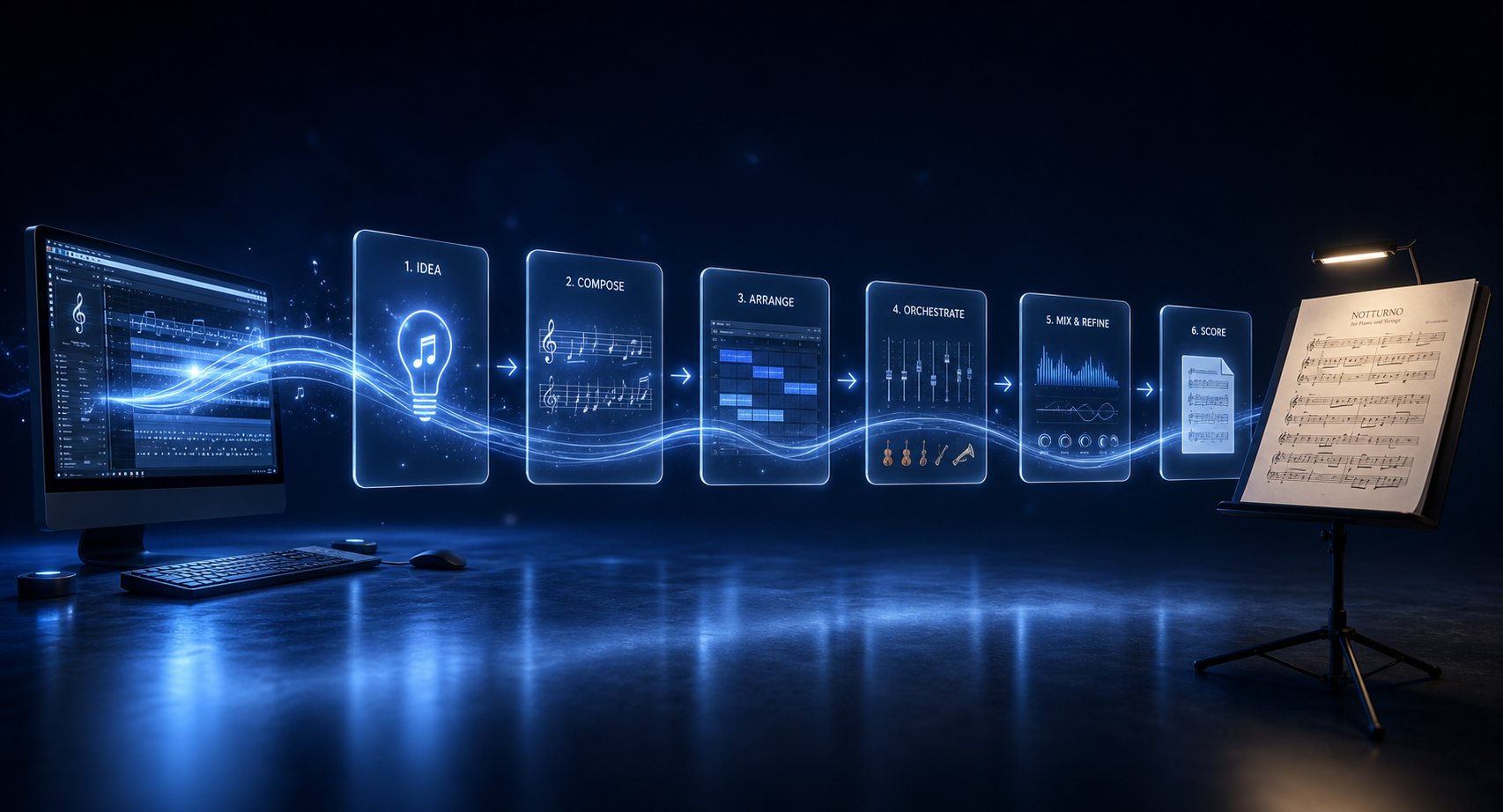
Whether you're starting from a reference recording or a blank canvas, the path from idea to finished score follows a predictable sequence. Each stage uses AI where it's strongest and hands control back to you where musical judgment matters most.
- Define your starting point. Are you working from an existing recording you want to convert song to sheet music from? Or generating something original? This determines whether you begin with a transcription tool or a composition tool.
- Generate raw material with AI. For transcription: upload your audio and export as MusicXML or MIDI. For composition: use a sheet music maker ai or MIDI generator to produce melodic ideas, chord progressions, or arrangement sketches based on your parameters (key, tempo, style, instrumentation).
- Import into notation software. Bring your MIDI or MusicXML file into MuseScore, Dorico, or Sibelius. Apply quantization settings carefully during import — this single step determines how much cleanup you'll face later.
- Edit and refine. Correct rhythmic errors, separate voices, fix enharmonic spellings, and add all the musical details AI missed: dynamics, articulations, slurs, tempo markings, rehearsal letters.
- Arrange and expand. Use the AI-generated material as a foundation. Add countermelodies, harmonize, voice for your target ensemble, and shape the structure into something that serves your musical purpose.
- Engrave and export. Finalize spacing, page layout, and formatting. Export as PDF for performers or MusicXML for collaborators who need editable files.
This pipeline works whether you're trying to generate sheet music from audio of a song you love or produce an entirely original score from scratch. The key insight is that AI excels at steps 2 and 3 — the mechanical translation work — while steps 4 through 6 require your ears, your taste, and your understanding of what performers actually need on a page.
Combining AI MIDI Generation With Traditional Notation
Producers and composers who think in DAW terms rather than notation-first often hit a wall when they need printed parts. You've built a track, the arrangement works, but now a session musician needs a chart. This is where AI MIDI generation bridges the gap between production and notation.
The workflow looks like this: generate melodic or arrangement ideas as MIDI using a tool like MakeBestMusic's AI MIDI Generator, audition them in your DAW, select the ideas that fit your vision, then export that MIDI into notation software for engraving. You skip the blank-page paralysis entirely — the AI gives you raw melodic material to react to, and your job becomes editorial rather than generative. It's a practical way to generate sheet music without starting from zero every time.
This approach works especially well for ai music to sheet music workflows where the final product needs to be a readable score but the creative process lives in a DAW. You're not asking AI to be an ai sheet music writer that produces finished notation. You're using it as an idea engine — a fast, tireless collaborator that throws material at you until something clicks. The best results come from treating AI output the way a sculptor treats a block of marble: the rough shape is there, but the art happens in what you choose to keep, reshape, and remove.
The producers and composers thriving with these tools share one habit: they never accept AI output as final. They generate, evaluate, refine, and iterate — using AI speed to explore more possibilities in less time, then applying human musicianship to turn the best possibilities into something worth putting on a stand.
