

What Is Friday Night Funkin' and Why AI Song Makers Matter
Imagine a tiny indie game, built in 72 hours for a game jam, exploding into one of the most modded titles in gaming history. That is Friday Night Funkin' in a nutshell — and it is the reason the AI FNF song maker has become such a sought-after creative tool.
The Indie Rhythm Game That Spawned a Modding Revolution
Friday Night Funkin' (FNF) started as an entry for the Ludum Dare 47 game jam in October 2020, created by Cameron "ninjamuffin99" Taylor, animator PhantomArcade, musician Kawai Sprite, and artist evilsk8r. The concept is deceptively simple: you play as Boyfriend, a character who must defeat a series of opponents in singing and rapping contests to keep dating his love interest, Girlfriend. Arrow-shaped notes scroll on screen, and you hit them in time with the beat — think PaRappa the Rapper meets Dance Dance Revolution, wrapped in Newgrounds-era Flash art style.
What turned a small rhythm game into a cultural phenomenon? Its open-source release. FNF is licensed under the Apache License 2.0, which means anyone can dig into the source code, study it, and build on top of it. The result has been staggering. Thousands of fan-made mods live on platforms like GameBanana, each introducing new characters, storylines, and — most importantly — entirely original music tracks. The modding community hasn't just extended the game; it has become arguably bigger than the base game itself.
What Exactly Is an AI FNF Song Maker
With so many mods demanding original compositions, a gap quickly emerged. Not every aspiring FNF creator knows music production, and composing dual-track vocal battle songs from scratch is no small feat. That is precisely where AI-powered tools stepped in.
An AI FNF song maker is a tool that uses artificial intelligence to generate original music tracks styled after the fast-paced, chromatic vocal battle format of Friday Night Funkin', enabling creators without traditional music production skills to produce mod-ready instrumentals and vocal lines from text prompts or parameter selections.
Some of these tools are purpose-built for the FNF community. Others are general-purpose AI music generators that modders adapt through careful prompt crafting. Either way, they are reshaping who can participate as an FNF creator.
Why Custom Songs Are the Lifeblood of FNF Mods
Here is something easy to overlook: every FNF mod lives or dies by its music. The gameplay is literally a rhythm battle — without a compelling original track, even the most beautifully animated mod falls flat. Each song requires at least two separate audio files: an instrumental backing track and a vocal track for the character battles. On top of that, modders need charting data that syncs arrow patterns to the beat.
This audio pipeline is the biggest bottleneck for aspiring modders. You might have a brilliant character concept and stunning pixel art, but if you can't produce a track that captures that energetic, slightly chaotic FNF sound, the mod won't land. An fnf song maker powered by AI lowers that barrier dramatically, letting an fnf maker focus on creativity rather than technical music theory.
The real question, though, isn't whether AI can help — it clearly can. The question is how these tools actually work under the hood, and what they realistically deliver versus what still requires human polish.
How AI FNF Song Makers Actually Work Under the Hood
Typing a few words and getting a complete song back feels like magic. But behind every AI FNF song maker sits a stack of machine learning technology that is both impressive and limited in ways every modder should understand before diving in.
How AI Music Generation Models Create Songs From Prompts
At their core, these tools rely on neural networks trained on massive datasets of recorded music — sometimes tens of thousands of hours of audio. Models like Meta's MusicGen, for example, were trained on 20,000 hours of licensed music. During training, the model learns patterns: how a kick drum relates to a bassline, how chord progressions create tension and release, what makes a hip-hop beat feel different from a chiptune loop.
When you enter a text prompt — say, "aggressive chiptune battle music at 170 BPM" — the model doesn't search a library of pre-made clips. Instead, it generates entirely new audio by predicting what sound should come next, moment by moment, based on everything it learned during training. Some models use an autoregressive approach, building audio one segment at a time like writing a sentence word by word. Others use diffusion models, which start with random noise and gradually refine it into coherent music — similar to how AI image generators transform static into pictures.
The result? A complete audio file generated from nothing but your text description. Tools like Stable Audio 2.0 can produce tracks up to three minutes long at 44.1 kHz stereo quality from a single prompt. That is genuinely remarkable. But remarkable doesn't always mean mod-ready, and here is where the FNF-specific challenges begin.
The Dual-Track Challenge of Instrumentals vs Vocals
Most AI music generators output a single mixed audio file. FNF mods, however, require a very specific audio pipeline. If you've ever peeked inside a mod's file structure, you'll notice it isn't one song file — it's several coordinated pieces working together.
- Inst.ogg — The instrumental backing track containing all non-vocal elements: drums, bass, synths, and melodic elements.
- Voices.ogg — The vocal track (or split into character-specific files like Voices-bf.ogg and Voices-opponent.ogg in newer engines) containing the pitched chromatic sounds that represent each character singing or rapping.
- Chromatic scale samples — A set of pitched vocal samples mapped across musical notes that the engine uses to produce the characteristic FNF vocal battle sounds during gameplay.
- Charting data (chart.json) — The timing information that maps arrow inputs to the beat, syncing gameplay with the music.
This dual-track structure is what separates FNF modding from simply generating a cool beat. You need an instrumental and a separate vocal layer that plays on top of it. As the official FNF modding documentation confirms, even adding a variation to an existing song requires providing separate Inst.ogg and Voices OGG files placed in specific directories.
This is where understanding fnf song stems becomes critical. Some AI tools generate a complete mixed track — vocals, instruments, everything baked together. Others can generate stems, or you can use AI stem separation tools powered by models like Demucs to split a finished track into vocals, drums, bass, and other instruments after the fact. That separation is an estimate rather than a perfect extraction, but it's often good enough to isolate a usable instrumental from a generated track.
What Current AI Tools Can and Cannot Do for FNF
Here is where honest expectations matter more than hype. FNF AI tools and general-purpose music generators each have clear strengths — and equally clear gaps.
What they handle well: Instrumental generation is the sweet spot. Give a capable AI music generator the right prompt — specific genre tags, a target BPM, mood descriptors — and you can get surprisingly usable backing tracks. The technology excels at producing coherent drum patterns, basslines, and melodic elements that capture the fast-paced, electronic energy of FNF music.
Where they struggle: The characteristic FNF vocal sound is a different beast entirely. Those pitched, chromatic vocal lines — the "ba-da-ba-bop" battle sounds that define the game — aren't standard singing vocals. They are short, percussive tonal hits mapped across a chromatic scale. Most AI music generators produce natural singing or rapping-style vocals, which sound nothing like what FNF needs. An fnf voice maker capable of generating authentic chromatic battle vocals from scratch remains a gap in the current toolset.
The practical workaround? Use AI to generate your instrumental backbone, then handle the vocal layer separately. Chromatic scale generators — tools that take a single vocal sample and pitch-shift it across every musical note — are the standard approach for creating FNF character voices. AI voice synthesis can help you generate that initial base vocal sample, but the chromatic mapping step still typically requires manual work or specialized FNF-focused utilities.
This split workflow — AI for instrumentals, manual or semi-automated tools for vocals — is the realistic picture of where the technology stands. It isn't a one-click solution, but it dramatically compresses a process that once required professional music production skills into something a determined modder can learn in an afternoon. The gap between generating raw AI audio and producing something that genuinely sounds like Friday Night Funkin', though, comes down to one critical skill: knowing exactly what to ask for in your prompts.
Prompt Engineering Secrets for Authentic FNF Music
A generic prompt produces generic music — and generic music is the fastest way to make an FNF mod feel lifeless. The difference between a forgettable AI track and one that genuinely captures the chaotic, adrenaline-soaked energy of Friday Night Funkin' comes down to how precisely you communicate with the AI. Think of your prompt as a production blueprint, not a vague wish. Every descriptor you include — or leave out — shapes what the model generates.
So how do you actually make your own FNF song that sounds like it belongs in the game? It starts with understanding which words, parameters, and structural cues push AI models toward that unmistakable FNF sound.
Prompt Templates That Produce Authentic FNF-Style Beats
AI music models weight the first descriptors in your prompt most heavily, meaning the opening words steer the entire generation. If you start with "chill ambient track," the model locks into relaxed territory before it even reads the rest. For FNF, you need to lead with energy and genre specificity.
Here is a starter template that consistently produces results closer to authentic FNF instrumentals:
Basic FNF Prompt Template:
"Aggressive chiptune hip-hop battle instrumental at [BPM] BPM in [key], fast synth arpeggios, punchy electronic drums, 8-bit melodic lead, competitive rap battle energy, no vocals."
Compare that to what most beginners type: "Make a Friday Night Funkin' song." The first prompt gives the model seven distinct musical anchors — mood, genre blend, context, tempo, instrumentation, melodic character, and vocal exclusion. The second gives it almost nothing to work with.
A few more prompt variations that work well for different FNF battle styles:
Intense boss battle:
"Dark aggressive EDM battle instrumental at 180 BPM in D minor, distorted synth bass, rapid-fire electronic percussion, chromatic synth runs, intense competitive energy, glitchy sound effects, no vocals."
Playful early-week track:
"Upbeat chiptune hip-hop instrumental at 150 BPM in G major, bouncy 8-bit melodies, funky bassline, light electronic drums, playful and confident mood, retro game soundtrack feel, no vocals."
Eerie villain theme:
"Sinister electronic hip-hop instrumental at 165 BPM in E minor, detuned synth pads, heavy trap-influenced drums, minor key chromatic melody, unsettling and threatening atmosphere, glitch effects, no vocals."
Notice how each prompt follows the same structural formula recommended by prompt engineering best practices: Mood + Genre + BPM + Key + Instrumentation + Arrangement cues + Production style. You're not guessing — you're giving the model a precise set of constraints that narrow its output toward the sound you want.
Genre Descriptors and BPM Settings That Work Best
FNF music doesn't fit neatly into a single genre. It blends elements from chiptune, EDM, hip-hop, and occasionally rock or jazz — all filtered through a rhythm-game sensibility where clarity and energy matter more than subtlety. Your prompt needs to reflect that hybrid character.
Genre tags that consistently push AI output toward FNF territory:
| Descriptor | What It Tells the Model | Best Used For |
|---|---|---|
| Chiptune | 8-bit and 16-bit synthesized tones, retro game aesthetics | Classic FNF Week 1-3 style tracks |
| EDM / Electronic | Synthesizer-heavy production, crisp digital drums | High-energy boss battles |
| Hip-hop instrumental | Rhythmic emphasis, beatmaking patterns, rap-ready structure | Core FNF vocal battle backing |
| Trap | 808 bass, hi-hat rolls, aggressive percussion | Hard-hitting opponent themes |
| Battle music | Competitive tension, call-and-response energy | All FNF tracks — great as a lead descriptor |
| Chromatic battle music | Pitched melodic runs, rapid note sequences | Emulating the FNF vocal exchange feel |
Combining two or three of these tags produces far better results than relying on one. "Chiptune hip-hop battle instrumental" tells the model something very different from just "chiptune" or just "hip-hop."
BPM is equally critical. FNF songs span a wide tempo range, but the most iconic tracks sit between 150 and 200 BPM for intense battles. Here is a rough breakdown:
- 120-145 BPM: Relaxed tutorial or early-week vibes (think Week 1 easy mode)
- 150-170 BPM: Mid-difficulty battles with solid energy
- 175-200 BPM: Intense boss fights and hard-mode tracks
- 200+ BPM: Extreme difficulty — use sparingly, as AI output stability drops at very high tempos
Always specify BPM as a number rather than using vague words like "fast" or "intense." As prompt engineering research shows, numeric precision reduces entropy in generation and locks the rhythmic grid into place. "170 BPM" gives the AI an exact target. "Fast" could mean anything from 130 to 220.
Mood keywords complete the picture. Terms like "aggressive," "competitive," "fast-paced," "chaotic," and "high-energy" drive the model toward the intensity FNF demands. For moodier or more atmospheric tracks, try "menacing," "tense," or "eerie" — but always pair these with an energetic BPM to prevent the output from drifting into ambient territory.
Iterative Refinement to Move Beyond Generic AI Output
Here is the part most guides skip: your first generated track will almost never be the final product. Learning how to make a FNF song with AI is fundamentally an iterative process — generate, evaluate, adjust, regenerate. The modders producing the best AI-assisted tracks aren't getting lucky on the first try. They are refining systematically.
- Generate an initial track using your best prompt template. Don't overthink it — get something generated so you have raw material to evaluate.
- Listen critically against real FNF tracks. Pull up a song from a popular mod and compare. Does your AI output match the energy level? Is the tempo right? Do the instruments sound appropriately digital and punchy, or too polished and smooth?
- Identify the biggest gap. Maybe the drums feel too laid-back, or the melody wanders into jazz territory instead of staying chromatic and aggressive. Pinpoint the single most off-target element.
- Adjust one or two prompt parameters. Change only one variable at a time — swap "electronic drums" for "punchy 8-bit drums," or increase BPM from 155 to 175. Changing too many things at once makes it impossible to learn what works.
- Regenerate and compare. Listen to the new output alongside both the previous attempt and a reference FNF track. Is the gap smaller? If yes, keep refining. If the change made things worse, revert that parameter and try a different adjustment.
- Experiment with the generation order of descriptors. AI models prioritize early tokens, so moving "battle instrumental" to the very beginning of your prompt versus burying it at the end can dramatically shift the output.
- Save your best prompts. Once you land on a combination that consistently produces good FNF-style results, document it. Build a personal prompt library organized by battle intensity, character mood, or week difficulty. This saves enormous time on future projects.
One crucial detail about how to make good FNF songs with AI: different tools respond to different prompt structures. A prompt that generates a perfect track in one AI music generator might produce something completely different in another. Suno, for instance, responds well to style tags and structure markers, while tools built on diffusion models may prioritize mood and instrumentation descriptors. There is no universal "best prompt" — only the best prompt for a specific tool, discovered through hands-on experimentation.
The goal isn't perfection from the AI alone. It is getting close enough that post-processing — trimming, tempo adjustments, layering effects — can bridge the remaining gap. And that bridge between raw AI output and a polished, mod-ready track? It requires the right tools for the job, which is exactly where choosing the right AI song maker becomes a make-or-break decision.
Best AI FNF Song Maker Tools Compared Head to Head
Knowing which prompts to write is only half the equation. The tool you feed those prompts into determines whether you get a raw, punchy battle track or a smooth jazz ballad that sounds nothing like Friday Night Funkin'. Not every AI music generator responds the same way to the same instructions, and not every platform exports in formats FNF mod engines actually accept. Picking the wrong fnf song maker online can waste hours of careful prompt crafting on output you'll never use.
So which tools actually deliver for FNF modders? We evaluated several leading options against the criteria that matter most for this specific use case — not just general music quality, but FNF-specific suitability.
Feature-by-Feature Comparison of Leading Tools
The table below compares tools across the features FNF modders care about: prompt customization depth, export format support (OGG Vorbis compatibility is non-negotiable for most mod engines), free tier generosity, licensing clarity for community mod distribution, and how well each platform handles the aggressive, chiptune-influenced electronic style FNF demands.
| Tool | Type | Free Tier | OGG Export | Genre Customization | Commercial / Mod Rights | FNF Suitability |
|---|---|---|---|---|---|---|
| MakeBestMusic | General-purpose AI music generator | Yes (limited credits) | Export as WAV/MP3; convert to OGG via Audacity | Deep — full prompt-to-song workflow with style, mood, and genre controls | Commercial use on paid tiers | High — broad style flexibility lets users target FNF aesthetics with precise prompts |
| Suno AI | Full-song generator with vocals | Yes (limited daily credits, non-commercial) | MP3/WAV download; requires conversion | Moderate — text prompt driven, less granular parameter control | Commercial on Pro/Premier ($8-30/mo) | Medium — produces polished full songs, but vocal style skews pop/mainstream rather than chromatic FNF |
| Udio | Full-song generator | Limited (restricted downloads post-2025 settlement) | Restricted export options | Moderate — iterative refinement workflow | Restricted — not recommended for distribution | Low — download restrictions and legal uncertainty make it impractical for mod distribution |
| Stable Audio | Instrumental-focused generator | Yes (limited generations) | WAV export; requires conversion | Good — prompt-based with duration and style control | Commercial on Pro tier; trained on 100% licensed data | Medium-High — strong instrumental output, cleanest legal foundation |
| AIVA | Composition-focused generator | Yes (attribution required, 3 downloads/mo) | WAV/MIDI export; requires conversion | High — 250+ styles, DAW-editable output | Pro tier: full copyright ownership ($49/mo) | Low-Medium — excels at orchestral and cinematic, less suited to chiptune/EDM battle music |
| Boomy | Quick song generator with distribution | Yes (limited) | MP3 download; requires conversion | Low — preset-based, minimal prompt control | Commercial use included | Low — preset-driven approach limits the specific genre targeting FNF needs |
A few things jump out immediately. No tool on this list exports directly to OGG Vorbis — the format FNF mod engines require. Every workflow will involve a conversion step through a free tool like Audacity. That's a universal reality, not a dealbreaker for any single platform.
What does separate these tools is how much control you get over the generation itself. As the prompt engineering section above demonstrated, FNF music demands very specific genre blending and parameter precision. A platform like MakeBestMusic stands out here because its prompt-to-song workflow gives you direct control over style, mood, and genre parameters — exactly the kind of granular input that turns a generic electronic track into something that sounds like it belongs in a Week 6 boss fight. You write the prompt, adjust the creative dials, and the AI responds to your specific direction rather than guessing from a preset category.
Meanwhile, Suno produces impressively polished complete songs with vocals, but those vocals lean toward natural singing rather than the pitched chromatic sounds FNF battles need. Udio's post-settlement restrictions make it essentially unusable for mod distribution — you can't freely download and redistribute your creations. Stable Audio offers a strong instrumental-focused alternative with the cleanest legal foundation in the industry, though its prompt system is slightly less flexible for niche genre blending.
Free Tiers and Pricing Considerations for Modders
Budget matters in the modding community. Most FNF creators are hobbyists, not professionals with production budgets. The good news? Nearly every tool on this list offers some kind of free access. The bad news? Free tiers come with real limitations.
- MakeBestMusic — Free credits let you test the prompt workflow and evaluate output quality before committing. Enough to prototype a track and see if the tool fits your project.
- Suno — Free tier generates tracks daily, but critically, anything created on the free plan cannot be used commercially — even if you upgrade later. For fnf mod maker projects you plan to share on GameBanana, start on a paid tier from day one.
- Stable Audio — Free generations available, but volume is limited. The Pro tier unlocks commercial rights and higher-quality output.
- AIVA — Free tier requires attribution and limits downloads to three per month. The Pro tier at $49/month offers full copyright ownership, which is overkill for most modders but valuable for creators pursuing sync licensing.
- Boomy — Offers a free tier with built-in distribution to streaming platforms, but the preset-driven generation gives you minimal creative control — a poor fit for targeting specific FNF aesthetics.
If you're looking for an fnf maker online free option to experiment with, starting on MakeBestMusic's or Suno's free tier gives you the broadest creative latitude. Just remember that free-tier outputs may carry non-commercial restrictions that matter the moment you upload your mod to a public platform.
For modders working on mobile devices — a surprisingly common scenario given how many creators sketch out ideas on the go — the landscape is thinner. Most full-featured AI music generators are browser-based, which means they technically work on mobile browsers, but the editing and post-processing steps that follow (Audacity, DAW work, engine imports) are desktop-dependent. If you're searching for an fnf mod maker mobile workflow, the realistic approach is generating your base track on a mobile browser, then switching to desktop for editing, format conversion, and engine integration.
Which Tool Fits Your Specific FNF Project Needs
There is no single "best" tool — only the best tool for your particular situation. Here is how to think about the choice:
- You want maximum prompt control for FNF-style instrumentals: MakeBestMusic gives you the deepest style and mood customization, making it ideal for applying the prompt strategies covered earlier. Its flexibility means you can target chiptune-EDM-hip-hop blends precisely.
- You want a complete song with vocals as a starting point: Suno generates full tracks with lyrics and singing. You'll need to strip the vocals and replace them with chromatic FNF-style sounds, but the instrumental backbone can be excellent.
- You prioritize legal safety above all else: Stable Audio's fully licensed training data makes it the safest option for creators worried about copyright challenges on distributed mods.
- You want to compose and edit at a granular level: AIVA exports MIDI alongside audio, letting you pull the composition into a DAW and rebuild individual parts — powerful for experienced producers adapting AI output.
Most experienced FNF modders don't rely on a single tool. They generate instrumental candidates across two or three platforms, compare the results against reference tracks from popular mods, and pick the output that best matches their vision. The fnf song maker online you start with matters less than the editing, conversion, and integration pipeline that turns raw AI audio into a playable mod — a pipeline that deserves its own step-by-step breakdown.
How to Make Your Own FNF Mod
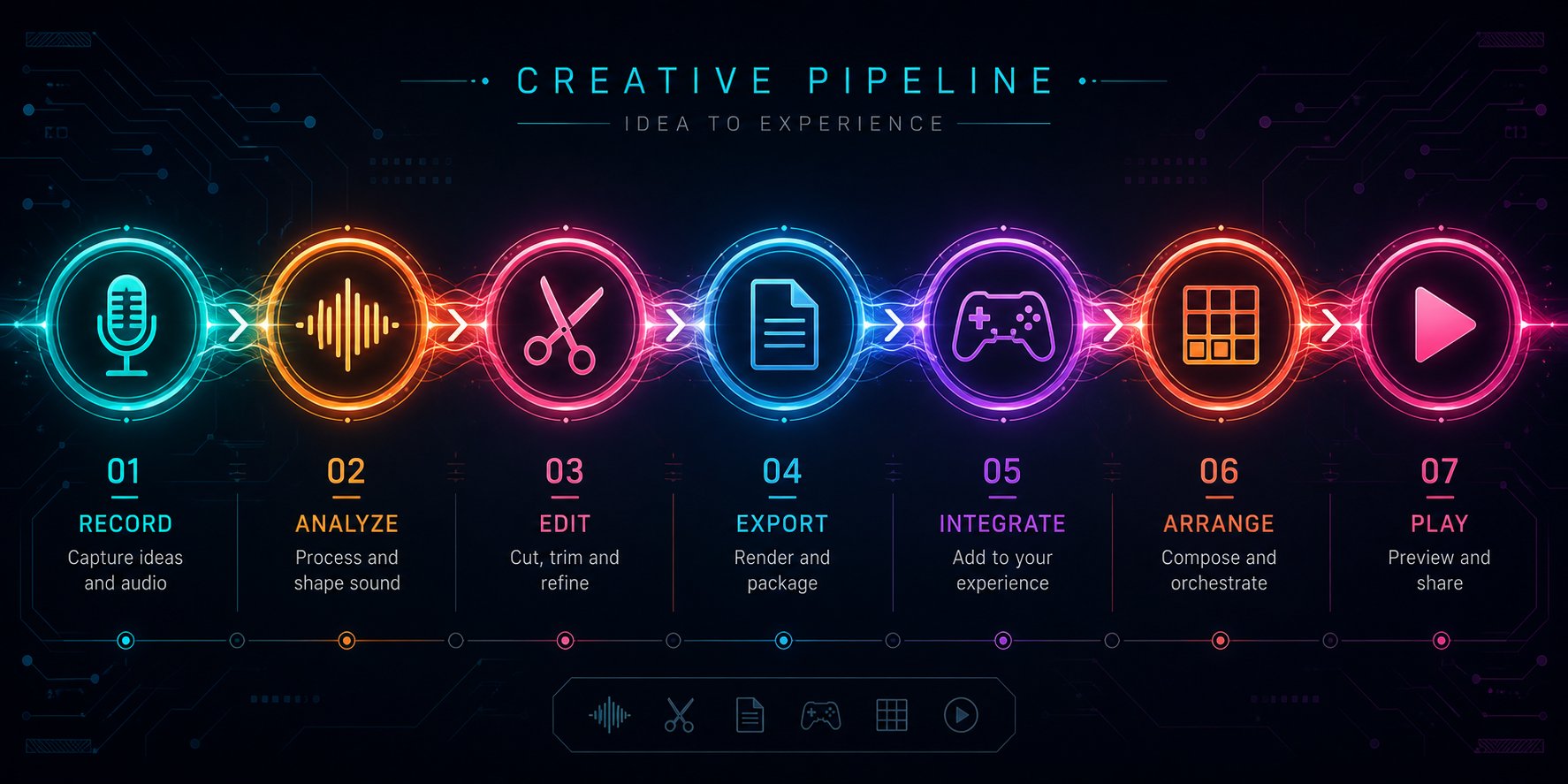
You've picked your tool, dialed in your prompts, and generated a track that actually sounds like Friday Night Funkin'. Great — but a raw audio file sitting on your desktop isn't a mod. It's just a starting ingredient. The pipeline between "I have a cool AI beat" and "players are hitting arrows to my song in Psych Engine" involves seven distinct steps, each with its own technical requirements and potential failure points.
Here is the full end-to-end workflow for turning AI-generated music into a playable FNF mod. Follow it in order, and you'll avoid the mistakes that derail most first-time modders.
- Generate the base track using an AI song maker with optimized prompts
- Edit and clean up the audio in Audacity or a DAW
- Split or create separate instrumental and vocal files
- Convert audio to OGG Vorbis at the correct sample rate
- Import files into a mod engine with correct naming conventions
- Chart the notes using a charting tool
- Playtest and iterate
Each step builds directly on the previous one. Skip a phase or rush through it, and the problems compound downstream — a slightly wrong BPM in step one becomes an uncorrectable desync nightmare by step six.
Generating and Editing Your AI Track for FNF Use
Step 1: Generate with intention. Open your chosen AI music generator and apply the prompt strategies covered earlier. Specify your target BPM as a precise number — 170 BPM, not "fast" — and layer genre descriptors like "chiptune hip-hop battle instrumental" to steer the AI toward authentic FNF territory. Generate at least three or four variations from the same prompt. AI output varies between runs, and your third generation might nail the energy your first attempt missed entirely.
A few practical tips at this stage:
- Always include "no vocals" or "instrumental only" in your prompt if the tool tends to add singing. You'll handle the vocal layer separately.
- Download the highest-quality export available — WAV if possible, MP3 as a fallback. You want to start editing from the least-compressed source.
- Write down the exact BPM you specified. You'll need this number repeatedly throughout the rest of the pipeline.
Step 2: Edit and clean up in Audacity. Raw AI output almost always needs cleanup before it's mod-ready. Open your generated track in Audacity (free, open-source, available on every platform) and work through these essential edits:
- Trim dead air. AI generators frequently add silence or fade-ins at the start. FNF songs need to start cleanly — even a few hundred milliseconds of leading silence will throw off your charting.
- Normalize levels. Use Effect > Normalize to bring peak amplitude to around -1.0 dB. This ensures your track plays at a consistent volume alongside other FNF songs without clipping.
- Remove artifacts. Listen carefully for digital glitches, sudden tonal shifts, or moments where the AI "lost the thread" of the composition. Cut or crossfade over these sections.
- Verify tempo. Use Audacity's beat analysis or tap along manually to confirm the actual BPM matches what you requested. If the AI drifted slightly — say, generating at 168 BPM instead of 170 — use Effect > Change Tempo (not Change Speed, which alters pitch) to correct it. Even a 2 BPM difference creates noticeable desync over a two-minute song.
- Structure the song. Most FNF songs follow an escalating pattern: a moderate opening section, a more intense middle, and a climactic finale. If your AI track feels flat or repetitive, splice sections around. Copy and paste the most energetic segment to the ending, or cut a repetitive middle section entirely.
Step 3: Create separate instrumental and vocal files. This is the step where many modders get stuck. If you prompted the AI to generate an instrumental-only track, you already have your Inst file — just clean it up and move to step four. The vocal layer requires separate work.
For creating FNF-style chromatic vocals, you have two practical paths:
- Record or synthesize a single vocal sample — a short "ah," "bah," or "dah" sound — and use a chromatic scale generator to pitch it across every note. Tools like UTAU or custom FNF chromatic generators handle this step.
- Use AI voice synthesis to generate a base vocal tone, then manually pitch-shift individual notes in Audacity using Effect > Change Pitch to create each chromatic step.
If your AI tool generated a full song with vocals baked in, you'll need to separate them. AI-powered stem separation tools like Demucs can isolate vocals from instrumentals with decent accuracy. The separated instrumental becomes your Inst file, and you replace the AI's singing vocals with proper chromatic FNF-style sounds.
File Format Conversion and Engine Import Steps
Step 4: Convert to OGG Vorbis. FNF mod engines expect audio in OGG Vorbis format — not WAV, not MP3, not FLAC. This is non-negotiable. In Audacity, the conversion is straightforward: go to File > Export Audio, select OGG Vorbis, and configure these settings:
- Sample Rate: 44100 Hz — this is CD quality and the standard for FNF engines.
- Channels: Stereo for the instrumental track. Vocal tracks can be stereo or mono depending on your engine's requirements.
- Quality: A setting of 5-6 in Audacity's quality slider provides a strong balance between file size and audio fidelity. Higher settings produce larger files with diminishing returns.
Name your files exactly as the engine expects — precision matters here, including capitalization:
Inst.ogg— the instrumental trackVoices.ogg— the combined vocal track (older engines and Psych Engine default)Voices-bf.oggandVoices-opponent.ogg— character-split vocals (newer engine builds)
A misnamed file — "inst.ogg" instead of "Inst.ogg," for instance — can prevent the engine from loading your song entirely. As the FNF maker troubleshooting community consistently reports, wrong folder placement and file naming are among the top reasons mods fail to load.
Step 5: Import into a mod engine. Most modders building their first custom song work in Psych Engine due to its large community and extensive tutorial library. The file placement follows a specific directory structure:
- Place your OGG audio files in
mods/[your-mod-name]/songs/[song-name]/ - Your chart data JSON files go in
mods/[your-mod-name]/data/[song-name]/ - Match folder and file names exactly to what you define in the engine's song metadata
If you're learning how to make your own FNF mod for the first time, consider swapping the instrumental in an existing mod as a practice run before building everything from scratch. This lets you verify your audio pipeline works — correct format, correct naming, correct folder — without the added complexity of charting from zero.
Charting Notes and Playtesting Your Custom Mod
Step 6: Chart the notes. This is where your song becomes gameplay. The FNF chart editor — or a third-party fnf chart maker built into engines like Psych Engine — lets you place arrow notes on a grid synchronized to your music. Left-clicking on the grid places notes; the first eight columns represent directional arrows (four for the opponent, four for the player), and the ninth column handles events like camera switches or animations.
Before placing a single note, verify two critical settings in your fnf charting maker:
- BPM is correct. Enter the exact tempo of your track. If the BPM is even slightly off, notes will drift further out of sync with every passing measure — a problem that's nearly invisible in the first ten seconds but completely ruins the song by the halfway point.
- Offset is calibrated. The instrumental and vocal offset values control the precise alignment between audio playback and note timing. Adjust in small increments of 10-30 milliseconds until downbeats land exactly on grid lines.
Charting is gameplay design, not music transcription. Resist the temptation to place a note on every single sound in the track. Focus on the dominant melody and rhythmic hooks — the elements players instinctively feel when listening. Community best practices recommend charting for how patterns feel under the fingers, not just how they look on the grid. Repeat with variation, respect stamina on high-BPM sections, and scale difficulty by simplifying transitions rather than randomly deleting notes.
Step 7: Playtest and iterate. Press Enter in the chart editor to playtest your creation with the changes you've made. Pay attention to three things during every test run:
- Does the timing feel right? If you consistently hit notes early or late despite reacting on beat, your offset needs adjustment — not your reflexes.
- Does the difficulty curve make sense? A sudden spike from simple patterns to dense clusters without warning feels unfair. Build intensity gradually.
- Does the audio loop or end cleanly? If there's a pop, click, or awkward silence at the end of the track, go back to Audacity and add a short fade-out.
Don't playtest alone. Grab two or three people from the FNF community — Discord servers and the GameBanana forums are full of willing testers — and ask them to play your mod cold, without any explanation of your creative intent. Their feedback reveals blind spots your own familiarity hides.
This seven-step pipeline is the complete path from an AI-generated audio file to a published, playable FNF mod. Each stage involves specific technical decisions — and some of the most important ones revolve around audio file formats and specifications that trip up even experienced modders.
Audio File Formats and Technical Specs Every FNF Modder Needs
A beautifully generated AI track means nothing if the mod engine refuses to load it — or worse, loads it with crackling artifacts, desynced timing, or an audible gap every time the song loops. These aren't creative problems. They're technical spec problems, and they catch modders off guard because the symptoms don't appear until the very end of the pipeline, when you're playtesting what you assumed was a finished product.
Understanding exactly which file formats, sample rates, and channel configurations FNF engines expect saves you from debugging sessions that can take longer than creating the song itself.
OGG vs WAV vs MP3 and Why Format Matters for FNF
You might wonder why format choice matters when all three — OGG, WAV, and MP3 — technically contain audio. The differences become critical inside a game engine, where file size, decode behavior, and looping precision directly affect gameplay.
The game development industry settled on a standard split long ago: uncompressed WAV for short, frequent sounds where decode latency matters, and OGG Vorbis for music and long audio where file size matters. FNF follows this convention. Mod engines like Psych Engine and Kade Engine natively expect your Inst.ogg and Voices.ogg files in OGG Vorbis format — not as a preference, but as a hard requirement baked into the engine's audio loading code.
MP3, despite being the most universally recognized audio format, is the worst choice for FNF mods. Why? MP3 encoders pad silence at the start of files — a technical artifact of how the codec handles frame boundaries. In normal music listening, you'd never notice a few milliseconds of silence. In a rhythm game where note timing is calibrated to the sample, that invisible padding breaks seamless loops and introduces the classic "why does my music gap" bug that plagues first-time modders.
| Format | File Size (3-min track) | Audio Quality | FNF Engine Compatibility | Recommended Use Case |
|---|---|---|---|---|
| OGG Vorbis | ~3-5 MB | High (lossy, but perceptually transparent at quality 5+) | Native — required by Psych Engine, Kade Engine, and most mod frameworks | Final export for both Inst and Voices files |
| WAV (PCM) | ~30-50 MB | Lossless — preserves every sample exactly | Not directly loaded by most FNF engines | Intermediate editing in Audacity or DAW; master archive before compression |
| MP3 | ~3-5 MB | Lossy — introduces encoding artifacts, especially at lower bitrates | Not recommended — causes looping gaps, second-class engine support | Avoid entirely for FNF mods; only acceptable as a source file to transcode from |
The practical takeaway is straightforward: work in WAV during editing (lossless means you're not degrading quality with every save), then export to OGG Vorbis as the final step. If your AI music generator only outputs MP3, import that MP3 into Audacity immediately and continue all further editing in WAV before the final OGG export. Transcoding MP3 directly to OGG stacks two layers of lossy compression, which audibly degrades the result. If you can get WAV exports from your AI tool, always choose that instead.
Sample Rates and Channel Configuration Requirements
Beyond format, two settings quietly determine whether your audio plays correctly or introduces subtle problems that are maddeningly hard to diagnose: sample rate and channel configuration.
Sample rate defines how many audio snapshots per second the file contains. The standard for FNF mods — and for game audio generally — is 44100 Hz (often written as 44.1 kHz). This is CD quality and matches what most AI music generators output by default. Some tools export at 48000 Hz, which technically offers slightly higher fidelity, but mixing sample rates within a single mod creates problems. When a 48 kHz file plays in an engine expecting 44.1 kHz, the engine resamples on the fly, introducing subtle pitch shifts and timing artifacts.
The rule is simple: pick one sample rate for your entire project and stick with it. 44100 Hz is the safest choice because it matches what FNF engines are built around.
Bit depth matters during editing but less so in the final export. Work at 16-bit or 24-bit in your DAW — 24-bit gives you more headroom for effects processing and volume adjustments without introducing quantization noise. When exporting to OGG, bit depth is handled internally by the codec, so you don't need to specify it separately.
Channel configuration is where vocal tracks need careful attention:
- Instrumental (Inst.ogg): Export as stereo. Instrumentals benefit from stereo width — panned drums, wide synth pads, and spatial separation between elements all contribute to a fuller sound.
- Vocals (Voices.ogg): Stereo works in most engines, but if you're splitting into character-specific files (Voices-bf.ogg and Voices-opponent.ogg), mono is perfectly acceptable and cuts file size in half. FNF vocal chromatic sounds are typically centered anyway, so stereo width adds nothing meaningful.
One consistency check worth building into your workflow: after exporting all your OGG files, re-import them into Audacity and verify the sample rate reads 44100 Hz, the channel count matches your intention, and the track length hasn't shifted by even a fraction of a second. Mismatches between your Inst and Voices files — even a few milliseconds of drift — create desync that worsens with every passing measure.
Understanding Chromatic Scales for FNF Vocal Battles
If you've ever wondered how to make FNF vocals that produce that signature "beep-bop-bap" sound, the answer lies in the chromatic scale system — and it's simpler than it sounds, once you see the logic behind it.
In a real singing voice, pitch changes smoothly and continuously. FNF characters don't sing like real people. Instead, each character has a set of short vocal samples — typically one base sound like "ah" or "dah" — that has been pitch-shifted to every note on a chromatic scale (all 12 semitones per octave, across multiple octaves). When the engine plays a charted note at C4, it pulls the vocal sample tuned to C4. When the next note is F#4, it grabs the F#4 sample. The rapid switching between these discrete pitched samples creates the characteristic rapid-fire vocal battle sound.
This is where an fnf chromatic maker becomes essential. These tools take your single base vocal sample and automatically generate every pitched variation the engine needs — sometimes 36 or more individual samples spanning three octaves. You feed in one clean vocal sound; the tool spits out a complete chromatic set ready for engine import.
How does AI fit into this? It helps at the very beginning of the chain. Use AI voice synthesis to generate your base vocal sample — experiment with different timbres, textures, and tonal qualities until you find a sound that fits your character. A deep, growling base tone produces a very different chromatic set than a bright, sharp one. Once you've selected your base sound, the chromatic generation step is mechanical: pitch-shifting math handles the rest.
A practical approach for learning this entire audio pipeline — from format conversion to chromatic vocal creation — is to start small. Instead of building a complete mod from zero, try changing the instrumental in an existing mod first. Understanding fnf how to change instrumental in an established mod teaches you the file structure, naming conventions, and engine expectations without the complexity of charting and vocal creation. Replace one Inst.ogg with your AI-generated track, load the mod, and see if it plays. If it does, you know your format, sample rate, and file naming are correct. If it doesn't, you've isolated the problem to the audio file itself rather than wondering whether charting data or folder structure might be at fault.
Getting these technical specs right isn't glamorous, but it's the difference between a mod that loads flawlessly and one that produces mysterious errors, stuttering audio, or desynced gameplay. The technical foundation, however, only ensures your audio works — it doesn't guarantee it sounds convincingly like Friday Night Funkin'. AI-generated tracks, even properly formatted ones, often carry telltale signs of machine origin that experienced players spot immediately, which brings up a different challenge entirely: post-processing raw AI output into something that feels authentically FNF.
Common Pitfalls With AI FNF Songs and How to Fix Them
Your AI-generated track loaded into Psych Engine without errors, the format is correct, the sample rate checks out, and the charting grid lines up. So why does the song still feel... off? Like it belongs in an elevator instead of a high-stakes rap battle against a demon clown? That disconnect between technically functional audio and music that genuinely feels like Friday Night Funkin' is the most common frustration modders face — and it's entirely fixable with the right post-processing approach.
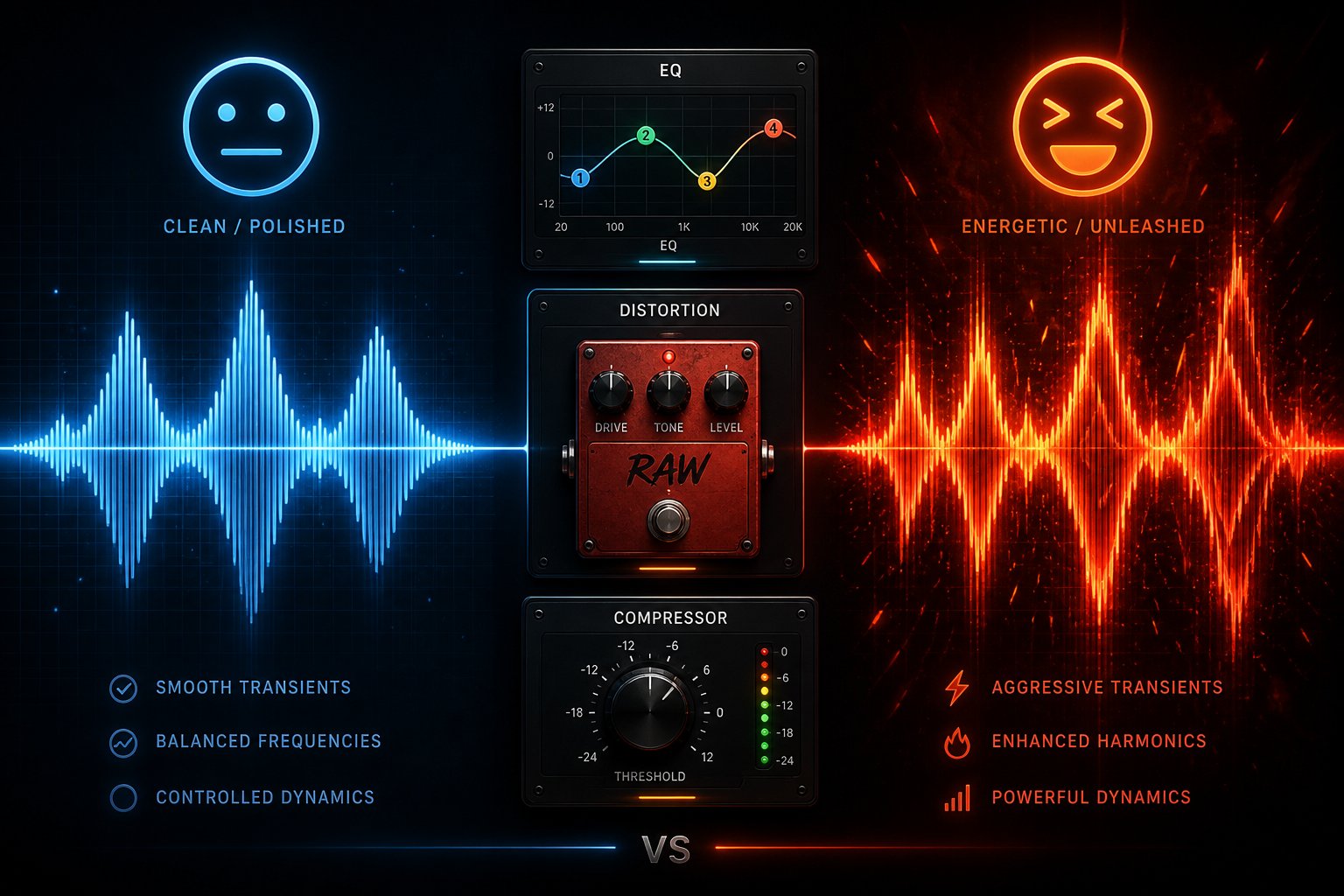
AI music generators produce clean, balanced, professional-sounding output by default. That's a feature for most use cases and a problem for FNF. The best Friday Night Funkin' tracks aren't clean. They're loud, compressed, slightly abrasive, and bursting with chaotic energy that makes your fingers twitch. Bridging that gap requires deliberate roughening — taking a polished AI track and injecting the raw character that makes players want to hit arrows.
Fixing Generic-Sounding AI Tracks With Post-Processing
The core issue is predictable: AI models optimize for what sounds "good" by conventional music production standards. Smooth dynamics, balanced frequencies, gentle transitions. FNF music breaks those conventions intentionally. It clips a little. The high end sizzles. The bass hits your chest before your ears register the kick drum. Replicating that aesthetic from a polished AI output means applying post-processing techniques that most mixing engineers would normally avoid.
Here are the specific techniques that transform generic AI output into something with authentic FNF bite:
- Light distortion or saturation on the master bus: Apply subtle overdrive or tape saturation across the entire mix. This introduces harmonic richness and that slightly "pushed" quality you hear in tracks from mods like VS Whitty or Tricky. In Audacity, use Effect > Distortion with a soft clipping curve — start conservatively and increase until the track gains grit without becoming unlistenable.
- High-frequency percussion boost: FNF drums cut through the mix aggressively. Use EQ to boost the 4 kHz–8 kHz range by 3–6 dB, which adds snap and presence to hi-hats, snares, and cymbal hits. This single adjustment often makes the biggest difference between a track that sounds like background music and one that sounds like a battle.
- Hard compression with fast attack: Apply a compressor with a fast attack (5–15 ms), moderate release, and a ratio of 4:1 or higher. This squashes dynamic range and pushes everything toward a consistently loud, in-your-face wall of sound — exactly the aesthetic FNF players expect.
- Tempo nudge upward: If your AI track feels sluggish despite hitting the correct BPM, try bumping the tempo up by 5–10 BPM using Audacity's Change Tempo effect (not Change Speed). A track generated at 165 BPM sometimes snaps into FNF territory at 173. The increase is small enough to preserve the composition but large enough to inject urgency.
- Bass enhancement: Boost the sub-bass region (40–80 Hz) by 2–4 dB and add slight distortion to the 100–200 Hz range. FNF instrumentals rely on heavy, punchy bass that you feel as much as hear. AI generators frequently under-represent this frequency band.
- Stereo widening on synth elements: Apply a stereo widener to the mid and high frequency range while keeping the bass centered. This creates the expansive, immersive sound field that characterizes the best FNF tracks without muddying the low end.
Apply these effects in layers rather than all at once. Process one technique, listen critically against a reference FNF track, then add the next. Stacking too many effects without evaluating between each step leads to a muddy, over-processed mess — the opposite extreme of the too-clean AI output you started with.
Workarounds for the FNF Vocal Battle Challenge
Instrumentals are the easy part. The vocal layer is where most AI-assisted FNF projects hit a wall. You feed a prompt into an AI music generator asking for "vocal battle sounds," and it gives you someone singing lyrics in a pop or hip-hop style. Perfectly usable in other contexts — completely wrong for FNF.
FNF vocal battles don't use singing. They use rapid-fire chromatic vocal hits — short, percussive tonal bursts pitched across the musical scale. When you make your own FNF character and design their voice, you're not creating a vocalist. You're creating an instrument that plays pitched syllables at whatever note the charted arrows demand.
Here's the practical workaround pipeline for generating FNF-style vocals when your AI tools insist on producing singing:
- Generate a base vocal tone with AI voice synthesis. Use a text-to-speech or voice generation tool to produce a single, clean vocal sample — a short "ah," "bah," "dah," or any syllable that fits your character's personality. Experiment with different voice timbres: a menacing villain needs a deep, growling base tone, while a playful rival might suit a bright, sharp one. This is the creative heart of the process — the base sample defines your character's entire vocal identity.
- Trim and clean the sample. In Audacity, cut the sample down to approximately 200–500 milliseconds. Remove any background noise, normalize the level, and ensure the waveform starts and ends cleanly without pops or clicks.
- Pitch-shift across the chromatic scale. Using a chromatic scale generator designed for FNF, or manually in Audacity using Effect > Change Pitch, create a version of your sample at every semitone across two to three octaves. This typically means generating 24–36 individual pitched samples from a single source.
- Assemble into a chromatic set. Organize the pitched samples following the naming and structure conventions your mod engine expects. Psych Engine and similar frameworks have specific formats for importing chromatic vocal sets.
- Layer and sequence in your Voices.ogg file. Using the charted note data as your guide, arrange the correctly pitched vocal samples along the timeline to match each note the player and opponent hit. This creates the Voices.ogg file that plays in sync with your Inst.ogg during gameplay.
The fnf character maker tools and fnf oc creator communities on platforms like GameBanana and Discord often share chromatic scale templates that streamline steps three and four considerably. Before building everything from scratch, search for existing chromatic generators compatible with your mod engine — many are free and dramatically reduce manual pitch-shifting work.
Ensuring Clean Loops and Proper Song Structure
Repetitive, structurally flat output is one of the most documented problems with AI-generated music. As prompt engineering research has demonstrated, AI models default to looping patterns when they lack structural guidance — repeating the same melodic phrase, drum pattern, or chord progression until the track feels like a one-bar loop stretched to three minutes. FNF songs demand the opposite: escalating intensity, clear sections, and dynamic contrast between phases of the battle.
Fixing this requires both better prompting and manual rearrangement after generation.
At the prompt stage, include structural variation cues in your text. Descriptors like "building intensity," "dynamic arrangement," "evolving sections," and "varied instrumentation" tell the model to change things up rather than settle into a comfortable loop. Avoid words like "hypnotic," "repetitive," or "looping," which actively encourage the exact behavior you're trying to prevent.
After generation, treat the AI output as raw material to be restructured. Open the track in Audacity and identify distinct sections — even in a repetitive track, you'll usually find subtle variations between different four-bar or eight-bar phrases. The restructuring process looks like this:
- Identify the strongest sections. Mark the two or three segments with the most energy, the most interesting melodic content, or the most rhythmic variation.
- Rearrange for escalation. FNF songs typically follow a build-up pattern: moderate opening, increasing intensity through the middle, and a climactic final section. Place your calmest section first, the moderately intense section in the middle, and your most energetic segment at the end.
- Create contrast with subtractive editing. Strip elements from your opening section — mute or reduce the bass, thin out percussion, drop the synth layers. Then reintroduce them progressively through the song. This creates dynamic contrast even from a track the AI generated at a constant energy level.
- Splice in transitions. Drop in a half-measure of silence, a drum fill, or a reversed cymbal crash between sections to signal changes. These micro-transitions prevent the rearranged sections from sounding like obvious cut-and-paste jobs.
- Ensure the ending is clean. FNF songs don't loop during gameplay — they play once and end. But a pop, click, or abrupt cutoff at the final sample sounds amateur. Apply a short fade-out (250–500 ms) at the very end of both your Inst.ogg and Voices.ogg files, and verify they're the exact same length down to the millisecond. Length mismatches between the two files cause one track to cut out before the other, which is immediately noticeable during play.
Before calling any track finished, run a quality control pass inside your mod engine — not just in Audacity. Load the complete mod, play through the entire song on at least two difficulty levels, and listen for problems that only appear in context: desync that develops gradually over the track length, volume imbalances between the instrumental and vocal layers, sections where the charting feels disconnected from the musical energy, or moments where the AI's artifacts become obvious through game speakers rather than studio headphones.
Invite at least one other person to playtest blind. Your ears adapt to problems after the tenth listen. A fresh player will catch the issues you've stopped hearing — the repetitive bridge, the slightly robotic drum fill, the vocal sample that sounds out of place at higher pitches. Community feedback, especially from experienced FNF players who know instinctively what the game "should" sound like, is the final quality filter no amount of solo editing can replace.
Fixing these pitfalls transforms AI-generated audio from a rough draft into a track players genuinely enjoy battling through. But there's one category of pitfall that no amount of post-processing can fix after the fact: licensing and copyright issues that determine whether you can legally distribute your mod at all.
Copyright and Licensing Rules for AI-Generated FNF Music
You've post-processed your AI track into something that genuinely sounds like a Friday Night Funkin' battle, charted the notes, and playtested it until the timing feels perfect. The mod is ready to upload to GameBanana. But before you hit publish, there's a question most modders never think to ask: do you actually have the legal right to distribute this music?
Copyright and licensing might feel like the least exciting part of the modding pipeline. It's also the part most likely to cause real problems if you ignore it — from mod takedowns to platform bans. The good news is that the landscape for AI-generated music is generally more favorable for creators than traditional music licensing. The catch is that "generally favorable" still has sharp edges you need to understand.
What Royalty-Free Actually Means for FNF Mod Distribution
Two terms get thrown around almost interchangeably in AI music marketing: "royalty-free" and "copyright-free." They sound similar. They mean very different things, and confusing them can lead an fnf mod creator into trouble.
Royalty-free means you don't owe ongoing payments every time someone plays, downloads, or interacts with your mod. You pay once (or nothing, on a free tier), and the track is yours to use without per-play fees. It does not mean the music has no copyright owner. The AI platform or — in some legal interpretations — you as the creator may still hold rights. It simply means the licensing model doesn't involve recurring royalty payments.
Copyright-free means no one holds copyright over the work at all. It exists in the public domain, and anyone can use it for any purpose without permission. Under current legal frameworks, pure AI-generated music — output created entirely by an algorithm without meaningful human creative input — may fall into this category by default, because most jurisdictions require human authorship for copyright protection.
For FNF modders distributing free mods on community platforms, the practical difference matters less than you might think. Whether your AI-generated track is royalty-free (licensed to you without per-use fees) or copyright-free (owned by nobody), you can distribute it in a free mod without owing anyone money. The distinction becomes critical only if you plan to sell your mod, monetize gameplay videos featuring it, or claim exclusive ownership over the music to prevent others from using it.
The real risk doesn't come from copyright law itself — it comes from the terms of service of the AI tool you used to generate the music. That's where most modders get blindsided.
Reading the Fine Print on AI Tool License Agreements
Here's a scenario that plays out constantly: a modder generates a track on an AI platform's free tier, builds an entire mod around it, uploads it to GameBanana, and only then discovers that the free plan restricts output to "personal, non-commercial use only." Is uploading a free mod to a public platform commercial use? The answer depends entirely on how the platform defines its terms — and many platforms define them broadly enough to cover public distribution of any kind.
The U.S. Copyright Office has been consistent since 2023: works created entirely by AI without meaningful human creative input are not eligible for copyright registration. This means the AI company doesn't hold copyright over what you generate, and your own copyright claim is weak unless you added substantial creative contribution beyond typing a prompt. But copyright law and platform terms of service are two separate systems. A platform can contractually restrict how you use output regardless of who holds the underlying copyright.
Different AI music generators handle this differently, and the differences are significant for anyone planning to make a FNF mod and share it publicly:
- Some platforms grant full commercial rights on all tiers — including free. Everything you generate is yours to distribute, monetize, or modify without restrictions. This is the safest scenario for modders.
- Some platforms tie commercial rights to paid plans only. Suno's pricing structure, for instance, explicitly restricts free-tier output to non-commercial use, with commercial rights reserved for Pro and Premier subscribers. Critically, upgrading later does not retroactively grant commercial rights to tracks generated under the free plan — you'd need to regenerate on the paid tier.
- Some platforms use revenue-share models where the platform retains partial rights to your generated output, particularly if they handle distribution to streaming services. This model creates complications for mod distribution because you may not have full authority to package and redistribute the audio.
- Some platforms require attribution. AIVA's free tier, for example, requires you to credit the platform when using generated music publicly. Forgetting this requirement technically violates the license, even if no one actively enforces it.
Before distributing any FNF mod containing AI-generated music, find the exact clause in your AI tool's terms of service that answers this question: "Does my current plan allow public distribution of generated output in a free, non-monetized project?" If the answer is unclear, assume the answer is no — and either upgrade or switch tools.
This single check prevents the most common licensing mistake in the fnf mod maker online community. It takes five minutes of reading. Skipping it can cost you a published mod and a platform reputation.
Beyond commercial use clauses, watch for two additional terms that affect modders specifically:
- Derivative works restrictions. Some platforms prohibit modifying their output or combining it with other content. FNF modding inherently involves editing, remixing, and integrating AI audio with charting data and game assets — all of which could qualify as creating derivative works under a strict interpretation.
- Content ID registration by the platform. A few AI music services register generated outputs in YouTube's Content ID database. If another user generates a similar track and it gets registered, your gameplay videos featuring your own mod could receive automated copyright claims. Verify whether your platform participates in Content ID registration before building a mod you plan to showcase on YouTube.
Protecting Your Creative Work in the FNF Community
FNF itself sits on a clear legal foundation. The game's source code is licensed under the Apache License 2.0, which grants broad permissions to use, modify, and distribute derivative works — provided you include the license notice and don't use the Friday Night Funkin' trademark in ways that imply official endorsement. The community norm built on top of this license is equally clear: original music created for mods is freely shared, and modders generally respect each other's creative work through attribution rather than legal enforcement.
But what about protecting your AI-generated music from being reused without credit? This is where the legal landscape gets genuinely tricky. If you typed a prompt and the AI produced a track with no further meaningful human input, that output likely cannot be copyrighted under current U.S. Copyright Office interpretations. You can't stop someone from ripping your Inst.ogg file and dropping it into their own mod, because you may not hold a legal copyright to enforce.
The way to strengthen your position is to add documented human creative contribution beyond the initial prompt. Post-processing the audio — restructuring sections, adding distortion, layering manual chromatic vocals, adjusting EQ curves, splicing in transitions — all constitute creative decisions made by a human. The more substantial and documented those contributions are, the stronger your potential copyright claim becomes. Keep records of your editing process: save project files, screenshot your Audacity timeline, and note which creative decisions you made and why. This documentation trail matters if you ever need to demonstrate human authorship.
Practically speaking, the FNF community operates on social norms more than legal enforcement. Credit the tools you used, respect other modders' work, and contribute positively to the ecosystem. If someone reuses your music without attribution, a polite message through GameBanana or Discord resolves the issue far more effectively — and with far less stress — than any legal claim.
The copyright landscape is genuinely evolving. The EU AI Act's transparency requirements are pushing platforms toward clearer disclosure of training data sources, and the U.S. Copyright Office has signaled further guidance specifically addressing AI music. These developments will likely create more defined rules over the next year. For now, the safest approach is straightforward: use platforms with clear licensing terms, add genuine creative input to AI-generated output, keep records of your process, and distribute within the community norms that have made FNF modding thrive.
With licensing sorted and technical specs locked in, every piece of the pipeline — from the first prompt to the legal clearance for distribution — is in place. The only question left is how to bring all of these moving parts together into a repeatable creative workflow that produces compelling mods consistently.
Putting It All Together and Creating Your First AI FNF Track
Eight sections of pipeline details, technical specs, and troubleshooting strategies can feel overwhelming when you step back and look at the full picture. But here's the thing — every step you just learned feeds directly into the next, forming a creative loop that gets faster and more intuitive with each mod you build. The creators producing the most impressive AI-assisted FNF mods aren't following a checklist mechanically. They've internalized the workflow until it feels like second nature.
The AI-Assisted FNF Modding Workflow Recap
Strip away the granular detail, and the entire pipeline compresses into seven connected phases:
- Prompt engineering — craft precise, layered prompts using genre blends, exact BPM targets, mood descriptors, and instrumentation cues to steer AI output toward authentic FNF energy.
- AI generation — produce multiple instrumental candidates from your prompts, selecting the output that best matches your creative vision.
- Post-processing — inject FNF character through distortion, EQ boosts, compression, and tempo adjustments that transform polished AI audio into something raw and battle-ready.
- Format conversion — export to OGG Vorbis at 44100 Hz with correct channel configurations and precise file naming.
- Engine import — place your Inst.ogg and Voices.ogg files into the correct directory structure for Psych Engine or your chosen mod framework.
- Charting — sync arrow patterns to your music's rhythmic hooks and melodic peaks, designing gameplay that feels satisfying under the fingers.
- Playtesting — test across difficulty levels, gather community feedback, and iterate until timing, energy, and playability all click.
Each phase produces a tangible output that the next phase consumes. A weak link anywhere — a vague prompt, an unconverted file format, a BPM mismatch in the chart editor — cascades into problems downstream. But a strong link at the very beginning, the generation phase, makes every subsequent step easier. That's why your choice of fnf music maker matters so much.
Combining AI Speed With Creative Human Polish
The modders who treat AI output as a finished product consistently produce forgettable mods. The ones who treat it as a powerful starting point — a scaffold to build on, reshape, and infuse with personal creative decisions — produce work that rivals hand-composed tracks. This distinction mirrors a broader pattern across creative industries: as AI integration matures from experimentation to production-grade workflows, the competitive edge belongs to creators who combine AI efficiency with human judgment rather than relying on either alone.
For FNF modding specifically, the human contribution is everything that makes a mod yours. The AI doesn't know your character's personality. It can't feel whether a vocal chromatic set sounds menacing enough for your villain or playful enough for a comic relief opponent. It doesn't understand that the bridge section needs to drop energy before the final explosion of notes. Those decisions — layering chromatic vocals, restructuring song sections for dramatic escalation, fine-tuning EQ to match the gritty FNF aesthetic — are where your creative identity lives.
The FNF modding community itself is evolving alongside these tools. Platforms like GameBanana are seeing an influx of mods from creators who previously lacked music production skills but now use AI-generated instrumentals as their foundation. An aspiring fnf oc maker who designs a brilliant character concept no longer hits a dead end at the music stage. A friday night maker building their first complete week of content can prototype five different battle tracks in an afternoon instead of spending weeks learning a DAW from scratch. The barrier to entry has dropped dramatically — and the community is richer for it.
This democratization doesn't dilute quality. It expands the talent pool. Modders who bring strong visual design, compelling storytelling, or innovative charting can now pair those strengths with AI-assisted music rather than settling for silence or stock loops. The best mods of the next year will likely come from creators who are excellent at one discipline and use AI to cover the rest — not from people who are mediocre at everything.
Start Creating Your First AI FNF Song Today
If you've read this far, you have every piece of knowledge you need. The only thing left is to start. Here's a practical first session that takes you from zero to a testable prototype:
- Open MakeBestMusic's AI Music Generator and apply the prompt strategies from Section 3 — lead with energy descriptors, specify a BPM between 150 and 180, blend chiptune and hip-hop genre tags, and include "no vocals" to get a clean instrumental. The platform's prompt-to-song workflow and deep style flexibility make it a natural fit for the precise genre targeting FNF demands.
- Generate three or four variations. Compare them against a reference track from a popular mod. Pick the candidate with the strongest rhythmic energy and most FNF-appropriate instrumentation.
- Pull the track into Audacity. Apply the post-processing checklist: trim dead air, normalize levels, add light distortion, boost high-frequency percussion, and verify tempo.
- Export as OGG Vorbis at 44100 Hz. Drop it into an existing mod's song folder as a replacement Inst.ogg to test your audio pipeline before tackling charting and vocal work.
That's your first loop. It takes an hour or two, and it validates every technical step before you invest days into a full mod. From there, layer in chromatic vocal creation using the techniques covered earlier, chart your notes, and build toward a complete, original creation. If you're also designing a custom opponent alongside the music, the fnf character creator tools and communities on GameBanana and Discord can help you develop visuals, animations, and chromatic voice sets that bring your character to life as a cohesive package.
The FNF modding ecosystem thrives because people share what they create. Upload your finished mod. Write a description explaining your process. Credit the tools you used. Respond to feedback. The community that built thousands of mods through pure passion and open-source collaboration is the same community that will play your creation, critique it honestly, and inspire your next one. Every mod you publish — even an imperfect first attempt — contributes to an ecosystem that has kept a small indie rhythm game alive and evolving for years.
AI didn't replace the creativity that drives Friday Night Funkin'. It removed the bottleneck that kept creative people from participating. The music is still yours to shape. The characters are still yours to imagine. The battles are still yours to design. The AI just helps you get there faster — and what you build with that speed is entirely up to you.
