

What BPM Means and Why Beats Per Minute Matter
When you tap your foot to a song, you're instinctively tracking its BPM. Every track you hear has a pulse, and that pulse has a speed. Before you reach for a bpm changer to speed up or slow down a piece of music, you need to understand exactly what you're adjusting and why it matters so much.
Defining Beats Per Minute in Plain Terms
BPM (beats per minute) is the number of rhythmic beats that occur in one minute of music, serving as the universal measurement of tempo that tells musicians, DJs, producers, and listeners how fast or slow a song feels.
Imagine a clock ticking once per second. That steady tick represents 60 BPM. A song at 120 BPM doubles that rate, delivering two beats every second. The bpm of a song is simply a count of these pulses over sixty seconds, giving everyone involved in music a shared numerical language for tempo.
This concept is closely tied to other musical properties. For instance, what is pitch in music? Pitch describes how high or low a note sounds, and it can be affected when you alter tempo carelessly. The bpm key relationship also matters: certain tempos pair naturally with certain keys to create a specific emotional character. These connections become critical once you start modifying a track's speed.
Why BPM Is the Backbone of Every Song
Song bpm does far more than set a metronome click. It shapes the entire listening experience in ways you feel even if you never consciously count beats:
- Energy and mood - Research published in Frontiers in Psychology found that fast-tempo music evokes positive emotional valence, while slow tempos tend toward calm or melancholy. The bpm in a song directly steers how a listener feels.
- Danceability - Dance styles align with specific BPM ranges. A salsa track at 90 BPM feels entirely different from a techno loop at 130 BPM, and dancers rely on that consistency.
- Musical compatibility - DJs blending two tracks need matching tempos. Even a 2-3 BPM mismatch causes beats to drift apart within seconds, ruining a transition.
- Fitness synchronization - Runners and cyclists match their cadence to BPM, using tempo as a pacing tool during workouts.
A bpm changer gives you the power to adjust this foundational property of any song, whether you're slowing a guitar solo to learn it note by note or speeding up a playlist for a high-intensity workout. The tool itself is straightforward, but using it well requires knowing what BPM actually controls beneath the surface.
That distinction between simply moving a speed slider and making an informed tempo adjustment is exactly where most people go wrong. The difference comes down to how these tools manipulate audio at a technical level.
How BPM Changers Actually Work Under the Hood
Every tempo changer you've ever used relies on one of two core technologies to manipulate audio speed. The method it chooses determines whether your track sounds natural or like a chipmunk singing through a tunnel. Understanding the difference puts you in control of the outcome instead of hoping for the best.
Time-Stretching Algorithms Explained Simply
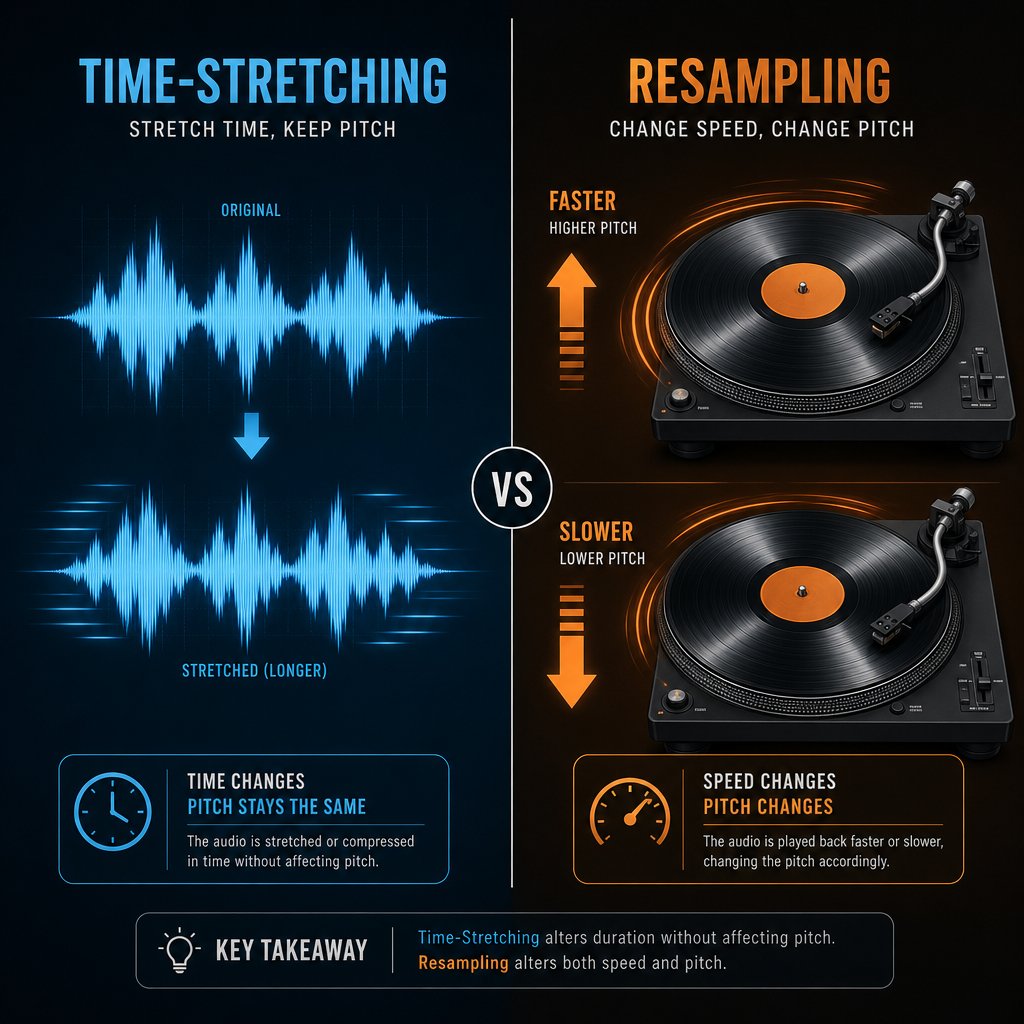
Time-stretching changes the tempo of audio without affecting its pitch. Think of it like reading a sentence faster without raising your voice. The words stay the same tone, they just arrive quicker. The algorithm analyzes small slices of the audio waveform, then redistributes them across a shorter or longer timeline while keeping the original frequencies intact.
According to Point Blank Music School, time stretching lets you make a sound play faster or slower while keeping the notes the same. This is why you can slow a guitar solo to half speed for practice and still hear every note at its correct pitch. The software essentially fills in or removes tiny gaps between audio segments so the duration changes but the musical content stays faithful to the original.
Small adjustments typically sound clean. Push beyond roughly 15-20% from the original tempo, though, and you'll start hearing artifacts like warbling, phasing, or metallic textures. The algorithm runs out of real audio data to work with and starts guessing, which is where quality breaks down.
Resampling and Why Pitch Changes With Speed
Resampling is the older, simpler method. Imagine placing a vinyl record on a turntable and spinning it faster. The song plays quicker, but every sound also shifts higher in pitch. Slow it down, and everything drops lower. Speed and pitch are locked together because the audio waveform itself is being compressed or expanded without any intelligent processing.
This pitch shift is a direct physical consequence. When you compress a waveform into less time, the frequency of every sound increases. Stretch it out, and frequencies decrease. There's no separation between timing and tone. An audio speed and pitch changer using pure resampling treats them as a single inseparable property.
For most practical purposes, this linked behavior is a problem. You don't want a vocal track to sound unnaturally deep just because you slowed the song by 10 BPM. But in certain creative contexts, that pitch distortion is the entire point.
Which Method Modern BPM Changers Use
Nearly every modern BPM changer defaults to time-stretching. Whether it's a browser-based tool, a mobile app, or a DAW's built-in warp engine, the goal is the same: let users adjust tempo independently of pitch. This is why you can slow down a complex mix for transcription or speed it up for a workout without the music sounding wrong.
Resampling hasn't disappeared, though. It thrives in remix culture. Wondering how to make a song slow down then speed up with that distinctive pitched effect? That's resampling at work. Nightcore tracks deliberately speed songs up and let the pitch rise for an energetic, high-voiced character. The slow reverb generator aesthetic does the opposite, dragging tempo down so vocals drop into a dreamy, low register. Both styles intentionally use resampling's "flaw" as a creative tool to pitch music into new emotional territory.
So when you open a speed and pitch changer, you're usually choosing between these two modes, whether the interface labels them clearly or not. Time-stretching for transparent tempo control, resampling for stylized pitch effects. Knowing which one is active behind the scenes explains why some tempo adjustments sound invisible and others transform the entire character of a track.
The real question becomes: how do you know what tempo you're starting from before you make any changes at all?
How to Find the Current BPM of Any Song
Most people skip straight to the speed slider without knowing the original tempo of their track. That's like adjusting a recipe without knowing how much salt is already in the pot. A bpm finder gives you the starting number you need to calculate a precise target tempo instead of dragging a slider until something "feels right." Two main approaches exist, and each fits different situations.
Manual Tap-Tempo Counting
The simplest bpm finder tap method requires nothing more than your ears and a timer. You listen to the track, tap along with the beat, and count how many taps land within a set time window. The standard 15-second method works like this: start a stopwatch, count beats for exactly 15 seconds (beginning your count at zero, not one), then multiply by four. If you counted 32 beats, that gives you 128 BPM.
For an even quicker estimate, count beats over 10 seconds and multiply by six. The tradeoff is accuracy. Missing even half a beat over that short window throws your result off by 3 BPM or more. The underlying formula stays the same regardless of your counting window: (number of beats divided by number of seconds) multiplied by 60.
This approach works well in live situations. Imagine you're at a rehearsal and need to communicate tempo to a drummer, or you're DJing with older vinyl records that carry no digital metadata. A quick tap count gets you in the ballpark within seconds.
Automatic BPM Detection From Audio Files
Automatic detection takes a different path entirely. A bpm analyzer scans the actual audio waveform, identifies rhythmic onsets (the start of each beat, drum hit, or transient), and calculates the spacing between them. Modern algorithms typically analyze 60 seconds of audio, which captures enough musical content for a reliable reading. The result is a precise value, often down to one decimal place, like 128.3 BPM.
These tools use onset detection to find sudden energy changes in the signal, autocorrelation to identify repeating rhythmic patterns, and beat tracking to refine the final tempo estimate. A song bpm finder built on this approach achieves accuracy within plus or minus 1 BPM for most commercial music with consistent tempos.
Many BPM changers include built-in detection that runs automatically when you upload a file. Standalone bpm finder mp3 tools also exist as dedicated utilities, letting you check tempo before deciding which tool to use for the actual adjustment. Either way, the goal is the same: replace guesswork with a concrete number.
Which Method Should You Use?
The right choice depends on your context and how much precision you need. Here's a side-by-side comparison:
- Manual tap-tempo
- Automatic bpm checker
For production work, DJ prep, or any situation where you need to calculate an exact percentage change between your current and target tempo, automatic detection is the clear winner. For quick estimates during practice or live performance, tapping along gets the job done without breaking your flow.
Knowing your starting BPM transforms how you use a bpm changer. Instead of nudging a slider and hoping the result lands near your target, you can do simple math. If a track sits at 140 BPM and you need it at 128 for a DJ set, that's an 8.6% reduction. You enter that value directly and get a predictable, repeatable result every time. The difference between guessing and calculating is the difference between a clean mix and a track that drifts out of sync after eight bars.
Of course, knowing your starting tempo only tells half the story. The other half is knowing where you want to land, and that depends heavily on the genre you're working with.
Common BPM Ranges Across Music Genres
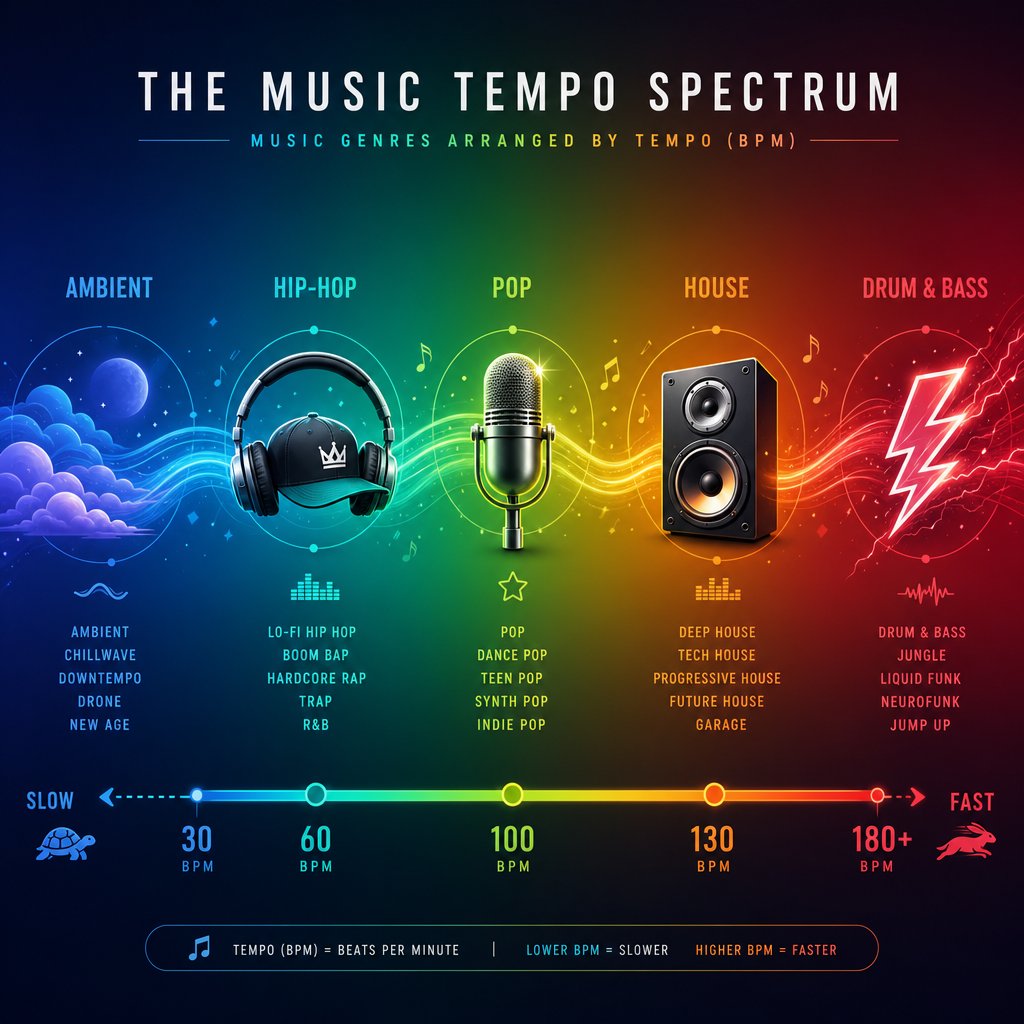
Every genre carries a tempo fingerprint. Hip-hop grooves at a different speed than house, and drum and bass lives in a completely separate lane from ambient. When you're about to adjust a track's tempo, knowing where that genre typically sits tells you how far you can push the BPM before the song stops feeling like itself.
Genre-by-Genre BPM Reference Ranges
The table below maps major genres to their typical tempo windows and explains why someone using a bpm changer might target each range. These numbers draw from production tempo guides and reflect conventions that producers and DJs rely on daily.
| Genre | Typical BPM Range | Common Use Cases for Tempo Adjustment |
|---|---|---|
| Ambient / Downtempo | 60–90 BPM | Slowing tracks for meditation, yoga playlists, or relaxation content |
| Hip-Hop / R&B | 70–100 BPM | Matching beats for freestyle practice, aligning samples to a boom-bap groove |
| Lo-fi Hip-Hop | 70–90 BPM | Creating study or focus playlists with consistent pacing |
| Reggaeton | 85–100 BPM | Syncing dembow rhythms for dance routines or mashups |
| Pop | 100–130 BPM | Slowing 100 bpm songs for choreography or speeding them for cardio playlists |
| Afrobeats | 100–120 BPM | Aligning polyrhythmic tracks for DJ transitions into house sets |
| Rock | 110–140 BPM | Slowing guitar solos for practice, matching tempo across a setlist |
| House | 120–130 BPM | Locking tracks to 128 BPM for seamless DJ mixing |
| Techno | 125–150 BPM | Adjusting darker tracks to fit a 130 bpm set without pitch drift |
| Trance | 135–145 BPM | Matching euphoric builds to a consistent set tempo |
| Drum and Bass | 160–180 BPM | Speeding breakbeats to DnB range or slowing for half-time edits |
| Punk / Hardcore | 150–200 BPM | Slowing high bpm songs for transcription or cover rehearsals |
Notice the overlaps. Songs in 100 bpm could be slow pop, uptempo R&B, or mid-range Afrobeats. A track labeled "110 bpm songs" might sit comfortably in rock, ska, or Afrobeats territory. Genre boundaries blur constantly, and that flexibility is exactly what makes a bpm changer so useful across different musical contexts.
How Genre BPM Guides Your Tempo Changes
These ranges aren't rigid rules. They're targets that help you make smarter decisions. A DJ building a house set doesn't just want tracks that sound good individually. They need every song locked near the same tempo so transitions stay seamless. A dancer preparing choreography to a pop track at 120 BPM might need it slowed to 100 bpm for rehearsal, then gradually brought back up to full speed as the routine solidifies.
For DJ mixing specifically, certain tempos dominate because they represent the center of gravity for entire genres. Here are the most common target BPMs that DJs align their tracks to:
- 128 BPM — The universal house and dance-pop sweet spot, where the largest number of club tracks converge
- 130 BPM — Slightly faster energy for tech house and 130 bpm songs that bridge house into techno territory
- 140 BPM — The dubstep and trap standard, felt in half-time as 70 BPM
- 174 BPM — The drum and bass center, where most liquid and neurofunk tracks cluster
- 90 BPM — Classic hip-hop mixing range, ideal for boom-bap and G-funk blends
When you know both your starting BPM and your genre's target range, the math becomes simple. A 5% adjustment keeps audio quality high. A 15% jump starts introducing artifacts. That quality threshold is something most people discover the hard way, but it connects directly to why you're changing tempo in the first place and what you're trying to achieve with the result.
Why You Might Need to Change a Song's Tempo
Knowing genre ranges and detection methods is useful, but it only matters if you have a clear reason to change bpm in the first place. The motivations span far beyond DJing. Musicians, athletes, dancers, video editors, and casual listeners all reach for a tempo change at some point, and each use case demands a different approach to how much you adjust and what quality tradeoffs you're willing to accept.
Slowing Songs Down for Music Practice
Imagine you're learning a jazz saxophone solo that flies by at 180 BPM. At full speed, the notes blur together and your fingers can't keep up. The solution is to slow down audio to a comfortable pace, learn the passage note by note, then gradually increase tempo as muscle memory develops.
This isn't just common sense. It's a well-documented practice strategy. Gerald Klickstein's The Musician's Way outlines a method where musicians isolate difficult passages, reduce tempo until execution feels effortless, then step up incrementally using a metronome to gauge progress. The key insight: you first have to reduce the effort required at your initial tempo before you can reliably increase speed.
A BPM changer makes this workflow seamless. Instead of manually counting beats and guessing at percentages, you set a precise target. Start at 50% of the original tempo, master the passage, bump it to 60%, then 70%, and so on. Each increment builds on solid technique rather than sloppy approximation. Some practitioners recommend stepping up in small increments of 3-5 BPM at a time, never increasing until the current tempo feels comfortable and controlled.
The critical requirement here is pitch preservation. When you slow a track for practice, you need the notes to stay at their original pitch so you can play along in the correct key. This is where time-stretching earns its keep. A tool that uses resampling would drop the pitch as it slows the track, forcing you to transpose your instrument or practice in the wrong key entirely.
Beat Matching and DJ Mixing
For DJs, the ability to change the tempo of a song isn't optional. It's the foundation of every transition. Beat matching means aligning two tracks to the same BPM so their beats land simultaneously, creating a seamless blend where one song flows into the next without the audience noticing the switch.
Hercules DJ Academy describes beatmatching as aligning the tempos of two tracks so the beats hit at the same time, allowing for smooth mixing between them. The technique is especially important in genres like house, techno, and hip-hop, where smooth transitions maintain the energy of a set.
The practical workflow looks like this: you identify the BPM of both tracks, use the pitch fader on your controller to nudge the incoming track's speed until it matches the playing track, then use jog wheels for fine alignment. Even with modern sync buttons handling the math automatically, understanding how to change bpm of song manually gives DJs creative flexibility. You might intentionally speed song A up by 2 BPM to build energy, or slow the incoming track slightly to create a more relaxed transition.
DJ-focused tempo changes are typically small, usually within 3-5% of the original. That's good news for audio quality. A track at 126 BPM nudged to 128 BPM stays well within the range where time-stretching algorithms produce transparent results. Push beyond 8-10%, though, and even experienced DJs notice degradation in the highs and transients.
Fitness, Dance, and Content Creation Uses
The reasons to adjust tempo extend well beyond music production. Here's where things get practical for everyday listeners.
Fitness and running cadence. Research consistently shows that music tempo directly affects exercise performance. A meta-analysis of 139 studies found that music produces a reliable ergogenic effect, with fast-tempo tracks generating greater performance benefits than slow-to-medium music. The validated motivational range for runners sits between 125 and 140 BPM. If your favorite workout track sits at 110 BPM, a tempo change to 130 BPM transforms it into an effective cadence-matching tool. Cyclists often target 80-100 BPM for steady-state rides and 120-140 BPM for high-intensity intervals.
Dance and choreography. Choreographers routinely slow tracks during the learning phase of a routine. A complex sequence set to a pop song at 124 BPM might need to drop to 90-100 BPM while dancers memorize counts and transitions. As the routine solidifies, the tempo gradually returns to performance speed. This mirrors the musician's practice approach but applied to full-body movement.
Remix culture. Nightcore edits speed a song up by 20-30% and let the pitch rise with it, creating an energetic, high-voiced aesthetic. Slowed-reverb edits do the opposite, dragging tempo down 15-25% for a dreamy, low-register vibe. Both styles deliberately use resampling rather than time-stretching because the pitch shift is the creative point.
Content creation. Video editors match background music tempo to their edit pacing. A travel montage with quick cuts needs faster music. A reflective voiceover segment needs something slower. Rather than searching for a new track, you can change bpm of song you already licensed to fit the visual rhythm perfectly.
Audiobook and podcast speed. Technically not music, but the same tools apply. Listeners routinely speed spoken content to 1.25x or 1.5x to consume more material in less time. The underlying algorithm is identical to what a music tempo changer uses, just applied to speech rather than melody.
Here's a quick reference for the ideal adjustment range in each scenario:
- Instrument practice — Slow to 50-80% of original tempo, then increase in 3-5 BPM steps
- DJ beat matching — Adjust within 3-5% (typically 2-6 BPM) for clean transitions
- Dance choreography — Slow 20-30% during learning, return to full speed for performance
- Running playlists — Target 125-140 BPM regardless of original tempo; adjust up to 20% if needed
- Cycling playlists — Target 80-100 BPM for endurance, 120-140 BPM for intervals
- Nightcore remixes — Speed up 20-30% with pitch shift enabled (resampling mode)
- Slowed-reverb edits — Slow down 15-25% with pitch shift enabled
- Video background music — Adjust 5-15% to match edit pacing without noticeable artifacts
- Podcast/audiobook speed — Speed up 25-50% (1.25x to 1.5x) for faster consumption
Each use case carries different tolerance for audio artifacts. A DJ needs pristine quality because the audience hears every detail on a club system. A runner with earbuds at mile eight won't notice subtle warbling. A nightcore creator wants the artifacts. Understanding your specific goal helps you decide how aggressively to push the tempo and whether pitch preservation matters for your situation.
That relationship between tempo and pitch isn't always straightforward, though. Sometimes you want to change one without the other. Sometimes you need to change both. The distinction depends entirely on how BPM, pitch, and musical key interact beneath the surface.
How BPM Connects to Pitch and Key Changes
BPM, pitch, and musical key are three separate properties of a song, but they're tangled together in ways that catch people off guard. Change one carelessly and you might accidentally shift another. A bpm changer that uses resampling will alter all three simultaneously. One that uses time-stretching leaves pitch and key untouched. Knowing which scenario you're in determines whether your tempo adjustment sounds professional or introduces problems you didn't ask for.
When Tempo Changes Affect Pitch
Here's the core distinction. When you speed up or slow down audio using resampling, the pitch moves with it. Speed a track up by 10%, and every note rises in pitch. Slow it down by 10%, and everything drops lower. This happens because the audio waveform itself is being compressed or stretched, which physically changes the frequency of every sound in the file.
That frequency shift doesn't just make things sound higher or lower. It actually moves the song into a different musical key. A track originally in C Major, sped up enough via resampling, might land in D Major or higher. The tonal center has shifted, the relationships between notes remain intact, but the entire piece now lives in a new key.
Time-stretching avoids this entirely. It manipulates timing without touching frequency, so you can change pitch of a song's tempo while the notes, vocals, and harmonies stay exactly where they were. For practice, DJ prep, and most production work, this independence between tempo and pitch is what you want.
Semitones and Key Shifting Explained
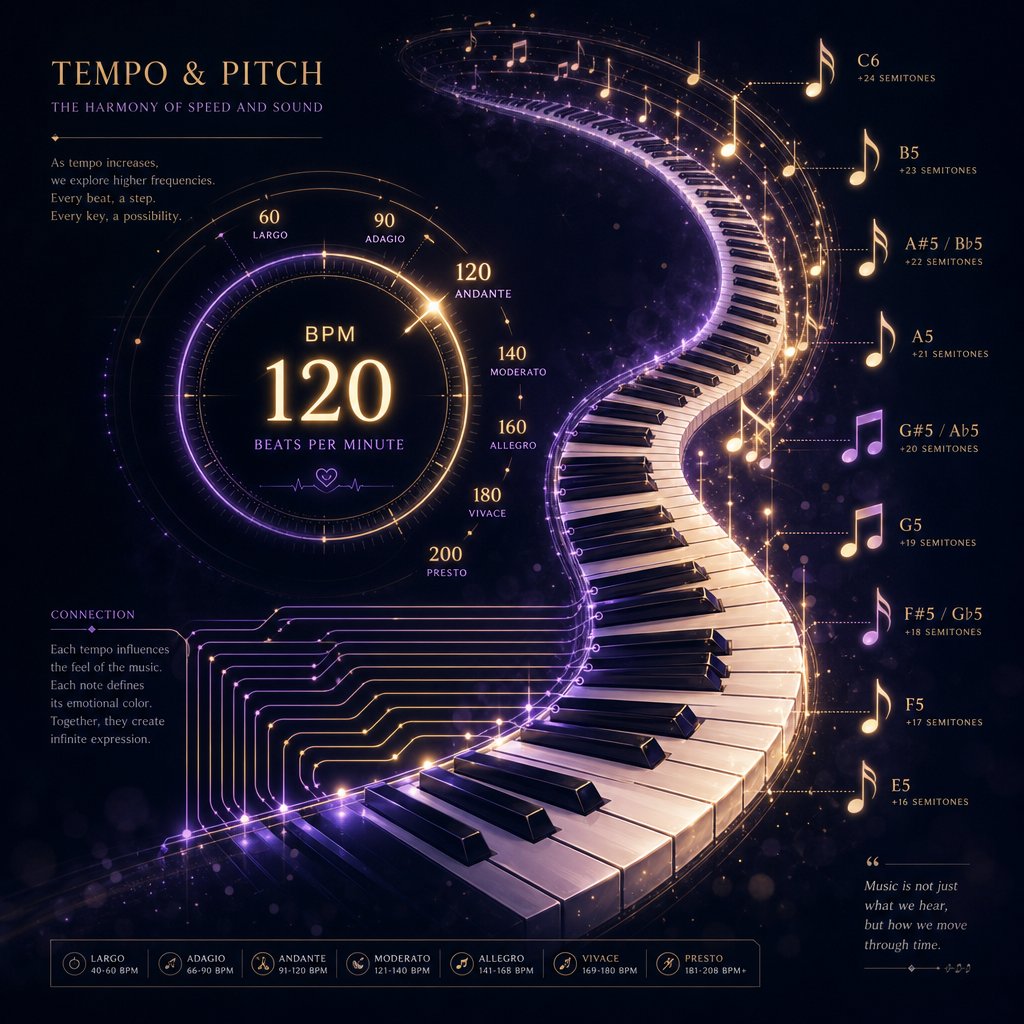
When you do need to change pitch intentionally, the unit of measurement is the semitone. A semitone (also called a half step) is the smallest interval between two adjacent notes in Western music. Moving from C to C# is one semitone. Moving from C to D is two semitones. Twelve semitones make a full octave.
Why does this matter for tempo work? Because pitch shifting by a specific number of semitones is how you transpose music from one key to another. Shift every note up by two semitones, and a song in C Major becomes a song in D Major. The melody, chords, and harmonic relationships all stay the same, just relocated to a higher tonal center. A key changer tool does exactly this, letting you move a track up or down in semitone increments without altering its speed.
This is the mechanism singers use when a song sits outside their comfortable vocal range. Rather than straining for notes that are too high, they transpose the entire track down by one or two semitones. The song feels the same, but the pitch sits where their voice works best.
When to Change BPM and Key Together
Sometimes you need to adjust both tempo and key simultaneously. DJs encounter this constantly. Two tracks might sit at compatible BPMs but clash harmonically because their keys conflict. As the harmonic mixing approach demonstrates, mixing two songs from incompatible key families creates muddy basslines and sour-sounding vocals, even when the beats align perfectly.
The solution is adjusting key alongside BPM. Modern DJ software includes a key lock feature that preserves pitch when you change tempo, plus a separate key shift control that lets you transpose music by semitones on the fly. This combination means a DJ can speed a track from 126 to 128 BPM without affecting its key, then independently shift the key up one semitone to make it harmonically compatible with the next track in the mix.
Producers face similar decisions. You might want a vocal sample slowed from 130 to 100 BPM for a hip-hop beat, but you also need it transposed down three semitones to fit your track's key. These are two independent operations: time-stretching handles the tempo, and a pitch shifter handles the key change. Running them separately gives you cleaner results than trying to accomplish both through resampling alone.
The practical takeaway: if you only need a tempo adjustment, use time-stretching and leave pitch alone. If you need a key change without tempo change, use a dedicated pitch shifter measured in semitones. If you need both, apply them as separate steps for maximum control. Understanding this relationship is what separates someone blindly dragging a slider from someone making deliberate, informed adjustments.
With the connection between tempo, pitch, and key clear, the next decision is which type of tool best fits your workflow and how much control you actually need.
Choosing the Right BPM Changing Tool for Your Needs
You understand how tempo, pitch, and key interact. You know your starting BPM and where you want to land. The remaining variable is the tool itself. Not every bpm changer is built for the same job, and picking the wrong category wastes time or compromises quality. Three main types exist: browser-based online tools, mobile apps, and DAW-based solutions. Each serves a different workflow, and the best choice depends on what you're actually trying to accomplish.
Browser-Based BPM Tools for Quick Adjustments
If you need to change tempo of song online free without installing anything, browser-based tools are the fastest path. You open a webpage, upload your file, adjust the tempo slider, and download the result. No accounts, no software updates, no learning curve beyond clicking a few buttons.
These tools work well for casual and semi-professional needs: slowing a song for instrument practice, adjusting a playlist for a workout, or creating a quick remix edit. Most modern web-based options use time-stretching algorithms, so pitch stays intact when you move the tempo slider. Some also include pitch control, letting you shift key independently of speed.
For example, MakeBestMusic's Vocal Remover combines audio speed changing with pitch control in a single browser interface. Beyond basic tempo adjustment, it also handles vocal and instrumental separation, which makes it particularly useful for practice workflows. You can isolate a guitar part, slow it down, and loop it at a comfortable BPM without the vocal track getting in the way. That combination of stem separation and tempo flexibility covers a lot of ground without requiring a desktop application.
The tradeoffs are real, though. Browser-based tools typically impose file size limits, process audio on remote servers (which means upload and download time), and offer fewer fine-tuning options than dedicated software. If you're working with a three-minute MP3 for personal practice, none of that matters. If you're processing a full-length WAV for a professional mix, you'll feel the limitations.
Mobile Apps for Practice and Fitness
Mobile apps sit in the middle ground between convenience and capability. A music tempo changer on your phone travels with you to rehearsals, the gym, or the dance studio. You can adjust tempo on the spot without needing a laptop or internet connection.
For musicians, apps like Anytune and Amazing Slow Downer have become staples. They let you load a track from your library, slow it to any percentage, loop specific sections, and gradually increase speed as you improve. Fitness users benefit from apps that automatically match playlist BPM to running cadence or cycling RPM, adjusting songs in real time as your pace changes.
The downsides mirror what you'd expect from a smaller platform. Processing power is limited compared to desktop tools, so extreme tempo changes may produce more noticeable artifacts. File format support can be narrower, and some apps restrict functionality behind subscription paywalls. Audio alter capabilities on mobile also tend to be less granular. You might get a tempo slider and a pitch knob, but you won't find the detailed warp markers or algorithm selection that a DAW provides.
Still, for on-the-go practice and fitness use, mobile apps hit the sweet spot. You don't need surgical precision when you're running intervals or learning a bass line in your living room. You need something fast, portable, and good enough.
DAW-Based Tempo Control for Production
Digital audio workstations like Ableton Live, FL Studio, Logic Pro, and Pro Tools offer the most powerful tempo manipulation available. DAW-based tools give you access to multiple time-stretching algorithms, warp markers for beat-level precision, automation curves for gradual tempo changes, and complete control over how the software handles transients, tonal content, and texture.
In Ableton Live, for instance, you can choose between different warp modes (Beats, Tones, Texture, Re-Pitch, Complex, Complex Pro) depending on the type of audio you're stretching. A percussive loop sounds best with the Beats algorithm. A vocal phrase needs Complex Pro to avoid artifacts. That level of algorithm selection simply doesn't exist in browser or mobile tools.
DAWs also let you work with individual stems rather than a full mix. You can time-stretch a vocal independently from the drums, apply different stretch settings to each, and maintain quality across the entire arrangement. For producers working on official remixes, mashups, or any project destined for release, this precision is non-negotiable.
The cost is accessibility. DAWs carry a learning curve that ranges from moderate to steep. Even basic tempo adjustment requires understanding the interface, importing audio correctly, and knowing which algorithm to select. Pricing ranges from free (GarageBand, Audacity) to several hundred dollars for professional suites. And you need a computer with enough processing power to handle real-time stretching without glitches.
For someone who just wants to slow a song down for guitar practice, a DAW is overkill. For someone producing a track that thousands of people will hear, it's the only serious option.
Comparing Your Options at a Glance
The table below breaks down the three categories across the factors that matter most when choosing a song pitch and bpm changer online or offline solution. Use it as a quick decision guide based on your primary use case.
| Tool Type | Best For | Pitch Preservation | Learning Curve |
|---|---|---|---|
| Browser-based online tools (e.g., MakeBestMusic Vocal Remover) | Quick practice edits, casual remixes, workout playlists, stem separation + tempo adjustment | Yes (time-stretching) | Minimal |
| Mobile apps (e.g., Anytune, Amazing Slow Downer) | On-the-go practice, fitness cadence matching, dance rehearsals | Yes (time-stretching) | Low |
| DAW-based (e.g., Ableton Live, FL Studio, Logic Pro) | Professional production, remixes, multi-stem editing, release-quality output | Yes (multiple algorithm choices) | Moderate to steep |
A few patterns stand out. Every modern option preserves pitch by default, so the old worry about chipmunk vocals is mostly solved regardless of which category you choose. The real differentiators are control and context. Browser-based tools like a bpm changer online win on speed and accessibility. Mobile apps win on portability. DAWs win on precision and flexibility.
Most people don't need to pick just one. A producer might use a bpm converter in the browser for quick reference checks, a mobile app during commute practice sessions, and their DAW for final production. The categories complement each other rather than compete.
Whichever tool you choose, though, the output quality depends less on the software and more on how aggressively you push the tempo change. Small adjustments sound clean everywhere. Large ones introduce artifacts everywhere. Understanding that quality threshold, and knowing a few tricks to work around it, is what separates a transparent tempo edit from one that sounds obviously processed.
Tips for Clean Tempo Changes Without Audio Artifacts
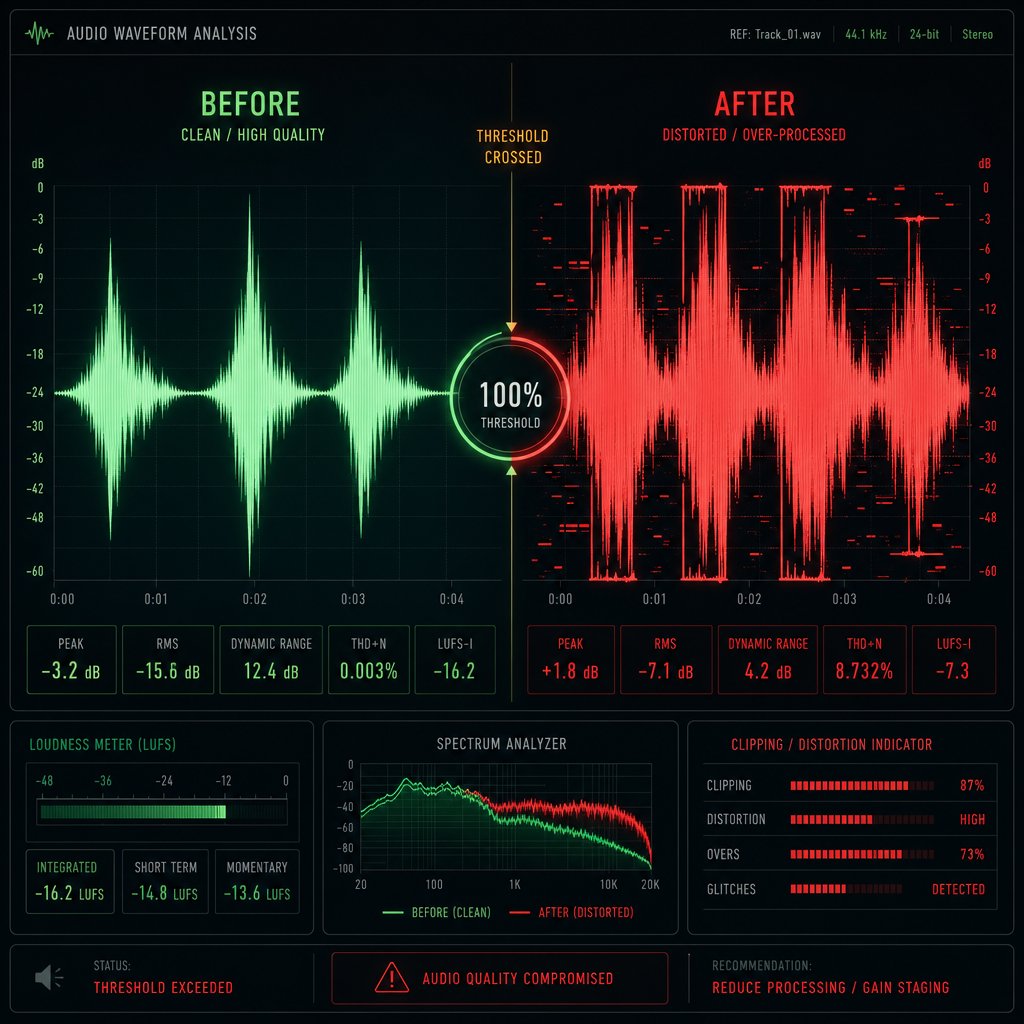
Every tool in the previous section, whether browser-based, mobile, or DAW-powered, shares the same fundamental limitation. Push the tempo too far from the original, and the audio starts falling apart. Warbling vocals, metallic shimmer on cymbals, rhythmic stuttering where a snare hit used to snap cleanly. These artifacts are the reason your bpm changer might be ruining your tracks, and the fix isn't a better tool. It's understanding the quality threshold you're working within.
Why Small Tempo Changes Sound Better
Time-stretching algorithms work by slicing audio into tiny segments, then rearranging and crossfading those segments to fit a new timeline. When you make a small adjustment, say 5-10% from the original tempo, the algorithm has plenty of real audio data to work with. The slices overlap naturally, crossfades stay smooth, and your ears can't detect the manipulation. The result sounds identical to the original, just faster or slower.
Stretch beyond that 10-15% window, and the math starts breaking down. The algorithm needs to either repeat or skip larger chunks of audio to hit the target duration. That's when you hear the telltale signs: a vocal that wobbles like it's underwater, hi-hats that develop a grainy, sandpaper texture, or a kick drum that loses its punch and sounds like a dull thud. As Lucid Samples explains, extreme stretches place greater demands on the processing, increasing the likelihood of audible degradation, especially with percussive sounds that have sharp transients or complex harmonic content.
Keep tempo adjustments within 5-15% of the original BPM for transparent results. Beyond that range, artifacts become increasingly audible regardless of which tool or algorithm you use.
This isn't a flaw in any specific tool. It's a fundamental constraint of how digital audio processing works. Even professional pitch correction software and high-end DAW algorithms hit this wall. The difference between consumer and pro tools is how gracefully they degrade at extreme settings, not whether they degrade at all.
Practical Tips for Artifact-Free Results
You can't eliminate the quality threshold, but you can push it further and minimize the damage when you need to exceed it. These tips apply whether you're using an mp3 bpm changer in your browser or warping stems inside a DAW.
- Start with the highest quality source file available. A 320 kbps MP3 gives the algorithm more audio data to work with than a 128 kbps file. A WAV or FLAC file is even better. Compression artifacts in low-bitrate files compound with stretching artifacts, so the mp3 bpm you start with directly affects the output quality. If you have access to a lossless version, use it.
- Make incremental changes instead of one extreme jump. If you need to slow a track from 160 BPM to 120 BPM (a 25% reduction), try processing it in two stages. Drop to 140 first, export, then drop from 140 to 120. Each step stays within a manageable range, and some algorithms handle two moderate stretches better than one large one.
- Enable pitch-lock (time-stretch mode) unless you specifically want pitch to shift. When tempo and pitch move together via resampling, the formant structure of vocals and instruments gets distorted. Formants are the resonant frequencies that give a voice or instrument its natural character. Shifting them makes singers sound robotic or unnatural. Pitch-lock keeps formants intact by separating tempo from pitch entirely.
- Choose the right algorithm mode for your audio type. If your tool offers algorithm options, match them to the content. Use percussive or rhythmic modes for drum loops, melodic or complex modes for vocals and full mixes. A mismatched algorithm is one of the most common causes of unnecessary artifacts.
- Trim and clean your audio before processing. Remove silence at the beginning and end of the file. If there's background noise, apply gentle noise reduction first. The cleaner the input, the less the algorithm has to guess about what's signal and what's noise.
- Avoid stacking multiple processes on the same file. Each round of time-stretching introduces a small amount of degradation. If you tempo adjust a track, then pitch-shift it, then stretch it again, those losses accumulate. Plan your processing chain so you minimize the number of passes.
Working With Isolated Stems for Cleaner Output
Here's a technique that dramatically improves results for larger tempo changes: separate the track into individual stems before you adjust the tempo. Instead of stretching a full mix where vocals, drums, bass, and instruments all compete for the algorithm's attention, you process each element independently.
Why does this help? A full mix is a dense, complex signal. The algorithm has to simultaneously handle sharp drum transients, sustained vocal notes, and harmonic instrument layers, all woven together. When you stretch that combined signal, compromises are inevitable. The settings that preserve vocal clarity might smear the drums. The settings that keep drums punchy might add metallic texture to the vocals.
Isolated stems solve this problem. You can apply a percussive stretching algorithm to the drums, a melodic algorithm to the vocals, and a tonal algorithm to the bass, each optimized for its specific content. The results are noticeably cleaner, especially when you need to change bpm of mp3 files by more than 10-15%.
MakeBestMusic's Vocal Remover offers a practical way to handle this preparation step. It separates vocals from instrumentals directly in your browser, giving you isolated stems you can then tempo-adjust individually. By splitting the track before stretching, you reduce the complexity each algorithm pass has to handle, which translates directly into fewer artifacts in the final output.
The workflow looks like this: upload your track and separate it into vocal and instrumental stems, apply your desired tempo adjust to each stem independently using whichever tool fits your needs, then recombine the processed stems. It adds a step to the process, but the quality difference is audible, particularly on vocal-heavy tracks where pitch correction artifacts and stretching artifacts tend to stack up fastest.
This stem-first approach also opens creative possibilities. You might slow the instrumental by 15% for a laid-back remix while keeping the vocal at its original tempo, or speed up the drums while leaving a piano part untouched. Independent control over each element gives you flexibility that processing a full mix simply can't match.
Every technique in this article connects back to a single principle: understanding what's actually happening to your audio when you change its tempo. BPM isn't just a number on a screen. It's the rhythmic foundation that shapes how music feels, how it's mixed, and how it's used across dozens of real-world scenarios. The difference between someone who drags a slider and hopes for the best and someone who gets clean, predictable results every time comes down to knowing the starting tempo, choosing the right method, respecting the quality threshold, and preparing the audio properly before processing. That knowledge turns a simple bpm changer from a blunt instrument into a precision tool.
