

Yes, AI Can Create Sheet Music, and Here Is How It Works
Can AI create sheet music? The short answer is yes. The longer answer is that the phrase means three completely different things depending on what you actually need. A pianist wanting to notate a live recording, a teacher generating sight-reading exercises, and a beginner asking AI to compose a melody from scratch are all looking for "AI sheet music," but they need entirely different tools and workflows.
Understanding which category your goal falls into determines everything else: the tool you pick, the input you provide, the quality you can expect, and the amount of editing you will do afterward. The technology has matured significantly, with the global generative AI in music market valued at USD 642.8 million in 2024 and projected to reach USD 3 billion by 2030. But maturity does not mean perfection. Every method has trade-offs, and realistic expectations will save you hours of frustration.
Three Types of AI Sheet Music Creation
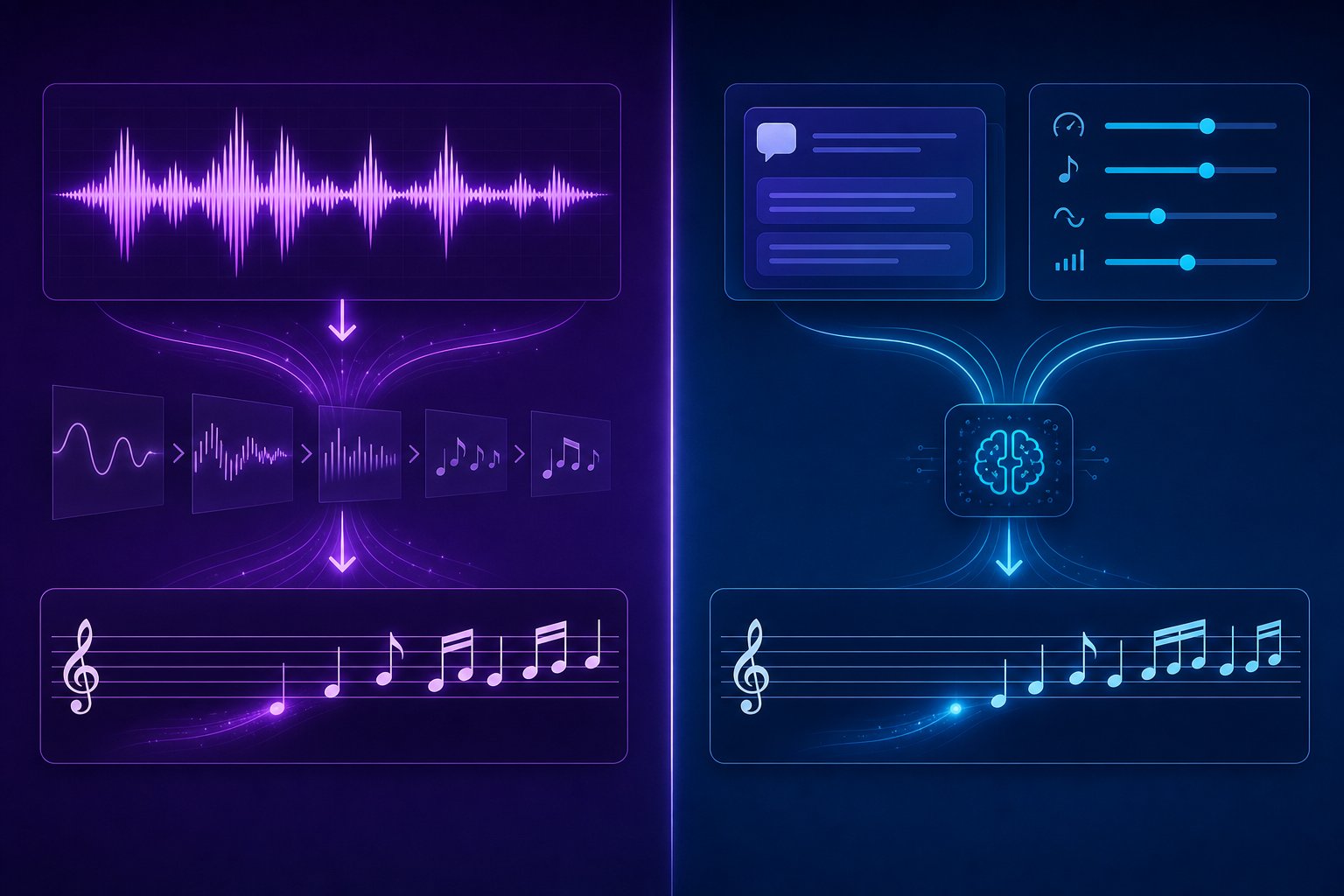
When people search for an ai sheet music generator, they are usually looking for one of these distinct processes without realizing the differences:
- AI Transcription: Converts existing audio recordings into written notation. You feed it a sound file, and it produces a score representing what it "hears." Best for musicians who already have a performance they want on paper.
- AI Composition: Generates original sheet music from text prompts, style parameters, or musical constraints. This is a music note generator in the truest sense, creating melodies and arrangements that did not exist before. Tools like NotaGen already demonstrate this by producing full scores from period, composer, and instrumentation prompts.
- MIDI-to-Notation Conversion: Translates MIDI data from a DAW or digital keyboard into readable, printable sheet music. The musical content already exists as digital performance data; ai notation software simply reformats it into standard notation.
Each path involves different input requirements, different accuracy expectations, and different levels of human cleanup. Conflating them leads to choosing the wrong tool and getting disappointing results.
Who Benefits Most from AI Notation Tools
A study by Ditto Music found that nearly 60 percent of surveyed artists already use AI in their music projects. But sheet music AI serves an even wider audience than producers and performers alone.
Musicians transcribing recordings benefit when they need a written score from a live performance or a favorite track. Educators creating practice materials can use AI to generate fresh sight-reading exercises or personalized sheet music for students at varying skill levels, something music teachers have been asking about for years. Beginners who lack notation literacy can describe a mood or style in plain language and receive a playable score, turning a music sheet creator into a creative on-ramp rather than a barrier.
The capabilities are real, but they come with honest limits. Solo instruments transcribe far more accurately than dense mixes. AI-composed output often sounds structurally correct but emotionally flat without human editing. And MIDI conversion only works cleanly when the source data is well-quantized. Knowing these boundaries before you start is what separates a productive workflow from a frustrating one.
The critical first step, then, is matching your specific goal to the right method, and that decision shapes every choice that follows.
Step 1: Define Your Sheet Music Goal
Picking the wrong method is the fastest way to waste an afternoon. Imagine spending thirty minutes uploading audio into a composition tool when what you actually needed was a transcription engine, or feeding a text prompt into a transcription service that only accepts WAV files. Your goal dictates the path, and each path leads to a completely different set of tools, accuracy levels, and editing demands.
Ask yourself one question before anything else: does the music already exist as sound, as MIDI data, or only as an idea in your head?
Matching Your Goal to the Right AI Method
If you have a recording, a voice memo, or an MP3 of a song you want notated, you need audio to sheet music transcription. This is the route for anyone trying to convert song to sheet music that already exists in the real world. The AI listens to the audio and attempts to identify pitches, rhythms, and sometimes even dynamics.
If the music does not exist yet and you want AI to create it for you, you need a composition or generation tool. You provide prompts, style references, or parameters like key and tempo, and the AI produces original notation or MIDI you can shape further.
If you already recorded MIDI into a DAW, whether from a keyboard session or a programmed arrangement, you need notation conversion software. The musical information is already captured digitally. The tool simply translates it into a readable score.
Each path carries different expectations. Transcription output depends almost entirely on source audio quality. Composition output depends on how well you define your parameters. MIDI conversion depends on how cleanly the performance was recorded or quantized.
Common Scenarios and Which Path to Take
Think about where you fit. A pianist who recorded a live performance on their phone and wants printed notation needs mp3 to sheet music ai transcription. A songwriter who hums melodies into a voice recorder and wants those ideas turned into a lead sheet also needs transcription, though results from a solo vocal line can vary. A producer sitting on dozens of MIDI arrangements who needs printable parts for session players needs notation conversion, the most predictable of the three paths. And a beginning composer who wants an ai piano sheet music generator to sketch ideas from a text description needs the composition route.
The table below maps these situations clearly:
| Goal | AI Method | Typical Input | Expected Output Quality |
|---|---|---|---|
| Notate an existing recording | AI Transcription | MP3, WAV, or FLAC audio file | Good for solo instruments; requires cleanup for complex mixes |
| Create sheet music from audio of a hummed melody | AI Transcription | Voice memo or isolated vocal track | Moderate; pitch detection varies with vocal clarity |
| Generate original melodies or arrangements | AI Composition | Text prompts, style parameters, chord progressions | Structurally sound but often needs human refinement for musicality |
| Convert song into sheet music from DAW sessions | MIDI-to-Notation Conversion | Quantized MIDI files | High accuracy when MIDI is clean; minimal editing needed |
Notice that ai music to sheet music transcription consistently demands the most post-processing, while MIDI conversion demands the least. Composition sits in the middle: the output is technically correct, but making it sound like something a human would actually write takes iteration.
With your goal clearly defined, the next variable that determines success is what you feed into the tool, and source material quality makes or breaks every method.
Step 2: Prepare Your Source Material for Best Results
The quality of what you feed into an AI tool determines the quality of what comes out. This principle, often called "garbage in, garbage out," applies across all three methods. A clean solo piano recording can yield near-publishable notation in minutes. A noisy live recording of a full band may produce an unreadable mess that takes longer to fix than transcribing by ear. The same logic extends to MIDI inputs and composition prompts: vague parameters produce vague results.
Before you upload anything or type a single prompt, a few minutes of preparation can save hours of editing on the back end.
Preparing Audio Files for AI Transcription
When you want to convert audio to sheet music online free or through any paid tool, your source recording is the single biggest variable. Audio quality affects transcription results more than any other factor, including which tool you choose. Echo, background noise, and heavy compression all degrade the AI's ability to identify what is actually being played.
Here is what matters most:
File format and quality. WAV and FLAC files preserve all audio detail and give the AI the most information to work with. MP3 is workable for most tasks, but heavily compressed MP3s introduce artifacts that confuse pitch detection. If you are converting an mp3 to music sheet notation, use the highest bitrate version available. When you have the option, always choose uncompressed audio over lossy formats.
Polyphonic complexity. This is where expectations need to be realistic. Solo melodic instruments, especially piano, violin, and clean vocals, produce the most reliable results from any music to notation converter. Each note onset gives the algorithm a clear, consistent point to work from. Add a second instrument, and the model has to separate overlapping sounds, which introduces more room for error. Full band recordings with drums, bass, guitar, and vocals playing simultaneously sit near the practical limit for reliable automated transcription. If you need notation from a dense mix, isolating individual stems first using a tool like stem separation software dramatically improves accuracy.
Background noise and room acoustics. The signal-to-noise ratio of your recording directly correlates with transcription accuracy. A recording made in a quiet room with the microphone close to the instrument can yield 98-99 percent accuracy. That same performance recorded from across a reverberant hall with an air conditioner running may drop below 80 percent, requiring hours of manual correction.
Use this checklist before uploading audio for transcription:
- Choose WAV or FLAC over MP3 when possible; if using MP3, ensure a bitrate of 192 kbps or higher
- Use isolated instrument tracks rather than full mixes whenever available
- Remove or reduce background noise using a free tool like Audacity's noise reduction feature before uploading
- Avoid recordings with heavy reverb or echo, as these are the hardest artifacts for AI to work around
- For polyphonic instruments like piano, ensure the recording captures clear note attacks without pedal blur
- Keep tempo relatively steady; rubato and frequent tempo changes confuse rhythm detection significantly
- Trim silence and non-musical sounds from the beginning and end of the file
Many users search for ways to convert mp3 to sheet music online free, expecting instant results from any recording. The reality is that even the best free tools produce poor output from poor source material. A few minutes spent cleaning your audio file, even basic noise reduction and format conversion, pays exponential dividends in usable notation.
Setting Up MIDI and Prompt Inputs for AI Composition
For MIDI-to-notation conversion: The quality gap here comes down to one word: quantization. MIDI recorded in a DAW with snap-to-grid enabled or manually quantized after recording converts into clean, readable notation with minimal editing. Every note lands exactly on the beat division you intended, so the music to sheet music ai conversion is almost mechanical.
Live-recorded MIDI from a keyboard performance without quantization is a different story. Human timing fluctuations, even subtle ones, create note values that do not map neatly onto standard rhythmic divisions. A note played slightly before the beat might register as a tied thirty-second note rather than a clean quarter note. Recent transformer-based research on rhythm quantization has achieved onset F1-scores of 97.3 percent on the ASAP dataset for interpreting these timing deviations, but consumer-grade tools are not yet at that level. If your MIDI feels sloppy when you listen back, quantize it in your DAW before exporting for notation conversion.
For AI composition tools: The inputs here are creative rather than technical. Most generation tools accept some combination of text prompts describing mood or genre, reference melodies, chord progressions, key and tempo settings, or style parameters like instrumentation and complexity level. The more specific your input, the more usable the output. Telling a tool to "compose something sad" produces generic results. Specifying "a solo piano piece in D minor, 72 BPM, with arpeggiated left hand and lyrical right-hand melody in ABA form" gives the AI meaningful constraints to work within.
Best practices for composition and MIDI inputs:
- Quantize live-recorded MIDI to at least sixteenth-note resolution before exporting
- Remove accidental double-triggered notes and overlapping MIDI events
- Export MIDI at the correct tempo; notation software uses tempo data to calculate note values
- For composition prompts, specify key, tempo, time signature, and instrumentation at minimum
- Include stylistic references or genre descriptors to narrow the AI's creative range
- Generate multiple variations and compare rather than relying on a single output
Whether you are working with audio to sheet music free tools, paid transcription services, or AI composition platforms, the pattern is the same. Cleaner input means less editing later. The tool you choose matters, but what you give it matters more. With your source material optimized, the next decision is which specific tool fits your workflow and instrument type.
Step 3: Choose the Right AI Tool for Your Workflow
Your source material is clean, your goal is defined, and you know which method you need. The remaining variable is the tool itself. The AI sheet music landscape has matured into a crowded space, with each tool optimized for specific instruments, workflows, and output formats. Picking the right one avoids the frustration of forcing a piano-focused tool to handle drums, or expecting a composition engine to transcribe audio it was never designed to process.
The tools below are organized by the two primary categories that matter most: transcription (audio in, notation out) and composition/generation (parameters in, original MIDI or notation out). MIDI-to-notation conversion is handled natively by notation software like MuseScore and Sibelius, so it does not require a separate dedicated tool in the same way.
AI Transcription Tools for Audio to Notation
Transcription tools listen to your audio and attempt to produce a written score. Their accuracy depends heavily on instrument type and recording clarity, so the best ai music transcription tool for you is usually the one built specifically for your instrument.
Klangio offers a suite of instrument-specific transcribers: Piano2Notes for piano, Guitar2Tabs for guitar tablature, and Drum2Notes for percussion patterns. The per-instrument approach is deliberate. By narrowing the problem to a single sound source, each model achieves higher accuracy than a generic "transcribe anything" engine. Klangio also provides an API and DAW plugins, making it the practical choice when you want transcription integrated directly into your production environment rather than running through a separate web app. The interface is clean and intuitive, and as music educators have noted, it serves as a bridge between performance and notation, particularly with clear monophonic input.
Songscription AI takes a similar per-instrument approach but focuses on a complete sheet music workflow beyond raw transcription. It covers piano (its strongest model), acoustic guitar, drums, violin, flute, saxophone, trumpet, and bass. What sets Songscription apart is that it extends into arrangement and difficulty leveling, meaning it can take audio with multiple instruments and produce something playable for a chosen instrument at a specific skill level. It exports PDF, MusicXML, and MIDI, with an in-platform editor for fixing errors without switching tools. This makes it a strong sheet music ai generator for educators who need materials at varying difficulty levels.
AnthemScore is a desktop application with one-time pricing, no subscription, and fully offline operation. The model is older and the interface reflects that age, but you buy it once and own it permanently. The tradeoff is more cleanup time compared to newer cloud-based tools, but it appeals to users who transcribe frequently and prefer avoiding monthly fees.
Here is an honest take on accuracy by instrument type: solo piano and drums yield the best transcription results across all tools. Single melodic instruments like violin and flute also perform well. Guitar is trickier due to string overtones and techniques like bends or slides. Full polyphonic arrangements, anything with multiple overlapping instruments, remain genuinely challenging. Even the best tools drop noticeably in accuracy on dense mixes, and the realistic expectation is 80 to 95 percent note accuracy on clean solo recordings, declining from there as complexity increases.
AI Composition Tools That Generate MIDI and Notation
Composition tools solve a different problem entirely. Rather than listening to existing music, they create new musical content from your parameters. These function as an ai music sheet generator by producing MIDI or notation that did not previously exist, giving you raw material to refine into a finished score.
MakeBestMusic's AI MIDI Generator supports producers and composers who want AI-assisted melodic and arrangement ideas. It generates MIDI output based on your creative direction, covering melodies, chord progressions, and multi-part arrangements. The practical value for sheet music workflows is straightforward: generate MIDI ideas through the tool, then import that MIDI directly into MuseScore, Sibelius, or any notation software for conversion into printable scores. This makes it a useful first step in the AI-to-sheet-music pipeline, particularly for composers who think in terms of production workflows rather than notation-first composition.
AIVA operates as a full AI composition DAW in the browser or as a standalone application. You set parameters like key signature, tempo, and style, and it produces multitrack MIDI compositions. The output covers full arrangements rather than single-line melodies, which makes it useful for generating orchestral or ensemble sketches. The piano song maker functionality is strong, though the default instrument sounds are basic and the real value is in the MIDI data itself.
Lemonaide works as a VST plugin directly inside your DAW, generating MIDI "seed ideas" for chords and melodies. Its AI models are trained in partnership with specific artists, capturing unique melodic tendencies and chord voicings. The DAW-native approach means you never leave your production environment, which suits producers who want notation as a secondary output from their existing workflow.
HookPad (Aria) combines songwriting tools with AI generation. Its model, built on an Anticipatory Music Transformer fine-tuned on 50,000+ MIDI transcriptions of popular songs, suggests continuations and variations based on what you have already written. It works in a browser or as a standalone app, and exports MIDI for further processing in notation software.
The table below compares these tools across both categories:
| Category | Tool | Key Capabilities | Supported Instruments | Ideal Use Case |
|---|---|---|---|---|
| Composition | MakeBestMusic AI MIDI Generator | Generates melodies, arrangements, and chord progressions as MIDI | Multi-instrument MIDI output | Producers and composers generating ideas to convert into sheet music |
| Composition | AIVA | Full multitrack AI composition with mixing modules | Orchestra, piano, ensemble | Generating complete arrangement sketches for notation export |
| Composition | Lemonaide | DAW plugin generating MIDI seed ideas from artist-trained models | Chords and melodies | In-DAW producers wanting quick melodic starting points |
| Composition | HookPad (Aria) | AI continuation and variation of existing musical ideas | Melody and harmony | Songwriters building on existing progressions |
| Transcription | Klangio (Piano2Notes, Guitar2Tabs, Drum2Notes) | Per-instrument audio-to-notation with API and DAW plugins | Piano, guitar, drums, vocals | Developers and producers needing integrated transcription |
| Transcription | Songscription AI | Transcription plus arrangement and difficulty leveling | Piano, guitar, drums, violin, flute, sax, trumpet, bass | Educators and musicians wanting complete sheet music workflows |
| Transcription | AnthemScore | Offline desktop transcription with one-time purchase | General polyphonic audio | Users who prefer no subscription and offline operation |
A few patterns emerge from this landscape. Transcription tools have converged on instrument-specific models because the per-instrument approach consistently outperforms general-purpose transcription. Composition tools, meanwhile, differentiate on workflow integration: some live in your DAW, some run in browsers, and some function as standalone environments. The ai sheet music maker you choose should match where you already work, not force you into a new environment.
Also worth noting: many users combine tools from both categories. A producer might generate original MIDI through a composition tool, import it into a notation editor, then use a transcription tool on a separate audio reference to check their arrangement against what a performer actually played. The tools are not mutually exclusive, and the sheet music maker free options in both categories, particularly MuseScore for notation rendering, mean you can build a complete workflow without significant upfront cost.
Selecting the right tool is only half the equation. The real workflow begins when you hit "generate" and receive your first output, which almost always needs iteration and refinement before it becomes usable notation.
Step 4: Generate Your Sheet Music Using AI
You have your tool selected and your source material prepped. This is where the actual generation happens, and where most users discover that hitting a single button is just the beginning of a back-and-forth process. Each method follows its own sequence, carries its own quirks, and rewards a slightly different mindset. Walk through yours step by step, and resist the urge to accept the very first output as final.
Running AI Transcription on Your Audio
When you want to generate sheet music from audio, the workflow across most transcription tools follows a consistent pattern. The differences are mostly in interface design, not in the fundamental steps.
- Upload your audio file. Drag your WAV, MP3, or FLAC into the tool's interface. Most platforms accept files up to 10-15 minutes in length per upload. If your recording is longer, split it into sections first.
- Select the instrument type. This step matters more than people realize. Telling the tool you are transcribing piano versus guitar changes the underlying model it applies. A song to sheet music ai engine uses instrument-specific pitch detection ranges and note onset patterns, so mislabeling the instrument produces noticeably worse results.
- Choose your output format. PDF if you just need a printable score, MusicXML if you plan to edit further in notation software, MIDI if you want playback or DAW integration. Pick MusicXML when in doubt, since it preserves the most musical information and converts easily to the other formats later.
- Review the initial transcription against your audio. Play back the original recording while following the generated notation. Errors become obvious within seconds when a note does not line up visually with what you hear. Flag problem spots rather than fixing everything immediately; batch corrections are faster.
- Run the same audio through a second tool and compare. This tip alone can improve your final accuracy significantly. Different models make different mistakes. One tool might nail the rhythm but miss a chord tone, while another catches the harmony but writes awkward rhythmic notation. Combining the best elements of two outputs, especially for complex passages, often produces a cleaner result than trusting any single music sheet generator from audio.
For anyone creating piano arrangement from audio ai free, the same steps apply whether you are using a free tier or a paid subscription. The difference is usually in export limits and file length caps, not in the transcription quality itself.
Generating Original Sheet Music from AI Composition Tools
Composition tools flip the process. Instead of analyzing existing sound, they generate sheet music from your creative direction. The workflow feels more iterative because you are shaping something new rather than verifying something that already exists.
- Define your musical parameters. At minimum, set a key signature, tempo, and time signature. Then layer in style descriptors: genre, mood, instrumentation, and complexity level. The more constraints you provide, the more focused the output. A prompt like "melancholic solo cello in G minor, 60 BPM, simple quarter-note melody" gives the AI far more to work with than "something sad."
- Generate multiple variations. Never settle for one output. Generate three to five variations using the same parameters, or slightly tweak one element between runs. AI composition is probabilistic; each generation produces something different even with identical inputs. Treat it like auditioning takes in a recording session.
- Preview playback before committing. Listen to each variation with notation displayed. You are evaluating two things simultaneously: does it sound musically interesting, and does the notation look playable? A passage might sound fine in MIDI playback but be impractical for a human performer to read or execute.
- Select and combine the best sections. Your final piece does not have to come from a single generation. Take the opening from variation two, the bridge from variation four, and the ending from variation one. Most composition tools export MIDI, which makes splicing sections together in a DAW or notation editor straightforward.
- Iterate on your prompts based on what worked. If the third variation nailed the harmonic language but the rhythm felt stiff, adjust your next prompt to reference that rhythm specifically. Prompt refinement is a skill, and each generation teaches you how the particular model interprets your language.
For MIDI-to-notation conversion, the process is more mechanical: import your MIDI file into notation software like MuseScore, let the program quantize note values to the nearest rhythmic division, and then review how it separated voices across staves. Check that the software assigned notes to the correct hand (for piano) or the correct voice (for choral or ensemble writing). Overlapping notes sometimes get placed in a single voice when they should be split, creating unreadable clusters.
Across all three methods, one truth holds: the first AI output is a draft, not a finished product. The tools that ai generate sheet music from audio or from prompts are remarkably capable starting points, but they consistently miss the human nuances that turn notation from technically correct into musically clear. Dynamics, phrasing, articulation marks, and logical page layout all require a human pass, and that editing phase is where your score actually becomes something a performer can sight-read with confidence.
Step 5: Edit and Refine AI Output in Notation Software
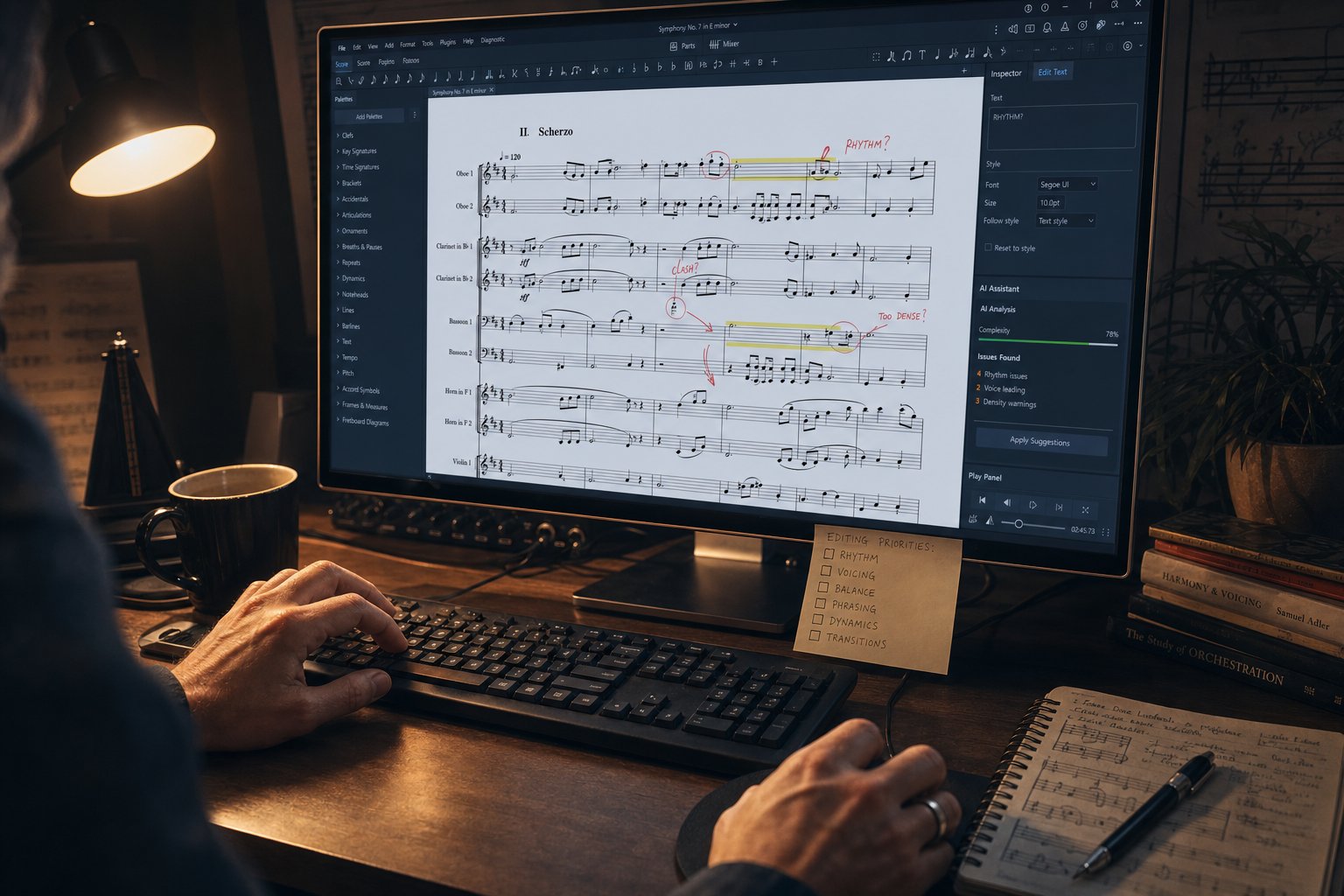
That first AI-generated score sitting on your screen is a starting point, not a destination. Every method, whether transcription, composition, or MIDI conversion, produces output that needs human refinement before it becomes something a musician can actually read and perform. This editing phase is where your score transforms from raw data into real sheet music, and skipping it is the single most common mistake new users make.
The gap between AI output and a finished score is well documented. Testing by Music Notation Hub found that correcting AI-generated notation took 2.25 times longer than transcribing from scratch on a short piano piece, largely because structural issues like broken beam groupings, collapsed voices, and incorrect meter made the cleanup more complex than simply starting fresh. That does not mean editing is always impractical. It means you need the right program to write music score edits efficiently, and you need to know what to look for.
Importing AI Output into Notation Software
Your AI tool produced a file. The next question is: which notation editor opens it cleanly and gives you the best editing environment? The answer depends on format and budget.
MusicXML is the universal interchange standard for notation data. It preserves notes, rhythms, key signatures, time signatures, clef assignments, and basic layout information across different software. When you export from an AI tool, choose MusicXML over PDF whenever the option exists. PDF locks you into a static image. MusicXML keeps everything editable. According to the MuseScore handbook, MusicXML faithfully reproduces notes and instrumentation, though some cleanup is usually necessary to make the transferred score look exactly as intended.
Here is how the major notation editors handle AI output:
| Software | Price | Imports | Best For |
|---|---|---|---|
| MuseScore | Free | MusicXML, MIDI | Budget-conscious users who want a full-featured score creator without cost |
| Sibelius | Subscription | MusicXML, MIDI | Professional engraving with advanced layout control |
| Dorico | Subscription or one-time | MusicXML, MIDI | Composers who value intelligent notation defaults and playback |
| Flat | Free tier available | MusicXML, MIDI | Browser-based score writer online for collaboration and quick edits |
| Finale | One-time purchase (legacy) | MusicXML, MIDI | Existing users with established workflows |
MuseScore deserves special mention as a free music score maker that handles both MusicXML and MIDI imports with solid fidelity. For anyone learning how to make sheet music from AI-generated raw material, it offers the lowest barrier to entry while still providing professional-grade editing tools. Its import preferences let you control whether to bring in layout settings, system breaks, and text styles from the MusicXML file, giving you flexibility in how much of the AI tool's formatting decisions you keep versus override.
MIDI output from tools like MakeBestMusic's AI MIDI Generator imports directly into MuseScore or Sibelius for notation refinement. The workflow is seamless: generate your melodic ideas or arrangements as MIDI, open the file in your notation editor, and the software interprets note values, assigns voices, and renders a readable score. From there, you shape it into polished notation without needing to re-enter a single note by hand.
Essential Edits AI Cannot Handle Yet
Knowing what to fix is half the battle. AI consistently struggles with the same categories of musical information, regardless of which tool generated the output. When you open your imported file, scan for these issues first:
- Incorrect rhythm notation: AI quantizes to a grid and struggles with swing, rubato, tuplets, and pickup bars. Downbeats land in wrong positions, and note values get halved or doubled.
- Voice assignment errors: Polyphonic passages often collapse into a single voice. Piano scores with separate melody and accompaniment lines get merged into one unreadable layer, requiring manual voice separation.
- Enharmonic spelling mistakes: D-sharp where it should be E-flat, creating contradictions within the key signature. AI lacks harmonic context awareness, so it picks whichever accidental the algorithm resolves first.
- Missing dynamics and articulations: Current AI tools output notes and durations only. Markings like piano, forte, crescendo, staccato dots, slurs, and pedal indications are almost never generated and must be added manually.
- Incorrect beam groupings: Beaming that does not follow the meter, making rhythmic patterns visually unclear and harder to sight-read.
- Tied notes spanning incorrect durations: Ties that cross barlines incorrectly or connect notes that should be separate, creating confusing rhythmic ambiguity.
- Missing or wrong clef assignments: Vocal parts written in alto clef, bass lines in treble clef, or instruments assigned to the wrong register entirely.
- No expression or tempo markings: Ritardando, a tempo, fermatas, rehearsal marks, and breath marks are absent from AI output and require a musically informed human to place correctly.
A practical editing session follows a consistent sequence. Start by verifying the key signature and time signature, since errors here cascade through the entire score. Next, check that pickup bars (anacrusis) are notated correctly, as AI frequently mishandles these and throws off the meter from the first measure onward. Then review voice assignments in any polyphonic passages, separating merged lines into distinct voices with proper stem directions. Clean up ties and rests so that rhythmic groupings follow standard conventions for the meter. Finally, add performance markings: dynamics, articulations, tempo indications, and expression text.
This is genuinely how to write sheet music in the AI era. The tool handles pitch extraction and basic rhythmic structure. You handle everything that makes the notation musically intelligent: phrasing, expression, readability, and performance logic. The division of labor is not a flaw in the technology. It reflects the reality that musical intent cannot yet be inferred from audio or generated from prompts alone.
With your score cleaned up and musically complete, the final decision is how to get it out of your notation editor and into the hands of the people who need it, and the format you choose determines what they can do with it.
Step 6: Export in the Right Format for Your Needs
Your score is polished, dynamics are in place, and every note reads clearly. The temptation is to hit "export" and move on. But the format you choose in that moment determines what anyone can do with your score afterward. Export as the wrong type and you lock yourself, or your collaborators, out of future edits, transpositions, or arrangements. This is the step where a small decision carries long-term consequences.
Think of it this way: a format is not just a file extension. It defines the relationship between your score and whoever opens it next.
Choosing Between PDF, MusicXML, and MIDI Exports
PDF is the final-form format. It preserves your score exactly as it appears on screen, with all layout, spacing, fonts, and symbols locked in place. Every device renders it identically, and every printer produces the same page. PDF files are a reliable way to share and view sheet music because they keep symbols, fonts, and page formatting perfectly intact. The tradeoff is zero editability. You cannot transpose, rearrange, extract a single part, or fix a wrong note without going back to your source file. Use PDF when the score is truly finished and the recipient only needs to read or print it.
MusicXML is the opposite philosophy. It stores structured musical data, not a visual snapshot, meaning any notation software can open it, edit it, transpose it, or reformat it for a different page size. As the universal interchange format, MusicXML preserves notes, rhythms, lyrics, and key signatures across programs like MuseScore, Sibelius, Dorico, and GuitarPro. The layout may shift slightly between programs, but the musical content stays intact. Choose MusicXML whenever someone downstream might need to modify the score, whether that is transposing for a different instrument, extracting individual parts from a full score, or continuing to arrange.
MIDI stores performance data rather than notation. It captures which notes were played, when they started, how long they lasted, and at what velocity, but it contains no information about visual presentation: no clef assignments, no beam groupings, no dynamics markings. MIDI is ideal for playback, further production work in a DAW, or as a music notes converter between composition tools and notation editors. However, it should never be your only export. A MIDI file alone cannot produce a print-ready score without being re-imported and re-interpreted by notation software, reintroducing potential quantization and voice assignment issues you already fixed.
Guitar tablature is an alternative notation format that some AI transcription tools generate directly alongside or instead of standard notation. Tools like Klangio's Guitar2Tabs produce tab output natively. Tab tells guitarists which fret and string to play rather than which abstract pitch to produce, making it more accessible for players who do not read standard notation. The limitation is that tab does not encode rhythm as clearly as standard notation and is instrument-specific, so it cannot be repurposed for other instruments.
Here is how the formats compare side by side:
| Format | Editable | Best For | Limitations |
|---|---|---|---|
| No | Sharing finished scores with performers; printing for rehearsal | Cannot transpose, rearrange, or correct errors without the source file | |
| MusicXML | Yes | Transferring between notation programs; ongoing editing and arranging | Layout may shift between programs; requires notation software to open |
| MIDI | Yes (data only) | Playback; DAW production; importing into notation software | No visual formatting; requires re-interpretation for printable notation |
| Guitar Tab | Varies | Guitarists who read tab; quick fretboard reference | Instrument-specific; weaker rhythmic clarity; not universal |
A critical detail many users miss: some AI tools output only MIDI. If you used a composition tool that exports MIDI exclusively, you still need an additional conversion step in MuseScore or Sibelius to get a printable, readable score. That extra step means re-quantizing, assigning voices, and formatting, so factor it into your timeline. Exporting MusicXML from your notation editor after that cleanup gives you maximum flexibility for future use.
Sharing and Distributing Your Finished Score
Format choice becomes practical the moment you need to get your score to other people. Consider these real scenarios:
- Emailing parts to band members: Export individual instrument parts as PDF for immediate printing, but also save the full score as MusicXML so the bandleader or arranger can make changes later without starting over.
- Uploading to score-sharing platforms: Sites like MuseScore.com accept both MusicXML and native MuseScore files, giving other users playback and transposition features. PDF uploads display correctly but lock out those interactive tools.
- Printing for rehearsal: PDF is the clear choice here. It prints consistently regardless of what software or printer the recipient uses.
- Collaborating with an arranger or orchestrator: Always send MusicXML. They need editable data to create your own music score variations, add harmonies, or redistribute parts across new instruments.
- Sending to a producer for further DAW work: Export MIDI alongside your notation file. The producer can drop the MIDI directly into their session for sound design or production without manually re-entering notes.
The smartest habit is to export in multiple formats simultaneously. Save a MusicXML master file that preserves full editability, a PDF for anyone who just needs to read or print, and a MIDI if there is any chance the material will re-enter a production workflow. Storage is cheap. Losing the ability to transpose or rearrange a score you spent hours refining is not.
For anyone looking to make your own sheet music online free and share it widely, MuseScore handles all three exports at no cost. You can write your own sheet music from AI-generated raw material, polish it in the editor, and then distribute it in whatever combination of formats your collaborators need. The workflow from AI output to shared, usable notation is complete once you have the right exports saved.
Even with perfect exports, though, problems surface. Performers report wrong notes, rhythms feel off during rehearsal, or the AI output sounded fine in playback but falls apart under human interpretation. Knowing how to diagnose and fix these common issues quickly is what separates a functional workflow from a frustrating one.
Step 7: Troubleshoot Common AI Sheet Music Problems
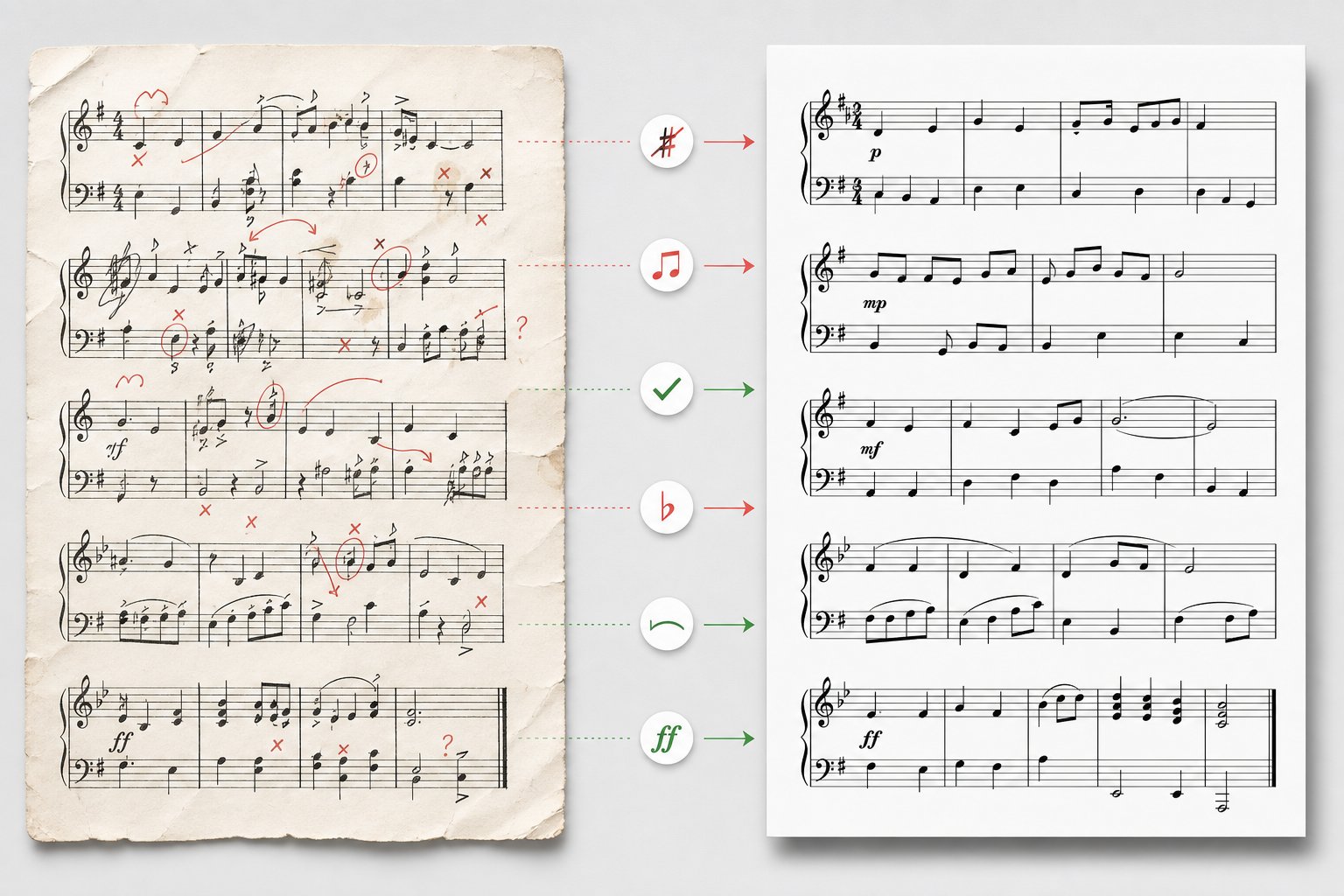
Performers squinting at a measure that does not match what they hear, rhythms that look right on screen but feel wrong under the fingers, entire passages where the AI clearly guessed rather than understood. These problems are not rare edge cases. They are the everyday reality of working with AI-generated notation, and diagnosing them quickly keeps your workflow from stalling.
The good news: most AI sheet music errors fall into predictable categories with known solutions. Once you recognize the pattern, fixing it becomes routine rather than frustrating.
Fixing Rhythm and Pitch Errors in AI Transcription
Rhythm errors are the most common and most disruptive issue in AI transcription. A score with wrong pitches is annoying. A score with wrong rhythms is unplayable. Research from Music Notation Hub confirms that even when AI achieves up to 96 percent pitch accuracy on clean solo piano, the rhythmic notation frequently remains unusable, with quantized grids failing to capture swing, rubato, tuplets, and pickup bars.
Use this troubleshooting checklist organized by problem type:
- Inaccurate rhythms from rubato or tempo changes: AI quantizes everything to a rigid grid. If your recording has expressive timing, pre-process the audio through a tempo detection tool or, when possible, re-record with a click track. A steady pulse gives the algorithm consistent reference points for beat placement.
- Wrong notes in dense chordal passages: When multiple notes overlap, pitch detection accuracy drops sharply. Isolating the instrument using stem separation before transcription gives the model a cleaner signal. Alternatively, use instrument-specific tools like Piano2Notes rather than a general-purpose transcriber. AI piano transcription on isolated tracks consistently outperforms transcription from full mixes.
- Displaced downbeats and wrong meter: AI frequently mishandles pickup bars (anacrusis), throwing off the entire metric structure from measure one. Solution: manually set the correct time signature and pickup length in your AI tool's settings before running the transcription, or fix the first bar in your notation editor and let the rest realign.
- Halved or doubled note values: The AI sometimes interprets tempo ambiguously, writing quarter notes as eighths or vice versa. If the entire score feels "twice as fast" or "half as slow" as expected, the tool likely misjudged the tempo. Retranscribe with the correct BPM specified, or scale note values globally in your notation editor.
- Ghost notes and false triggers: Reverb tails, string resonance, and pedal sustain can register as additional note onsets. Trim reverb from your recording and reduce sustained pedal passages before uploading.
A practical tip that saves significant time: run the same audio through two different tools and compare their outputs side by side. One tool might nail the rhythm but miss chord tones, while another captures harmony accurately but writes awkward rhythmic groupings. Combining the strengths of each gives you a more accurate composite result than trusting either alone.
For transposition issues, be aware that many AI tools default to concert pitch output regardless of the instrument. If you used a tool to ai transcribe piano from a recording of a B-flat trumpet or E-flat alto sax, the notation will appear in concert pitch rather than the transposed key the performer expects. Can ai transpose sheet music? Most notation editors handle this instantly. MuseScore, Sibelius, and Dorico all offer one-click transposition between concert and written pitch, functioning as an effective ai sheet music transposer. The issue is not that transposition is difficult, but that users do not realize it happened and hand performers notation in the wrong key.
If you need an ai music transposer for bulk operations, transposing multiple parts simultaneously, most notation software handles this natively through the Edit or Tools menu. Select all parts for transposing instruments, apply the correct interval, and the software adjusts key signatures and accidentals automatically.
What AI Still Cannot Do Well in Sheet Music Creation
Is there ai that can transcribe music perfectly? Not yet. Can ai transcribe music reliably enough to be useful? Absolutely, within known boundaries. Understanding where those boundaries sit prevents wasted effort on tasks the technology handles poorly.
What AI handles well:
- Pop and singer-songwriter material with predictable structures and clear recordings
- Classical solo piano with steady tempo and clean audio
- Simple melodic transcription from isolated instruments
- Drum pattern transcription from reasonably clean recordings
- MIDI-based composition in common time signatures and tonal harmony
What AI still struggles with:
- Jazz improvisation: Swing feel, complex altered chords, and spontaneous phrasing confuse both transcription and composition models. A 2025 study in the EURASIP Journal found that genre shifts alone can reduce transcription accuracy by 20 percentage points.
- Complex orchestral scores: Multiple overlapping timbres, wide dynamic ranges, and intricate voice leading remain beyond reliable automated transcription. Accuracy on dense polyphonic mixes drops to around 38 percent for pitch detection alone.
- Microtonal and extended-technique music: Quarter tones, prepared piano sounds, and non-standard playing techniques have no representation in standard MIDI or in the training data most models learn from.
- Expression and dynamics: No current tool reliably infers performance directions from audio. Dynamics, articulations, pedal markings, and tempo indications must be added entirely by hand.
- AI composition musicality: Generated output often sounds structurally correct but emotionally flat. The solution is treating AI composition as a sketch generator rather than a finished product. Add human creativity in the editing phase: reshape phrases, introduce unexpected harmonic turns, vary dynamics, and break the mechanical regularity that AI defaults to.
The pattern across all these limitations is consistent. AI excels at mechanical extraction, identifying pitches, placing notes on a grid, and generating syntactically correct musical structures. It falls short on everything that requires musical understanding: interpretation, expression, context-aware notation choices, and the subtle decisions that make sheet music not just accurate but readable and performable. Knowing this boundary lets you leverage AI for what it does well and apply your own musicianship where the technology cannot yet reach.
