

AI and Sheet Music Explained
Can AI play sheet music? The short answer is yes — but what "play" actually means here is more layered than most people expect. AI does not interact with sheet music in a single way. It spans a spectrum of technologies, each solving a different musical problem. Some systems scan printed notation and produce instant audio playback. Others interpret dynamics and phrasing to generate expressive, human-like performances. A few can accompany a live musician in real time, adjusting tempo on the fly. And an entirely separate category works in reverse — listening to audio recordings and writing the notation down for you.
Understanding which type of AI you actually need is the first step toward getting useful results. A student learning how to read sheet music basics might want a sheet music player that turns a PDF into sound so they can hear what a piece is supposed to sound like before practicing. A composer sitting on a stack of handwritten manuscripts needs something different — a music reader that digitizes notation into an editable format. A producer sampling classical themes for a beat wants MIDI data they can manipulate in a DAW. Same general concept, completely different tools.
What Does It Mean for AI to Play Sheet Music
When you ask whether AI can play sheet music, you are really asking about one of several distinct capabilities. Reading sheet music — the way a human musician does, interpreting symbols on a page and translating them into sound — is not one skill but many. AI breaks this down into modular steps: recognizing visual symbols, understanding their musical meaning, and rendering that meaning as audible output. Each step uses different technology, and the quality of the final result depends on how well each stage performs.
The simplest version is pure playback. AI identifies the notes on a page and triggers them through a synthesizer, producing sound that is technically correct but musically flat. The more advanced version layers in expression — the subtle timing variations, dynamic shaping, and articulation choices that make music feel alive rather than mechanical. These are fundamentally different achievements, and the gap between them is where much of the current research lives.
The Different Ways AI Interacts With Notation
If you have ever wondered how to read music notes faster or wished someone could just play that unfamiliar score aloud for you, AI now offers multiple paths depending on your starting point and goal. Here are the four main categories of AI-sheet-music interaction:
- Scanning for playback — AI uses Optical Music Recognition (OMR) to read sheet music from an image or PDF, converting visual notation into digital data that a synthesizer can play back as audio.
- Expressive performance generation — Advanced models trained on recordings of human musicians interpret a score with dynamics, rubato, and articulation, producing playback that sounds like a real performer rather than a robotic sequence.
- Real-time accompaniment — AI systems that listen to a live musician and follow along, adjusting tempo and dynamics to stay synchronized, essentially acting as an intelligent practice partner or ensemble member.
- Audio-to-notation transcription — Working in the opposite direction, these tools listen to a recording and attempt to write out the notes as sheet music or MIDI, bridging the gap between ear-learned music and written scores.
Each category relies on different underlying AI architectures, produces different output formats, and serves different musical needs. A tool built for scanning printed scores will not help you transcribe a guitar solo from a recording, and a real-time accompaniment system solves an entirely different problem than a batch notation converter. The technology you choose depends on which direction you need information to flow — from page to sound, from sound to page, or somewhere in between.
That raises a natural question: how does the first and most common category — scanning notation and producing playback — actually work under the hood?
The Technology Behind AI Reading Music
The foundation of every AI music scanner capable of turning printed notation into playable digital data is a technology called Optical Music Recognition, or OMR. Think of it as OCR (Optical Character Recognition) for music — but significantly harder. Where OCR reads letters arranged in linear sequences, OMR must decode a two-dimensional system where the vertical position of a symbol on the staff determines its pitch, and its shape determines its duration. A dot next to a note means something completely different from a dot above it. Context is everything.
How Optical Music Recognition Works
Imagine pointing your phone at a page of sheet music and asking, "what note is this?" For a human, answering requires understanding music clefs, key signatures, and rhythmic context all at once. An OMR system tackles the same challenge through a structured pipeline. Here is how the process breaks down:
- Image preprocessing — The scanned image is cleaned up through binarization, noise removal, and skew correction to produce a clear black-and-white representation of the score.
- Staff line detection — The system identifies the five-line staves that form the grid of the notation system. This step establishes the spatial framework for everything that follows.
- Symbol segmentation — Individual musical elements — noteheads, stems, beams, rests, accidentals, and other markings — are isolated from one another and from the staff lines.
- Note classification — Each segmented symbol is identified. The system acts as a note recognizer, determining whether a shape is a quarter note, a half note, a sharp, a dynamic marking, or something else entirely.
- Musical context reconstruction — Recognized symbols are reassembled into a coherent musical structure, respecting relationships like which notes belong to which voice, how beamed groups define rhythmic patterns, and how music clefs assign pitch meaning to staff positions.
This last step is where note recognition in sheet music gets genuinely difficult. A black dot on a page means nothing in isolation — its meaning depends entirely on where it sits relative to staff lines, what clef is active, and what key signature is in effect. As OMR researcher Alexander Pacha explains, music notation is a featural writing system: only the configuration of symbols relative to each other gives them meaning.
OMR vs General-Purpose AI Vision Models
Early OMR systems relied on hand-coded rules — rigid pattern matching that broke down whenever notation deviated from expected layouts. Modern systems have moved to deep learning, using convolutional neural networks (CNNs) trained on large datasets of annotated scores. These models learn to recognize musical symbols the way image classifiers learn to identify objects in photos, but with the added challenge of understanding spatial relationships between elements.
Dedicated OMR tools like ScanScore use specialized models fine-tuned specifically for this note finder task. They are built from the ground up to handle the quirks of music notation — beamed groups, ties, slurs, multi-voice staves, and complex rhythmic patterns. The results are generally reliable for cleanly printed scores.
General-purpose multimodal LLMs like GPT-4o take a different approach, attempting to interpret sheet music using broad visual reasoning rather than specialized training. Research from the MusiXQA benchmark reveals that these models struggle significantly with OMR tasks, often performing near random levels on note pitch and duration recognition. Even with retrieval-augmented prompting, GPT-4o learned to mimic answer formatting without truly recognizing musical symbols. A fine-tuned model (Phi-3-MusiX) trained specifically on music sheet data achieved up to eight times the accuracy of GPT-4o on OMR tasks — a clear signal that specialized training still matters enormously for reliable note recognition in sheet music.
The takeaway: dedicated music scanners built on purpose-trained neural networks consistently outperform general AI models that treat sheet music as just another image to describe. For anyone who needs dependable results, specialized OMR remains the stronger choice.
The Complete Scan-to-Sound Workflow
Knowing how OMR identifies symbols on a page is one thing. Understanding what happens next — from recognized notation all the way to audible sound coming out of your speakers — is where the practical value lives. The entire pipeline from paper score to playback involves several distinct stages, and each one affects what you can do with the result downstream.
From Paper Score to Digital Playback
Picture this: you have a printed piano score sitting on your music stand, or maybe a PDF saved on your tablet. Here is what happens when AI turns that into something you can hear:
- Scanning or importing — You either photograph the printed page with a phone camera or import a PDF directly into the app. Tools like PlayScore 2 let you capture multiple pages sequentially, building a complete score from individual shots.
- OMR processing — The system runs its recognition engine over the image, identifying every notehead, rest, accidental, dynamic marking, and piece of key notation on each staff.
- Conversion to a machine-readable format — Recognized symbols get translated into a structured digital format. The two most common outputs are MIDI and MusicXML. This is the sheet music to MIDI (or pdf to musicxml) conversion step, and it determines how much musical detail survives the transition.
- Playback rendering — The digital file loads into a playback engine, which assigns synthesized sounds to each part and plays the result back in real time.
Sounds straightforward, but the choice of export format at step three has major consequences. MusicXML preserves rich notation details — dynamics, articulations, lyrics, key notation markings, and layout information — making it ideal for importing into notation software like Finale, Sibelius, or MuseScore for further editing. MIDI, on the other hand, is leaner and more universally compatible with production tools.
MIDI is not audio. It contains no sound of its own. A MIDI file is a set of instructions telling a device which notes to play, when to play them, how hard to strike them, and how long to hold them. The actual sound you hear depends entirely on whatever instrument or synthesizer interprets those instructions.
This distinction matters because MIDI gives you complete editing freedom — you can reassign instruments, shift octaves, quantize timing, or load the file into an online midi player — but it loses notational nuance like slur markings and explicit dynamic text. MusicXML keeps that information intact at the cost of being less universally portable across production environments.
Editing and Practice Features After Scanning
The real payoff of this pipeline is not just hearing the score — it is what you can do with the digital data afterward. Once AI has processed notation into an editable format, a range of practice and arrangement tools become available.
Soundslice handles this particularly well. You upload a MusicXML or MIDI file, sync it with audio or video, and get a fully interactive score that scrolls in real time. Students can slow playback down, loop difficult passages, and isolate individual parts from a multi-instrument score — all without touching the original file. For ensemble teachers running remote rehearsal prep or flipped learning environments, this kind of flexibility changes how students engage with repertoire.
Beyond playback, the digitized score opens up practical manipulation tools that would be tedious or impossible with paper. You can change tempo of a midi sample to drill a tricky passage at half speed, then gradually bring it back up. Need to accommodate a transposing instrument? A pdf sheet music key transposer feature lets you shift the entire piece up or down without manually rewriting every note. Part isolation lets you mute the accompaniment and play along with just the melody, or vice versa.
These features collectively turn a static page of notation into a flexible practice environment. The sheet music itself has not changed — what changed is that AI gave you a digital representation you can bend, stretch, and reshape to fit your learning or production needs. The question that naturally follows is whether this pipeline works in reverse: can AI listen to a recording and write the score for you?
AI That Listens and Writes the Score
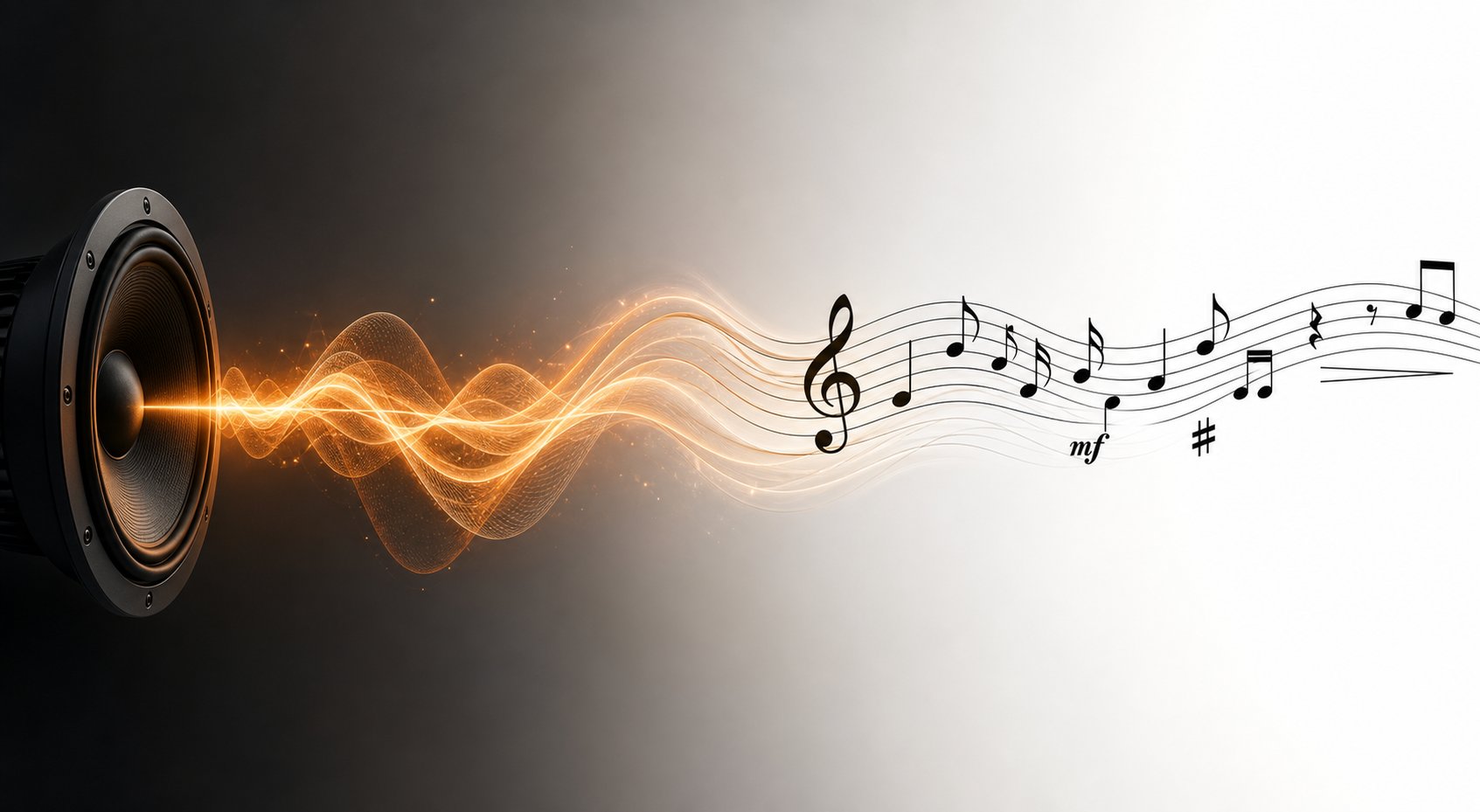
It can. The technology that converts audio recordings into written notation or MIDI is called Automatic Music Transcription (AMT), and it flips the entire scan-to-sound workflow on its head. Instead of reading visual symbols and producing audio, AMT listens to sound and produces the symbols. For musicians who learn by ear, want to archive live performances, or need to transcribe music from a recording they love, this is the bridge between what they hear and what they can study on paper.
How AI Transcribes Audio Into Sheet Music
Imagine humming a melody into your phone and getting sheet music back. That is the simplest version of audio to sheet music conversion. Under the hood, the process relies on three core analysis steps:
- Pitch detection — The system identifies which frequencies are present in the audio signal at any given moment, mapping them to specific musical pitches. For a single instrument playing one note at a time, this is relatively straightforward. A melody scanner ai tool handling monophonic input can achieve high accuracy because there is only one fundamental frequency to track.
- Onset detection — The AI determines exactly when each note begins. It looks for transient energy spikes — the percussive attack of a piano hammer, the bow change of a violin, or the tongue articulation of a wind instrument — to mark note boundaries.
- Rhythm quantization — Raw timing data from onset detection rarely aligns perfectly with standard note values. The system snaps detected onsets and durations to the nearest musically meaningful subdivision — eighth notes, sixteenths, triplets — based on an inferred tempo grid.
Modern AMT systems, particularly those built on sequence-to-sequence deep learning architectures like MT3 and its variants, handle all three steps simultaneously. Rather than processing each stage independently, these models take a spectrogram representation of audio as input and output MIDI or symbolic notation directly — learning the entire piano to notes mapping end to end from large training datasets.
Tools like Songscription AI make this accessible to everyday musicians, offering free transcription capabilities that let you turn mp3 into midi without needing any technical expertise. You upload a recording, and the system returns editable notation or a MIDI file you can import into your DAW or notation software. For anyone creating piano arrangement from audio ai free tools like these remove what used to be hours of manual ear-training work.
Challenges of Polyphonic Transcription
Here is where things get hard. A single flute playing a melody? AI handles that well. A full piano piece with ten fingers producing overlapping notes, pedal sustain blurring boundaries, and voices moving in contrary motion? That is a fundamentally harder problem.
Polyphonic transcription requires the AI to separate multiple simultaneous pitches from a single audio stream — the equivalent of hearing a chord and writing down every individual note within it. Results from the 2025 AMT Challenge demonstrate just how steep the difficulty curve is. When transcribing solo instrument passages, the top-performing system (MIROS) achieved precision above 0.90. Scale that to three instruments playing simultaneously, and precision dropped to 0.46 — nearly cut in half. Statistical analysis confirmed this was not a fluke: increasing polyphony produced a large, consistent degradation across all tested architectures.
The core difficulties include:
- Overlapping frequency content — When two instruments share a similar pitch range or timbre, their harmonics blend in the audio signal, making separation extremely difficult.
- Instrument leakage — Models sometimes hallucinate notes from instruments that are not actually present, or assign notes to the wrong instrument in a multi-track transcription.
- Ambiguous note boundaries — Piano notes sustained by pedal, for example, have acoustically defined durations that differ from their notated durations. Tools like piano2notes must decide which interpretation to commit to.
- Data scarcity — Training datasets for multi-instrument transcription remain limited, particularly for less common instruments like viola, bassoon, and trombone.
Despite these limitations, the technology is improving steadily. Self-supervised audio foundation models and multi-decoder architectures are narrowing the gap, and for many practical use cases — solo melody scanner tasks, piano transcription, and simple ensemble arrangements — current tools deliver usable results that save significant time compared to manual transcription by ear.
Whether AI reads notation and produces sound or listens to sound and produces notation, the output shares a common trait: it tends to sound mechanical. The notes are technically correct, but the musical life is missing. That gap between accuracy and artistry is where expressive AI performance models come in.
Expressive AI Performance vs Mechanical Playback
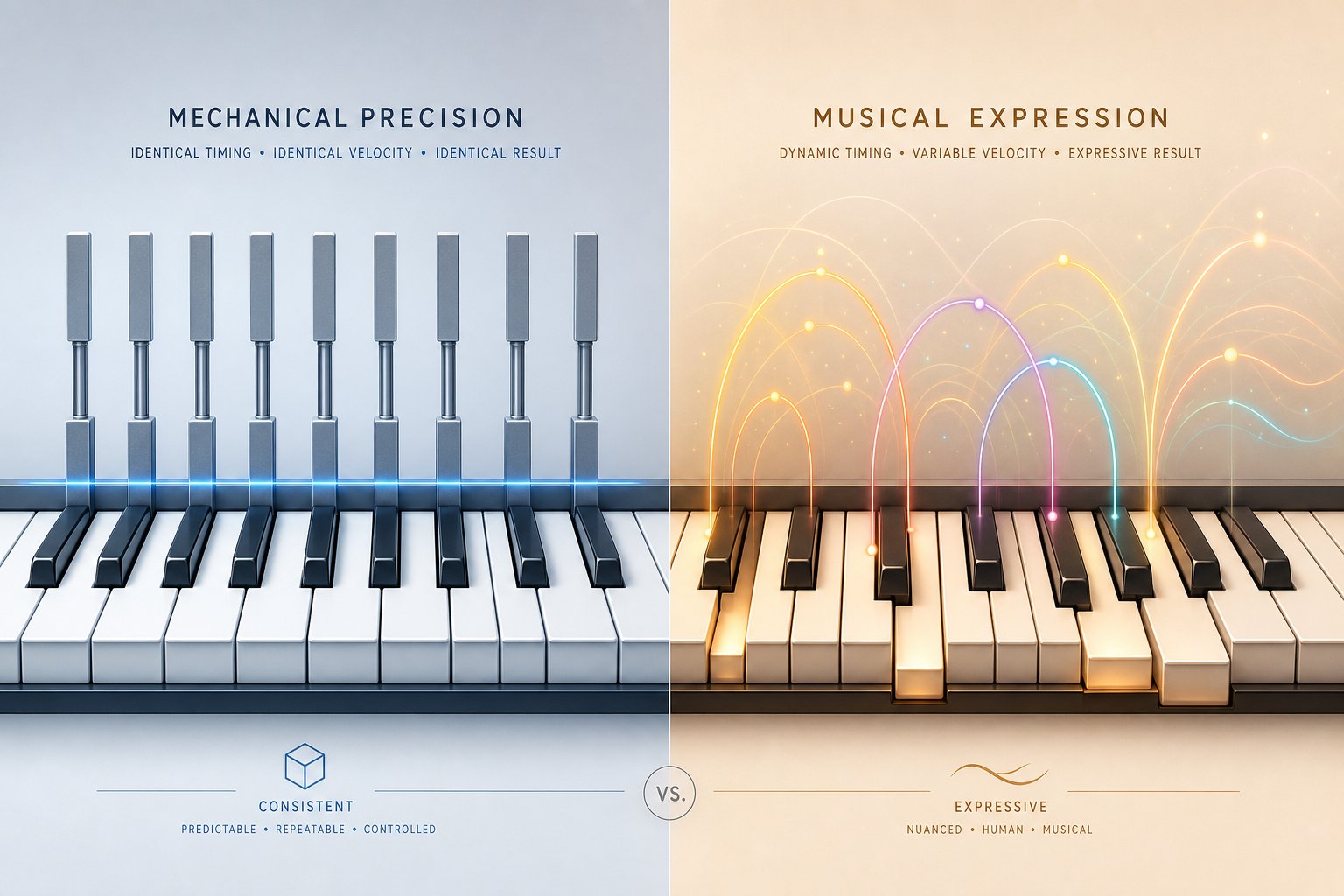
You have a beautifully scanned score. The OMR recognized every note perfectly. You hit play, and what comes out sounds like a robot reading a grocery list aloud — technically correct, emotionally vacant. Every note arrives at exactly the same volume, lasts precisely its written duration, and falls on the beat with metronomic rigidity. This is the fundamental gap between AI that reproduces notes and AI that actually performs music.
Why Basic MIDI Playback Sounds Robotic
When a piano sheet player app converts scanned notation into MIDI and triggers playback, it does something deceptively simple: it assigns a fixed velocity (volume) to every note, places each onset at its mathematically exact position on the time grid, and releases each note at precisely its notated duration. Rests and notes in music get treated as binary switches — sound on, sound off — with no shading in between.
The problem is that real musicians never play this way. A human pianist does not strike every note with identical force. They lean into a melodic peak, pull back before a phrase ending, and linger almost imperceptibly on a downbeat. Reading rhythms off a page is just the starting point — the interpretation layered on top is what transforms notation into music. When that layer is absent, even a Chopin nocturne sounds like a typing exercise.
Here is what basic MIDI playback typically lacks:
- Velocity variation — All notes at the same loudness, regardless of melodic shape or harmonic tension.
- Micro-timing deviations — No rubato, no push-and-pull against the beat, no slight anticipation of a strong beat.
- Articulation shaping — Staccato markings might shorten a note, but the nuance of how much and how sharply is lost. Legato connections between notes lack the subtle overlap a pianist creates with finger and pedal technique.
- Phrase breathing — No tiny silences between phrases, no gradual tapering at the end of a musical sentence.
- Pedaling — Either absent or applied in a blunt, uniform pattern that ignores harmonic context.
The result is electronic sheet music rendered with perfect accuracy and zero soul. Every symbol on the music staves with notes gets technically honored, yet the performance feels lifeless. This is not a limitation of the notation itself — the score contains interpretive instructions in the form of dynamics, articulation marks, and phrasing slurs. The problem is that basic playback engines treat these markings as simple parameter adjustments rather than artistic directives that require contextual judgment.
AI Models That Add Musical Expression
Newer AI performance models approach the problem differently. Instead of following a static set of rules for how loud a forte should be or how short a staccato note gets, these systems learn expressive behavior from recordings of real musicians. They are trained on datasets like MAESTRO — a collection of over 200 hours of classical piano performances with precisely aligned MIDI and audio data captured from Yamaha Disklavier pianos. Every velocity variation, every timing deviation, every pedal movement from the original human performance is preserved in the training data.
The result is an AI that learns what it sounds like when a skilled pianist interprets a crescendo, when they stretch time at the end of a phrase (rubato), or when they add weight to a melodic peak. Research published in Nature demonstrates that deep reinforcement learning models trained on this data can produce expressive dynamics through velocity modification and timing modulation, making AI-generated piano performances sound significantly more lifelike. Transformer-based architectures achieve the highest scores in rhythmic diversity and expressive phrasing among current model types, outperforming both LSTM and GAN-based approaches in listener evaluations.
These models do more than follow explicit markings. They infer expressive intent even where no marking exists — learning, for example, that a rising melodic line typically receives a subtle dynamic increase, or that repeated phrases are rarely played identically twice. This mirrors how experienced musicians internalize music notation rests and dynamic conventions without needing every nuance spelled out on the page.
There is a compelling historical parallel here. Player piano rolls from the early twentieth century captured real performances mechanically — encoding not just which notes were played, but the exact velocity and timing of each keystroke from artists like Rachmaninoff and Gershwin. Those rolls preserved expression through physical recording. Modern AI performance models achieve something conceptually similar through statistical learning, extracting expressive patterns from thousands of recorded performances and applying them to new scores.
Here is how the two approaches compare across the key dimensions of musical performance:
| Dimension | Basic MIDI Playback | Expressive AI Performance |
|---|---|---|
| Dynamics | Uniform velocity for all notes; dynamics markings applied as fixed presets | Continuously varying velocity shaped by phrase context and learned patterns from human recordings |
| Timing variation | Metronomically rigid; every note exactly on the grid | Micro-timing deviations including rubato, slight anticipations, and phrase-end ritardando |
| Articulation | Binary interpretation (staccato = short, legato = connected) with fixed ratios | Context-sensitive articulation depth varying by tempo, register, and musical phrase position |
| Phrasing | No phrase-level shaping; each note treated independently | Grouping notes into musical sentences with dynamic arcs, breath points, and directional momentum |
| Pedaling | Absent or rule-based (every bar, every beat) | Harmonically aware pedal changes learned from performance recordings |
Despite these advances, limitations remain real. Listening studies show that even the best Transformer-based models still score below human compositions in perceived expressiveness and overall musicality. Research participants consistently rated AI-generated pieces lower on emotional depth and improvisational feel compared to performances by trained musicians. The models excel at statistical plausibility — producing output that sounds like it could have been played by a human — but struggle with the kind of interpretive risk-taking and long-term narrative arc that define memorable performances.
Dynamic range also poses ongoing challenges. AI systems sometimes misinterpret artistic restraint as underperformance, or flatten the contrast between a whispered pianissimo passage and a thundering climax because the training data averages emotional intensity rather than modeling its full range. Genre sensitivity compounds the issue — a model trained primarily on classical piano data may apply rubato conventions inappropriately to a jazz standard or a minimalist piece where strict time is the expressive choice.
Still, the trajectory is clear. The gap between robotic playback and human-like expression is narrowing steadily, and for practical applications like practice playback, arrangement previews, and electronic sheet music demonstrations, current expressive models offer a listening experience that is genuinely useful rather than merely correct. The question shifts from whether AI can add expression to how reliably it does so — and that reliability depends heavily on the quality of the source material feeding the system.
Accuracy and Limitations of AI Sheet Music Scanners
Expressive playback, real-time accompaniment, audio transcription — none of it matters if the initial recognition step gets the notes wrong. And that happens more often than marketing pages want you to believe. AI sheet music scanner technology has made genuine progress, but its reliability still varies dramatically depending on what you feed it. Understanding where these tools excel and where they fall apart saves you from frustration and wasted time.
What AI Reads Accurately Today
Give a modern OMR engine a clean, well-printed score and it performs impressively. Real-world testing with tools like Audiveris shows that for clear, simple printed music with standard notation, recognition accuracy lands in the 80-90% range. That is high enough to save significant manual entry time, even though some correction is still needed afterward.
Here is where current AI recognition works best:
- Clean printed scores — Professional publications from major publishers with standard engraving practices produce the most reliable results.
- Single-instrument parts — A solo flute part or a lead sheet with one melody line is far easier to parse than a densely packed orchestral page.
- Common time signatures — 4/4, 3/4, and 6/8 are well-represented in training data. AI handles these confidently.
- Well-spaced layouts — Scores with generous margins between staves, clear separation between symbols, and consistent spacing give the recognition engine room to segment elements accurately.
- Standard symbols — Notes, rests, bar lines, clefs, key signatures, and simple accidentals are the easiest elements to recognize. These form the backbone that OMR systems are specifically trained on.
For students who scan music from a standard method book, or performers digitizing cleanly printed parts from a modern edition, the results are genuinely useful. You will still need to proofread, but the bulk of the data entry is handled for you.
Known Limitations and Failure Cases
Step outside that sweet spot, and accuracy drops fast. Research on the Sheet Music Benchmark (SMB) from 2025 demonstrates just how steep the decline can be. State-of-the-art deep learning models trained on monophonic scores achieved error rates above 57%, and quartet (multi-staff) textures pushed error rates to nearly 40% even in controlled conditions. Dense orchestral pages with multiple voices, dynamics, and articulations spread across several staves consistently confuse current systems.
The most common failure scenarios include:
- Handwritten manuscripts — This is the hardest category by far. Audiveris reports below 40% accuracy on handwritten scores, and post-editing takes longer than simply inputting the score manually from scratch.
- Complex orchestral scores — When multiple staves interact, the system sometimes misplaces notes between parts or confuses cross-staff beaming. Accuracy drops to the 60-75% range even with printed originals.
- Unusual notation symbols — Extended techniques, graphic notation, proportional spacing, and contemporary compositional markings sit outside most training datasets entirely.
- Guitar tablature mixed with standard notation — The combination of two different notational systems on the same page creates segmentation confusion that most OMR engines are not built to handle.
- Heavily annotated scores — Pencil markings, fingering numbers, practice notes, and highlight marks overlay the printed notation and get misread as musical symbols.
- Page layout elements — Titles, composer names, lyrics, chord symbols, rehearsal marks, and other non-notation text can trip up the recognition pipeline. The system may attempt to interpret text characters as musical symbols, or get confused about where the actual notation begins.
There is also a gap between what marketing materials claim and what real-world users experience. A sheet music scanner online free tool might advertise "95% accuracy" based on testing with perfectly typeset single-line melodies. Feed it scanned sheet music from a worn library copy with coffee stains and tight binding margins, and you will see very different numbers. Score complexity, print quality, and image resolution all compound to determine actual results.
Tips to Improve Your Scan Accuracy
You cannot control the OMR algorithm, but you can control what you feed it. These practical adjustments make a measurable difference in recognition quality:
- Scan at high resolution — Use 300 DPI minimum, and 400-600 DPI for scores with dense notation or small symbols. Higher resolution gives the neural network more pixels to work with during symbol segmentation. If you are shopping for recommended photo scanners, flatbed models with 600 DPI optical resolution handle sheet music well.
- Use good, even lighting — Shadows from overhead lights or uneven illumination create false edges that confuse staff line detection. When using a smartphone, position near a window with diffused natural light. If you are wondering how to scan with notes app on iPhone, the built-in document scanner handles lighting correction automatically, but starting with even illumination still produces better raw input.
- Prefer PDF over photos — A native digital PDF retains crisp vector edges and perfect alignment. A photo introduces lens distortion, perspective skew, and resolution loss. Whenever a PDF version exists, use it directly. Understanding how to scan in notes app versus importing an existing PDF can save you a recognition step entirely.
- Start with clean editions — Modern Henle, Barenreiter, or Peters editions use clear engraving with standard spacing. These produce dramatically better results than old reprints with faded ink or cramped layouts.
- Preprocess the image — Straighten skewed pages, crop unnecessary margins, and adjust contrast before running OMR. Many scanner apps do this automatically, but manual tweaking helps with difficult originals.
- Start simple — If you are new to the process, begin with a single-instrument piece in common time before attempting a full orchestral score. This lets you calibrate your expectations and learn the correction workflow on manageable material.
The honest reality is that no AI sheet music scanner delivers perfect results on every input. These tools are best understood as time-savers that handle the bulk of data entry, not as fully automated solutions. For clean printed scores, they save enormous amounts of manual work. For complex or degraded sources, they still require hands-on correction — sometimes extensive correction. Knowing which category your source material falls into before you start lets you choose the right tool and set realistic expectations for the editing time ahead.
Best AI Sheet Music Tools Compared
Realistic expectations about accuracy and limitations help you choose better — but choosing still requires knowing what is actually out there. The landscape of AI sheet music tools has expanded significantly, with options ranging from free music notation software with basic scanning to professional-grade ai music notes reader platforms that combine OMR, playback, and editing in a single workflow. The right tool depends entirely on what you need: are you scanning existing scores, generating new MIDI ideas, transcribing audio, or building an interactive practice environment?
Rather than declaring a single winner, the comparison below organizes tools by primary function and maps them against the dimensions that matter most for daily music workflows. Some tools overlap in capability, and many producers combine two or three in a single project pipeline.
Top AI Tools for Sheet Music Workflows
Here is a detailed breakdown of the leading options available, covering everything from AI-assisted MIDI generation to dedicated OMR scanners and notation-integrated platforms. Each serves a distinct role in how musicians interact with sheet music digitally.
| Tool | Primary Function | Input Type | Output Formats | Editing | Real-Time Playback | Pricing |
|---|---|---|---|---|---|---|
| MakeBestMusic AI MIDI Generator | AI-assisted MIDI composition and melody generation | User parameters, melodic prompts | MIDI | Yes (MIDI editing) | Yes | Free tier available |
| Soundslice | Notation viewer, OMR scanner, and interactive practice platform | PDF, photo scan, MusicXML, MIDI | MusicXML, MIDI | Yes (built-in editor) | Yes (synced with audio/video) | $5/month (Plus plan) |
| ScanScore Professional | Desktop OMR scanner with built-in editor | PDF, scanned images, camera via mobile app | MusicXML, MIDI, PDF | Yes (robust editor) | Yes | $79/year |
| PlayScore 2 | Mobile OMR with instant playback | Camera photo, PDF import | MusicXML, MIDI | Limited (transposition, tempo) | Yes (instant) | $6.99/month or $49.99/year |
| Newzik | Sheet music library with LiveScore OMR conversion | PDF, camera photo | MusicXML | No (export-focused) | Yes | $49.99/year or $149.99 lifetime |
| Songscription AI | Audio-to-notation transcription | Audio files (MP3, WAV) | Sheet music, MIDI | Limited | Yes | Free tier available |
| Sheet Music Scanner | Mobile OMR with fast playback | Camera photo, PDF, image files | MusicXML, MIDI | No | Yes (near-instant) | $4.99/month or $22.99/year (iOS) |
| SmartScore Pro 64 NE | Desktop OMR with comprehensive editing suite | Scanner, PDF, images | MusicXML, MIDI, PDF | Yes (extensive) | Yes | $399 (perpetual license) |
A few patterns emerge from this comparison. The machine learning-based platforms — Soundslice and Newzik — consistently produce the best out-of-the-box recognition accuracy according to independent testing by Scoring Notes. They require little configuration and handle complex notation intelligently, though processing takes longer because significant computational power runs behind the scenes. Mobile apps like PlayScore 2 and Sheet Music Scanner trade some accuracy for speed and convenience — you fire up the app, snap a photo, and hear playback within seconds. Desktop applications like ScanScore and SmartScore offer the deepest customization and editing tools, rewarding users who invest time learning the interface.
For producers and composers working in MIDI-centric workflows, MakeBestMusic's AI MIDI Generator fills a complementary role that scanning tools do not address. Where OMR tools extract notation that already exists, an AI MIDI generator creates new melodic and harmonic material from scratch. This makes it particularly useful after you have scanned and studied a score — you can feed the melodic DNA of an existing piece into an AI composition tool and explore variations, counter melodies, or entirely new arrangements inspired by the original notation.
Choosing the Right Tool for Your Needs
With this many options, how do you pick? Start by identifying your primary workflow direction:
- Paper or PDF to editable digital notation — If your goal is getting scanned sheet music into notation software as quickly and accurately as possible, Soundslice and Newzik deliver the strongest scan score results with minimal setup. Both use machine learning models that handle complex notation better than rule-based systems. For users who prefer desktop software with deep editing before export, ScanScore Professional offers a strong balance of accuracy and correction tools.
- Quick playback and practice — PlayScore 2 is the fastest piano sheet reader for immediate audio feedback. You photograph a page, and playback starts almost instantly. It is popular among choral singers and ensemble players who need to hear their part quickly without fussing with export settings. Sheet Music Scanner serves a similar niche with a clean, no-frills interface.
- Audio to notation — If your source material is a recording rather than a printed score, Songscription AI and similar transcription services handle the conversion from sound to written music. These are ideal for musicians who learn by ear and want to create lead sheets from favorite recordings.
- AI-generated MIDI for composition and production — When you do not have existing sheet music to scan but want AI-assisted melodic ideas to spark a new project, the MakeBestMusic AI MIDI Generator supports that creative phase. It works as a sheet music maker free of the constraints of pre-existing scores, generating original MIDI content you can shape in your DAW.
- Interactive learning and ensemble management — Soundslice doubles as one of the best practice platforms available. Its ability to sync notation with audio and video, combined with tempo control and part isolation, makes it a standout for educators and students alike.
Many musicians find that no single tool covers every scenario. A common setup combines a dedicated ai sheet music reader online free tool for quick scans, a desktop application for complex scores requiring heavy correction, and an AI MIDI generator for the creative composition phase. The tools are not competitors so much as collaborators in a broader digital music workflow.
One related category worth noting: platforms like play.ai are exploring real-time AI interaction in broader audio contexts, and similar real-time intelligence is beginning to appear in music tools — accompaniment systems that listen and respond, practice apps that adapt to your tempo, and composition assistants that suggest what comes next as you write. These are still emerging, but they point toward a future where the tools in the table above become increasingly interconnected rather than siloed.
Knowing which tools exist is useful. Knowing how to chain them together into a production workflow — scanning a score, extracting MIDI, then building something new from that raw material — is where the real creative leverage lives.
Putting AI Sheet Music Tools to Work
Chaining tools together is where isolated features become a genuine production advantage. A scanned score is not just something to listen to — it is editable data that feeds directly into composition, arrangement, and performance preparation workflows. Whether you are a producer mining classical libraries for sample material, a student practicing with intelligent accompaniment, or a composer developing variations on a theme, the scan-to-MIDI pipeline opens creative doors that did not exist a few years ago.
Creative Production Workflows With AI
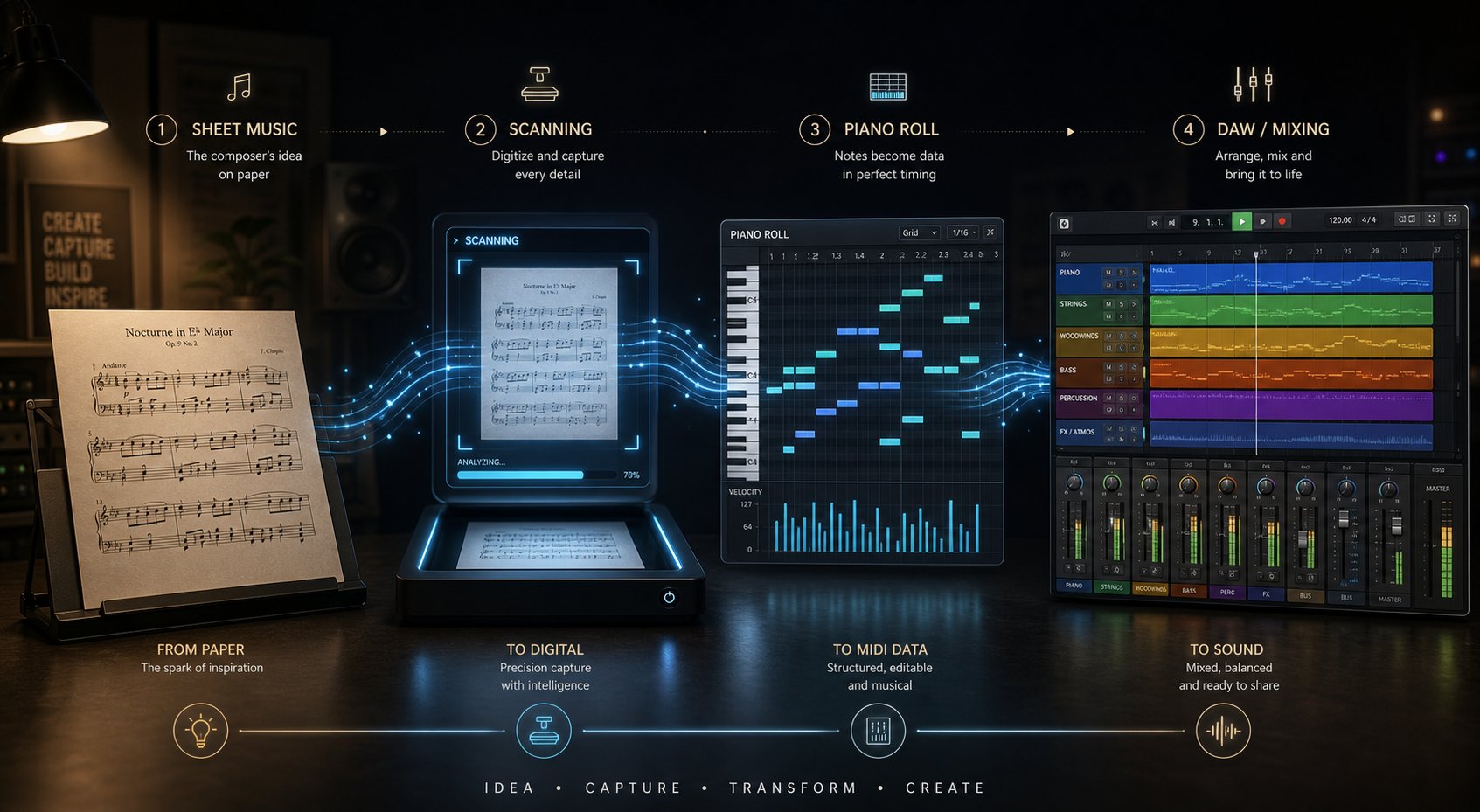
Here is a concrete example of how the full pipeline works in practice — from a printed page all the way to a finished production element:
- Scan the source material — Photograph or import a PDF of the score you want to work with. This could be a jazz lead sheet, a classical theme, or an etude you have been practicing.
- Extract MIDI through OMR — Run the image through a dedicated scanner like Soundslice or PlayScore 2. Export the recognized notation as a MIDI file. At this stage you can also transpose music into whatever key suits your project.
- Analyze and develop — Load the MIDI into a chord analyzer or DAW piano roll. Use a music chord identifier to map the harmonic progression. Identify melodic motifs worth developing. Isolate a melody line and write a counter melody against it, or use a chord identifier guitar plugin to explore how the harmony translates to a different instrument.
- Generate new ideas with AI — Feed your extracted melodic material into MakeBestMusic's AI MIDI Generator to explore variations, suggest harmonizations, or produce entirely new arrangement layers based on the patterns in your source. This is where a scanned score stops being an archive and becomes a launchpad for original work.
- Produce and refine — Route your generated MIDI through quality virtual instruments in your DAW. Layer AI-generated parts with your original extraction. Shape dynamics, mix, and master into a polished final product.
This workflow turns study notes into a song — literally converting pedagogical material or archival scores into living creative output. A Baroque invention becomes the harmonic backbone of an electronic track. A folk melody becomes the basis for a cinematic arrangement. The printed page was the starting point, not the destination.
AI accompaniment tools add another dimension for performers. Systems that read sheet music and follow a live musician in real time — adjusting tempo when you slow down, waiting when you pause — function as intelligent practice partners. Students preparing for recitals can rehearse with a responsive backing ensemble rather than a rigid metronome. Combined with a free music visualizer or ai beat visualizer showing rhythmic patterns in real time, these tools create immersive practice environments that adapt to the player rather than demanding the player adapt to them.
Where AI Sheet Music Technology Is Heading
The trajectory points toward tighter integration. Scanning, recognition, expressive playback, and AI-assisted composition are converging into unified platforms rather than remaining separate utilities. Recent testing shows that machine learning OMR on single-instrument parts already produces results requiring almost no cleanup — a threshold that seemed distant just a few years ago. Handwritten score recognition is improving through self-supervised learning on larger datasets. Real-time accompaniment systems are gaining musical sensitivity through better sequence modeling.
For producers and composers, the practical implication is straightforward. The gap between having a printed score and having usable creative material continues to shrink. Tools like MakeBestMusic's AI MIDI Generator sit at the creative end of that pipeline — taking extracted MIDI and spinning it into new melodic possibilities, arrangement ideas, and production-ready content. The scan-to-create workflow is no longer aspirational. It is a daily reality for musicians who know which tools to connect and in what order.
