

Yes You Can Create Music With AI and Here Is How
The short answer is yes. You can create music with AI right now, today, without knowing a single chord, owning an instrument, or understanding time signatures. The technology has matured to the point where describing what you want to hear is enough to produce a complete, polished track. If you can type a sentence, you can make a song.
This guide is different from the product pages and feature lists you have probably already seen. Instead of pushing a single tool, it walks you through the entire process from understanding how the technology works to publishing a finished piece of music you actually own. By the end, you will know how to make a song from scratch using nothing but your ideas and an AI platform.
The landscape of AI music generation keeps evolving rapidly. More than 68% of independent creators now report using AI-powered tools for music or sound projects. Will AI get better at helping with making music? It already has, dramatically, and the trajectory points toward even more intuitive systems in the near future. What matters right now is that the tools are accessible, capable, and ready for anyone to use.
What AI Music Creation Actually Means
Imagine typing a short description like "upbeat acoustic folk song with warm male vocals about a road trip" and receiving a fully produced track 60 seconds later. That is AI music generation in practice. Users provide text prompts, written lyrics, or style references, and AI models return complete audio featuring vocals, instruments, mixing, and mastering. The underlying systems have been trained on massive music datasets, learning patterns in harmony, rhythm, arrangement, and song structure so they can generate original compositions on demand.
This is not a gimmick or a toy producing robotic sounds. Modern platforms deliver studio-quality output across genres, from lo-fi beats and cinematic orchestral scores to pop songs with full vocal performances. The best AI generated music today is often indistinguishable from human-produced tracks to casual listeners.
Who This Guide Is For
You do not need to be a musician to benefit from these tools. This guide speaks directly to:
- Content creators who need background music for videos without licensing headaches
- Podcasters looking for original intro and outro tracks
- Game developers seeking custom soundtracks on a budget
- Hobbyists curious about turning ideas into real songs for fun
- Small business owners who want jingles or hold music without hiring a composer
- Anyone who has ever hummed a melody and wished they could hear it fully produced
AI music tools have democratized song creation so that the barrier to entry is now just describing what you want to hear.
Whether you are searching for the best AI for musicians or simply want to experiment with turning a lyric idea into a real track, the process follows the same steps. This guide covers each one in order: understanding the technology, choosing the right tool, writing effective prompts, generating your first track, editing the output, navigating copyright, and deploying your music in real projects.
The best AI for music is not necessarily the most expensive or feature-packed option. It is the one that matches your specific goals. The next step is understanding exactly how these systems work under the hood so you can choose wisely.
Step 1 Understand How AI Music Generation Works
Knowing what these tools produce is one thing. Understanding how they do it gives you a real advantage when it comes to picking the right platform and writing prompts that deliver results. The good news is you do not need a computer science degree to grasp the core concepts.
AI music models work similarly to the technology behind a chat GPT music maker. They are trained on enormous datasets of real music, breaking audio into tiny slices called tokens. A neural network then learns the patterns connecting those tokens, essentially discovering which sounds follow other sounds in jazz, pop, electronic, classical, and every genre in between. When you give the model a prompt, it predicts a sequence of tokens that match your description, then converts those tokens back into a continuous audio waveform you can listen to.
Think of it like a musician who has studied millions of songs and can improvise in any style on command. The AI does not copy existing tracks. It generates original sequences based on learned patterns in harmony, rhythm, and structure. Three distinct approaches have emerged from this foundation, and each one suits different creative goals.
Text-to-Music Generation
This is the most beginner-friendly method. You type a natural language prompt describing the genre, mood, tempo, and instrumentation you want, and the model produces a complete audio track. No musical knowledge required. A prompt like "dreamy lo-fi hip hop beat with vinyl crackle and soft piano" is enough for the system to generate a polished result. Platforms built around this approach function much like Music GPT style interfaces where conversation-like input drives the output.
Lyrics-to-Song Pipelines
Some tools go beyond instrumental output. You paste in written lyrics, select a vocal style and genre, and the AI returns a full vocal track complete with melody, harmony, and accompaniment. The system handles melodic interpolation, assigning pitch and rhythm to your words, then layers instruments underneath. This pipeline is ideal for songwriters who have lyrics but no way to record or arrange them into a finished piece, enabling basic song production from a scratch track AI handles entirely.
Style Transfer and Melody-Based Generation
A third category lets you provide a musical starting point rather than text. You can hum a melody into your phone, upload a reference track, or specify an artist-era style for the AI to emulate. Some tools even let you upload a song and the AI will make a drum beat or full arrangement around it. If you have been curious about creating piano arrangement from audio AI free tools can handle, this is the approach to explore. An ai piano music generator free of charge can take a simple melodic idea and build an entire composition around it.
Vocal-Capable vs. Instrumental-Only Tools
Not every platform produces the same type of output. Before you choose a tool, understand this key distinction:
- Vocal-capable generators produce complete songs with AI-sung lyrics, full verse-chorus structure, and mixed instrumentals. They behave like a virtual songwriter and vocalist combined.
- Instrumental-only generators create background music, beats, soundscapes, and ambient tracks without any vocal performance. They focus on mood, rhythm, and texture rather than storytelling.
- Vocal tools are best for TikTok songs, demos, and releases where a human-like singing voice is essential.
- Instrumental tools excel at podcast beds, game audio, video backgrounds, and loopable content where lyrics would distract.
- Some platforms offer both modes, letting you toggle between vocal and instrumental output from the same prompt.
Understanding these three generation methods and the vocal versus instrumental divide puts you in a much stronger position to evaluate platforms. The real question becomes which tool matches your specific use case, and that is exactly what the next step covers.
Step 2 Pick the Right AI Music Tool for Your Goals
Every platform handles prompts, vocals, and licensing differently. Picking the wrong one means wasted time regenerating tracks that do not fit your project or discovering after the fact that you cannot monetize the output. The best ai music generators share a few traits: intuitive interfaces, flexible prompting, and clear commercial terms. Beyond that, they diverge fast.
Your decision comes down to three questions. Do you need vocals or just instrumentals? How much creative control do you want over the output? And will you use the music commercially? Answering those narrows the ai music generator list considerably.
Key Features to Compare Across Platforms
This comparison of the top ai music generators covers the dimensions that matter most for beginners and working creators alike. Pricing and features shift regularly, so verify current terms on each platform before committing.
| Platform | Vocals | Prompt Flexibility | Output Quality | Commercial License | Free Tier | Ease of Use |
|---|---|---|---|---|---|---|
| MakeBestMusic | Yes | High (text, lyrics, style) | Strong | Yes (paid plans) | Yes | Very easy |
| Suno | Yes | High | Excellent | Yes (Pro and above) | Yes (50 credits/day) | Very easy |
| Udio | Yes | High (stem export) | Excellent | Yes (Standard and above) | Yes (10 credits/day) | Moderate |
| AIVA | No | Moderate (presets + custom) | Excellent for orchestral | Yes (Standard and above) | Yes (3 downloads/mo) | Easy |
| ElevenLabs Music | Yes | High | Strong | Yes (Self-Serve plans) | Yes (7 songs/day) | Easy |
| Stable Audio | No | High | Strong for instrumentals | Yes (Creator license) | Yes (non-commercial) | Easy |
A few things stand out. The suno ai music maker ecosystem leads on raw vocal quality and genre breadth, backed by roughly 2 million paid subscribers. If you are a producer who wants to pull stems into a DAW, Udio gives you that workflow. The aiva ai music generator remains unmatched for cinematic and classical scoring, with full copyright ownership on its Pro plan. And MakeBestMusic offers the fastest path from prompt to finished song for creators who want a complete track without toggling between multiple tools.
Matching Tools to Your Use Case
Rather than chasing the trendiest platform, match the tool to what you are actually building:
- Quick prompt-to-song creation: MakeBestMusic handles text prompts, lyrics, and style references in one interface, making it ideal for beginners who want results fast.
- Full vocal songs with maximum control: Suno ai song creator workflows or Udio give you the most options for tweaking structure, extending sections, and exporting stems.
- Royalty-free background music: Stable Audio and Soundraw excel at instrumental beds for videos, podcasts, and apps without vocal distractions.
- Cinematic and game scoring: AIVA delivers orchestral depth with MIDI export so you can refine compositions in a traditional DAW.
- Commercial projects with strict licensing needs: ElevenLabs Music and AIVA Pro offer the clearest legal paperwork for sync, ads, and client deliverables.
Among the top ai music generation tools 2025 introduced and the best ai music generation platforms 2025 refined, no single option dominates every scenario. The smartest approach is to start with the free tier of whatever tool matches your primary use case, generate a handful of tracks, and evaluate whether the output quality and workflow feel right before upgrading to a paid plan.
Choosing the right platform is half the equation. The other half is telling it exactly what you want, and that skill of writing effective prompts is where most beginners leave quality on the table.
Step 3 Write Prompts That Produce the Sound You Want
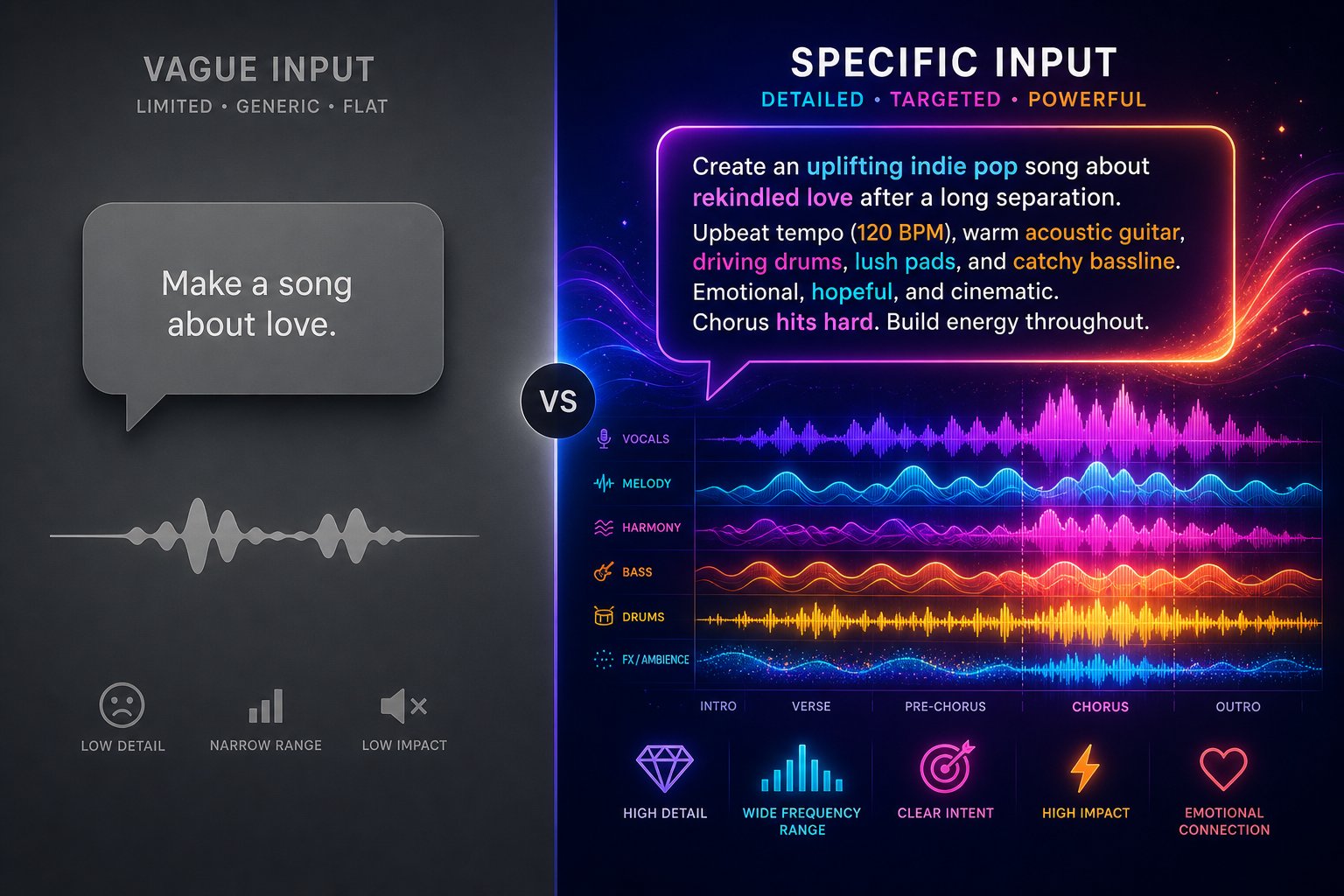
Your prompt is the only way you communicate with an AI music generator. Think of it as a creative brief handed to a session band that can play any genre on Earth. The brief does not need to be long, but it does need to be clear. Vague instructions produce generic tracks. Specific, layered prompts unlock results that sound like they were made for your exact project.
Most people type something like "make a cool beat" and wonder why the output feels flat. The difference between a forgettable clip and a track you actually want to use comes down to how you structure those few lines of text. This is where ai song writing shifts from random experimentation to a repeatable creative skill.
The Anatomy of an Effective Music Prompt
Every strong prompt shares the same building blocks. You do not need all of them every time, but knowing the full palette lets you dial in exactly the sound you are after. Here is a framework you can follow each time you sit down to generate a track:
- Start with genre and subgenre. "Electronic" is too broad. "Deep house" or "lo-fi chillhop" gives the model a clear sonic palette to draw from. Era references help too: "90s grunge" or "2010s tropical house" anchor the output in a specific sound.
- Define the emotional mood. Words like "melancholic," "triumphant," "eerie," or "laid-back" shape the harmonic and melodic choices the AI makes. Pair contrasting moods carefully: "bittersweet nostalgia" works, "angry and peaceful" confuses the model.
- Specify tempo and energy level. You can use qualitative terms like "slow and spacious" or provide an exact BPM such as "128 BPM." This controls the pace and intensity of the entire track.
- List desired instruments. "Warm Rhodes piano, dusty vinyl crackle, soft brushed drums" paints a much clearer picture than "some instruments." Naming 2-4 key instruments steers the arrangement without overloading the prompt.
- Describe vocal characteristics if needed. Specify gender, tone, and delivery style: "breathy female vocals" or "gritty male baritone with a bluesy feel." If you want an instrumental track, explicitly state "instrumental only, no vocals" to prevent the AI from adding a vocal layer.
You can also add context about how the music will be used. A prompt ending with "for a podcast intro" or "background for a meditation app" helps the model infer pacing and structure even when you do not spell those details out. If you are stuck on what to write about, a song topic generator or song idea generator can spark the initial concept before you move into prompt construction.
Prompt Examples That Produce Different Results
The gap between a lazy prompt and a crafted one is dramatic. Below are four real-world use cases showing how specificity transforms output quality:
| Use Case | Weak Prompt | Strong Prompt | Expected Output |
|---|---|---|---|
| Podcast intro | "upbeat intro music" | "Energetic funk pop instrumental, 120 BPM, punchy brass stabs, slap bass, tight drums, 15 seconds, no vocals" | Short, punchy opener with clear rhythmic identity and a natural stopping point |
| Cinematic game soundtrack | "epic game music" | "Dark cinematic orchestral underscore in D minor, 85 BPM, tense strings building to brass climax, timpani rolls, instrumental only, no major key resolution" | Suspenseful, layered score that builds tension across a one-minute arc |
| Lo-fi study beat | "chill beat" | "Lo-fi hip hop beat for studying, 82 BPM, warm piano chords, vinyl crackle, soft kick and snare, muted bass, instrumental only, seamless loop" | Loopable, mellow background beat with textured warmth and no distracting elements |
| Pop song with lyrics | "pop song about love" | "Upbeat synth-pop, 118 BPM in G major, female vocals with breathy delivery, verse-chorus-verse-bridge-chorus structure, lyrics about letting go of fear and starting fresh" | Complete vocal track with defined structure, catchy melodic hook, and cohesive lyrical theme |
Notice the pattern. The strong prompts layer genre, mood, tempo, instrumentation, structure, and exclusions without being excessively long. Each detail serves a purpose. When you are learning how to write a song lyrics section, the same principle applies: give the AI enough direction on theme, rhyme style, and emotional arc, and it will produce far more usable results. Tools that function as an ai rhyme finder can help you pre-write lyrical content before feeding it into the generator.
Common Prompt Mistakes to Avoid
Even seasoned creators fall into a few traps that produce disappointing results. Watch for these:
- Contradictory instructions. Asking for "aggressive punk rock that is also calm and soothing" gives the model no coherent direction. Pick one emotional lane or use terms like "starts soft, builds to aggressive" to create intentional contrast.
- Overloaded prompts. Listing ten genres, eight instruments, and three conflicting moods overwhelms the system. Prompt engineering research shows that simplifying to a core idea and adding detail gradually produces more coherent output than dumping everything in at once.
- Neglecting structure. If you do not specify verse-chorus form, intro length, or whether the track should loop, the AI guesses. For background music, add "seamless loop, no fade out." For songs, label sections: "verse-chorus-verse-bridge-chorus."
- Forgetting exclusions. Telling the model what to avoid is just as important as telling it what to include. "No autotune, no crowd noise, no fade in" filters out unwanted elements that might otherwise appear.
- Using command language. Best practice guides recommend writing descriptions rather than commands. Instead of "create an upbeat track," simply describe "upbeat pop track with driving bassline." The AI responds better to descriptive briefs than imperative instructions.
Prompt crafting is iterative. Your first attempt rarely nails the vision perfectly, and that is expected. Generate, listen, tweak one or two keywords, and run it again. Small changes like swapping "soft drums" for "brushed snare" can shift the entire feel of a track. Whether you are brainstorming with a song topic generator to find your theme or refining the final prompt phrasing, treat the process like a conversation where each round gets you closer to what you hear in your head.
With a solid prompt locked in, the next move is actually pressing generate and working with what comes back. That hands-on process has its own rhythm of iteration and refinement worth understanding before you dive in.
Step 4 Generate Your First Complete AI Song
You have a prompt ready. You understand what makes it effective. So how do you make a song from here? The gap between writing a prompt and holding a finished track is surprisingly short, often under two minutes. This is the hands-on part where ideas become audio.
Creating Your First Track From Scratch
If you have been wondering how do I make a song without studio experience, the answer is refreshingly simple. The entire workflow fits into a handful of clicks. Here is the exact sequence using MakeBestMusic's AI Music Generator, which handles prompts, lyrics, and style selection in a single interface:
- Open the creation page. Navigate to the generator and you will see input fields for your prompt, lyrics, and style preferences all on one screen.
- Enter your prompt or lyrics. Paste the prompt you built in Step 3, or write the song lyrics directly into the lyrics field if you want a vocal track. You can do both: provide lyrics and add a style prompt to guide the instrumentation and mood.
- Select style and settings. Choose a genre tag, vocal type, and duration. Most platforms default to around 2 minutes, which is enough to evaluate the output before committing to a full-length piece.
- Hit generate. The AI processes your input and returns a complete track. Expect a wait of roughly 30 to 120 seconds depending on the platform and server load.
- Listen and evaluate. Play the result from start to finish. Pay attention to whether the mood, energy, and vocal tone match your vision. Note specific moments that work and ones that feel off.
That is the entire process for how to make your own song. No DAW, no plugins, no recording equipment. You describe, the AI delivers. Most beginners are surprised at how close the first output gets to what they imagined, especially when the prompt is specific enough.
Generating Variations and Iterating
Here is the reality: your first generation is a starting point, not the finish line. Professional results come from iteration. How can you make a song that truly fits your project? Generate multiple versions and compare them side by side.
Try these approaches to dial in the perfect result:
- Run the same prompt 3 to 5 times. Each generation produces a unique interpretation. You might love the verse melody from version two but prefer the chorus energy of version four.
- Tweak one element at a time. Swap "acoustic guitar" for "electric guitar" or change "120 BPM" to "100 BPM" and regenerate. Small adjustments reveal how sensitive the AI is to individual keywords.
- Extend a short clip into a full track. Many platforms let you take a 30-second segment you love and extend it into a complete song structure with new verses, bridges, and an outro. This keeps the vibe consistent while building out a longer piece.
- Regenerate specific sections. If the verse sounds perfect but the bridge falls flat, some tools allow you to lock the parts you like and regenerate only the weak section.
This iterative approach is how to create songs that feel intentional rather than randomly generated. Think of each version as a rough draft. You are not failing when the first output misses the mark, you are refining. Experienced creators often generate ten or more variations before settling on the one that clicks.
Whether you need a custom song for a client project or a personalized song for a special occasion, the workflow stays the same: prompt, generate, listen, adjust, repeat. The speed of AI generation means those cycles take minutes instead of days. Try generating your first track now using the prompt formula from Step 3 and MakeBestMusic's generator, then run two or three variations to hear how different choices reshape the output.
Getting a track you are happy with is a milestone, but raw AI output can almost always benefit from a bit of polish. The difference between a good result and a great one often comes down to simple edits that take just a few minutes.
Step 5 Edit and Polish Your AI-Generated Track
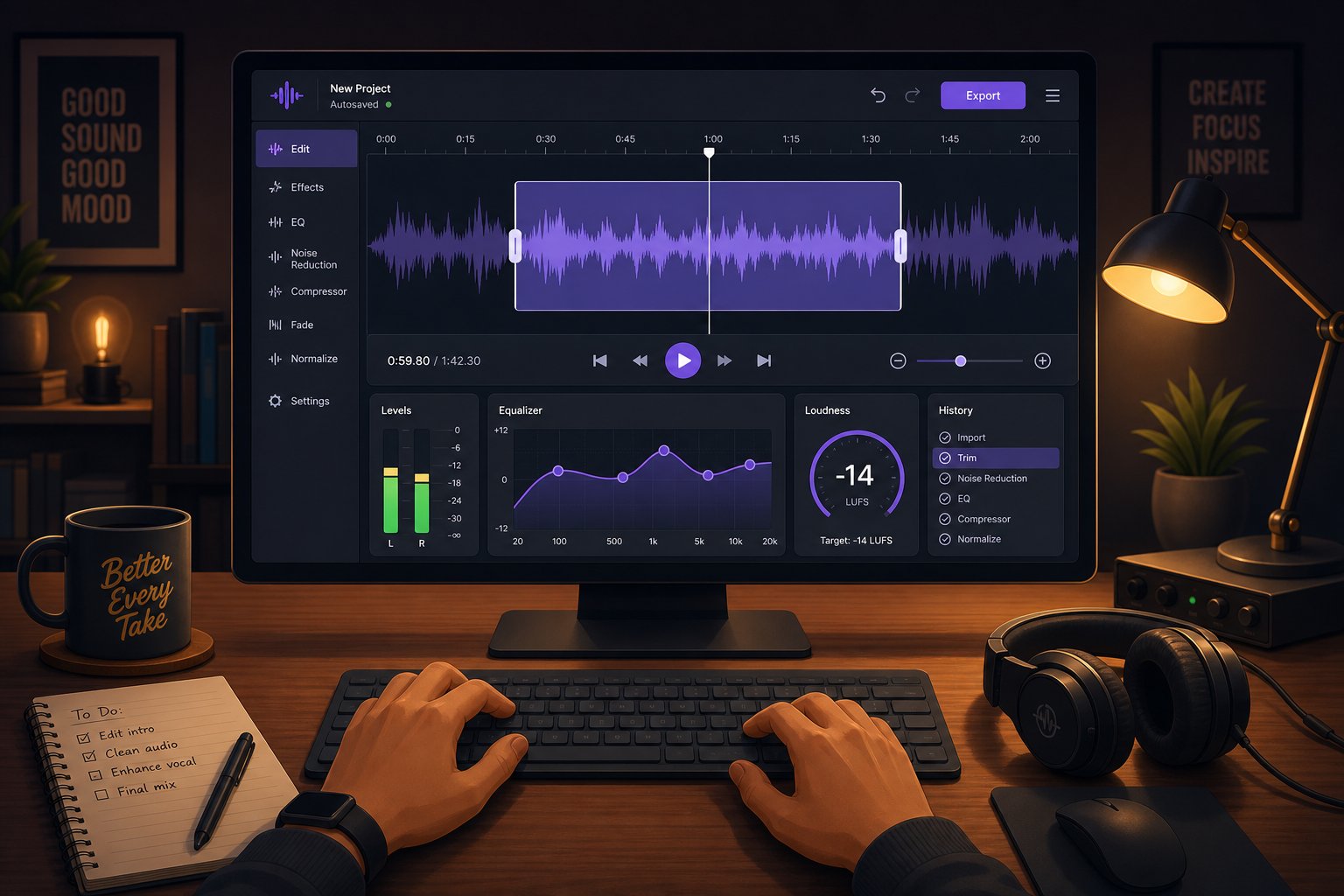
A raw AI track is like a first draft of an essay. It captures the idea, but a few minutes of cleanup can elevate it from "that sounds cool" to "that sounds professional." Most beginners skip this step entirely and publish straight from the generator. You do not need audio engineering experience to make meaningful improvements, just a free editor and a few basic moves.
Basic Editing Techniques for AI Tracks
Even the best AI output benefits from trimming. Maybe the intro lingers a beat too long, the outro fades awkwardly, or there is a brief silence in the middle that breaks momentum. These fixes take seconds in any free editor and instantly tighten the track.
Here is what to focus on first:
- Trim intros and outros. Cut dead air or overly long instrumental lead-ins so the track starts and ends cleanly.
- Apply fade-ins and fade-outs. A 1-2 second fade at either end prevents abrupt starts and harsh cutoffs when the track plays in a video or podcast.
- Adjust overall volume. Normalize the track so it sits at a consistent loudness level, especially if you plan to use it alongside other audio.
- Remove unwanted sections. If the AI generated a bridge that does not fit, cut it out. Non-destructive editors let you experiment without losing the original file.
Some AI platforms include built-in editing features that let you regenerate specific sections without leaving the tool. Suno, for instance, offers a Song Editor on paid tiers where you can rewrite a verse or swap out a chorus while keeping the rest intact. For everything else, a dedicated audio editor gives you finer control.
Enhancing Your Track With Mixing and Mastering
Mixing and mastering sound intimidating, but AI-powered tools have simplified the process to near one-click territory. Mixing balances individual elements like vocals, bass, and drums so they sit together cleanly. Mastering is the final polish applied to the stereo file, making it loud, cohesive, and ready for any playback system.
Three concepts deliver the most impact for beginners:
- EQ adjustments. Cutting muddy low frequencies or taming harsh high-end makes the track sound clearer on headphones, laptop speakers, and car stereos alike.
- Compression. This evens out the volume so quiet moments are audible and loud moments do not clip. Think of it as smoothing the dynamic peaks and valleys.
- Normalization. Bringing the overall loudness to a streaming-ready level (around -14 LUFS for Spotify) so your track does not sound quieter than everything else in a playlist.
You do not need expensive software for any of this. A handful of free and accessible tools cover the full range from basic cuts to AI-assisted mastering:
- Audacity — Free, open-source, cross-platform editor for trimming, fading, normalization, and basic effects. The best starting point for beginners.
- GarageBand — Free on macOS and iOS with built-in EQ, compression, and volume automation.
- BandLab Mastering — A free browser-based AI mastering tool that applies genre-aware processing to your finished track in seconds.
- Emastered — Upload a WAV or MP3, pick a reference style, and get back a mastered version in under a minute. Useful as a free ai music finalizer for quick projects.
- LANDR Pro — Cloud-based AI mastering plugin that integrates with major DAWs and handles batch processing for multiple tracks.
For vocal mixing AI free options exist too. BandLab and Audacity both let you adjust vocal levels, apply de-essing, and balance voice against instrumentation without spending anything. If you are layering multiple AI outputs, perhaps combining two generations into one using a song mashup maker approach, these same tools handle the splice and blend.
When to Edit and When to Ship As-Is
Not every track needs studio-grade polish. A 15-second podcast intro or a placeholder beat for a social media clip can go straight from generator to project without touching an editor. Refinement adds the most value when the track will be heard repeatedly, used commercially, or placed alongside professionally produced content where quality differences stand out.
The best ai for music production in a fully AI-assisted workflow combines a generator with a mastering tool. Generate in your platform of choice, then run the export through BandLab or Emastered for a quick final coat. That two-step process rivals what many independent producers achieve with far more complex setups. Among the best apps for music production today, AI mastering services are the fastest path from raw output to release-ready audio, and the best ai music production software options increasingly bundle generation and finishing into a single pipeline.
A polished track is only useful if you can actually publish and monetize it. The legal side of AI-generated music is where most creators have the most unanswered questions, and the answers matter more than you might expect.
Step 6 Understand Copyright and Commercial Licensing
You have a polished track you are proud of. Can you actually use it? Put it in a YouTube video? Sell it to a client? Upload it to Spotify? These questions dominate ai music reddit communities and for good reason. The legal landscape around AI-generated music is still evolving, and getting it wrong can mean lost revenue, content takedowns, or worse.
The short answer: yes, you can use AI-generated music commercially in most cases. The longer answer requires understanding what "most cases" actually means and where the boundaries sit.
Who Owns AI-Generated Music
Ownership depends on two factors: the platform you used and the jurisdiction you operate in. Copyright law in most countries still requires human authorship for a work to receive protection. A track generated purely by AI with no meaningful human input may not qualify for copyright registration at all. The U.S. Copyright Office has clarified that applicants must disclose AI involvement, and only the human-authored portions of a work receive legal protection.
What does this mean in practice? If you wrote the lyrics, shaped the prompt, selected from multiple outputs, and edited the final result, your creative contribution strengthens your ownership claim. The more human direction you provide, the clearer your rights become. Courts are leaning toward recognizing hybrid works where AI serves as the tool and the human serves as the author.
Platform terms matter just as much. Each tool handles output ownership differently:
- Free tiers often restrict commercial use or require attribution. Some explicitly state that tracks generated on free plans remain non-commercial.
- Paid tiers typically grant full commercial rights with no attribution needed. Suno's Pro plan, AIVA's Pro tier, and MakeBestMusic's paid plans all transfer commercial ownership to the user.
- Some platforms retain partial rights even on paid plans, like the ability to feature your track in their marketing or community library.
The rule of thumb: always read the terms of service before releasing anything commercially. A frequent question in ai music generator reddit threads is whether free-tier tracks can be monetized. The answer is almost always no, or only with visible credit to the platform.
Using AI Music on YouTube, Podcasts, and Social Media
Monetization eligibility is the practical concern most creators care about. Can you earn ad revenue on a YouTube video scored with AI music? Can you use a track as royalty free podcast intro music without risking a copyright strike? The answer depends entirely on the license your chosen platform grants.
The good news: major platforms like YouTube, Spotify, and Apple Music accept AI-generated content for distribution and monetization as long as you hold proper commercial rights. No platform currently bans AI music outright. The key is matching your license tier to your intended use.
| Use Case | Free Tier (Typical) | Paid Tier (Typical) | Notes |
|---|---|---|---|
| Personal projects | Allowed | Allowed | No restrictions on private or non-commercial listening |
| Social media posts | Often allowed with credit | Allowed, no credit needed | Check if platform requires attribution on free plans |
| YouTube monetization | Usually prohibited | Allowed | Content ID conflicts are rare when using legitimate licenses |
| Client work and freelance | Prohibited | Allowed | Verify that license covers sublicensing or transfer to clients |
| Streaming distribution (Spotify, Apple Music) | Prohibited | Allowed | Use a distributor like DistroKid or TuneCore; some require you own commercial rights |
| Sync licensing (ads, film, TV) | Prohibited | Varies by platform | Some platforms require higher-tier plans for broadcast sync rights |
If you need royalty free jazz music for a coffee shop video or a loopable ambient track for a meditation app, a paid-tier license from any major generator covers you. The track functions like song stock you own outright, usable across projects without recurring fees or per-use royalties. Discussions in ai generated music reddit forums confirm that creators using paid commercial licenses rarely encounter Content ID issues or platform disputes.
What You Cannot Do
Commercial rights do not mean anything goes. Several actions remain off-limits regardless of which platform or plan you use:
- Clone a specific artist's voice without permission. The NO FAKES Act provides federal protection for vocal likenesses. Generating a track that sounds like a named artist using their vocal identity can result in legal action, even if the lyrics and melody are original.
- Use copyrighted lyrics. Pasting someone else's published lyrics into an AI generator and producing a track does not give you ownership of the resulting song. The lyrical copyright belongs to the original writer regardless of the new musical arrangement.
- Release output that closely resembles existing songs. AI models occasionally produce melodies that are "substantially similar" to tracks in their training data. If your output sounds suspiciously close to a hit song, you are potentially liable for infringement, not the AI company.
- Misrepresent AI involvement. Claiming a fully AI-generated track is 100% human-created can violate platform guidelines and damage credibility. Transparency is increasingly expected, and some distribution services ask creators to confirm AI usage during upload.
- Ignore platform-specific restrictions. Some generators prohibit using output to train other AI models or reselling raw stems as sample packs. These edge cases live in the fine print.
People searching for a music ai creator without copyright restrictions reddit often hope to find a tool with zero rules. That tool does not exist. Every legitimate platform imposes some guardrails, and those guardrails protect you as much as they protect others. The safest path forward is straightforward: use a paid plan, document your creative process, avoid imitating specific artists, and read the terms before you publish.
Legal clarity frees you to focus on what matters: putting your music to work in actual projects. The final step is deploying your tracks where they create the most value.
Step 7 Use Your AI Music in Real Projects
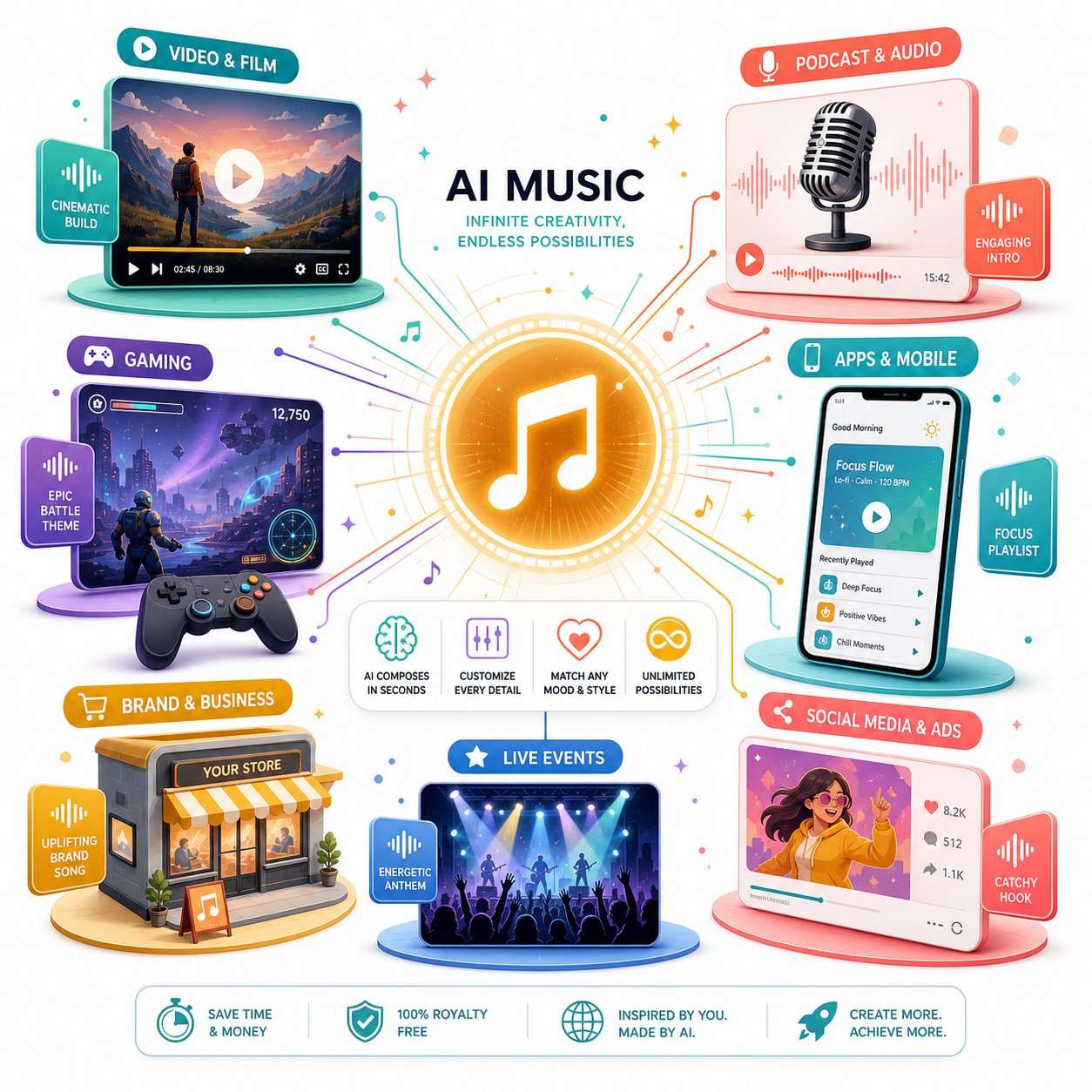
A finished, licensed track sitting in your downloads folder is not doing anything for you. The real payoff comes when that audio shows up in a video, a podcast, a game, or a commercial project where it serves a purpose. Each use case has its own workflow, format requirements, and prompt considerations worth understanding before you hit export.
AI Music for Video Content and Podcasts
Video creators and podcasters are the most common users of AI-generated music. Whether you need theme music songs that define your brand or a subtle bed that plays under narration, the workflow follows a predictable path.
How do you add music to a video once you have a track? Export your AI-generated file as a WAV or high-quality MP3, then import it into your video editor. Premiere Pro, DaVinci Resolve, CapCut, and iMovie all accept standard audio formats. From there:
- Place the track on a dedicated audio layer beneath your dialogue or voiceover.
- Set background music volume to -15 to -20 dB below spoken audio so it supports without competing.
- Use volume automation to duck music during speech and bring it forward during B-roll or transitions.
- Fade in at the start and fade out at the end to avoid jarring cuts.
For podcasts, generate separate tracks for different functions: a 10-15 second intro, a 3-5 second transition sting, and a low-volume ambient bed for storytelling segments. Keeping these as individual files gives you modular building blocks that work across every episode. Some creators pair an AI track with a free ai music video generator to produce visual content where both image and audio are AI-assisted, covering the full production pipeline without touching traditional tools.
AI Music for Games, Apps, and Commercial Projects
Games and apps need music that behaves differently from a linear song. Loopability matters. A 60-second track that transitions cleanly back to its own beginning can score an entire level without the player noticing a seam. Add "seamless loop, no fade out" to your prompt and the AI handles this surprisingly well.
Beyond gaming, AI works as a capable ai jingle maker for businesses that need short, memorable audio branding. A commercial jingle for a local radio spot, hold music for a phone system, or a sonic logo for a YouTube channel all fall within what current generators can produce in minutes.
Here are specific project types with prompt approaches that deliver strong results:
- Energetic gaming soundtracks: "Fast-paced electronic action music, 140 BPM, driving synth bass, aggressive drums, seamless loop, instrumental only."
- Calm meditation app backgrounds: "Ambient drone in C major, very slow, soft pads, no percussion, 3 minutes, seamless loop."
- Catchy commercial jingles: "Bright upbeat jingle, 110 BPM, 15 seconds, memorable melody, ukulele and hand claps, positive energy."
- Professional presentation music: "Clean corporate background, inspiring and modern, 95 BPM, soft piano and strings, subtle, instrumental only."
- Cartoon theme music: "Playful orchestral cartoon intro, bouncy tempo, xylophone and pizzicato strings, 20 seconds, fun and energetic."
Business background music for retail spaces, restaurants, and offices follows the same generation process. The key difference is duration. Generate longer tracks at 3-5 minutes or loop shorter ones, then export a playlist that covers an entire shift without repeating noticeably.
An ai music video project combines generated audio with visual content for social media, ads, or promotional material. The workflow is straightforward: generate the track first, then build or edit visuals to match the rhythm and mood of the audio. Cutting on the beat creates a polished, intentional feel even with simple footage.
When AI Music Is Not the Right Choice
AI handles a remarkable range of scenarios, but honesty matters: it is not always the best option. There are situations where hiring a human musician or licensing premium stock music serves the project better.
Consider going human when:
- You need a specific live performance feel. The subtle imperfections of a real guitarist or the breath dynamics of a live vocalist carry emotional weight that AI still struggles to replicate convincingly in acoustic genres.
- Complex orchestral arrangements require precise control. While tools like AIVA handle cinematic scoring well, a 40-piece orchestral arrangement for a film trailer still benefits from a human composer who can iterate in real time with a director.
- Brand sound must match an existing identity. If your company already has established musical branding created by a composer, maintaining continuity is easier by working with that same person rather than reverse-engineering the style through prompts.
- Copyright protection is critical. As Christopher Penn noted when commissioning his YouTube theme song, human-made works receive clear copyright protection in the United States. If you need to enforce ownership against copycats with no legal ambiguity, a work-for-hire from a human composer gives you that certainty.
- The project has a large budget and high creative stakes. Feature films, major ad campaigns, and album releases still benefit from the nuance, iteration, and emotional intelligence that a skilled human brings to the table.
For everything else, from social content and podcasts to indie games and small business audio, AI delivers professional results at a fraction of the cost and timeline. The technology is not replacing musicians. It is filling the enormous gap between "I need music" and "I can afford to hire a composer," giving everyone access to original, usable audio for the projects that matter to them.
