

Yes You Can Publish AI Music on Spotify But There Are Rules
Can you upload AI music to Spotify? The short answer is yes. Spotify does not ban AI-generated content outright. But there are conditions attached, and missing them can get your tracks removed or your distributor account flagged. The platform treats AI as a tool, much like a synthesizer or Auto-Tune, while drawing firm lines around spam, impersonation, and deception.
The Short Answer to Publishing AI Music on Spotify
AI music on Spotify is allowed when it meets specific criteria. You need meaningful human creative involvement in the track, honest disclosure about how AI was used, and content that does not clone another artist's voice without permission. Spotify's position is clear: artists have the freedom to incorporate AI into their creative process, but the platform will aggressively protect against misuse.
We envision a future where artists and producers are in control of how or if they incorporate AI into their creative processes. We leave those creative decisions to artists themselves while continuing our work to protect them against spam, impersonation, and deception.
That statement, from Spotify's official newsroom, frames the entire policy landscape. The platform is not anti-AI. It is anti-abuse.
Why Spotify's AI Policy Matters for Independent Creators
If you are an independent creator wondering whether AI-generated music is allowed on Spotify, the stakes are real. In the past 12 months alone, Spotify removed over 75 million spammy tracks from the platform, many of them tied to the explosion of generative AI tools. A new music spam filter, stricter impersonation rules, and an industry-standard AI disclosure system through DDEX now shape what gets accepted and what gets pulled.
The rules are not static either. Spotify launched a beta feature in April 2026 that lets artists share how they used AI directly in Song Credits on mobile. A Verified by Spotify badge now signals authenticity, and profiles that primarily represent AI-generated personas are currently ineligible for verification.
For creators using tools like Suno, Riffusion, or Udio, this means the path to publishing is open but requires intentional steps. You will need to understand Spotify's classification tiers, meet the threshold for human creative input, choose a distributor that supports AI disclosure, and follow submission best practices that keep your music live.
This guide covers all of it: policy details, the upload process, distributor comparisons, and what happens if something goes wrong.
Understanding Spotify's Three Tiers of AI Music Classification
Spotify's AI generated music policy does not treat all AI involvement the same way. The platform recognizes that AI use in music exists on a spectrum, from zero involvement to full automation, and it evaluates content accordingly. Think of it as three distinct lanes, each with its own rules and risk level. Where your track lands determines whether it stays live, gets flagged, or faces removal.
Human-Created Music with No AI Involvement
This is the traditional lane. A songwriter writes lyrics, a producer records instruments, a vocalist performs, and the final mix is assembled using standard digital audio tools. No generative AI is involved at any stage of creation.
- All composition, arrangement, and performance are done by humans
- Standard production tools like DAWs, effects plugins, and sample libraries are used
- No AI-generated vocals, melodies, lyrics, or instrumentation appear in the track
- No AI disclosure is required in metadata
This category carries zero risk under Spotify's current framework. If you record a guitar riff, write your own lyrics, and sing the vocal yourself, you are squarely in this lane regardless of how polished or rough the final product sounds.
AI-Assisted Music with Human Creative Direction
Here is where most independent creators land, and where the Spotify AI assisted music rules get interesting. If you use tools like Suno, Riffusion, or similar platforms as part of your workflow but layer meaningful human creativity on top, your music falls into this middle tier.
- AI generates raw material (a melody idea, a beat pattern, a chord progression) but a human selects, edits, arranges, or transforms the output
- The creator writes original lyrics or substantially rewrites AI-suggested text
- Human vocals are recorded over AI-generated instrumentals
- The producer makes deliberate mixing, mastering, and arrangement decisions
- Prompting is done with artistic intent, and outputs are curated rather than used as-is
Spotify treats AI in this category as a creative tool, similar to how producers have always used synthesizers or drum machines. The key distinction is human creative direction. You are steering the ship. The AI is handling some of the labor, but the artistic vision and decision-making remain yours.
For creators wondering whether Spotify allows AI uploads from Riffusion or whether Suno AI tracks can go on Spotify, this tier is where you want to be. Proper disclosure through your distributor's metadata fields keeps you compliant, and Spotify has stated explicitly that disclosing AI use does not result in down-ranking or penalization.
Fully AI-Generated Content and Its Limitations
This is the high-risk lane. Imagine clicking "generate" in an AI music tool, downloading the raw output, and uploading it to a distributor with no editing, no added vocals, no arrangement changes, and no creative curation beyond a single text prompt.
- The entire track, including vocals, instrumentation, lyrics, and arrangement, is generated by AI with no human modification
- No meaningful selection or editing process occurred after generation
- The content resembles mass-produced output, often short loops or generic patterns
- Multiple near-identical variations are uploaded in bulk
Fully automated content faces the most scrutiny. Spotify's spam filter, which has already removed over 75 million tracks, specifically targets behavior patterns associated with this type of output: mass uploads, minimal content, and repetitive structures. Even if a fully AI-generated track slips through initial review, it may be quietly suppressed from algorithmic playlists or excluded from discovery features based on engagement signals and catalog behavior analysis.
The platform's position is not that fully AI-generated music is automatically banned. Rather, it lacks the human creative involvement that Spotify considers essential for legitimate artistic content. Without that involvement, tracks become difficult to distinguish from spam, and the platform's quality filters treat them accordingly.
For most creators exploring AI music tools, the practical takeaway is straightforward: add your creative fingerprint. The line between the second and third tier is not about which tool you use. It is about how much of yourself you put into the final product. That threshold, what exactly counts as "meaningful human creative input," is where many creators get tripped up.
What Counts as Meaningful Human Creative Input
Every creator using AI tools hits the same question: how much editing for AI music does Spotify actually require? The platform uses the phrase "meaningful human creative input" without publishing a checklist. That ambiguity frustrates people who just want a clear pass or fail. But the threshold becomes much clearer once you understand what kinds of activities demonstrate creative authorship versus what amounts to passive consumption of AI output.
The distinction matters beyond Spotify's policies too. The US Copyright Office has stated that works generated entirely by AI with no human creative control over the expressive elements are not eligible for copyright registration. So the human creative input requirements affect both whether your track stays live on Spotify and whether you can legally protect it.
Creative Activities That Demonstrate Human Input
Imagine you use Suno to generate a raw instrumental loop. Then you write original lyrics over it, record your own vocals, restructure the arrangement by cutting sections and rearranging the song form, add live guitar layers, and produce the final mix in your DAW. That track has your creative fingerprint all over it. The AI provided raw material, but you shaped it into something personal and deliberate.
Here are the activities that count toward meeting the human creative input threshold:
- Writing original lyrics or substantially rewriting AI-suggested text so the final words reflect your artistic voice
- Composing melodies by hand, or generating multiple AI melodies and selecting, combining, and modifying them into a new composition
- Arranging the song structure — deciding verse order, adding bridges, creating dynamic builds, and shaping the emotional arc
- Recording live instruments or vocals over AI-generated backing tracks
- Producing and mixing with intentional decisions about EQ, compression, spatial effects, layering, and sonic character
- Curating prompts with artistic intent — running dozens of generations, selecting the best fragments, and assembling them into a cohesive piece
- Significant post-generation editing — chopping, time-stretching, pitch-shifting, re-harmonizing, or otherwise transforming AI outputs so the final product sounds distinctly different from the raw generation
The common thread is decision-making. Each activity involves you exercising judgment about what sounds right, what serves the song, and what expresses your creative vision. The more of these layers you add, the stronger your position, both on Spotify and in terms of copyright protection.
What Spotify Considers Insufficient Human Involvement
The flip side is equally important. If you want to publish Suno songs on Spotify or upload tracks from any AI generator, certain workflows fall short of the threshold no matter how good the output sounds.
Clicking generate once, downloading the file, and submitting it to a distributor is the clearest example. You made no creative decisions beyond the initial prompt. You did not select from multiple options. You did not modify the output. You did not add any personal artistic layer. The AI did all the expressive work.
Other insufficient approaches include:
- Generating a full track and only adjusting the volume or adding a fade-out
- Running one prompt, accepting the first result, and uploading it with no edits
- Using AI to create dozens of near-identical short tracks for bulk upload
- Adding only a title and cover art to an otherwise untouched AI generation
- Regenerating the same prompt repeatedly until you get a version you like, without modifying that version further
That last point catches many creators off guard. Selecting your favorite output from multiple generations might seem like a creative choice, but if you change nothing about the selected track, you are choosing rather than creating. The Copyright Office draws the same line: simply choosing which AI output to release likely does not meet the authorship threshold.
The Practical Threshold: A Side-by-Side Comparison
To make this concrete, here is how specific activities map against the acceptable versus unacceptable spectrum. If you are trying to upload Suno songs to Spotify or release tracks from any AI tool, use this as a gut check before submitting.
| Activity | Acceptable Human Input | Insufficient Human Input |
|---|---|---|
| Lyrics | Writing original lyrics or heavily rewriting AI drafts | Using AI-generated lyrics verbatim with no changes |
| Melody | Composing your own melody, or selecting and modifying AI fragments into a new composition | Accepting the first AI-generated melody without alteration |
| Arrangement | Restructuring sections, adding or removing parts, shaping dynamics | Leaving the AI-generated structure completely untouched |
| Vocals | Recording your own voice or directing a vocalist's performance | Using AI-synthesized vocals with no editing or direction |
| Production | Making mixing decisions, adding effects, layering sounds, processing stems | Exporting the raw AI output file with no processing |
| Prompting | Iterating across many prompts, combining outputs from multiple sessions, editing results | Running a single prompt and uploading the result directly |
| Post-Editing | Chopping, re-pitching, re-arranging, or layering AI material into something new | Only trimming silence or normalizing volume |
You do not need to check every box in the "acceptable" column. But you do need enough creative involvement that the final track reflects human artistic decisions, not just AI computation. A good rule of thumb: if someone listened to your raw AI output and your finished track back to back, would they hear a meaningful difference that came from your creative choices? If yes, you are likely in safe territory.
This threshold directly affects whether your track survives Spotify's review process and spam filters. It also determines whether a distributor will accept your upload in the first place, since distributors enforce their own layer of compliance on top of Spotify's rules.
Comparing Music Distributor Policies on AI Content
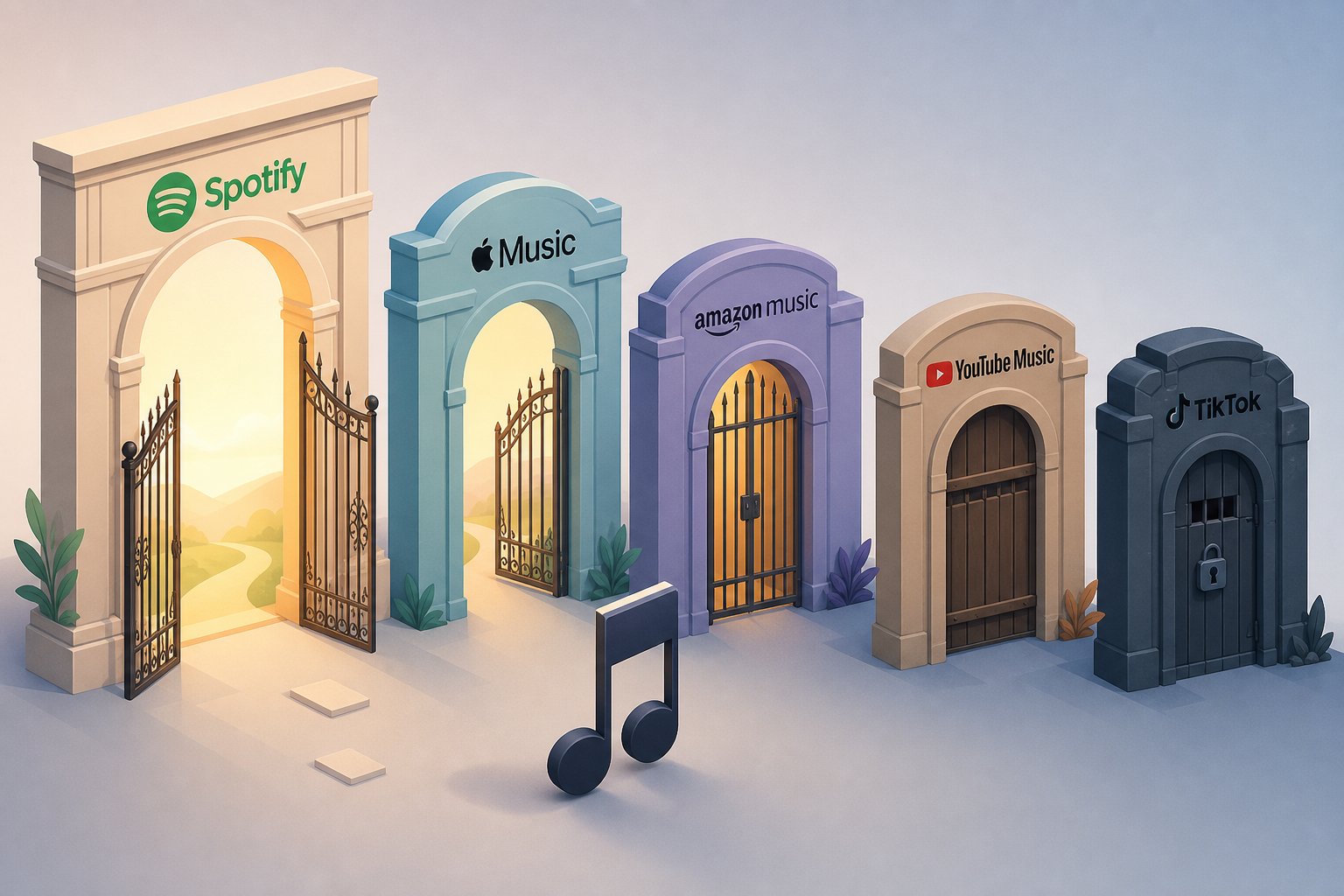
Your music does not go directly from your hard drive to Spotify. A music distributor sits between you and the platform, acting as the gatekeeper that delivers your tracks to streaming services. That means your distributor's AI policy is a second compliance layer on top of Spotify's own rules. Even if your track meets Spotify's human creative input threshold, your distributor can still reject it based on their own terms.
Not all distributors treat AI music the same way. Some welcome it with a simple checkbox. Others demand detailed attribution. A few reject fully AI-generated content outright. Choosing the wrong distributor for your workflow can mean weeks of delays, unexpected rejections, or worse, account penalties that affect your entire catalog.
Distributor Acceptance Policies for AI Music
The landscape in 2026 reflects growing pressure from major labels, new ai music platform licensing deals between generators like Suno and Universal Music Group, and increasingly sophisticated detection technology. Every major distributor now runs automated AI detection on incoming uploads. The difference is what happens next.
DistroKid is the most permissive major distributor for AI creators. AI music is accepted with mandatory disclosure through a simple checkbox during upload. There are no upload limits for AI tracks, and disclosed content enters the same distribution pipeline as human-produced music. At $22.99 per year for unlimited uploads with zero commission, DistroKid is particularly cost-effective for high-volume creators. Undisclosed AI content that gets caught by their detection system faces removal and potential account suspension.
TuneCore takes a middle-ground approach. AI music is accepted, but the transparency requirements go deeper. During upload, you must specify which aspects of the track used AI, whether that is composition, lyrics, vocals, or production, and which tools were involved. If their system flags undisclosed AI content, TuneCore pauses the release and asks you to resubmit with full disclosure rather than rejecting outright. That resubmission pathway is more forgiving than immediate removal, but it adds days to your release timeline.
CD Baby enforces the strictest policy among major distributors. Fully AI-generated tracks are rejected, period. CD Baby only accepts content that qualifies as "AI-assisted," meaning a human led the creative process and AI served as a tool. Their detection threshold is lower than competitors, and they err on the side of rejection. There is no resubmission pathway for content classified as AI-generated. Creators regularly report CD Baby rejections even for tracks with moderate human involvement.
Ditto Music allows AI music with disclosure requirements and has been more explicit than most about viewing AI as a legitimate creative tool. Pricing starts at $19 per year for unlimited uploads, slightly undercutting DistroKid. Their detection system focuses on verifying disclosure compliance rather than gatekeeping content, making them a solid budget-friendly alternative for AI-focused creators.
Amuse offers a free tier with revenue sharing and paid plans at $24.99 per year. They currently accept AI music with disclosure, but the platform has signaled potential policy tightening based on streaming platform feedback. The free tier works for testing the waters with a few tracks, but the uncertainty around future policy changes makes Amuse less predictable for long-term AI music distribution.
Disclosure and Restriction Differences Between Platforms
The disclosure process itself varies dramatically. DistroKid asks a binary yes-or-no question. TuneCore requires a granular breakdown. CD Baby demands proof of human authorship. These differences matter because the metadata your distributor passes to Spotify shapes how the platform evaluates your release.
Here is how the five major distributors compare across the dimensions that matter most when you are deciding where to upload AI-assisted tracks:
| Distributor | AI Music Accepted | Disclosure Method | Undisclosed AI Consequence | Notable Restrictions |
|---|---|---|---|---|
| DistroKid | Yes, with disclosure | Single checkbox during upload | Track removal, potential account suspension | None for disclosed content; unlimited uploads |
| TuneCore | Yes, with detailed transparency | Granular attribution form specifying AI tools and usage areas | Release paused; resubmission required with proper disclosure | Per-release pricing makes bulk uploading expensive |
| CD Baby | AI-assisted only; fully AI-generated rejected | Must demonstrate human authorship | Immediate rejection; no resubmission for AI-generated content | Aggressive detection with low threshold; 9% commission on revenue |
| Ditto Music | Yes, with disclosure | Disclosure during upload process | Track flagged for compliance review | None for disclosed content; unlimited uploads at $19/year |
| Amuse | Yes, with disclosure (policy may tighten) | Disclosure during upload | Track removal possible | Free tier has revenue sharing; policy stability uncertain |
A few patterns stand out. Every distributor now uses automated AI detection, including spectral analysis, timing pattern evaluation, and metadata scanning. The difference is intent: DistroKid and Ditto use detection primarily to verify that disclosed tracks match their stated AI involvement. CD Baby uses detection as a gatekeeping tool to reject content before it reaches Spotify.
For creators whose workflow involves tools like Suno or Udio, DistroKid and Ditto offer the smoothest path. If your process is heavily human-led with AI playing a supporting role, TuneCore's detailed attribution system may actually work in your favor by letting you clearly document what was human versus machine. And if your music is primarily human-created with only minor AI assistance, CD Baby remains a viable option, though you will need to be prepared to demonstrate that human authorship if challenged.
The distributor you choose shapes more than just your upload experience. It determines what metadata reaches Spotify, how quickly your release goes live, and what happens if something gets flagged. Getting past your distributor is the first hurdle. The next step is understanding exactly what the upload process looks like once your distributor accepts the track.
Step-by-Step Guide to Uploading AI Music to Spotify
You have a finished AI-assisted track, a distributor account, and a clear understanding of the disclosure rules. What does the actual upload process look like from start to finish? This is where many creators stall. Not because the steps are complicated, but because the practical details, metadata fields, technical specs, and timing expectations, are scattered across help pages and forum threads with no single walkthrough covering the full picture.
Whether you are figuring out how to upload songs from Suno to Spotify or releasing tracks made with any AI tool, the submission workflow follows the same sequence. Here is every step, in order, with the specifics that keep your release on track.
Setting Up Your Artist Profile and Distributor Account
Spotify does not accept direct uploads from independent artists. Your distributor handles the delivery, but your artist identity on Spotify is yours to manage separately. These two pieces need to be in place before you submit anything.
- Create your distributor account. Sign up with your chosen distributor (DistroKid, TuneCore, Ditto, or whichever platform fits your workflow). Verify your email and complete any identity verification steps. Some distributors require a government-issued ID before your first release can be submitted.
- Set up your artist name. During your first upload, most distributors ask you to establish an artist name. This becomes your identity across all streaming platforms. Choose carefully, because changing it later requires support tickets and can temporarily disrupt your catalog.
- Claim your Spotify for Artists profile. Once your first release goes live on Spotify, visit Spotify for Artists and claim your profile. This gives you access to analytics, profile customization, playlist pitch tools, and the ability to manage how your artist page appears to listeners. Verification through Spotify for Artists is separate from the Verified by Spotify badge, which has its own eligibility requirements and currently excludes profiles that primarily represent AI-generated personas.
A quick note for creators releasing AI music under a project name rather than their legal identity: this is perfectly fine. Many AI-assisted artists create distinct project identities for different sonic directions. Just ensure your distributor account is tied to your real identity for royalty payments, even if the public-facing artist name is different.
Metadata Requirements and AI Disclosure Steps
Metadata is the information layer that tells streaming platforms what your track is, who made it, and how it should be categorized. Getting this right prevents delays and rejections. Getting it wrong can push your release back by weeks or trigger a manual review.
Here is what you need to prepare before clicking upload:
- Track title and artist credits. Double-check spelling. Include featured artists or collaborators exactly as they should appear on streaming platforms. Inconsistencies between your distributor entry and your Spotify for Artists profile can cause matching failures.
- ISRC codes. An International Standard Recording Code uniquely identifies each individual track. Most distributors generate these automatically during upload, so you typically do not need to obtain them yourself. If you already have ISRC codes from a previous distributor or a national agency, you can enter them manually to maintain continuity across releases.
- UPC or EAN codes. A Universal Product Code identifies your overall release (the single, EP, or album as a package). Again, most distributors generate this automatically. If you are releasing a single, one UPC covers the entire release.
- Genre and subgenre tagging. Select the primary genre that best represents your track. Some distributors offer secondary genre fields. Be accurate rather than strategic here. Misgenring a lo-fi ambient track as "pop" hoping for better playlist placement backfires because Spotify's algorithm evaluates listener behavior against genre expectations.
- Audio file format. Upload WAV or FLAC files at a minimum of 44.1kHz sample rate and 16-bit depth. Target -14 LUFS integrated loudness for optimal playback on Spotify's normalization system, with a true peak no higher than -1.0 dBTP to prevent clipping on lossy codecs.
- Cover artwork. Provide a square image between 3000x3000 pixels (recommended) and a minimum of 640x640 pixels. Accepted formats are JPEG, PNG, or TIFF. The artwork must not contain social media handles, URLs, pricing information, or misleading imagery that implies a different artist.
- AI disclosure. This is the step that separates AI music uploads from standard releases. Your distributor's upload form will include a field, whether a checkbox, dropdown, or detailed attribution form, asking about AI involvement. Check the appropriate option honestly. On DistroKid, this is a single checkbox. On TuneCore, you will specify which elements used AI (vocals, composition, lyrics, production). This metadata gets passed to Spotify as a "Synthetic Content" flag and is used during both automated and manual review.
Skipping the AI disclosure step, or checking "no" when AI was involved, is the fastest way to lose your track and potentially your account. Spotify's detection systems cross-reference distributor metadata with their own automated analysis, and mismatches trigger manual review. Honesty here costs you nothing. Dishonesty can cost you your entire catalog.
Release Scheduling and Review Timeline
Timing your release properly matters more than many creators realize, especially for AI-assisted music that may receive additional scrutiny during review.
- Schedule 4 to 6 weeks ahead. Set your release date at least four weeks in the future. This buffer serves two purposes: it gives you time to pitch your track to Spotify's editorial playlist team (available through Spotify for Artists once your profile is claimed), and it provides a cushion if your distributor's review takes longer than expected.
- Distributor review period. After submission, your distributor runs their own quality and compliance checks. For most distributors, this takes 1 to 3 business days. AI-disclosed tracks may take slightly longer if flagged for manual verification. DistroKid typically delivers to Spotify within 2 to 5 days after approval. TuneCore matches that timeline. CD Baby and Amuse can take 1 to 2 weeks.
- Spotify ingestion and processing. Once your distributor delivers the release, Spotify processes it into their system. This usually happens within 24 to 48 hours but can occasionally take longer during high-volume periods. Your track will not appear in search results until this processing completes.
- Content review. Spotify may run additional checks on AI-disclosed content. Their system evaluates the Synthetic Content flag alongside audio analysis to confirm the disclosure is accurate and the content does not violate platform policies (voice cloning, spam patterns, impersonation). Most properly disclosed AI-assisted tracks pass without issue. Fully AI-generated tracks with minimal human input face higher scrutiny.
- Release goes live. On your scheduled release date, the track becomes available to listeners. You will see it appear on your Spotify for Artists dashboard, and streaming data begins populating within 24 to 48 hours of the first plays.
A practical tip if you are uploading Suno tracks to Spotify or releasing from any AI generator: do a test release first. Upload a single track rather than an entire album. Observe how your distributor handles the AI disclosure, how long the review takes, and whether anything gets flagged. That first release teaches you the rhythm of the process without putting a larger body of work at risk.
One detail creators often overlook: the review process is not just a one-time gate. Spotify continuously monitors content after publication. Tracks can be flagged and removed weeks or months after going live if new detection methods identify undisclosed AI content, if listener reports accumulate, or if the track's engagement patterns resemble known spam behavior. Publishing your track is the beginning of ongoing compliance, not the end of it.
What Happens If Your AI Music Gets Flagged on Spotify
Your track went live. Streams started trickling in. Then one morning you check your Spotify for Artists dashboard and the track is gone. No email. No warning. Just removed. This scenario plays out constantly for AI music creators, and understanding Spotify's AI music removal policy before it happens to you is far more valuable than scrambling to recover afterward.
Spotify has removed over 75 million tracks tied to spam and generative AI abuse since 2025, and their detection technology improves with every sweep. Tracks that passed initial screening months ago get pulled during retroactive catalog reviews as new analysis tools come online. Knowing why removals happen, what recourse you have, and which behaviors guarantee permanent penalties puts you in a much stronger position than the majority of creators who only learn the rules after losing their music.
Common Reasons AI Tracks Get Flagged or Removed
Spotify does not send you a detailed explanation when a track disappears. You have to work backward from the evidence. Based on how the platform's enforcement systems operate, here are the most common triggers:
- Automated AI detection fingerprints. Spotify runs spectral analysis, timing pattern evaluation, metadata scanning, and third-party detection tools across its catalog. Raw exports from Suno, Udio, and similar generators carry distinctive audio signatures that these systems catch, sometimes months after initial upload during retroactive sweeps.
- Undisclosed AI involvement. If you checked "no" on AI disclosure but the audio analysis flags synthetic content, the mismatch between your metadata and the detected reality triggers manual review and likely removal.
- Spam behavior patterns. Mass uploads from a single account, artificially short tracks, duplicative content, and SEO manipulation in titles or tags activate Spotify's music spam filter. High-volume AI creators uploading dozens of tracks per week are especially vulnerable.
- Artificially inflated streams. Bot-driven plays, stream farms, or suspicious engagement patterns get flagged independently of AI content issues but compound the problem when both exist on the same account.
- Voice cloning or impersonation reports. A single report from a rights holder about unauthorized vocal mimicry triggers immediate removal without prior review. This is the fastest and least forgiving removal pathway.
- Distributor-initiated takedowns. Sometimes the removal comes from your distributor, not Spotify. If DistroKid or TuneCore's own detection flags your track after initial delivery, they may send a takedown to Spotify on their end.
The frustrating reality is that retroactive removal happens by design. Spotify's detection continuously improves, meaning a track invisible to their systems six months ago can get caught in today's sweep. This is not a bug. It is the enforcement model working on a delay.
The Appeals Process and Account Consequences
Here is the part most creators do not want to hear: Spotify does not offer a direct appeal process for removed tracks. There is no form, no email address, and no button to click. Their official guidance is to contact your distributor.
Spotify does not accept appeals from artists for removed tracks. Your only path to resolution is through your distributor, who can see the removal reason and potentially request reinstatement on your behalf.
The practical process looks like this. You open a support ticket with your distributor, include the track title, ISRC code, Spotify URL if you still have it, and any evidence supporting your case. Then you wait. Distributor support queues typically take 1 to 3 weeks for removal investigations. DistroKid's queue is notoriously slow. TuneCore tends to respond slightly faster.
In most cases involving AI detection flags, the outcome is not reinstatement. If the audio itself triggered detection, the evidence is embedded in the file. The distributor confirms the removal and the track stays down. Your realistic options at that point are to reprocess and reupload as a new release with a fresh ISRC code, or to accept the loss and focus on future compliant releases.
The consequences extend beyond a single track:
- All accumulated streams are lost permanently. Even if reinstated, stream history typically does not restore.
- Playlist placements disappear immediately. Editorial and algorithmic positions are gone, and curators do not re-add reinstated tracks automatically.
- Algorithmic momentum resets. Release Radar, Discover Weekly, and genre mix recommendations rely on recent engagement history that removal erases.
- Account reputation takes a hit. Repeated removals increase scrutiny on your entire catalog. Distributors and Spotify flag high-removal accounts for closer manual review of every subsequent upload.
- Revenue stops immediately. All future royalties from that track end the moment it is pulled. Past earned royalties typically still pay out, but the income stream is severed.
One or two removals are recoverable. A pattern of removals signals systemic noncompliance and can result in your distributor terminating your account entirely, which takes your whole catalog offline across every streaming platform simultaneously.
Voice Cloning and Artist Impersonation Rules
Of all the behaviors that trigger removal, unauthorized voice cloning carries the most severe and immediate penalties. Spotify's impersonation policy makes this explicit: vocal impersonation is only allowed when the impersonated artist has authorized the usage. No exceptions. No gray area.
Unauthorized use of AI to clone an artist's voice exploits their identity, undermines their artistry, and threatens the fundamental integrity of their work.
The ai voice cloning spotify rules apply whether you used a dedicated voice-cloning tool, trained a model on an artist's vocal recordings, or simply prompted an AI to "sing like" a recognizable performer. If the output resembles a real, identifiable artist and that artist did not consent, one rights-holder report triggers immediate takedown. There is no review period. There is no benefit of the doubt.
Spotify is also investing in preventing a related tactic: fraudulent delivery of music to another artist's profile. They are testing prevention systems with leading distributors to stop these attacks at the source and have expanded their content mismatch reporting process so artists can flag unauthorized uploads even during pre-release.
This brings up a practical question for creators who want to monitor covers or create rmx music using AI tools. Where does a legitimate AI-assisted cover or remix stand?
The landscape shifted significantly in May 2026 when Spotify and Universal Music Group announced landmark licensing agreements for fan-made covers and remixes. This deal creates a legitimate pathway for AI-powered covers and remixes of UMG catalog songs, built on a framework of consent, credit, and compensation. The tool launches as a paid add-on for Spotify Premium users, and participating artists and songwriters share directly in the revenue generated.
What this means for independent AI creators: if you want to release a cover or remix of a copyrighted song using AI tools, the safest path is through officially licensed channels rather than uploading independently and hoping no one notices. Outside of authorized frameworks, AI-generated covers that replicate an artist's vocal identity still violate impersonation rules, even if the underlying composition is properly licensed through mechanical rights.
The key distinction is between covering a song (performing someone else's composition in your own voice or a synthetic original voice) versus cloning an artist's identity (making it sound like a specific performer sang your track). The first can be done legitimately with proper licensing. The second requires explicit consent from the impersonated artist, period.
Spotify's enforcement posture across all these areas points in one direction: the platform is building systems designed to catch noncompliance sooner, penalize it more consistently, and make evasion progressively harder. Creators who build their workflow around compliance from the start, rather than testing limits and dealing with consequences, will find themselves in a much more sustainable position as these systems continue to tighten. That enforcement trajectory is not unique to Spotify either. Every major streaming platform is developing its own version of these protections, each with slightly different rules and thresholds.
How Spotify's AI Rules Compare to Other Streaming Platforms
Each streaming service has drawn its own lines around AI content. A track that passes Spotify's review might get flagged on YouTube Music, and something rejected by Bandcamp could live happily on SoundCloud. If you are releasing across multiple platforms, and most independent creators should be, you need to understand where those lines differ.
How Other Streaming Platforms Handle AI Music
The differences between platforms come down to philosophy. Spotify focuses on disclosure and spam prevention. Apple Music centers its approach on transparency through metadata tagging, requiring labels and distributors to flag AI involvement but leaving the definition of "AI content" to its partners. YouTube Music's policy on AI generated content takes a harder stance on raw AI audio, treating tracks with minimal human input as low-value and often ineligible for monetization.
Amazon Music operates without a detailed public AI policy but quietly removes tracks that raise IP flags. SoundCloud, historically the most open upload platform, still accepts AI-assisted music freely while focusing its policy energy on preventing its existing catalog from being scraped for AI training. And at the restrictive end, Bandcamp has explicitly banned music produced entirely or mainly by AI.
Here is how the major platforms compare on the dimensions that matter most for AI music creators:
| Platform | AI Music Accepted | Disclosure Required | Key Restriction |
|---|---|---|---|
| Spotify | Yes, with human creative input | Yes, via DDEX metadata | Bans unauthorized voice clones; spam filter targets mass-produced content |
| Apple Music | Yes, from verified creators | Yes, new metadata tags required | Requires proof of data consent for training sets; curation-integrity focused |
| YouTube Music | Conditionally | Yes, mandatory disclosure | Raw AI audio ineligible for monetization; AI vocals require artist opt-in consent |
| Amazon Music | Yes, informally | No formal public requirement | Quiet takedowns for IP concerns; no detailed public policy |
| SoundCloud | Yes | No formal requirement | Focused on preventing catalog use for AI training, not restricting uploads |
| Bandcamp | No (fully/mainly AI banned) | N/A | Explicit ban on AI-generated audio; reserves right to remove suspected content |
| Deezer | Yes, with detection tagging | Auto-detected and labeled | AI tracks excluded from algorithmic and editorial recommendations |
Notice the pattern: ai music on Apple Music vs Spotify differs mainly in enforcement style rather than core philosophy. Both accept AI-assisted content. Both require disclosure. But Apple leans on its partners to define boundaries, while Spotify actively polices through its own detection systems. YouTube Music's approach is arguably the most punitive for creators who skip disclosure, since non-transparent AI content faces demonetization or removal altogether.
Building a Multi-Platform Release Strategy
Given these differences, how should you think about releasing AI-assisted music across multiple services? A few practical principles help.
First, design your workflow around the strictest platform you care about. If your track passes YouTube Music's "transformative human input" standard and Apple Music's data consent requirements, it will almost certainly pass everywhere else. Building to the highest bar saves you from platform-specific rejections after the fact.
Second, understand that your distributor handles disclosure differently per platform. When you check the AI disclosure box in DistroKid or TuneCore, that metadata propagates to every streaming service in your distribution list. You cannot disclose on Spotify but hide it from Apple Music. The flag travels with the release.
Third, stay current. These policies shift quarterly. Deezer's AI detection labeling system launched in early 2026. Apple's metadata tags rolled out in March. YouTube's consent requirements for AI vocals tightened significantly over the past year. Bookmark each platform's creator policy page and check for updates before major releases. What passed six months ago may not pass today.
The evolving nature of these rules means there is no permanent "safe" configuration. Creators who treat compliance as an ongoing practice rather than a one-time setup will navigate this landscape with far fewer surprises. And compliance starts with the tools and habits you build into your creative process from the very beginning.

Best Practices and Tools for AI Music Creators
Compliance is not a single gate you pass through. It is a set of habits baked into how you create, document, and release music every time. Creators who build these practices into their workflow from the start rarely face removals, account flags, or distributor disputes. Those who treat compliance as an afterthought tend to learn the rules the hard way.
Whether you want to release Suno songs on Spotify, distribute tracks built with Udio, or publish music made with any AI tool, the best practices for publishing AI music boil down to a handful of repeatable principles.
Best Practices for Compliant AI Music Publishing
Think of this as your pre-release checklist. Run through it before every upload, and you dramatically reduce the risk of removal or account penalties.
- Always add meaningful human creative layers. Record your own vocals. Write or heavily rewrite lyrics. Rearrange the song structure. Layer live instruments. Add production decisions that transform the raw AI output into something distinctly yours. The more creative fingerprints you leave, the safer your position.
- Document your creative process. Keep brief notes, screenshots, or session files showing what AI generated versus what you added. If a distributor or platform ever questions your release, having a paper trail of your creative decisions saves weeks of back-and-forth. A simple text file noting "Suno generated initial beat, I wrote lyrics, recorded vocals, rearranged into verse-chorus-bridge" is enough.
- Disclose AI usage honestly every time. Check the AI disclosure box. Fill in the attribution fields. Never misrepresent a track as fully human-made when AI contributed audible elements. Disclosure does not penalize your track in algorithmic recommendations. Failing to disclose can cost you your entire catalog.
- Avoid voice cloning of real artists. No exceptions. Do not train models on recognizable performers. Do not prompt AI to imitate a specific vocalist. Do not release anything that could be mistaken for an existing artist's voice without their explicit written consent. This is the fastest path to immediate, permanent removal.
- Use legitimate AI tools that respect copyright. Choose generators that have licensing agreements with rights holders or that produce original outputs not derived from unlicensed copyrighted material. Tools that have settled with major labels, like Suno and Udio after their 2025 licensing deals, carry less legal risk than unlicensed alternatives. Industry guides consistently emphasize knowing the copyright status of your sound sources.
- Release at a sustainable pace. Uploading dozens of AI-assisted tracks per week raises spam flags regardless of quality. Space your releases like a human artist would. Quality over quantity keeps your account healthy and your tracks in algorithmic rotation.
- Monitor platform policy updates quarterly. Bookmark Spotify's newsroom, your distributor's policy page, and at least one industry blog that tracks AI music regulation. Rules shift fast. What passes today might not pass next quarter.
You do not need to follow every bullet perfectly on every release. But the more consistently you apply these principles, the more resilient your catalog becomes against future policy changes and detection improvements.
Free Tools for Creating Royalty-Free AI Music
Not every AI music project needs to land on Spotify. Many creators use AI-generated tracks for YouTube videos, podcast intros, social content, game soundtracks, or client work where ownership clarity matters more than streaming distribution. For these use cases, the compliance burden is different. You need a track you fully control with clear commercial rights, not necessarily one that passes Spotify's human creative input threshold.
This is where a royalty-free AI music generator becomes practical. Rather than navigating distributor disclosure forms and platform detection systems, you generate music with explicit usage rights attached from the start.
MakeBestMusic's Free Music Generator fits this niche well. It produces royalty-free tracks you can use in commercial projects, including videos, podcasts, social media content, and games, without worrying about downstream licensing disputes. For creators who want to experiment with AI music before committing to Spotify distribution, or who need background music for content where ownership needs to be unambiguous, it provides a low-friction starting point.
A practical workflow might look like this: use a free royalty-free AI music generator to create backing tracks for your YouTube channel or podcast, then reserve your more creatively involved AI-assisted productions for Spotify releases where you have layered enough human input to meet the platform's threshold. This separates your "content soundtrack" needs from your "artist identity" releases, keeping each workflow clean and compliant for its intended purpose.
The AI music landscape will continue evolving. Policies will tighten in some areas and relax in others. Detection technology will improve. Licensing frameworks will mature. But the creators who build sustainable practices today, documenting their process, disclosing honestly, and adding genuine creative value to every release, are the ones who will still have thriving catalogs a year from now while others scramble to recover from preventable removals.
