

What Is an AI Music Generator and Why It Matters
Imagine typing a sentence like "upbeat pop song about summer" and receiving a fully produced track, complete with vocals, instrumentation, and song structure, in under a minute. That scenario is no longer hypothetical. It describes exactly what an AI music generator does every day for millions of users worldwide.
Defining AI Music Generation in Simple Terms
An AI music generator is software powered by machine learning models that composes, arranges, and produces original music based on user inputs such as text prompts, lyrics, genre selections, or reference audio.
These tools are trained on vast datasets of recorded music, learning statistical patterns in melody, harmony, rhythm, instrumentation, and song structure. When you provide a prompt, the model predicts what should come next based on those learned patterns and generates new audio accordingly. It does not copy existing songs. Instead, it synthesizes original compositions that reflect the characteristics you described.
The core input methods vary across platforms. Some accept plain text descriptions of a mood or scene. Others let you write lyrics and select a vocal style. More advanced options allow you to upload a reference track or configure specific parameters like tempo, key, and instrumentation. The output ranges from short loops to full-length songs with intros, verses, choruses, and endings.
Why AI Music Generators Matter for Creators
Traditional music composition has always demanded years of training. You needed to learn an instrument, study theory, understand production software, and invest in recording equipment. That barrier kept original music creation limited to a relatively small group of trained musicians and producers.
AI music generation flips that equation. A podcaster who needs an intro track, a filmmaker scoring a short on zero budget, or a small business owner looking for a custom jingle can now produce something usable without hiring a composer. As AI News Hub reports, over 60% of musicians now incorporate AI tools for composition and editing, and the global generative AI in music market is projected to reach USD 2.8 billion by 2030.
This shift matters whether you are searching for the best ai for music production or you are an experienced ai songwriter exploring new creative directions. The technology serves both camps. For professionals, it accelerates prototyping and helps overcome creative blocks. For beginners, it removes the gap between having an idea and hearing it as a finished ai track.
The best ai music creators available right now span a wide range of approaches, from simple prompt-based generators to platforms offering detailed control over arrangement and vocal style. Platforms like producer.ai and tools that let you makesong from a text description represent just part of the landscape. Understanding how these systems work, where they genuinely deliver, and where the hype outpaces reality is what separates informed use from disappointment.
This article covers exactly that. You will learn the technology behind these tools, explore the different generation approaches, walk through real workflows, evaluate output quality honestly, compare top ai music platforms, and understand the legal and ethical landscape. The goal is not to sell you on any single tool but to give you the knowledge to judge for yourself whether the best ai generated music meets your creative needs.
How AI Music Generators Actually Work
Knowing what these tools produce is one thing. Understanding how they produce it gives you a much clearer sense of what to expect and why different ai tools for music sound noticeably different from each other. The technology is not magic, though it can feel that way. It is pattern recognition and probability at enormous scale.
At the core, every AI music generator follows the same basic idea: feed a model vast amounts of music, let it learn the patterns that make music sound like music, then ask it to generate new audio based on those patterns. The differences come down to architecture, the specific way each model learns and creates. Three dominant approaches power nearly every ai music composition tool on the market today.
Transformers and Diffusion Models Explained
You already use transformer technology every day without realizing it. When your phone autocompletes a sentence, it predicts the next word based on everything that came before. Transformer-based music models do the same thing, except instead of predicting words, they predict the next chunk of audio. They treat a song as a sequence of tokens, small encoded pieces of sound, and generate each token based on what has already been produced.
Google's MusicLM uses a hierarchical transformer trained on 280,000 hours of music, first generating high-level semantic tokens that capture structure, then filling in acoustic detail. Meta's MusicGen takes a single-stage approach, generating compressed audio codes from its EnCodec system in one pass. Both excel at structural coherence, producing tracks where a chord progression in measure four logically connects to the melody in measure thirty-two. The tradeoff is that transformers can sometimes sound slightly less natural in raw timbral detail.
Diffusion models take a completely different path. Imagine a sculptor starting with a rough block of marble and gradually chipping away until a form emerges. Diffusion models start with pure noise, random static, and iteratively remove that noise step by step until coherent audio appears. Each denoising step brings the signal closer to something that sounds like real music.
Stability AI's Stable Audio applies this technique in a compressed latent space, generating high-fidelity tracks up to three minutes long at full 44.1 kHz stereo quality. Riffusion took another angle entirely, treating spectrograms as images and fine-tuning an image diffusion model to generate them. Diffusion models produce exceptionally detailed audio textures and natural-sounding timbres, but they are computationally expensive because each generation requires dozens or hundreds of denoising steps.
Hybrid approaches combine both strengths. A transformer handles the structural planning, deciding what comes next in the musical sequence, while a diffusion-based decoder refines the final audio output for maximum fidelity. This layered approach is increasingly common in the best ai music production software available, because it delivers both the logical song structure that transformers provide and the sonic richness that diffusion achieves. Will ai get better at helping with making music? These hybrid architectures suggest the answer is clearly yes, as each generation of models combines complementary strengths more effectively.
How Training Data Shapes Musical Output
The architecture is only half the story. What a model learns depends entirely on what it hears during training. Think of it this way: a composer who only studied classical piano will write differently from one immersed in jazz, hip-hop, and electronic music. AI models work the same way.
Training datasets for state-of-the-art models are massive. MusicLM trained on 280,000 hours of recorded music. MusicGen used 20,000 hours of licensed material from Shutterstock and Pond5. Stable Audio drew from 800,000 tracks in the AudioSparx library. These datasets span genres, tempos, production styles, and instrumentation, giving each model a broad but distinct palette of musical knowledge.
Raw audio cannot be fed directly into neural networks. Instead, models extract compressed representations during training:
- Mel spectrograms, visual maps of frequency content over time that mirror how human hearing perceives sound
- Neural audio codecs like EnCodec and SoundStream, which compress audio into discrete token sequences at extremely low bitrates while preserving perceptual quality
- Latent embeddings, continuous mathematical representations that capture high-level musical features like mood, genre, and energy
For text-to-music generation, models also need to learn the relationship between language and sound. Systems like CLAP (Contrastive Language-Audio Pretraining) train on millions of text-audio pairs, mapping descriptions and their matching audio clips into a shared space. This alignment is what allows a prompt like "melancholic cello solo in a cathedral" to activate the right combination of instrument, mood, and reverb in the generated output.
This training foundation explains why different platforms produce different results. A tool trained primarily on pop and electronic music will struggle with a prompt requesting authentic bluegrass. A model trained on a smaller but genre-diverse dataset might handle unusual requests better but lack the depth of one trained on millions of tracks within a narrower range. When people ask whether a chat gpt music maker can produce songs, the answer is nuanced: general language models understand text but lack the specialized audio training that dedicated music models possess.
The diversity and licensing status of training data also varies significantly across platforms, which directly affects both output quality and the legal standing of what you generate. That distinction leads naturally into an equally important question: what types of music can these different architectures actually produce, and which approach fits which creative need?
Types of AI Music Generation Approaches
Not every AI music tool works the same way, and not every creator needs the same thing. A YouTuber looking for background audio has completely different requirements from a producer who wants to upload song and ai will make a drum beat that fits an existing track. The generation approach you choose determines what you put in and what you get back.
Here is a clear breakdown of the six primary approaches powering today's AI music landscape.
Text-to-Music and Lyric-to-Song Generation
Text-to-music is the most accessible entry point. You describe a scene, mood, or genre in plain language, and the AI returns a complete instrumental or vocal track. Type "dark cinematic orchestral with building tension" and you receive a produced composition matching that description. The model translates your language into musical parameters using the CLAP-style alignment discussed earlier, then generates audio token by token or through iterative denoising.
Lyric-to-song generation goes a step further. You provide written lyrics, select a vocal style and genre, and the AI composes melody, harmony, instrumentation, and synthesized vocals around your words. This approach has become the top ai for lyrics for songs among independent artists and hobbyists who have words but lack the production skills to bring them to life. It is also where ai rap generation has gained significant traction, with dedicated rap maker tools letting users input bars and receive fully produced hip-hop tracks with rhythmically accurate vocal delivery.
Both approaches share a strength: zero musical knowledge required. If you can describe what you want or write lyrics, you can produce a song.
Accompaniment, Stem Generation, and Vocal Synthesis
Where text-to-music creates from nothing, accompaniment generation builds around something you already have. Feed the AI an existing melody or chord progression, and it produces complementary parts, drums, bass, pads, or counter-melodies, that fit harmonically and rhythmically. Research like the STAGE model demonstrates how transformer architectures can generate single-stem accompaniments conditioned on a given audio mixture, achieving strong coherence without requiring a full retraining process. This is ideal for musicians creating piano arrangement from audio or producers who want AI to handle the rhythm section while they focus on melody.
Stem-based generation produces individual instrument layers rather than a mixed-down track. You get separate files for drums, bass, vocals, and other instruments, giving you full control in a DAW. Producers value this because they can keep, discard, or replace any layer. Some tools also work in reverse, acting as a song mashup maker by separating existing tracks into stems and recombining them in new ways.
Vocal synthesis generates realistic singing voices from text input. Modern neural synthesis maps pitch, timbre, dynamics, and emotional phrasing to create performances that range from subtle whisper tones to powerful belts. This same technology powers the best ai cover song generator tools, which apply a synthetic or cloned vocal style to new lyrics or melodies. Vocal mixing ai free options exist on several platforms, though premium tiers typically unlock higher fidelity and more natural expression.
Style transfer rounds out the taxonomy. It takes an existing piece of audio and transforms its genre characteristics, converting a folk ballad into an electronic track or applying jazz harmony to a pop progression, without changing the underlying melody or structure.
| Approach | Input Required | Output Format | Best For | Skill Level Needed |
|---|---|---|---|---|
| Text-to-Music | Text description of mood, genre, or scene | Full mixed track (MP3/WAV) | Content creators, beginners | None |
| Lyric-to-Song | Written lyrics + style selection | Complete song with vocals | Songwriters, ai rap creators | Basic (writing ability) |
| Style Transfer | Existing audio + target genre | Transformed audio | Remixers, experimenters | Beginner to intermediate |
| Accompaniment Generation | Melody, chords, or partial mix | Complementary instrument parts | Musicians, producers | Intermediate |
| Stem-Based Generation | Prompts or reference audio | Separated instrument stems | Producers, mix engineers | Intermediate to advanced |
| Vocal Synthesis | Lyrics + vocal style parameters | Isolated vocal track | Producers, cover artists | Beginner to intermediate |
Each approach solves a distinct problem. The right choice depends on where you are in the creative process, whether you are starting from a blank page or refining something already in motion. That distinction also shapes the workflow itself, from first prompt to exported file, which is where practical differences between tools become most apparent.
The Complete AI Music Creation Workflow
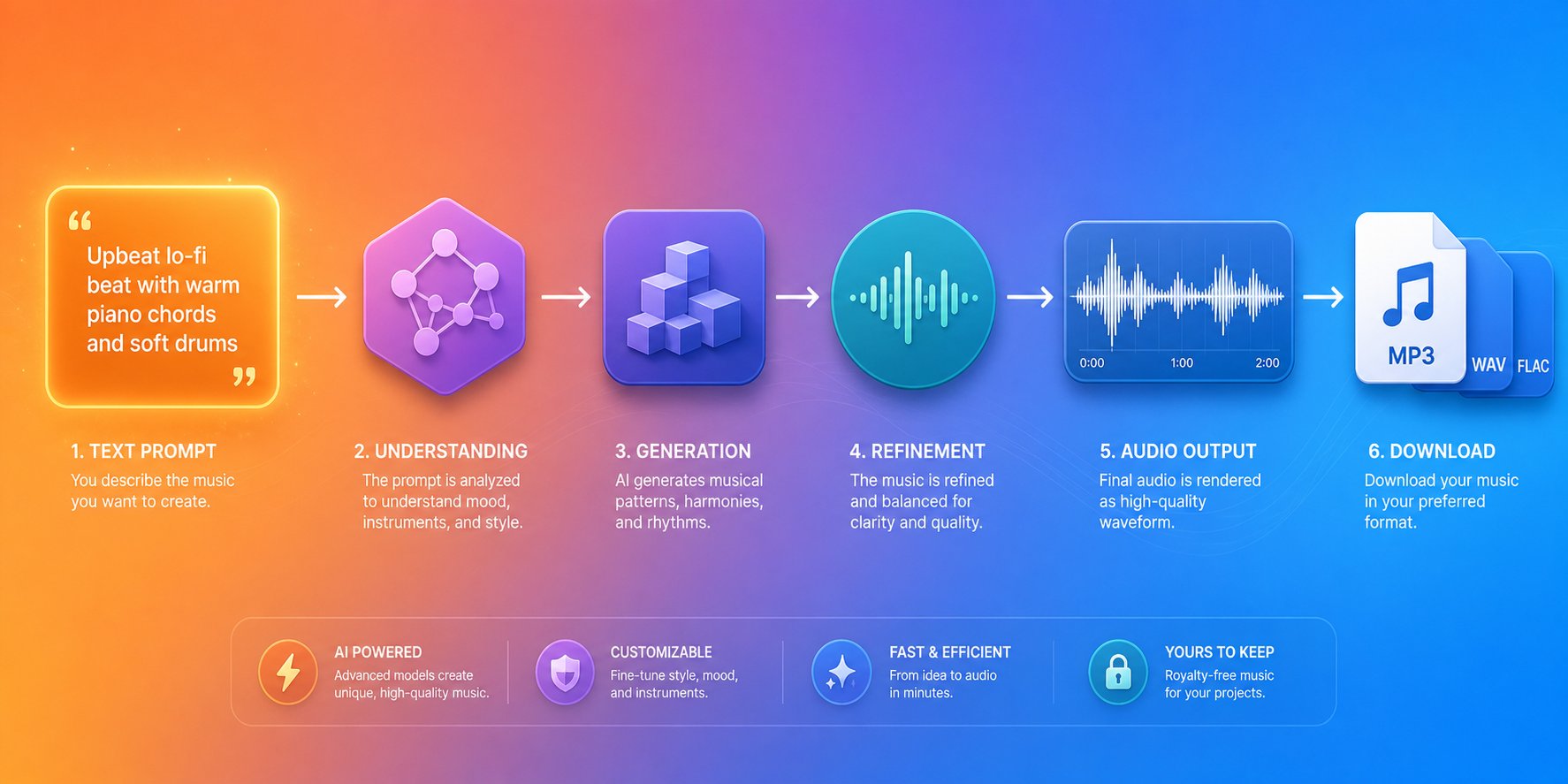
Knowing the different generation approaches answers what these tools can do. The next practical question is straightforward: how do you make a song with one, start to finish? The process follows a consistent pipeline regardless of which platform you choose, from raw idea through export-ready file.
From Prompt to Generated Track
Every AI music workflow begins with an input decision. You have several paths depending on what you are starting with:
- A text prompt describing mood, genre, and instrumentation ("melancholic indie folk with fingerpicked guitar and soft female vocals")
- Written lyrics you want turned into a complete song
- A reference audio file that sets the style direction
- Genre and mood selections from dropdown menus or preset tags
The specificity of your input directly controls output quality. A vague prompt like "happy song" gives the model too much room to guess, often producing something generic. A detailed prompt combining genre, tempo, instrumentation, mood, and structure, such as "upbeat 120 BPM synth-pop with arpeggiated chords, punchy drums, and a bright chorus hook," narrows the possibility space and produces results closer to your vision. This is the same principle behind any song idea generator: the more constraints you provide, the more focused the creative output becomes.
Once you submit your input, generation typically takes between ten seconds and two minutes. Most platforms produce multiple variations per request, usually two to four options, so you can compare and select the strongest candidate. This is where iteration matters. The producers and creators getting the best results treat first outputs as auditions rather than final answers. Generate five, ten, or even twenty variations with slightly adjusted prompts, then curate the strongest result.
Output format options vary by platform and pricing tier. Standard exports include MP3 for quick sharing and text to mp3 workflows, WAV at 44.1 kHz or 48 kHz for higher fidelity, and separated stems on platforms that support them. Track length typically ranges from 30 seconds on free tiers to three or four minutes on paid plans, with some tools offering extend features that let you build beyond initial limits section by section.
Editing and Refining AI-Generated Music
Here is where expectations need calibrating. AI-generated output is often a strong starting point rather than a finished product. The relationship between an AI generator and a DAW mirrors the relationship between a rough demo and a polished recording.
For basic needs like background music for a video or a podcast intro, many creators export directly and use the track as-is. The quality is sufficient and the speed is unbeatable. But for anything approaching release-quality production, a hybrid workflow delivers far better results. As Born To Produce outlines, the most effective approach follows a clear pipeline: generate in AI, extract stems, import into your DAW, then arrange, edit, mix, and master with traditional production skills.
Common issues you will encounter in raw AI output include frequency buildup in the low-mids (200-500 Hz) that makes mixes sound muddy, occasional vocal artifacts or pronunciation glitches, timing imprecision where audio does not sit perfectly on the grid, and abrupt transitions between song sections. These are fixable with standard production techniques: EQ cuts, crossfading around problem sections, time-stretching, and manual arrangement edits.
If you are wondering how to create songs that sound polished, the answer involves treating AI generation as step one rather than the only step. Basic song production from a scratch track ai means using that generated material as raw ingredients, then applying the same arrangement, mixing, and mastering principles that apply to any recording session. Song writing applications and AI generators are converging into integrated workflows where creative tools and production tools sit side by side.
The question "how do i make a song" no longer requires years of instrument training to answer. But knowing when an AI output is genuinely good versus merely passable still demands a trained ear, which raises a different challenge entirely: how do you actually judge what these generators produce?
How to Evaluate AI Music Generator Quality
Marketing pages will tell you every AI generator produces "studio-quality" results. Your ears will often disagree. The gap between promotional claims and actual output is where disappointment lives, so you need concrete criteria to judge what you are hearing rather than relying on demo tracks cherry-picked for a landing page.
Five dimensions determine whether AI-generated music is genuinely usable: musical coherence, audio fidelity, vocal quality, genre accuracy, and prompt adherence. Evaluating across all five gives you a reliable picture regardless of which tool you are testing.
Musical Coherence and Structural Quality
Does the track feel like a song or a randomly assembled collection of sounds? Musical coherence means the composition has logical structure, an intro that sets expectations, verses that develop ideas, a chorus that delivers payoff, and transitions that connect sections without jarring the listener.
Listen for these distinctions. A coherent AI track builds momentum across its runtime. Chord progressions resolve where your ear expects them to. Melodic phrases repeat with variation rather than exact duplication. Sections contrast enough to create movement but share enough tonal DNA to feel unified. The words to describe music that applies here are "intentional" and "directional," where each section leads somewhere rather than looping aimlessly.
Weak output reveals itself through repetitive four-bar loops that never evolve, abrupt cuts between sections with no harmonic preparation, and endings that sound like the model simply ran out of tokens rather than concluding deliberately. If you have ever listened to an AI track and felt like the verse and chorus belonged to two different songs, that is a coherence failure. Transformer architectures handle this better than pure diffusion models because they predict sequences, but even the best systems occasionally lose structural logic in longer compositions.
Audio Fidelity and Common Artifacts
Beyond structure, the raw audio quality matters enormously. Common AI music quality issues include metallic vocal timbres where synthetic voices sound robotic rather than human, muddy low-end frequencies caused by overlapping bass elements the model failed to separate cleanly, and timing drift where instruments gradually fall out of sync with each other.
Vocal synthesis remains the most challenging dimension. Listen for unnatural consonant transitions, slurred pronunciation on complex syllables, and emotional flatness where the voice delivers lyrics without dynamic variation. AI singing has improved dramatically, but it still struggles with the micro-expressions that make human performance feel alive, the slight breath before a high note, the subtle crack of emotion on a vulnerable line.
Genre accuracy is another revealing test. When you prompt for jazz, does the output actually swing? Does it use extended chord voicings and improvisational phrasing, or does it simply layer a saxophone over a straight beat? A reliable genre finder for evaluating output is your own familiarity with the style. If you prompt for bossa nova and receive something closer to smooth pop with nylon guitar, the model lacks depth in that genre of the song category. The best music composition software in the AI space handles genre distinctions with nuance rather than surface-level instrumentation swaps.
Prompt adherence ties everything together. If you asked for "melancholic piano ballad at 70 BPM" and received an upbeat synth track at 120 BPM, the generation failed regardless of how polished the audio sounds. Tools that consistently deliver what you described, rather than loosely related interpretations, earn trust through repeated use.
When testing any platform, use this quality checklist to evaluate output systematically:
- Does the track have distinct sections (intro, verse, chorus, bridge, outro) with intentional transitions?
- Do chord progressions resolve naturally, or do they wander without direction?
- Is the frequency spectrum balanced, with clear separation between bass, mids, and highs?
- Are there audible artifacts like clicks, phase distortion, or unnatural silence gaps?
- Do vocals pronounce lyrics clearly, with natural breath pacing and emotional variation?
- Does the genre match your prompt beyond surface instrumentation, capturing rhythmic feel, harmonic language, and production style?
- Does the output match your specific requests for tempo, mood, instrumentation, and energy level?
- Can you find songs that are similar to the output in the real world, confirming the genre authenticity?
- Does the track hold up on repeated listens, or do flaws emerge that were not obvious initially?
Run this checklist across multiple generations from the same prompt. Consistency matters as much as peak quality. A tool that produces one great track out of twenty is less useful than one delivering seven solid results out of ten, even if the ceiling is slightly lower. A similar songs finder approach, comparing output against real reference tracks in the same style, remains one of the most reliable evaluation methods available.
These quality dimensions are not abstract. They translate directly into whether a generated track is usable for your specific purpose, which raises the practical question of how different tools stack up against each other when measured by these same criteria.
Top AI Music Generators Compared
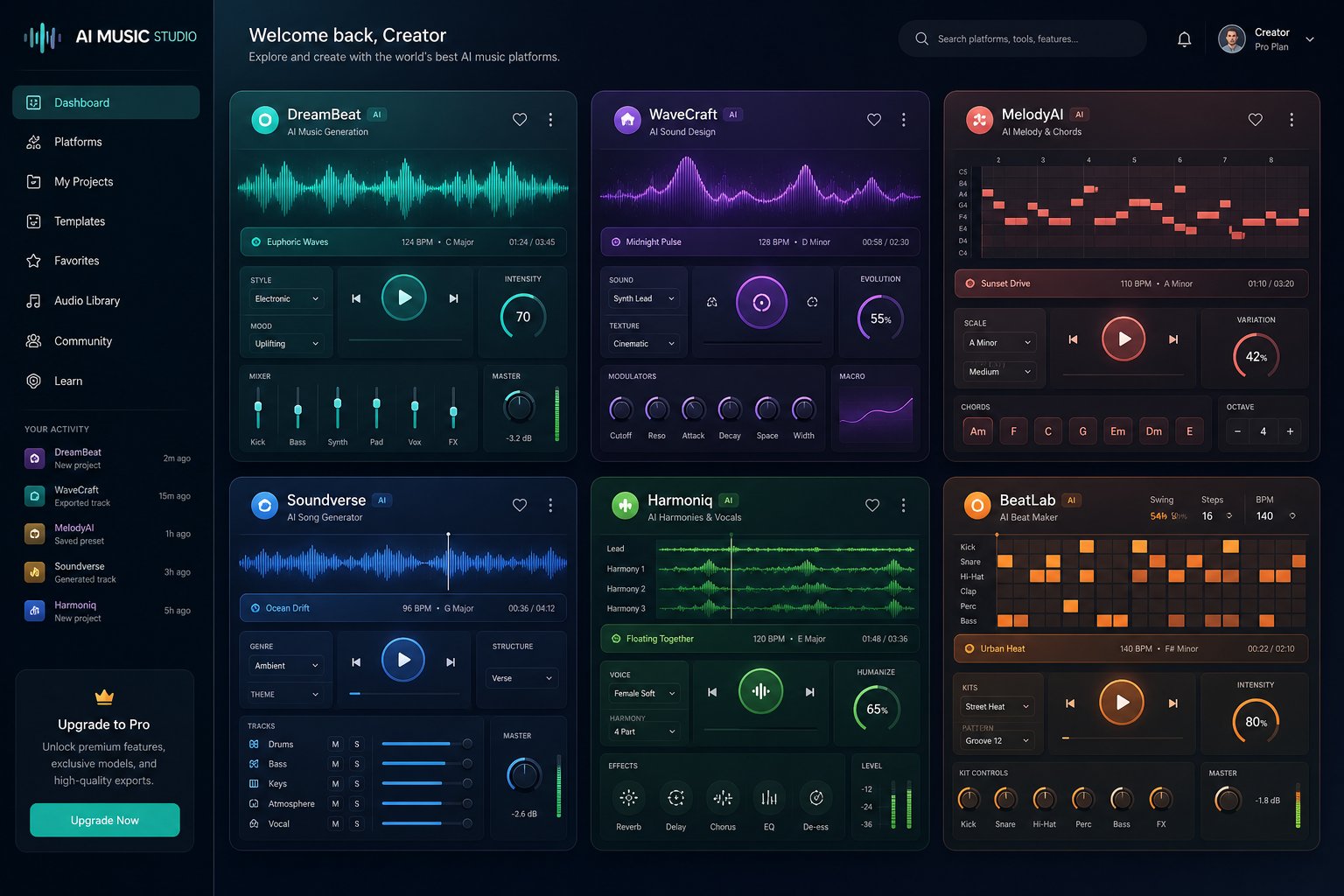
Quality criteria only matter if you can apply them to real options. The question most creators actually ask is direct: which is the best ai music generator for my needs? The honest answer depends on your input style, budget, and how you plan to use the output. Rather than ranking tools on a single axis, a side-by-side comparison of the top ai music generators 2025 reveals that each platform occupies a distinct niche.
Comparing Top AI Music Generators Side by Side
This comparison covers the best ai music generators currently active, evaluated across input flexibility, output quality, pricing, commercial rights, and ideal user profiles. No single tool wins every category, which is exactly why understanding the tradeoffs matters more than chasing a single recommendation.
| Tool | Primary Input Method | Output Quality | Pricing Model | Commercial Rights | Best For |
|---|---|---|---|---|---|
| MakeBestMusic | Text prompts, lyrics, style selection | High (full songs with vocals) | Freemium with credit tiers | Yes (paid plans) | Beginners and creators wanting fast prompt-to-song results |
| Suno | Text prompts, custom lyrics | High (realistic vocals, dynamic arrangements) | Subscription ($10-$30/mo) | Yes (Pro and Premier tiers) | Full vocal songs, high-volume creators |
| AIVA | Style presets, reference audio, MIDI upload | High (orchestral/classical focus) | Subscription ($15-$49/mo) | Full copyright on Pro tier | Film scoring, classical composition, professionals |
| Soundraw | Parameter sliders (genre, mood, tempo) | Medium-High (instrumental only) | Subscription ($11-$65/mo) | Royalty-free on all paid plans | Video creators, podcasters needing background music |
| Mubert | Text prompts, duration settings | Medium (loop-based, real-time) | Subscription/perpetual license ($14-$499) | Yes (Pro tier and above) | Streamers, long-form content, adaptive audio |
| Soundful | Template selection + customization | Medium-High (150+ templates) | Freemium ($5-$250/mo) | Royalty-free on paid plans | Social media creators, YouTube producers |
A few patterns emerge from this comparison of the top ai music generators. If you want complete songs with vocals and a low learning curve, MakeBestMusic and the suno ai music maker are the strongest starting points. Both accept text prompts and lyrics, producing full arrangements with singing in minutes. MakeBestMusic stands out for creators who want a streamlined workflow without navigating complex settings, supporting prompts, lyrics, and style inputs through a single interface.
For orchestral and cinematic work, the aiva ai music generator remains the specialist. Trained on over 20,000 classical scores, AIVA produces compositions with structural depth that general-purpose tools struggle to match. Its Pro tier grants full copyright ownership, which matters significantly for professional film and game scoring.
Platforms like remusic.ai and other newer entrants continue to expand the landscape, though established tools currently offer more predictable results and clearer licensing terms. When evaluating any best ai music generator 2025 candidate, prioritize trying the same creative brief across three or four platforms rather than trusting marketing demos alone.
Understanding Pricing Models in AI Music
Pricing in this space follows four distinct models, and understanding them prevents surprise costs:
- Freemium with limits — Free generation with restricted downloads, watermarks, or non-commercial-only output. Useful for testing but rarely sufficient for real projects.
- Credit-based — You purchase or earn credits consumed per generation. Flexible for occasional use but costs can escalate with heavy experimentation.
- Monthly subscription — Fixed fee for a set number of generations or unlimited access. The most predictable cost structure for regular creators.
- Perpetual license — One-time payment granting ongoing usage rights. Rare but available on platforms like Mubert for creators who want lifetime access without recurring charges.
The critical variable is not the dollar amount but what rights transfer with it. Commercial distribution rights vary dramatically across tiers. Free plans on Suno, AIVA, and most other platforms explicitly prohibit commercial use. Mid-tier subscriptions typically unlock monetization for YouTube, podcasts, and social media. Only top-tier plans on platforms like AIVA Pro grant full copyright ownership where you can register and defend the composition as your own intellectual property.
For creators exploring the best ai music generators for the first time, starting with a free tier to test output quality and then upgrading only when you need commercial rights keeps costs proportional to actual use. The tools are genuinely different in what they produce, and hands-on comparison reveals far more than any feature matrix can capture on its own.
Choosing a tool is only half the equation, though. The real value of any generator depends on how well it serves your specific creative context, which varies enormously across content types, industries, and production needs.
Practical Applications for Every Creator
A tool is only as valuable as the problem it solves. Feature lists and architecture explanations matter, but the real question is this: where does an AI music generator actually deliver results that justify the time and cost? The answer depends entirely on what you are making and who will hear it.
Across industries and creative disciplines, these tools have carved out specific roles where they outperform traditional approaches on speed, cost, or accessibility. Some use cases are obvious. Others are less intuitive but equally impactful.
Content Creators and Podcast Producers
If you produce videos, podcasts, or social media content regularly, you have likely hit the same wall: finding music that fits your brand, does not trigger copyright claims, and does not sound like everyone else's stock library picks. Royalty free intro music solves the legal side, but generic stock tracks all start blending together after a while. Your audience notices when your intro sounds identical to three other channels in the same niche.
AI generators solve this by producing original compositions matched to your exact specifications. A podcaster can generate royalty free podcast intro music that reflects their show's personality, whether that is warm acoustic fingerpicking for a storytelling format or punchy electronic beats for a tech review show. YouTubers can produce unique podcast intro songs and background beds that evolve with their brand rather than remaining static license-locked tracks they chose three years ago.
The workflow is fast enough to be practical on a weekly publishing schedule. Describe the mood and energy level you need, generate a few variations, pick the strongest one, and export. For creators publishing daily short-form content on TikTok or Reels, where platform algorithms actively favor original audio over reused tracks, AI-generated music offers a genuine competitive edge without the time investment of manual composition.
Business Audio and Commercial Applications
Every brand with a phone line has hold music. Every company running video ads needs background tracks. Every retail location plays something through its speakers. Yet most small and mid-sized businesses treat audio as an afterthought, defaulting to whatever royalty-free library comes cheapest.
AI music generation changes the economics completely. A small business can now function as its own ai jingle maker, producing a custom commercial jingle that reinforces brand identity without the $5,000 to $25,000 price tag that traditional jingle production demands. According to AI MagicX's commercial audio guide, AI-assisted jingle production drops costs to $50-$300 while cutting timelines from weeks to one or two days.
Background music for presentation decks, training videos, and corporate events is another high-volume need. Marketing teams producing dozens of ad variants for A/B testing can generate unique business background music for each version rather than reusing the same track across every creative. The result is more varied content that avoids listener fatigue across campaign touchpoints.
Popular commercial jingles from major brands like Intel, Netflix, and McDonald's demonstrate how powerful audio branding can be. Research confirms that audio logos are recalled 8.5 times more easily than visual logos in unaided recall tests. AI tools now put that same strategic advantage within reach of businesses operating on startup and SMB budgets.
Beyond marketing, game developers use AI generators to produce adaptive soundtracks that respond to gameplay states, generating ambient loops, tension builders, and victory stings without hiring a full audio team. Educators use them to demonstrate music theory concepts in real time, generating examples of chord progressions, modal scales, or arrangement techniques on demand. Filmmakers scoring independent shorts on zero budget can produce mood sketches and temp tracks that previously required either expensive library subscriptions or composer relationships.
- Social media and short-form video — Lowest barrier, highest volume. Generate original background tracks for daily content without copyright risk.
- Podcasts and YouTube channels — Custom intros, outros, and transition music that establish brand identity across episodes.
- Small business marketing — Ad jingles, product videos, and campaign audio at a fraction of traditional production costs.
- Corporate and enterprise — Hold music, presentation backgrounds, training content, and internal communications audio.
- Game development — Procedural soundtracks, ambient layers, and sound effects that adapt to player behavior.
- Film and video production — Temp scores, mood sketches, and final background music for independent projects.
- Education and e-learning — Demonstrating musical concepts, generating lesson backgrounds, and creating accessible composition exercises for students.
- Musicians and producers — Rapid prototyping, overcoming creative blocks, generating arrangement ideas, and producing demo backing tracks for client review.
The common thread across every use case is the same: AI music generation delivers the most value where speed and cost matter more than absolute sonic perfection. A podcast intro does not need to compete with a Grammy-winning mix. A hold music track does not need emotional depth. A social media background does not need complex arrangement. These contexts reward "good enough, fast, and original" over "perfect but slow and expensive."
That practical value also introduces practical questions. When you generate a track for a commercial ad or publish AI-created music on a monetized channel, who owns it? What can you legally do with it? Those answers are less straightforward than most platforms would have you believe.
Copyright, Licensing, and Ethics of AI Music
You generated a track, it sounds great, and you want to use it in a monetized YouTube video or a paid ad campaign. Simple enough, right? Not exactly. The legal landscape around AI-generated music is one of the least understood and most consequential aspects of this entire technology. Threads debating these issues across ai music reddit communities reveal just how much confusion exists, even among experienced creators who have been generating tracks for months.
The core tension is straightforward: traditional copyright law was built for human creators, and AI does not fit neatly into that framework. Understanding where the boundaries actually stand, rather than where you might assume they stand, protects you from takedowns, lost revenue, and legal exposure.
Copyright and Licensing for AI-Generated Music
Can you copyright a song that an AI composed? In the United States, the answer leans heavily toward no, at least for purely AI-generated output. The Congressional Research Service confirms that U.S. copyright law requires human authorship, and courts have consistently upheld this principle. In March 2025, the D.C. Circuit Court of Appeals affirmed in Thaler v. Perlmutter that the Copyright Act "requires all eligible work to be authored in the first instance by a human being." The U.S. Copyright Office reinforced this position in its January 2025 report, concluding that "prompts alone do not provide sufficient human control to make users of an AI system the authors of the output."
This does not mean AI music is illegal to use or distribute. It means the protection model is different from what you are accustomed to. When you commission a human composer, you negotiate ownership or licensing of the resulting work, and that work qualifies for copyright registration. When you generate a track with AI, your usage rights come primarily from the platform's terms of service rather than from copyright law itself.
The distinction matters in practice. As ONCE's distribution guide explains, platforms like Suno grant commercial release rights only on Pro and Premier plans, while free-tier generations remain restricted to personal use. Other platforms follow similar tiered structures. You may hold distribution rights without holding copyright, which means you can monetize the track but may not be able to prevent someone else from using a substantially similar AI-generated composition.
The spectrum of licensing models across platforms breaks down into three broad categories:
- Royalty-free commercial use — Paid tiers on platforms like Soundraw and Soundful grant royalty free commercial music rights, allowing you to use generated tracks in videos, ads, and products without ongoing fees. You do not own the copyright, but you have a perpetual license to use the output.
- Full copyright transfer — Rare but available on select platforms. AIVA's Pro tier, for example, grants full copyright ownership where you can register the composition and defend it legally. This is the closest equivalent to traditional music ownership.
- Personal use only — Free tiers across nearly every platform. You can generate and listen, but distributing commercially violates the terms regardless of which distributor you use. This is the detail that catches most beginners off guard.
The situation becomes even more nuanced when human creativity is layered on top of AI output. The Copyright Office has registered hundreds of works that incorporate AI-generated material where the human author's contribution, such as significant arrangement, editing, lyrics, or creative curation, meets the threshold for protection. If you generate a backing track with AI, write original lyrics, record your own vocals, and arrange everything in a DAW, the resulting work has a much stronger copyright case than a raw, unedited AI export.
Discussions on best ai music generator reddit threads frequently surface this exact question, and the practical consensus aligns with the legal guidance: the more human creative input you add to AI-generated material, the stronger your ownership position becomes.
Ethical Considerations and the Impact on Musicians
Legal rights are only one dimension. The ethical questions run deeper and generate sharper disagreement.
Every AI music model learns by training on existing recordings. Those recordings were created by human musicians, engineers, and producers who invested years developing their craft. When an AI model absorbs thousands of hours of music to learn harmonic patterns, vocal phrasing, and production techniques, the original artists typically receive no compensation and often have no knowledge that their work was used. As copyright law specialist Alizabeth Nowland notes, artists and musicians are increasingly concerned that their work has been absorbed into training datasets "without permission, credit, or compensation."
Several dozen lawsuits are currently working through the courts. In June 2025, federal courts issued split decisions on whether training AI on copyrighted works constitutes fair use. In Bartz v. Anthropic, a judge ruled that copying books for AI training was "quintessentially transformative" and therefore fair use. In Kadrey v. Meta, a different judge reached a similar conclusion but warned that market harm from AI outputs competing with original works could weigh decisively against fair use in future cases. The legal framework remains actively contested, and outcomes in music-specific cases may differ from those involving text.
The ethical debate extends beyond legality. Two perspectives dominate the conversation across best free ai music generator reddit discussions and professional forums alike:
AI as democratizer. Proponents argue that these tools open music creation to people who would never have had access, content creators on tight budgets, educators in under-resourced schools, hobbyists with ideas but no instruments. They point out that musical styles and techniques have always been shared and built upon across generations, and AI simply accelerates that natural evolution.
AI as displacement threat. Critics counter that session musicians, composers for hire, jingle writers, and stock music producers are losing work to tools trained on their own creative output. The concern is not abstract. When a small business can generate a custom jingle in two minutes instead of hiring a composer, that composer loses a paying client. When a filmmaker scores an entire short with AI, a session musician loses a booking. Organizations like the Recording Industry Association of America are lobbying for legislation requiring AI tools to disclose training data and obtain artist consent.
The honest answer is that both perspectives hold truth simultaneously. AI music generation does democratize creation, and it does displace certain professional roles. The technology itself is neutral. The ethical weight falls on how platforms source training data, how transparently they communicate usage rights, and how the broader industry develops compensation mechanisms for artists whose work fuels these systems.
Before you use any AI-generated music commercially, run through this licensing checklist to protect yourself:
- Does your current plan tier explicitly grant commercial use rights, or is it limited to personal use?
- Do the platform's terms transfer copyright ownership to you, or only a distribution license?
- Are there restrictions on where you can use the output (streaming platforms, broadcast, advertising, merchandise)?
- Does the platform require attribution or credit in published works?
- Can other users on the same platform generate identical or near-identical compositions, potentially creating competing versions of your track?
- Does the platform indemnify you against copyright infringement claims if the AI output inadvertently resembles an existing song?
- Have you added sufficient human creative input (lyrics, arrangement, mixing, vocal performance) to strengthen your ownership position?
- Does the distribution platform you plan to use require AI disclosure metadata, and does your workflow handle that automatically?
- Have you reviewed the platform's terms recently, since many update their licensing language as the legal landscape evolves?
Skipping this checklist is the single most common mistake creators make. Threads asking about a music ai creator without copyright restrictions reveal that many users assume commercial rights come standard. They do not. Your rights are only as strong as the specific plan you are paying for and the specific terms you agreed to.
These legal and ethical realities are not reasons to avoid AI music generation. They are reasons to approach it informed. And for creators ready to start generating with clear eyes about what they can and cannot do with the results, the practical path from first prompt to finished track is more accessible than ever.
Getting Started With AI Music Generation
Legal clarity and ethical awareness set the foundation. The next step is simply doing it. If you have been reading this far and wondering how do i write a song using these tools, the barrier is lower than you might expect. You do not need music theory, production experience, or expensive equipment. You need a clear idea and a willingness to iterate.
The difference between creators who get disappointing results and those who consistently produce usable tracks comes down to one skill: prompt quality. Among the best ai music creation tools 2025 has to offer, every single one responds better to specific, structured input than vague one-liners. This is the closest thing to a universal rule in AI music generation.
Writing Effective Prompts for Better Results
Think of your prompt as a creative brief, not a wish. "Make something cool" gives the model almost nothing to work with. A structured prompt combines five elements that dramatically narrow the output toward what you actually want:
- Genre — Name the style explicitly. "Indie folk," "dark trap," "cinematic orchestral," or "lo-fi jazz" each activate completely different musical frameworks within the model.
- Mood and emotion — Describe how the track should feel. "Nostalgic and bittersweet" produces something entirely different from "triumphant and energetic," even within the same genre.
- Instrumentation — Specify what you want to hear. "Fingerpicked acoustic guitar, soft brushed drums, and warm upright bass" is far more actionable than "acoustic instruments."
- Tempo and energy — Include a BPM range or energy descriptor. "Slow and contemplative at 70 BPM" versus "driving and uptempo at 140 BPM" shapes the entire rhythmic foundation.
- Structure — If the tool supports it, indicate arrangement preferences. "Build from sparse verse to full chorus with layered harmonies" gives the AI a roadmap rather than letting it guess.
A weak prompt like "happy pop song" might return something generic. A structured prompt like "upbeat synth-pop, 118 BPM, bright female vocals, shimmering arpeggiated chords, punchy electronic drums, euphoric chorus with layered harmonies" produces results you can actually use. As Soundverse's prompt engineering guide explains, combining emotional cues with technical specificity is what separates average output from professional-grade results.
If you are stuck on subject matter, treat the tool itself as a song topic generator. Describe a scene, a memory, or an emotion rather than a technical specification. "The feeling of driving alone on an empty highway at 2 AM" gives the AI enough emotional context to produce something atmospheric and intentional, even without naming a genre explicitly.
For anyone wondering how to write a song lyrics that pair well with AI generation, the same principle applies: specificity over vagueness. Concrete imagery and clear narrative arcs produce better vocal performances than abstract platitudes. "I left the porch light on but you never came home" lands harder than "I miss you so much" because it gives the AI vocal model emotional texture to work with.
Your First AI-Generated Song
The best approach for beginners is to start simple, learn from the output, and build complexity gradually. Do not aim for a masterpiece on your first generation. Aim for understanding how the tool responds to your input, then refine from there.
Here is a step-by-step workflow to produce your first track:
- Choose one clear idea. Pick a single genre and mood combination. "Chill lo-fi beat for studying" or "upbeat acoustic pop about a road trip" is specific enough to produce focused results.
- Write your prompt using the five-element structure. Combine genre, mood, instrumentation, tempo, and structure into two or three sentences. Do not overcrowd it with contradictory directions.
- Generate three to five variations. Never judge the tool by a single output. Each generation explores a slightly different interpretation of your prompt, and comparing them teaches you how the model thinks.
- Listen critically and take notes. Which variation has the strongest hook? Which has the best vocal tone? Which has weak sections? Write down what worked and what did not.
- Refine your prompt based on results. If the tempo felt too fast, specify slower. If the instrumentation was too dense, request fewer elements. Each iteration gets you closer.
- Select your strongest output and export. Download in the format your project needs, whether that is MP3 for quick sharing or WAV for further editing in a DAW.
- Iterate on your next generation. Apply what you learned. Better prompts come from understanding how the model interprets your language, and that understanding only builds through repetition.
For a low-friction starting point, MakeBestMusic's AI Music Generator lets you turn prompts, lyrics, and style ideas into complete songs without navigating complex settings. It supports the full range of inputs, from simple text descriptions to full lyric sheets with vocal style preferences, making it particularly accessible if you want to hear results quickly and decide whether to invest time learning more advanced workflows. Among the best ai music generator apps 2025, it represents the fastest path from idea to finished song for someone generating their first track.
Common beginner mistakes to avoid as you experiment:
- Overly vague prompts — "Make something good" tells the AI nothing. Be specific about at least genre, mood, and one instrumentation detail.
- Unrealistic expectations — Your first generation will rarely be release-ready. Treat early outputs as drafts and learning opportunities.
- Not iterating — Generating once and giving up wastes the tool's potential. The best ai song creator workflow involves multiple rounds of generation and refinement.
- Ignoring licensing terms — Before publishing anything commercially, confirm your plan tier grants the rights you need. Review the checklist from the previous section.
The best ai tool to create music is ultimately whichever one matches your creative style and produces results you want to keep using. Start with the best free ai music generators 2025 offers on free tiers, test your prompts across two or three platforms, and upgrade only when you find a tool that consistently delivers what you hear in your head. The skill is not in finding the perfect platform. It is in learning to communicate your ideas clearly enough that any competent tool can execute them.
