

Yes, AI Can Read Sheet Music and Play It
The short answer is yes. AI can read sheet music and play it back to you. But the longer, more honest answer involves a few layers worth unpacking. The technology works, it is available right now in multiple forms, and it handles certain tasks remarkably well. It also has real limitations that matter depending on what you are trying to accomplish.
Whether you are a student learning how to read sheet music piano style, a choir director who needs individual vocal parts isolated for rehearsal, or a composer sitting on a stack of handwritten manuscripts, the promise is the same: point AI at a page of piano sheet music notes and hear it played back in seconds. The reality, though, depends on which technology you are actually asking about.
What People Actually Mean When They Ask This Question
When someone searches this question, they usually picture one of two scenarios. Either they have a physical page or PDF of printed notation and want to hear what it sounds like, or they have a recording of someone playing and want the notes written out. These feel like the same problem from the outside, but they rely on completely different AI systems under the hood.
A pianist wanting to hear an unfamiliar score before practicing it needs a sheet music player that converts visual notation into audio. A guitarist trying to transcribe a solo from a recording needs something else entirely — a music reader that listens to audio and writes down what it hears. Both involve AI, both produce notation or playback, but the underlying technology is fundamentally different.
Two Technologies That Sound the Same but Are Not
Optical Music Recognition (OMR) reads images of written notation and converts them into digital music data. Audio transcription listens to sound recordings and attempts to identify the pitches, rhythms, and instruments being played. These are separate AI disciplines with different strengths, different accuracy levels, and different tool ecosystems.
OMR — the technology behind sheet music AI tools — works like a specialized scanner. It looks at staves, noteheads, beams, and clefs, then interprets their spatial relationships to reconstruct the music in a playable digital format. Tools built on this approach, such as Soundslice and Maestria, are designed specifically to read music from images.
Audio transcription, sometimes called Automatic Music Transcription (AMT), takes the opposite path. Software like Klangio AI and AnthemScore analyzes a sound recording and attempts to identify which notes are being played, at what velocity, and for how long. It is essentially trying to reverse-engineer a performance back into notation.
Both technologies produce similar outputs — typically MIDI or MusicXML files that can be played back or edited. But confusing one for the other leads to frustration. If you have a PDF, you need an ai sheet music reader. If you have an MP3, you need an audio transcription tool. Knowing which problem you are solving is the first step toward getting useful results.
The gap between what these tools promise and what they deliver is where most disappointment lives. Understanding the actual workflow — from scan to structured data to playback — reveals both the power and the boundaries of current AI music reading technology.
The Technology Behind AI Sheet Music Recognition
Reading text from a page is something AI mastered years ago. Scanning a receipt, digitizing a book chapter, converting a handwritten letter into editable text — these are solved problems. So why is reading music notation still so difficult? The answer lies in the fundamental difference between how text and music encode information on a page.
Text flows in one direction. Letters form words, words form sentences, and meaning moves left to right, top to bottom. Music notation, by contrast, encodes information across multiple simultaneous dimensions. A single vertical slice of a piano score might contain notes in both hands, dynamic markings below the staff, tempo indications above it, slurs arching over several measures, and pedal markings at the bottom — all of which must be interpreted together. This is what makes building a reliable sheet music scanner so technically demanding.
Three Generations of Music Reading Technology
The field of music notation AI has evolved through three distinct phases, each representing a fundamentally different approach to the problem.
The first generation relied on rule-based image processing. These early systems used heuristic filters and template matching to detect staff lines, segment the image into regions, and identify noteheads by their shape and position. Imagine a set of rigid if-then rules: "if a filled oval sits on the third line of a treble clef staff, it is a B." These systems worked on clean, simple scores but broke down quickly with any visual complexity or variation in printing style.
The second generation introduced machine learning, and this is where dedicated tools like ScanScore and the open-source Audiveris operate. Instead of hand-coded rules, these systems use trained neural networks — specifically Convolutional Neural Networks (CNNs) for identifying graphical elements and Recurrent Neural Networks (RNNs) or Transformers for modeling the sequential relationships between symbols. Research published in recent years shows that hybrid architectures like Convolutional Recurrent Neural Networks (CRNNs) can approach human-level accuracy on monophonic and simple polyphonic scores by jointly performing feature extraction, symbol classification, and sequence decoding. Tools like piano2notes and PlayScore use variations of these trained models specifically for notation recognition.
The third generation is the newest and most experimental: multimodal Large Language Models (LLMs) like GPT-4, Claude, and Gemini attempting to read notation as part of their general visual understanding. These models were not trained specifically as a melody scanner ai — they are general-purpose systems that happen to accept image inputs. The results, as you might expect, are inconsistent.
Why Sheet Music Is Harder Than Text for AI
When you think about OCR (Optical Character Recognition) for text, the task is relatively straightforward. Each character occupies its own space, the reading order is linear, and context helps resolve ambiguity. Music notation breaks all of these assumptions.
Here is what makes it so challenging for any ai music notes reader:
- Polyphony and vertical stacking: Multiple notes sound simultaneously, requiring the system to parse overlapping symbols that share horizontal alignment on the same staff.
- Beaming and grouping: Notes are connected by beams that encode rhythmic grouping, and the angle and connection points of those beams carry meaning.
- Articulations and dynamics: Dots, accents, staccato marks, hairpins, and text expressions float around the staff in positions that vary between publishers and editions.
- Spatial relationships: A single pixel of vertical offset changes which note is being indicated. The difference between a G and an A is just one staff position — a tiny spatial distinction that carries enormous musical consequence.
- Layout variations: Different publishers use different spacing, font styles, and engraving conventions, meaning a model trained on one style may struggle with another.
- Ties, slurs, and cross-staff notation: Curved lines that connect notes across beats or between staves require the system to understand long-range dependencies rather than processing symbols in isolation.
Research into end-to-end neural methods for piano notation — which features dual staves and complex beam structures — has only recently achieved robust transcription of complete piano scores without manual segmentation. Transformer-based sequence-to-sequence frameworks have further advanced the field by capturing long-range dependencies among musical symbols, but performance still plateaus when generalizing to wholly unseen print styles.
How Neural Networks Process Visual Notation
Imagine feeding a photo of sheet music into a trained melody scanner. The system does not "read" the way a musician does. Instead, it processes the image through layers of abstraction. Early layers detect edges and basic shapes — lines, curves, filled ovals. Middle layers combine these into recognized components — noteheads, stems, flags, clefs. Final layers assemble these components into a structured sequence that represents the music's pitch, rhythm, and expression markings.
Dedicated OMR tools like ScanScore train these networks on thousands of annotated score images, teaching the model to handle the specific visual vocabulary of music. Newer approaches using Connectionist Temporal Classification (CTC) and sequence-to-sequence frameworks reduce the need for meticulous alignment between images and annotations, which accelerates training and improves generality across different engraving styles.
General-purpose LLMs take a different path. Testing by researcher and engineer artfish.ai found that frontier models like Claude, GPT, and Gemini could often identify popular pieces by name and correctly read key and time signatures, but consistently failed at identifying individual notes. When asked "what is the first note?" on pieces they had just correctly named, all three models gave wrong answers. Sheet music sits in an awkward spot for these models: it is visual, but the meaning lives in tiny spatial relationships that general vision training does not prioritize.
This gap between dedicated OMR systems and general AI explains why the tool you choose matters enormously. A purpose-built sheet music scanner trained on notation will outperform a general chatbot every time for actual digitization work. But understanding what happens after recognition — how the recognized symbols become playable sound — requires following the data through its next transformation.
The Complete Workflow from Scan to Sound
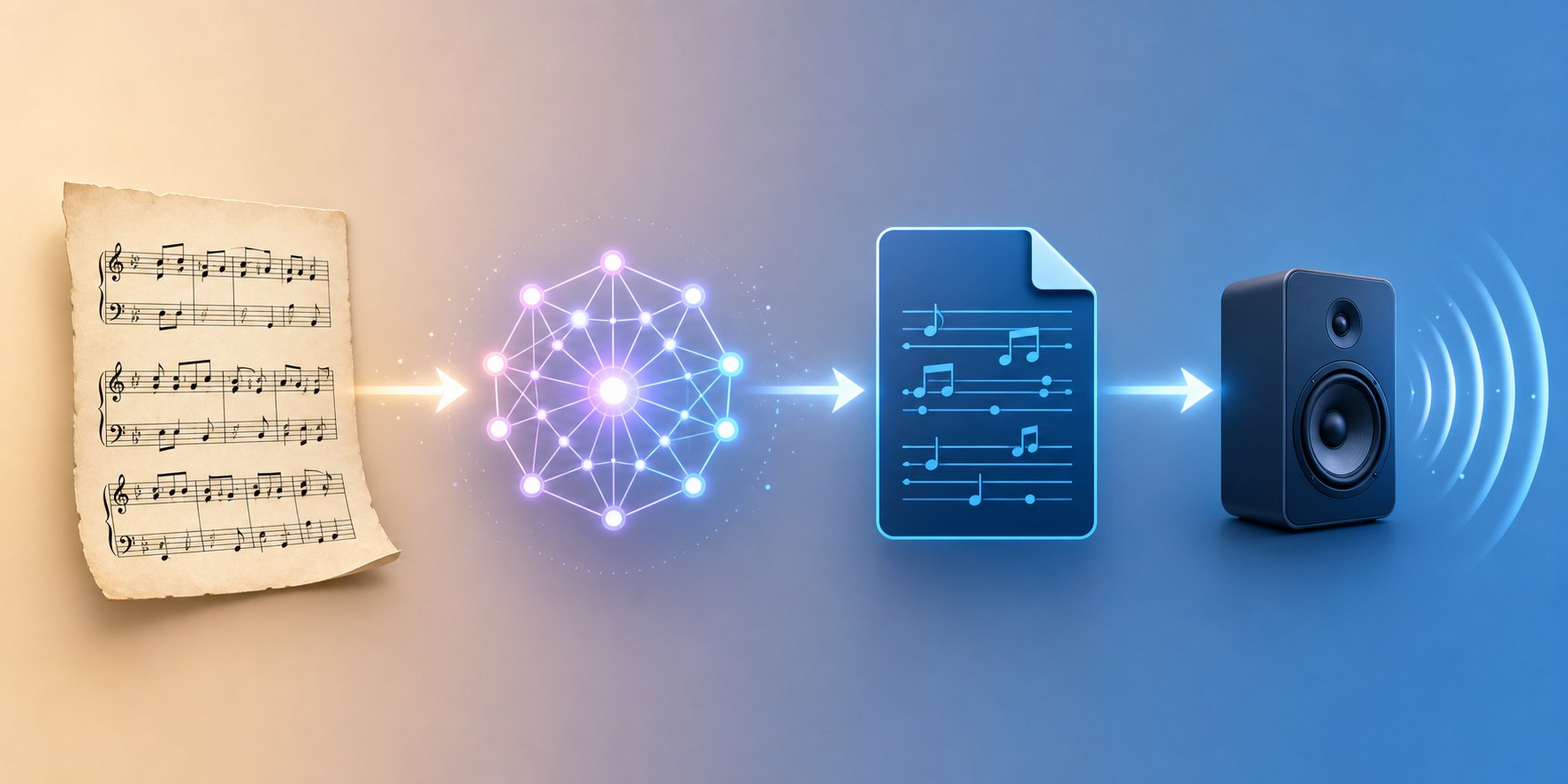
Here is something that surprises most people: AI cannot go directly from a picture of sheet music to audio. There is no single step that takes an image and produces sound. Instead, the process moves through a chain of transformations, each converting the music into a progressively more usable format. Understanding this pipeline explains both why the technology works as well as it does and why errors creep in along the way.
Think of it like translating a book from one language to another. You cannot just look at a page of French text and instantly produce spoken English. You read the words, understand their meaning in an abstract form, then express that meaning in the new language. AI sheet music reading follows the same logic — visual symbols get interpreted into structured data, and that data gets rendered as sound.
Step by Step from Paper to Playback
Whether you are working with scanned sheet music from a flatbed scanner or a PDF downloaded from a digital library, the journey from page to playback follows the same sequence:
- Capture or upload the source material. This might be a photograph taken with your phone, a high-resolution scan, or a PDF file. The quality of this input directly affects everything downstream — blurry images or low-contrast scans introduce errors before the AI even begins processing.
- AI recognition and symbol interpretation. The OMR engine analyzes the image, detecting staff lines, noteheads, stems, beams, rests, clefs, key signatures, time signatures, dynamics, and articulations. It maps the spatial position of each element to determine pitch and rhythmic value. This is where the neural networks discussed earlier do their heavy lifting.
- Conversion to a structured intermediate format. The recognized symbols get encoded into a machine-readable file — typically MIDI or MusicXML. This is the critical translation step. The AI is not producing audio here; it is producing a structured description of the music that other software can interpret.
- Playback through a synthesizer or notation application. A MIDI player online, a DAW, or notation software like MuseScore reads the intermediate file and renders it as audible sound using synthesized instruments. This is where you finally hear the music.
Each step in this chain is a potential failure point. A shadow on the scan might cause the AI to misread a note in step two. A misidentified accidental compounds in step three when the wrong pitch gets encoded into the MIDI file. By step four, you hear a wrong note and may not know where in the pipeline the error originated. This compounding effect is why scan quality and source preparation matter so much — garbage in, garbage out applies with full force here.
The conversion from sheet music to MIDI is the step most users care about, because MIDI is what enables playback. Tools like PlayScore 2 handle this entire pipeline within a single mobile app — you photograph or import a PDF, the app runs recognition, and you can export the result as a MIDI file ready for playback or further editing. But even in a streamlined tool, the same four stages are happening under the hood.
Why Intermediate Formats Like MIDI and MusicXML Matter
You might wonder why the process needs an intermediate format at all. Why not just go straight from recognized notation to audio? The answer is flexibility. Different users need different things from the same scanned score. A student wants playback. A composer wants to edit the notation. A musicologist wants archival-quality encoding. The intermediate format determines what you can do with the recognized music after the AI finishes its work.
Three formats dominate this space, each designed for a different purpose:
| Format | Purpose | Best For | Limitations |
|---|---|---|---|
| MIDI | Encodes note events (pitch, duration, velocity, timing) as performance instructions for electronic instruments | Playback, DAW integration, sequencing, converting midi to mp3 via a synthesizer | Does not store notation details like stem direction, beaming, dynamics text, or layout — only what notes sound and when |
| MusicXML | Encodes the full visual and semantic content of a score in a structured XML format | Importing into notation editors (MuseScore, Finale, Sibelius), preserving layout and engraving details | Larger file sizes, not directly playable without notation software to interpret it |
| MEI (Music Encoding Initiative) | Academic-grade encoding that captures notation, metadata, editorial annotations, and source provenance | Musicological research, digital archives, critical editions of historical manuscripts | Complex to produce and consume, limited tool support outside academic contexts |
The distinction between MIDI and MusicXML is worth emphasizing. MIDI describes how music sounds — what notes play, when they start, and how long they last. MusicXML describes how music looks — the actual notation, including beaming, stem direction, expression markings, and page layout. As MusicXML creator Michael Good has explained, the format is designed to transfer musical information into a richer, more accurate representation than MIDI alone can provide.
In practical terms: if your goal is to hear the music played back, change tempo of a midi sample, or load it into a DAW for production work, MIDI is the format you want. If your goal is to open the score in notation software and edit it — fix wrong notes, rearrange parts, print clean copies — MusicXML preserves far more of the original score's information. MEI serves a narrower audience, primarily researchers working with historical manuscripts who need to encode not just the music but editorial decisions and source relationships.
Most OMR tools offer export in both MIDI and MusicXML, letting you choose based on your downstream needs. Some, like Audiveris, output MusicXML by default since it captures more information, and you can always convert MusicXML to MIDI afterward using notation software. Going the other direction — MIDI to MusicXML — loses information, because MIDI simply does not contain the notational detail that MusicXML encodes.
This pipeline architecture also explains something practical: the quality of your final playback depends not just on how well the AI reads the score, but on what happens at the rendering stage. A perfectly recognized MIDI file still sounds mechanical if played through a basic General MIDI synthesizer. The same file routed through high-quality virtual instruments in a DAW sounds dramatically different. The intermediate format is just data — how that data gets voiced is an entirely separate question.
What Playing the Music Actually Sounds Like
So the AI has read your score and produced a MIDI file. You hit play. And what comes out sounds... robotic. Every note lands at exactly the same volume, with metronomic timing and zero expression. This is the moment most people feel let down, because "playing" music means something very different to a human than it does to a computer.
The gap between what a piano sheet reader outputs and what a real performance sounds like is enormous. Understanding why — and knowing how to bridge that gap — turns a disappointing beep-and-bloop experience into something genuinely useful.
MIDI Playback vs Realistic AI Performance
When most OMR tools "play" your scanned sheet music, they are sending MIDI data to a synthesizer. MIDI itself is not sound. It is a set of instructions — which note to play, when to start it, how hard to strike it, and when to release it. Think of it as a digital piano roll rather than a recording. The quality of what you hear depends entirely on what interprets those instructions.
A basic General MIDI synthesizer — the kind built into most operating systems and browser-based tools — maps those instructions to simple sampled sounds. You can use an online midi player to hear the result instantly, but it will sound flat and lifeless. Every note gets equal treatment regardless of musical context.
Realistic AI performance is a separate and much newer technology. Rather than simply triggering notes at fixed velocities, these systems interpret the score the way a trained musician would — adding subtle timing variations (rubato), dynamic shaping, articulation differences, and instrument-specific techniques. Research from Queen Mary University of London introduced RenderBox, a framework that takes MIDI scores and generates expressive audio performances across multiple instruments using diffusion transformer architecture. The system learns from real human performances, progressively training from strict synthesis to stylistically varied interpretations — even learning to replicate the playing styles of specific pianists.
Similarly, work on the Expressive Music Variational AutoEncoder (XMVAE) separates the problem into two roles: a "Composer" branch that handles the notes and structure, and a "Pianist" branch that generates expressive parameters like timing variation, velocity curves, and articulation. These models demonstrate that AI can move beyond mechanical playback toward genuinely musical rendering — but this technology is still largely in the research stage, not yet standard in consumer piano sheet player tools.
Making MIDI Output Sound Musical
Until AI-expressive rendering becomes mainstream, you have several practical options for making your scanned MIDI output sound better. The differences in quality are dramatic:
| Playback Method | Quality Level | Accessibility | Best For |
|---|---|---|---|
| Raw General MIDI (browser or OS synth) | Low — mechanical, thin sound | Instant, free, works anywhere with a midi play online tool | Quick pitch verification, checking if recognition was accurate |
| Notation software playback (MuseScore, Dorico) | Medium — better samples, basic expression | Free to moderate cost, requires installation | Students reviewing a muse score sheet, rehearsal preparation |
| DAW with virtual instruments | High — realistic sampled instruments with full control | Requires DAW software, virtual instrument libraries, and some production knowledge | Composers, arrangers, and producers creating polished audio |
| AI-expressive rendering (RenderBox, XMVAE-style systems) | Very high — human-like timing, dynamics, and style | Currently limited to research demos and specialized tools | Realistic performance simulation, style exploration |
For most users, notation software offers the best balance. MuseScore, for example, includes built-in playback with decent instrument sounds and interprets some dynamic and articulation markings from MusicXML imports. NotePerformer, a third-party playback engine for Sibelius and Dorico, uses AI-based phrasing to automatically add musical expression to notation — a practical middle ground between raw MIDI and full research-grade performance rendering.
The DAW route offers the most control. Loading your MIDI into a Digital Audio Workstation and routing it through high-quality sampled instruments — libraries where every note of a real violin or piano was individually recorded at multiple dynamics and articulations — produces results that can sound nearly indistinguishable from a live recording. As virtual instrument developer Benjamin Botkin explains, modern sampled instruments capture so many layers of nuance that skilled users can create compelling orchestral music entirely from MIDI data on a home computer.
The key insight here: the AI's job of reading your sheet music ends at the MIDI file. Everything after that — how musical, how realistic, how expressive the playback sounds — depends on your rendering choices. A perfectly accurate recognition still needs good voicing to sound like music rather than data. And the accuracy of that recognition itself has real limits worth understanding before you scan your first score.
AI Limitations and When It Gets Things Wrong
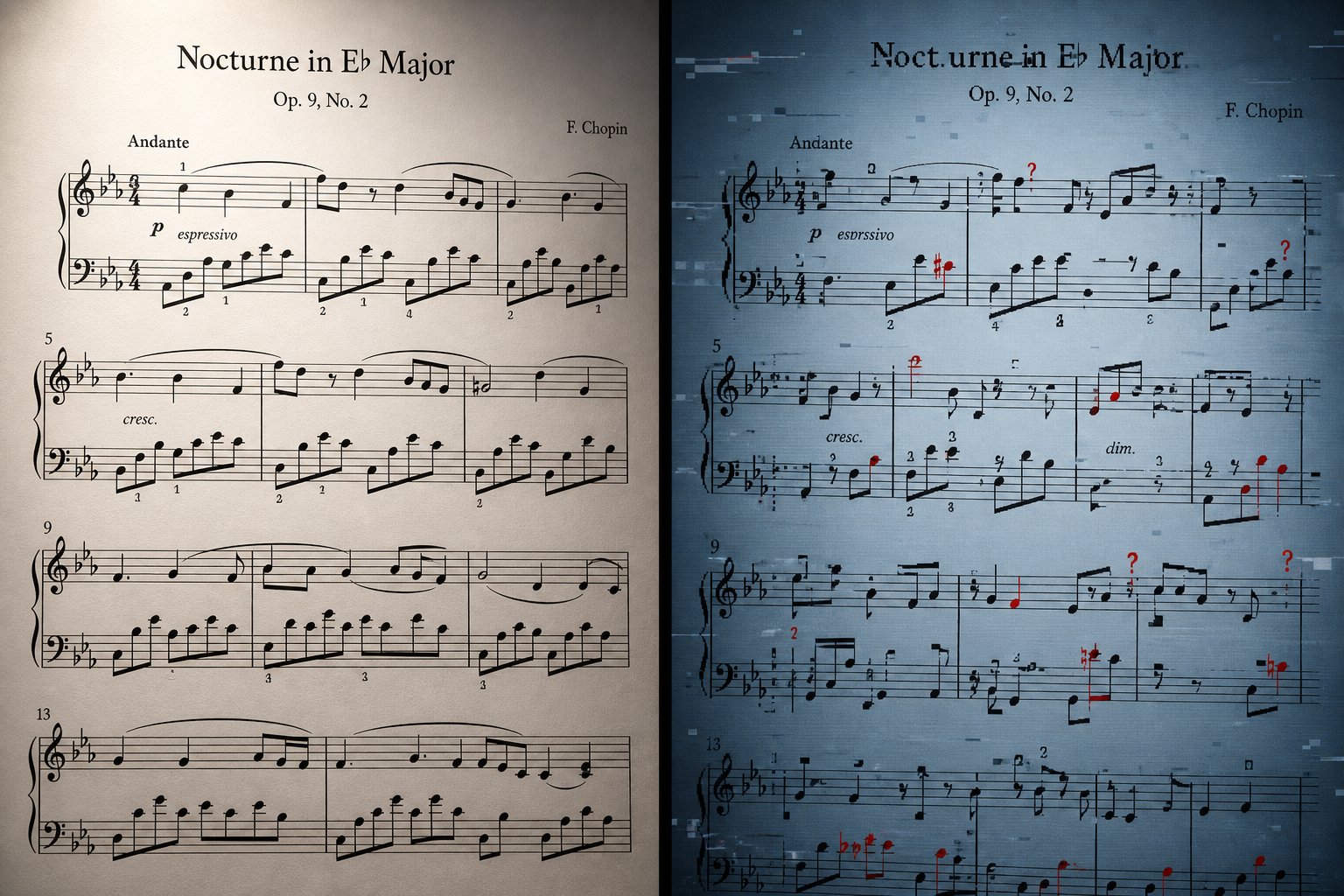
Accurate recognition and clean playback paint an optimistic picture. But anyone who has actually run a score through an OMR tool knows the reality is messier. AI sheet music reading works impressively well under ideal conditions — and degrades fast when conditions are anything less than ideal. Knowing where the technology breaks down saves you from wasted hours correcting garbled output that should never have been scanned in the first place.
Where AI Sheet Music Reading Breaks Down
Not all scores are created equal in the eyes of a recognition engine. The complexity of piano notation, the density of notes on sheet music, and the physical condition of the source material all determine whether AI produces a usable result or a frustrating mess.
Here are the score types ranked from easiest to hardest for AI to process accurately:
- Single-voice melodies with standard notation — lead sheets, simple hymns, beginner exercises. Clean, widely spaced, minimal markings. AI handles these reliably.
- Simple piano pieces with two staves — straightforward rhythm, clear printed engraving, standard key signatures. Most dedicated OMR tools perform well here.
- Multi-instrument chamber music — string quartets, wind ensembles. More staves introduce alignment challenges, but printed parts remain manageable.
- Dense polyphonic keyboard works — Bach fugues, Romantic-era piano music with thick chords, cross-staff beaming, and layered voices. Accuracy drops noticeably.
- Full orchestral scores — dozens of staves, transposing instruments, cue notes, and complex vertical alignment. Even commercial tools struggle here.
- Handwritten manuscripts — inconsistent symbol shapes, irregular spacing, personal shorthand. Recognition accuracy plummets below usable thresholds.
- Non-standard or graphic notation — extended techniques, aleatoric passages, spatial notation. Current AI simply cannot interpret these.
The pattern is clear: the further a score deviates from cleanly printed, single-instrument, standard Western notation, the less reliable AI recognition becomes. If you are trying to figure out how to read notes on sheet music that use unconventional symbols, AI is not your answer — at least not yet.
Realistic Accuracy Expectations for Different Score Types
Concrete numbers help set expectations. Audiveris, one of the most widely used free OMR tools, reports approximately 80-90% accuracy on clear, simple printed music with standard notation. That sounds high until you consider what 10-20% error means in practice — potentially dozens of wrong notes per page, any one of which can derail the musical meaning.
For moderately complex scores with multiple staves, accuracy drops to roughly 60-75%. Handwritten or poorly scanned sheet music falls below 50%, at which point manual input from scratch may actually be faster than correcting the AI output.
A 95% symbol recognition rate sounds impressive until you realize that in a single page of piano music containing 200+ symbols, that still means 10 or more errors — and in music, a single misread accidental can make an entire passage sound wrong.
OMR researcher Alexander Pacha illustrates this vividly using Debussy's Clair de Lune: missing just two tiny accidentals at the beginning of a passage produces a completely different — and completely wrong — musical result. The computer might correctly recognize 99% of all symbols, yet the output remains unacceptable to any musician because those few errors land in critical spots. Small mistakes propagate. A misread key signature poisons every note that follows. A missed tie changes rhythm across an entire phrase.
General-purpose AI models fare even worse. Testing by researcher Yennie Jun found that ChatGPT-4, Claude 3, and Gemini Pro all failed at basic music reading tasks. When asked "what note is this?" on specific passages, all three models gave incorrect answers. ChatGPT-4 fabricated notation details — claiming staccato markings, accent markings, and sixteenth notes existed in a score where none appeared. Claude confidently misidentified pieces. Gemini could not correctly read a time signature, a task as simple as recognizing two numbers stacked vertically. These models are not functioning as a reliable note finder for anyone who needs accurate results.
The common error types you will encounter with dedicated OMR tools include:
- Misread accidentals — sharps confused for naturals, flats missed entirely, especially when printed small or positioned close to noteheads
- Incorrect rhythm interpretation — dotted notes read as undotted, beam groupings misassigned, tuplets ignored or miscounted
- Missed ties and slurs — curved lines that cross barlines or span large intervals are frequently dropped, changing both rhythm and phrasing
- Wrong enharmonic spelling — a D-sharp rendered as E-flat, which is sonically identical but notionally incorrect and confusing for performers
- Voice separation failures — in polyphonic textures, notes assigned to the wrong voice or staff, scrambling the musical logic
- Dynamic and expression markings ignored — many tools focus on pitch and rhythm, skipping performance instructions entirely
For students learning how to read notes on sheet music, these errors matter because they undermine trust in the output. If you are using AI-recognized notation as a study aid — perhaps matching piano notes and letters to learn pitch names — you need confidence that the recognition is correct. A beginner cannot spot errors the way an experienced musician can. Similarly, anyone using music notes letters annotations generated from AI output should verify accuracy against the original source.
The honest takeaway: dedicated OMR tools are genuinely useful for clean printed scores where you are prepared to spend some time on correction. General-purpose LLMs are not reliable for notation reading. And the more complex your source material, the more manual work you should expect on the back end. Knowing this upfront lets you choose the right tool and prepare your source material to give the AI its best chance at getting things right.
Free and Paid AI Sheet Music Tools Compared
Knowing the limitations helps you set realistic expectations. But it also raises a practical question: which tool should you actually use? The landscape ranges from completely free open-source projects to professional desktop suites costing several hundred dollars, with mobile apps and browser-based services filling the middle ground. Your choice depends on what you are scanning, how often you need it, and what you plan to do with the output.
Free Tools That Actually Work
If you are looking for an ai sheet music reader online free, a few options deliver genuinely usable results without spending anything.
Audiveris is the most capable free music notation software for OMR. It is open-source, runs on Windows, macOS, and Linux, and exports MusicXML that you can open in any notation editor. The trade-off is a steeper learning curve — the interface is functional rather than polished, and you will spend time configuring settings for best results. But for someone digitizing a personal library or working through a research project, it handles clean printed scores well.
MuseScore's built-in PDF import offers another zero-cost path. Powered by Audiveris under the hood, it lets you upload a PDF through the MuseScore.com platform and receive an editable score file. You will need a musescore login to access this feature, and the results work best on simple lead sheets, choral parts, or single-instrument music. For students who already have the musescore software download installed for coursework, this integration means no additional tools are needed — upload a PDF of musescore piano sheet music or any printed score, and start editing directly.
Soundslice offers a limited free tier as well — two pages per month with its machine learning recognition engine. That is enough for occasional use, like checking a single passage or testing whether a particular score scans cleanly before committing to a paid plan.
Paid Solutions for Professional Results
When accuracy and workflow efficiency matter more than budget, paid tools earn their price through better recognition, built-in editing, and smoother export pipelines.
Soundslice at $5 per month (100 pages) delivered the most accurate results in recent comparative testing by Scoring Notes, particularly on single-instrument parts. Its machine learning engine requires no configuration — you upload, it processes, and it asks you to clarify only low-confidence elements. The web-based interface means nothing to install.
Newzik at $49.99 per year combines OMR with a full digital library and collaborative score management platform. It automatically detected transposing instruments and handled complex orchestral scores better than most competitors in the same testing. For ensemble directors distributing parts to students on iPads, the collaborative features justify the price beyond raw scanning accuracy.
PlayScore 2 at $6.99 per month is the fastest mobile option — scan a page with your phone camera and hear playback almost instantly. It is popular among choir singers who need to hear their individual part isolated from a condensed vocal score. The scan2notes pipeline happens in seconds, though MusicXML export quality is secondary to the in-app playback experience.
ScanScore Professional at $79 per year and SmartScore Pro 64 NE at $399 (one-time) represent the desktop power-user tier. Both include robust in-app editors for correcting recognition errors before export — a significant advantage when you are processing dozens of pages and want to fix problems without switching between applications.
| Tool | Type | Price | Platform | Best For | Key Limitation |
|---|---|---|---|---|---|
| Audiveris | Free / Open-source | Free | Windows, macOS, Linux | Budget-conscious users digitizing clean printed scores | Steep learning curve, no built-in playback |
| MuseScore PDF Import | Free | Free (requires musescore login) | Web + Desktop | Students and educators already using MuseScore | Struggles with complex or handwritten scores |
| Soundslice | Freemium | $5/month (free: 2 pages/month) | Web | Highest accuracy on single-instrument parts, practice tools | No offline use, subscription required for volume |
| Newzik | Paid | $49.99/year | iOS, Web | Ensemble directors, collaborative score distribution | Processing time can be several minutes per score |
| PlayScore 2 | Freemium | $6.99/month or $49.99/year | iOS, Android, Windows | Quick mobile scanning, choir part isolation | Less accurate MusicXML export than desktop tools |
| Sheet Music Scanner | Paid | $4.99/month or $22.99/year | iOS, Android | Fast playback verification on the go | No dynamics, grace notes, or advanced symbol support |
| ScanScore Professional | Paid | $79/year | macOS, Windows | Desktop users needing in-app editing before export | Struggles with implied tuplets |
| SmartScore Pro 64 NE | Paid | $399 one-time | macOS, Windows | Professional archival digitization, full editing suite | High price, learning curve, inconsistent MusicXML output |
Dedicated OMR vs General AI Approaches
You might wonder whether ChatGPT, Claude, or Gemini can replace these dedicated tools. After all, multimodal LLMs accept image inputs and can discuss music intelligently. The short answer: not for actual digitization work.
General-purpose AI models can sometimes identify a piece by name or describe its structure in broad terms. But as testing has consistently shown, they cannot reliably extract individual notes, rhythms, or articulations from a score image. They lack the specialized training on notation datasets that dedicated OMR engines possess. Asking GPT-4 to convert a page of sheet music into MIDI is like asking a literary critic to typeset a book — adjacent knowledge, wrong skill set.
For anyone whose goal is accurate, editable digital notation from a printed source, dedicated OMR tools remain the only viable path. The choice between them comes down to your specific situation: a student scanning occasional practice pieces does fine with MuseScore's free import or Soundslice's limited tier. A music educator distributing parts to an ensemble benefits from Newzik's collaborative features. A professional digitizing an archive of hundreds of scores needs the batch processing and in-app correction tools that ScanScore or SmartScore provide.
Whichever tool you choose, the quality of your results depends heavily on what you feed it. The difference between a clean, well-prepared scan and a hastily photographed page can mean the difference between 90% accuracy and 60% — a gap that translates directly into hours of correction work.
How to Prepare Sheet Music for Accurate AI Recognition
That gap between 90% and 60% accuracy is not random. It is almost entirely determined by what happens before the AI ever sees your score. The recognition engine can only work with the image you give it — and small differences in scan quality produce outsized differences in output accuracy. A few minutes of preparation can save hours of correction later.
Imagine handing a blurry, shadowed photocopy to a sight-reading musician and asking them to play it perfectly. They would squint, guess at ambiguous notes, and make mistakes. AI behaves the same way. The clearer and cleaner your source image, the fewer errors propagate through the recognition pipeline.
Scan Settings That Make a Difference
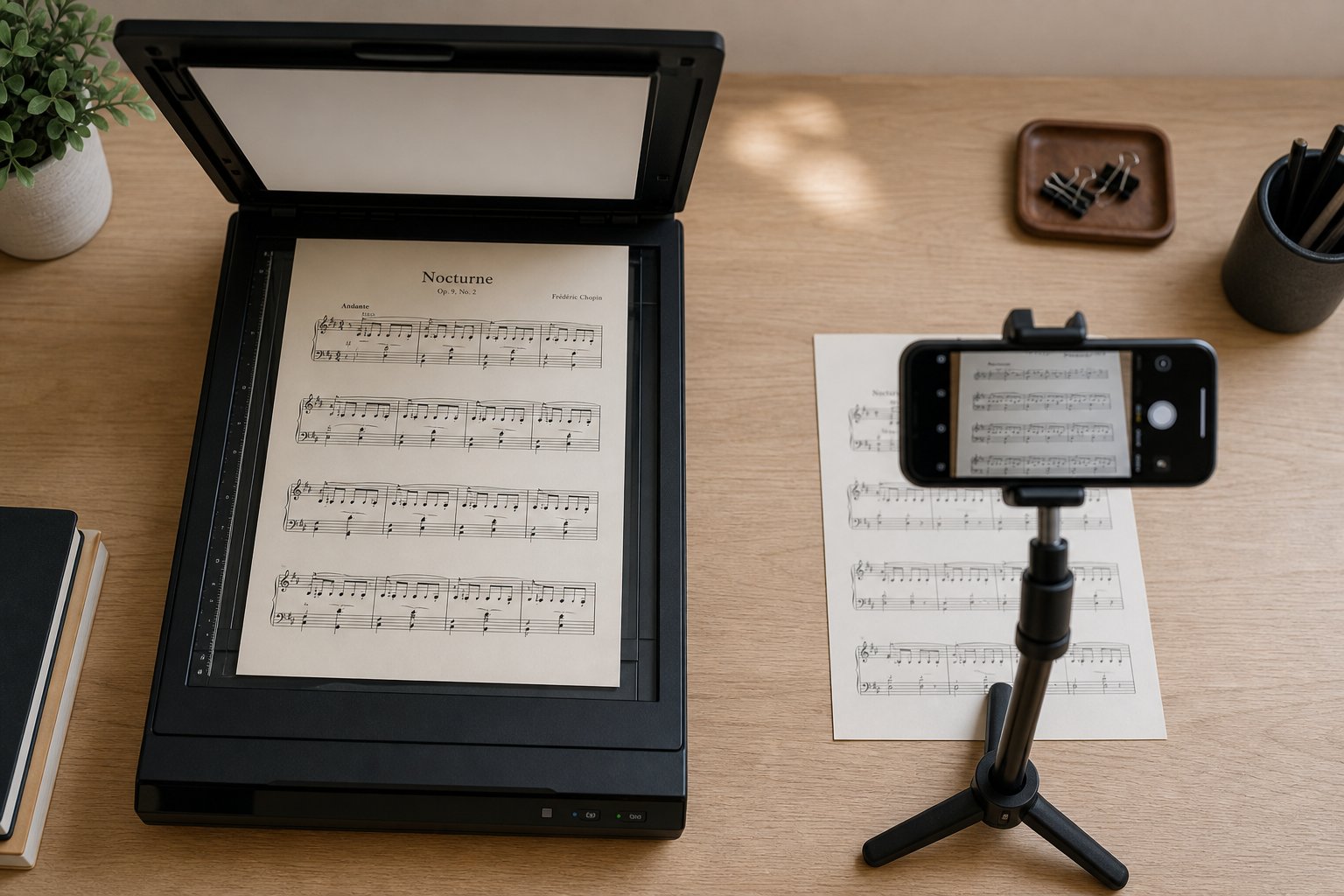
If you are wondering how to scan on notes effectively, the technical settings matter more than the scanning device itself. A phone camera with good lighting can outperform an expensive flatbed scanner with poor settings.
Resolution is the single most important factor. Scan at 300 DPI minimum — anything lower causes thin staff lines and small noteheads to blur together, making accurate symbol detection impossible.
Beyond resolution, your color mode choice affects recognition directly. Chorilo's OMR documentation recommends black and white or grayscale for best results, and this aligns with what every dedicated OMR tool prefers. Color scans introduce unnecessary data — the AI does not need to know that your score is printed on cream-colored paper or that your highlighter marks are yellow. Grayscale strips away color noise while preserving the contrast between notation and background. Pure black and white (1-bit) works well for cleanly printed modern editions but can lose detail on older prints where ink has faded to gray.
Format matters too. PDF files preserve resolution and page structure reliably across devices. JPEG images introduce compression artifacts — those blocky distortions around high-contrast edges — that can confuse symbol detection. PNG or TIFF formats preserve full quality without compression loss. If your scanner offers PDF output at 300+ DPI, that is your safest default. If you are working from photos, save as PNG rather than JPEG whenever possible.
Preparing Your Sheet Music for Best Results
Different source materials need different handling. A freshly printed score from a modern publisher behaves very differently under AI recognition than a 40-year-old photocopy or a page scanned from a tightly bound hymnal.
Here is a preparation checklist that covers the most common scenarios:
- Printed scores (loose pages): Place flat on the scanner glass or document pad. Ensure the page sits straight — even a few degrees of skew forces the AI to compensate, introducing potential errors. CZUR's scanning guide recommends aligning pages with center guides and keeping surrounding objects out of the scanning area.
- Bound books and hymnals: Gutter shadow — that dark strip where pages curve into the spine — is the biggest enemy here. Overhead scanners like the CZUR ET Max handle this with curve-flattening algorithms, but if you are using a flatbed, press the book as flat as possible and consider scanning each page individually. Crop the gutter shadow out before uploading to your OMR tool.
- Photocopies: Often lower contrast than originals, with thickened lines and filled-in noteheads. Increase contrast in an image editor before scanning. If staff lines appear broken or faded, the AI may fail to detect them entirely.
- Phone photographs: Shoot from directly above to avoid perspective distortion. Use natural daylight or even artificial lighting — shadows across the page create false dark regions that confuse staff line detection. Avoid flash, which creates hotspots and uneven exposure.
- Older or faded prints: Boost contrast digitally before uploading. Some OMR tools include preprocessing, but starting with a clean high-contrast image always produces better results than relying on the tool to compensate.
- Handwritten manuscripts: Be realistic. As Chorilo notes, handwritten scores produce only approximate recognition at best. Inconsistent symbol shapes, irregular spacing, and personal shorthand defeat pattern recognition. If you must scan music from handwritten sources, expect to correct heavily — or consider manual input as the faster path.
One often-overlooked tip from professional music prep workflows: arranger John Hinchey recommends cropping images so only the staff is visible before uploading. Remove wide margins, handwritten annotations in the margins, and any non-notation elements. The less visual noise the AI has to filter out, the more accurately it identifies the actual music symbols.
For anyone learning how to scan in notes from multiple pages, consistency matters. Use the same settings, same lighting, and same positioning for every page of a multi-page score. Inconsistent input quality across pages means inconsistent recognition quality — and you will not know which pages need heavy correction until you review the entire output.
After recognition, the correction workflow itself benefits from a systematic approach. Hinchey's professional checklist prioritizes fixes in a specific order: verify time signatures and key signatures first (since errors here cascade through the entire score), then check clefs, then correct rhythm so no bars have missing beats, then fix accidentals, and finally address staff groupings and text assignments. This sequence catches the errors that cause the most downstream damage before you spend time on cosmetic fixes.
One more practical insight: save your work in the OMR tool's native format before exporting. If you open the MusicXML in your notation editor and discover a systematic error — a missed key change that threw off an entire section — it is often faster to go back and fix it in the scanning app and re-export than to correct dozens of individual notes in the notation software.
With clean source material and a disciplined correction workflow, the scan-to-notation pipeline becomes genuinely practical for everyday use. And once you have accurate digital notation in hand, the creative possibilities extend well beyond simple playback.
Turning Scanned Sheet Music Into New Creative Ideas
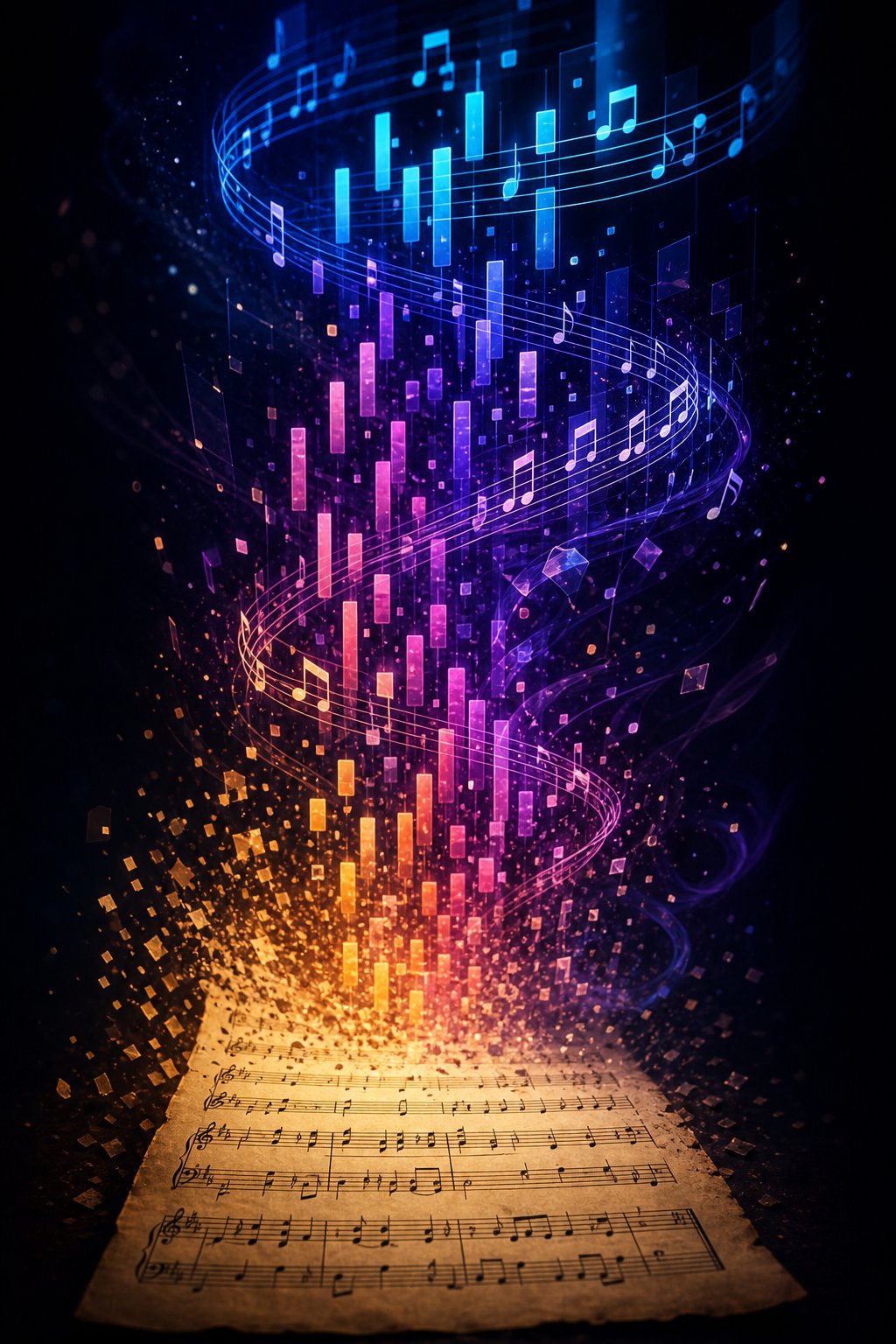
A corrected MIDI file is not an endpoint. It is raw material. The entire scan-to-notation pipeline — preparing your source, running recognition, fixing errors — produces something far more valuable than simple playback: editable musical data you can reshape, rearrange, and build upon. For producers, composers, and arrangers, this is where the real payoff lives.
Think about what you actually have once AI reads your sheet music and outputs a clean MIDI file. Every note, every rhythm, every chord voicing exists as data you can manipulate freely. You can transpose music into any key with a single command. You can isolate a melody line and write a counter melody against it. You can strip a dense arrangement down to its harmonic skeleton and rebuild it in a completely different style. The printed page was static — the MIDI file is infinitely malleable.
From Scanned Notation to Creative Starting Point
The most immediate creative application is transposition. Maybe you scanned a vocal score in E-flat and need it in G for your singer's range. Maybe you are transposing music written for clarinet (a B-flat instrument) into concert pitch for a flute player. Tools like ScanScore handle this directly within the scanning workflow — recognize the score, select a target key, and export the transposed version as MIDI or MusicXML without touching a DAW.
But transposition is just the beginning. Here are the practical workflow applications that connect sheet music scanning to active production and composition:
- Extracting melody lines for arrangement: Isolate the top voice from a piano score and use it as the foundation for a full band arrangement. The process of going from piano to notes in a DAW piano roll gives you complete freedom to reassign that melody to any instrument.
- Harmonic analysis and reharmonization: Load the MIDI into a chord analyzer to map the harmonic progression, then experiment with substitutions, extensions, or entirely different chord voicings beneath the original melody.
- Building variations and developments: Take a scanned theme and use it as seed material — invert it, retrograde it, fragment it into motifs, or layer it against itself at different intervals to generate new compositional ideas.
- Turning study notes into a song: Students who scan practice exercises or etudes can use those recognized patterns as building blocks for original compositions, transforming pedagogical material into creative output.
- Tempo and feel transformation: A scanned waltz becomes a swing tune. A classical theme becomes a lo-fi beat. MIDI data carries no inherent tempo or groove — you impose whatever rhythmic feel serves your vision.
- Creating backing tracks for practice or performance: Scan an ensemble score, mute your own part, and play along with the remaining voices rendered through quality virtual instruments.
Each of these workflows starts with the same foundation: accurate MIDI data extracted from printed notation. The scanning step unlocks the content; what you do afterward determines whether it stays a reference file or becomes the seed of something new.
AI Tools That Build on Your MIDI Output
Here is where the creative pipeline gets interesting. Once your scanned notation exists as MIDI, you are no longer limited to manual editing. A growing category of AI-powered tools can take that MIDI data and generate new musical ideas from it — suggesting chord progressions, extending melodies, creating complementary parts, or producing entirely new variations based on the patterns in your source material.
Imagine scanning a jazz standard's lead sheet, extracting the melody as MIDI, and then feeding it into an AI system that generates harmonically compatible counter melodies or suggests reharmonization options you had not considered. Or scanning a classical theme and using AI to produce variations in different genres — the same melodic contour rendered as an electronic production or a cinematic underscore. An ai beat visualizer can even help you see rhythmic patterns in your scanned data that suggest new groove possibilities.
MakeBestMusic's AI MIDI Generator fits naturally into this workflow. After AI reads your sheet music and produces a MIDI file, you can use AI-assisted generation to develop those ideas further — creating new melodic variations, exploring arrangement possibilities, or generating complementary parts that build on the harmonic and melodic DNA of your scanned source. It functions as a chord transposer and melody generator in one, bridging the gap between digitized notation and fresh creative output.
The broader pattern here matters more than any single tool. The scan-to-MIDI pipeline is not just about hearing old music played back. It is about converting static printed notation into living creative material that AI composition tools can extend, transform, and develop in directions the original composer never imagined. Your scanned score becomes a launchpad rather than an archive.
That shift in perspective — from preservation to creation — changes how you think about the entire process. And it raises a final practical question: given everything the technology can and cannot do, how do you choose the right approach for your specific situation?
Making AI Sheet Music Reading Work for You
The technology works. AI can read sheet music and play it back — that much is settled. But "works" means different things depending on who you are and what you need. A student learning how to read music notes for piano has different requirements than a producer mining a jazz fakebook for melodic raw material. The right approach depends entirely on your goal, your source material, and how much correction time you are willing to invest.
Choosing the Right Approach for Your Needs
Rather than chasing a single "best" tool, match your workflow to your situation:
If you need quick playback of a clean printed part — a single-instrument score, a hymn, a lead sheet, or easy piano sheet music with letters — dedicated OMR tools handle this reliably today. Soundslice or PlayScore 2 will get you from PDF to audio in under a minute with minimal errors. You do not need expensive software or deep technical knowledge. Scan, listen, practice.
If you need to digitize complex scores — orchestral parts, dense polyphonic piano works, or older editions with faded printing — expect manual correction as part of the process. Tools like Newzik and Soundslice deliver strong starting points, but reading piano sheet music with multiple voices, cross-staff beaming, and implied tuplets still trips up every engine on the market. Budget time for review and editing in your notation software of choice.
If you want to use recognized notation as creative fuel — feeding scanned melodies into arrangement workflows, generating variations, or building new productions on existing harmonic foundations — the MIDI pipeline connects directly to AI composition and arrangement tools. MakeBestMusic's AI MIDI Generator pairs naturally with this workflow, letting you take scanned MIDI output and develop it into new melodic ideas, arrangements, and production material without starting from a blank canvas.
The decision framework is simple: how much do you need from the output? Playback only requires basic accuracy. Editable notation requires high accuracy plus a good MusicXML export. Creative development requires accurate MIDI plus downstream tools that can extend and transform what the scanner produced.
The Future of AI and Sheet Music
The field is moving fast. Machine learning OMR engines have improved dramatically since even a few years ago — recent testing by Scoring Notes found that tools like Soundslice now produce results on single-instrument parts that require almost no cleanup, something that was unthinkable a decade ago. New research combining visual recognition with sequential understanding is pushing accuracy higher on complex scores, and end-to-end neural methods are beginning to handle handwritten notation with increasing reliability.
For anyone wondering how can i read music notes more efficiently — whether that means hearing a score played back, digitizing a personal library, or converting printed notation into production-ready MIDI — the tools available today are genuinely practical. They are not perfect. They require good source material and realistic expectations. But the gap between "almost useless" and "saves significant time" has been crossed for most common use cases.
AI sheet music reading is no longer a question of whether it works, but of choosing the right tool for your specific score type, preparing your source material properly, and knowing when the output needs human correction versus when it is ready to use — or ready to become the starting point for something entirely new.
The complete pipeline — from paper to recognition to MIDI to playback or creative development — is accessible to anyone with a phone camera and an internet connection. Whether your goal is learning sheet music how to read it by ear, preparing rehearsal tracks for an ensemble, or feeding scanned themes into AI tools like MakeBestMusic's AI MIDI Generator for fresh compositional ideas, the path from printed page to musical possibility has never been shorter.
