

Why Spotting AI-Generated Music Is a Skill You Need
Imagine scrolling through a playlist and hearing a track that sounds polished, catchy, and completely professional. The vocals sit perfectly in the mix. The production is clean. But no human being wrote, performed, or recorded a single note of it. That scenario is no longer hypothetical. It's happening millions of times a month across every major streaming platform.
Why AI Music Detection Matters Now
The flood of synthetic music has reached a scale that's hard to ignore. Deezer reported that AI-generated tracks now represent 44% of all new music uploaded to its platform, with nearly 75,000 AI-generated tracks arriving every single day. That's just one service. Spotify has removed over 75 million spammy tracks in the past year alone as generative tools make mass uploading trivial. Whether you're a listener trying to support real artists, a curator building playlists, or a creator protecting your craft, learning how to tell if music is AI generated is no longer optional. It's a practical skill.
In a blind listening test commissioned by Deezer and conducted by Ipsos across 9,000 participants in eight countries, 97% of respondents couldn't tell the difference between fully AI-generated music and human-made tracks.
That statistic should sit with you for a moment. If almost no one can reliably detect AI music by ear alone, how do you actually check music to see if its AI generated or not? The answer isn't a single trick. It's a layered process.
What This Guide Covers
This guide walks you through a progressive detection pipeline, starting with the easiest contextual checks and moving toward advanced spectral analysis. You'll learn how to detect AI music using metadata red flags, vocal artifacts, rhythmic patterns, tonal characteristics, dedicated detection tools, and stem separation techniques. No single method is foolproof. AI generation tools improve constantly, and heavily produced human music can trigger false positives. But when you combine multiple steps, you build reliable confidence in your assessment. Think of it as knowing how to know if music is ai through convergent evidence rather than a silver bullet.
Each step builds on the last, so even if you're starting from zero, you'll develop an ear and a workflow that catches what casual listening misses. The first and fastest layer of detection doesn't require any listening at all. It starts with the source itself.
Step 1 - Check the Source and Metadata for Red Flags
Before you train your ear on a single note, the fastest way to flag a suspicious track is to investigate its context. Artist profiles, release patterns, and embedded metadata all leave trails that synthetic music farms struggle to fake convincingly.
Examine Artist Profiles and Release Patterns
Pull up the artist's profile and ask a few quick questions. How old is the account? How many releases does it have relative to that age? A profile created three months ago with forty singles and zero social media links is a strong signal. Genuine musicians build catalogs over years, tour, post behind-the-scenes content, and accumulate press mentions. AI-generated content farms skip all of that.
On Spotify, the new Verified by Spotify badge offers a useful shortcut. To earn it, artists must show consistent listener engagement over time, comply with platform policies, and demonstrate real-world presence like concert dates, merch, and linked social accounts. Profiles that primarily represent AI-generated or AI-persona artists are not eligible at launch. If you're trying to find song by link and the artist behind it has no verification, no tour history, and no external web footprint, that's a red flag worth noting.
On YouTube, look for live performance footage, interviews, or press coverage. Can you recognize music from youtube videos that show an actual person performing the song? If the channel only hosts static-image lyric videos with no human presence, proceed with caution. SoundCloud follows similar logic: check for reposts, comments from other musicians, and engagement that looks organic rather than bot-driven.
Check File Metadata and Platform Watermarks
Some AI generation tools embed identifiers directly into the audio they produce. Google's SynthID watermarking system, for instance, converts generated audio into a spectrogram, embeds a hidden watermark, and converts it back. This mark persists through many common edits and can be scanned by detection systems. Other platforms are following suit with their own embedded markers. If you can access a track's raw file and run it through a song identifier or metadata inspector, look for generation timestamps, model identifiers, or watermark flags that commercial AI tools increasingly include.
The goal isn't to fingerprint every AI song to identify it on sight. It's to know where to look when something feels off. Metadata gaps are often the first crack in the facade.
Red Flags in Credits and Distribution
Professional releases carry songwriter credits, producer tags, mixing engineers, and ISRC codes tied to real publishing entities. AI-generated tracks often lack these entirely or list generic placeholder names. Here are the top contextual red flags to scan for:
- Brand-new artist profile with an unusually large catalog (20+ releases in under six months)
- No songwriter, producer, or performer credits listed
- Generic or algorithmically generated artist name (random word combinations, initials with numbers)
- No linked social media, website, or external press mentions
- Suspiciously uniform release schedule (e.g., one single every 48 hours)
- No live performance footage or behind-the-scenes content anywhere online
- Artist bio that reads like filler text with no verifiable biographical details
None of these signals alone confirms artificial generation. Plenty of new independent artists have sparse profiles. But when multiple red flags cluster together, you have strong contextual grounds to investigate further. The next layer of detection moves from what you can see on screen to what you can hear in the audio itself, starting with the element that's hardest for AI to perfect: the human voice.
Step 2 - Listen for Vocal Artifacts and Unnatural Delivery
The human voice is the single most revealing element in any song. We've spent our entire lives hearing voices, which means our brains are extraordinarily tuned to detect when something is even slightly off. AI generation tools know this too, and they invest enormous processing power into making vocals sound convincing. But they still leave traces.
When you're trying to figure out how to tell if a voice is AI generated, the key is knowing exactly where to direct your attention. The artifacts are subtle, but once you learn to hear them, they become difficult to un-hear.
Breath Patterns and Consonant Clarity
Real singers breathe. They inhale before phrases, and those breaths carry texture: the slight rasp of air passing through a throat, the timing that shifts depending on the emotional weight of the next line. AI-generated vocals handle breathing in one of two problematic ways. Either breaths are missing entirely, creating an eerie sense that the voice exists without a body behind it, or they're inserted at perfectly even intervals like a metronome click, regardless of phrase length or emotional intensity.
Listen for this: play a verse and pay attention to where the vocalist inhales. Does the breath feel organic and responsive to the phrasing, or does it land with mechanical precision every four beats? A human singer takes a quick, shallow breath before a short phrase and a deeper, more audible breath before a long belted line. AI tends to apply a single breath template throughout.
Consonant clarity offers another strong signal. Human speech produces complex sibilant sounds, the "s" and "sh" and "ch" that require precise tongue placement and airflow. AI voice artifacts commonly include what audio engineers call consonant smearing, where sibilants blur together or carry a slight metallic overtone in the 5-8 kHz range. You'll notice words that start with "st" or "str" losing their crispness, as if the consonant cluster was approximated rather than articulated. Phantom syllables are another giveaway: extra micro-sounds that appear between words where no human mouth would produce them.
The emotional dimension matters too. A real vocalist delivers the word "never" differently when it's defiant versus heartbroken. AI voices often nail the phonetics while missing these micro-expressions entirely. The word sounds correct but emotionally flat, like someone reading a transcript without understanding its meaning.
Platform-Specific Vocal Signatures
Different AI music platforms produce different vocal fingerprints. If you spend time with tracks from Suno and Udio, you'll start to recognize their distinct tendencies.
Suno tends to generate smoother, more polished vocal lines. The trade-off is a certain robotic quality in phrasing: syllables land with overly uniform timing, and vibrato, when present, applies at a consistent rate and depth that real singers rarely maintain. Suno's vocals can also exhibit what listeners describe as an "uncanny valley" vibrato, technically present but emotionally vacant, wavering at a rate that feels programmed rather than felt.
Udio often produces vocals that sound more natural in their timbral quality and phrasing variation. However, Udio tracks are more prone to pitch glitches and mispronunciations, moments where a note wavers unexpectedly between frequencies or a word gets subtly mangled. These aren't the dramatic pitch breaks of a singer pushing their range. They're brief, unmotivated wobbles that don't connect to any expressive intent.
An ai voice detector trained on these platforms looks for exactly these patterns. But even without specialized software, your ears can catch them once you know what to focus on.
| Vocal Characteristic | AI-Generated (Suno) | AI-Generated (Udio) | Human Production That Mimics It |
|---|---|---|---|
| Breath placement | Missing or uniformly spaced | Present but sometimes misplaced | Intentionally removed in pop production for seamless phrasing |
| Sibilant clarity | Slightly metallic sheen on "s" sounds | Occasional blurring between consonant clusters | Heavy de-essing in mixing can reduce sibilant detail |
| Vibrato | Consistent rate and depth throughout | More varied but with unmotivated wobbles | Pitch correction plugins can flatten vibrato to uniform rates |
| Pitch stability | Extremely stable, almost too perfect | Mostly stable with brief glitches between notes | Heavy auto-tune locks pitch to grid, creating similar hyper-stability |
| Emotional micro-expression | Phonetically correct but dynamically flat | Better phrase variation but inconsistent emotional arc | Vocal comping (stitching best takes) can reduce emotional continuity |
| Word pronunciation | Generally accurate, occasionally rushed syllables | Prone to mispronunciation, especially in non-English lyrics | Stylistic slurring in genres like R&B or mumble rap |
Avoiding False Positives From Auto-Tuned Human Vocals
Here's the complication that trips up even experienced listeners: modern pop, hip-hop, and electronic music routinely use processing that makes human vocals sound more synthetic. Heavy auto-tune locks pitch to a chromatic grid. Vocal stacking creates unnaturally thick harmonies. Time-stretching corrects timing imperfections. The result is that a heavily produced human vocal can trigger many of the same red flags as AI generation.
How do you distinguish them? Context and consistency. Auto-tuned human vocals still carry natural breath patterns, even if the pitch is corrected. They still exhibit dynamic variation between soft verses and loud choruses, because the underlying performance had that variation before processing. And critically, auto-tune introduces its own recognizable artifacts: the hard pitch snapping between notes, the T-Pain warble, the slight latency on fast melodic runs. These sound different from AI artifacts, which tend toward smoothness rather than the characteristic "staircase" effect of pitch correction.
Also consider the genre. If you're listening to a trap song with robotic-sounding vocals, that's likely an intentional aesthetic choice by a human artist. But if you hear those same robotic qualities in an acoustic ballad or indie folk track where such processing would be stylistically out of place, that's a much stronger indicator of AI generation.
An ai lyric detector can help here too. AI-generated lyrics sometimes reveal themselves through patterns that the vocals alone won't expose: overly generic phrasing, rhyme schemes that prioritize sound over meaning, or lines that feel assembled from common lyrical fragments without genuine narrative progression.
Vocal analysis gives you a powerful detection layer, but the voice isn't the only element that reveals artificial origins. The way a track handles rhythm and groove, particularly the micro-timing that separates a living performance from a programmed one, offers an entirely different angle of investigation.
Step 3 - Analyze Rhythm and Groove Inconsistencies
Vocals might be the most emotionally revealing element, but rhythm is where the body lives. Human musicians don't just play notes at the right time. They lean into beats, drag behind them, push ahead of them. These micro-timing variations are tiny, often measured in milliseconds, but they're what separate a track that grooves from one that simply keeps time. And they're one of the most overlooked signals when figuring out how to tell if music is AI generated.
Understanding Micro-Timing and the Quantization Grid
Every digital audio workstation has a quantization grid, a rigid framework that divides time into perfectly even subdivisions. When a human drummer plays, their hits land near the grid but almost never exactly on it. A snare might arrive 10 milliseconds late on one beat, 5 milliseconds early on the next. A bass player's notes drift slightly behind the kick drum, creating that "pocket" feel that makes you nod your head without thinking about why.
AI-generated music has a complicated relationship with this grid. Models trained on quantized pop and electronic music tend to produce rhythms with near-zero variance in their inter-beat intervals. Detection systems like NoiseEra's Rhythmic Quantization Agent specifically measure the time distance between every beat in a song down to the millisecond, looking for variance that falls within the "human pocket" rather than at mathematical zero or chaotically high levels.
When you use a song analyzer to visualize timing, you'll often see AI tracks cluster their transients precisely on grid lines across the entire frequency spectrum. A human producer might quantize the kick drum but leave the hi-hats slightly loose. AI tends to apply the same mechanical precision to everything simultaneously, because it doesn't understand that different elements in a mix interact with timing differently.
Genre-Specific Rhythm Expectations
Here's where detection gets nuanced. Not all genres expect the same relationship to the grid, and a good ai music analysis approach accounts for this.
Electronic dance music is inherently quantized. A techno kick hits every beat with metronomic precision because that's the point. Detecting AI in this context means looking for different signals: does the track introduce any progressive variation in groove across its runtime, or does every bar feel identically weighted? Human electronic producers subtly shift hi-hat velocities, add swing to percussion loops, and create micro-builds in energy that AI often flattens.
Jazz and folk sit at the opposite end. These genres live in the space between beats. A jazz drummer's ride cymbal pattern floats above the pulse with deliberate imprecision that communicates feel to the rest of the ensemble. If you run a jazz track through an ai genre detector and the rhythm section sounds metronomically locked, something is wrong regardless of how good the saxophone sounds.
Rock and pop fall in between. The rhythm section is tighter than jazz but still carries human variation, especially in fills, transitions, and moments of dynamic intensity. Pay attention to drum fills at section changes. A human drummer speeding up slightly during an energetic fill into a chorus is natural. AI-generated fills tend to maintain identical tempo throughout, as if the excitement of the moment has no physical consequence.
Humanization Patterns That Give AI Away
Some AI models attempt to solve the "too perfect" problem by adding randomized timing offsets, a process the music production world calls humanization. But here's the catch: AI humanization patterns are themselves repetitive and predictable. They apply the same statistical distribution of micro-timing variation across an entire track without adapting to musical context.
A real drummer plays differently during a quiet verse than during a loud chorus. They might sit back on the beat during a mellow section and push forward during intense passages. This contextual variation is one of the strongest signals in ai music analysis. AI models tend to apply a single "feel" uniformly, regardless of what the song is doing emotionally.
Compare the rhythmic feel of the verse to the chorus. Human performances naturally shift groove, intensity, and timing precision between sections. AI-generated tracks tend to maintain an identical rhythmic character throughout, as if the drummer never responded to the energy of the song changing around them.
Another giveaway is the relationship between instruments. Human musicians listen to each other. When a bass player digs into a note harder, the drummer often responds by hitting slightly harder on the next beat. This cross-correlation between rhythmic layers is something an ai music genre detector can flag when it's absent. AI models frequently generate each layer independently, so the drums and bass might be individually convincing but lack the responsive interplay that makes a real rhythm section feel alive.
Rhythm tells you about the body behind the music, but it's not the only physical dimension to investigate. The tonal quality of a recording, how frequencies distribute across the spectrum, how instruments decay, how reverb behaves, reveals whether sound was captured from physical space or generated from mathematical probability.
Step 4 - Examine Tonal Quality and Spectral Characteristics
Rhythm reveals whether a performance has a body behind it. Tonal quality reveals whether it has a room around it. Every real recording carries the fingerprint of the physical space where sound was captured: the hum of electronics, the ambient noise floor of a studio, the way frequencies bounce off walls and decay over time. AI-generated music often gets the notes right while getting the physics wrong, and that's where your ears can catch it.
Frequency Spectrum and Noise Floor Clues
Real recordings are messy at the microscopic level. Even in a world-class studio, there's a subtle noise floor: the faint hiss of preamps, the barely perceptible rumble of an air conditioning system, electrical interference that lives below conscious hearing but gives the recording a sense of existing in physical space. AI-generated tracks frequently lack this entirely. The silence between notes is too silent, unnaturally clean in a way that feels sterile rather than polished.
The high-frequency range is especially telling. Research published in the Journal of the Audio Engineering Society found that AI models trained on compressed streaming data often truncate harmonic content above certain thresholds, producing an overly "flat" spectral profile in the upper frequencies. Human recordings show rich, chaotic energy above 10 kHz from cymbal shimmer, string noise, breath turbulence, and room reflections. AI tracks tend to either cut off sharply in that range or fill it with an unnaturally uniform wash of high-frequency content.
Stereo imaging offers another clue. In a real recording, instruments occupy specific positions in the stereo field based on microphone placement and physical acoustics. AI-generated music sometimes produces stereo images that are either suspiciously symmetrical or place elements in spatial positions that contradict the implied recording context. Imagine hearing an acoustic guitar with wide stereo spread but zero room reflections, as if it exists in an impossible vacuum. That contradiction between spatial width and acoustic environment is a red flag an audio detector can quantify and your ears can learn to notice.
Instrument Decay and Reverb Behavior
When a pianist lifts their finger from a key, the note doesn't just stop. It decays through a complex physical process: the string's vibration weakens, the soundboard resonance fades, the sustain pedal's sympathetic overtones ring out. Each of these phases has a natural duration governed by physics. AI-generated piano notes sometimes decay in ways that violate these physical rules, cutting off too abruptly, sustaining at an unnaturally even volume before vanishing, or lacking the sympathetic resonance that acoustic instruments produce.
Reverb behavior follows a similar logic. Natural reverb tails are messy. They contain reflections at different frequencies arriving at slightly different times, with high frequencies dying faster than low frequencies because air absorbs them more readily. AI reverb sometimes sounds "simplified," as if the algorithm understands that reverb should exist but applies it as a uniform decay envelope rather than modeling the complex frequency-dependent behavior of a real acoustic space. Listen for reverb tails that cut off cleanly rather than fading through multiple stages, or rooms that sound impossibly large for the intimacy of the performance.
Bass instruments deserve special attention. Acoustic basses and upright pianos generate strong odd-order harmonics (3rd, 5th, 7th) below 200 Hz. AI models frequently truncate these, producing bass lines that sound "thin" even when the fundamental frequency is present. If you boost the frequency range between 360 and 840 Hz on a suspicious track, human bass performances will reveal clear resonant peaks at each harmonic multiple, while AI bass often shows weak or absent upper harmonics.
What Detection Tools Actually Measure
Sounds complex? Here's the accessible version of what's happening under the hood when an ai audio detector analyzes a track. Most detection systems rely on something called mel-frequency cepstral coefficients, or MFCCs. Think of these as a compact fingerprint that captures how sound energy is distributed across different frequency bands, weighted to match how human ears actually perceive pitch.
The process works roughly like this: the audio gets sliced into tiny frames, each frame's frequency content is measured, those frequencies are mapped onto a scale that mimics human hearing (the mel scale, where low frequencies get more resolution than high ones), and then the result is compressed into a small set of numbers. Those numbers, the mel-frequency cepstral coefficients, become the signature that machine learning models use to distinguish real from synthetic audio.
Why does this work? Because AI generation models distribute spectral energy differently than physical instruments and rooms do. A real saxophone has a specific pattern of harmonic emphasis that shifts as the player changes dynamics and embouchure. An AI saxophone might hit the right fundamental frequencies but distribute energy across harmonics in ways that are statistically improbable for a physical reed vibrating in a metal tube. A music analyzer built on MFCCs catches these distribution anomalies even when they're too subtle for casual listening.
Tools like the remusic ai music analyzer and similar platforms apply these spectral fingerprinting techniques at scale, comparing a track's MFCC profile against patterns learned from thousands of confirmed AI and human recordings. They're measuring things like spectral flatness (is the frequency content too evenly distributed?), spectral contrast (are the peaks and valleys between frequency bands as dynamic as real recordings?), and tonal consistency (does the timbre stay unrealistically uniform across an entire performance?).
Here are specific spectral indicators you can train your ears to notice:
- Silence between notes that feels artificially clean, with no ambient noise floor
- High-frequency content (above 10 kHz) that sounds uniformly washed rather than detailed and varied
- Instrument notes that sustain at an even volume before cutting off rather than decaying naturally
- Reverb tails that end abruptly or decay at the same rate across all frequencies
- Bass instruments lacking upper harmonic richness despite having a strong fundamental
- Stereo imaging that contradicts the implied acoustic environment
- Timbral consistency that never shifts, as if the performer's physical relationship to their instrument never changes
- Room acoustics that sound impossible: large reverb on dry, close-mic'd sources, or intimate dryness on instruments that should have bleed
None of these signals proves AI generation in isolation. A heavily mastered track might have a reduced noise floor by design. A synthesizer-heavy production won't have acoustic decay characteristics. But when you hear multiple spectral anomalies stacking up, especially in genres where acoustic realism is expected, you're building a case that moves beyond guesswork.
Spectral analysis sharpens your ability to hear what's physically plausible versus what's mathematically generated. But ears and frequency analysis still have limits. Dedicated AI detection tools formalize these techniques into automated systems that can cross-reference patterns across massive databases of known AI outputs, offering a verification layer that goes beyond what any single listener can achieve alone.
Step 5 - Run the Track Through AI Detection Tools
Your ears and spectral intuition can carry you far, but there's a point where subjective listening needs backup from something more systematic. That's where dedicated ai music detectors come in. These tools formalize the exact patterns you've been training yourself to hear, automating the analysis across thousands of data points in seconds. Think of them as a second opinion that doesn't get tired, doesn't have biases toward certain genres, and can compare a suspect track against databases of confirmed AI outputs at a scale no human could match.
How AI Music Detectors Work
At their core, most ai music detector tools work by training machine learning models on large datasets of confirmed AI-generated and human-produced audio. Once trained, these models learn to recognize the subtle statistical fingerprints that different AI generators leave behind. The actual detection process typically combines multiple analytical approaches simultaneously:
| Detection Method | What It Analyzes | Strengths | Weaknesses |
|---|---|---|---|
| Spectral pattern matching | Frequency-domain artifacts from neural vocoders (especially above 12 kHz) | Highly accurate on unprocessed AI output; architecture-dependent signals are hard to eliminate | Accuracy drops when tracks are re-encoded, compressed, or mastered in a DAW |
| Multi-model ensemble | Runs track through multiple neural networks, each trained on a different AI generator's output | Catches a wider range of platforms; reduces false negatives | Requires constant retraining as new generators launch; higher computational cost |
| Metadata and provenance checking | Export tags, format signatures, watermark traces, and file structure | Fast, low false-positive rate; doesn't require deep audio analysis | Easily defeated by re-exporting or stripping metadata; not all AI tools embed markers |
The strongest detection systems don't rely on just one of these methods. They layer all three into a pipeline, where each method compensates for the blind spots of the others. A track might pass the metadata check cleanly but get flagged by spectral analysis, or vice versa. The ensemble approach is what pushes overall reliability higher.
Running a Track Through Detection Tools
The practical workflow for using an ai song detector is straightforward. Here's the process most tools follow:
- Choose your detection tool. Free options like SubmitHub's AI Song Checker and letssubmit let you test tracks without commitment. For higher-volume needs, paid solutions like authio and the IRCAM Amplify ai music detector offer deeper analysis and batch processing.
- Submit the track. Most tools accept either a direct file upload (MP3, WAV, FLAC) or a streaming link (Spotify, YouTube, SoundCloud URL). Paste the link or drag your file into the interface.
- Wait for analysis. Free tools typically return results in under 30 seconds. Enterprise-grade systems like IRCAM Amplify can process over 250,000 tracks per hour for catalog-scale operations.
- Review the confidence score. Most detectors output a percentage indicating how likely the track is AI-generated, often alongside which specific platform (Suno, Udio, MusicGen) it most closely matches.
- Cross-reference with a second tool. Run the same track through at least one additional detector to confirm or challenge the first result. Agreement between tools strengthens your confidence; disagreement signals you need closer manual inspection.
If you're looking for an ai music detector online free option to start with, SubmitHub and letssubmit both work well for quick spot checks. They'll catch obvious cases, particularly tracks generated by Suno or Udio without post-processing. For anything more ambiguous, you'll want the depth of a paid ai music checker that uses multi-model ensemble approaches.
Interpreting Results and Understanding Limitations
Here's where many people get tripped up: a confidence score is not a verdict. A tool reporting "92% likely AI-generated" doesn't mean the track is definitively synthetic. It means the audio's statistical profile closely matches patterns the model learned from known AI outputs. Context matters enormously when interpreting these numbers.
Top ai song checker tools claim accuracy rates above 99% in controlled laboratory conditions, testing against known outputs from specific generators. Real-world accuracy on professionally produced tracks drops to 85-93%. That gap exists because controlled tests use raw, unprocessed AI output, while real-world tracks get mastered, compressed, layered with live instruments, or re-encoded through different codecs. Each processing step erodes the spectral artifacts that detectors rely on.
Several factors determine how reliable your detection result actually is:
- AI platform matters. Detectors trained on Suno and Udio perform well against those platforms but may miss output from newer or less common generators. One study found that models trained on Suno collapsed to just 6-24% detection accuracy when tested against Boomy output.
- Post-processing defeats most single-method detectors. Running AI output through standard mastering chains (EQ, compression, reverb, limiting) smooths the very artifacts detectors look for. If someone generated a track in Udio and then mixed it in a professional DAW, detection confidence drops significantly.
- Genre creates baseline differences. Electronic music naturally shares characteristics with AI output: quantized timing, synthetic timbres, digital processing. Detectors must calibrate differently for EDM than for folk or jazz, and not all tools do this well.
- False positives are real. Heavily processed human recordings, especially those using pitch correction, synthetic samples, and aggressive mastering, can trigger AI detection flags. A false positive rate of 0.6% sounds negligible until you apply it across millions of tracks.
The practical takeaway? Never rely on a single tool's output as your final answer. Use detection tools as one layer in the broader pipeline you've been building: contextual checks, vocal analysis, rhythmic assessment, spectral listening, and now automated detection. When multiple independent methods point the same direction, your confidence is well-founded. When they disagree, you've identified a track that needs deeper investigation.
That deeper investigation often means going beyond what automated tools can tell you from the full mix. Some artifacts only reveal themselves when you peel a track apart into its individual components, isolating vocals from drums from bass from instruments, and listening to each layer on its own terms.
Step 6 - Separate Stems to Inspect Individual Layers
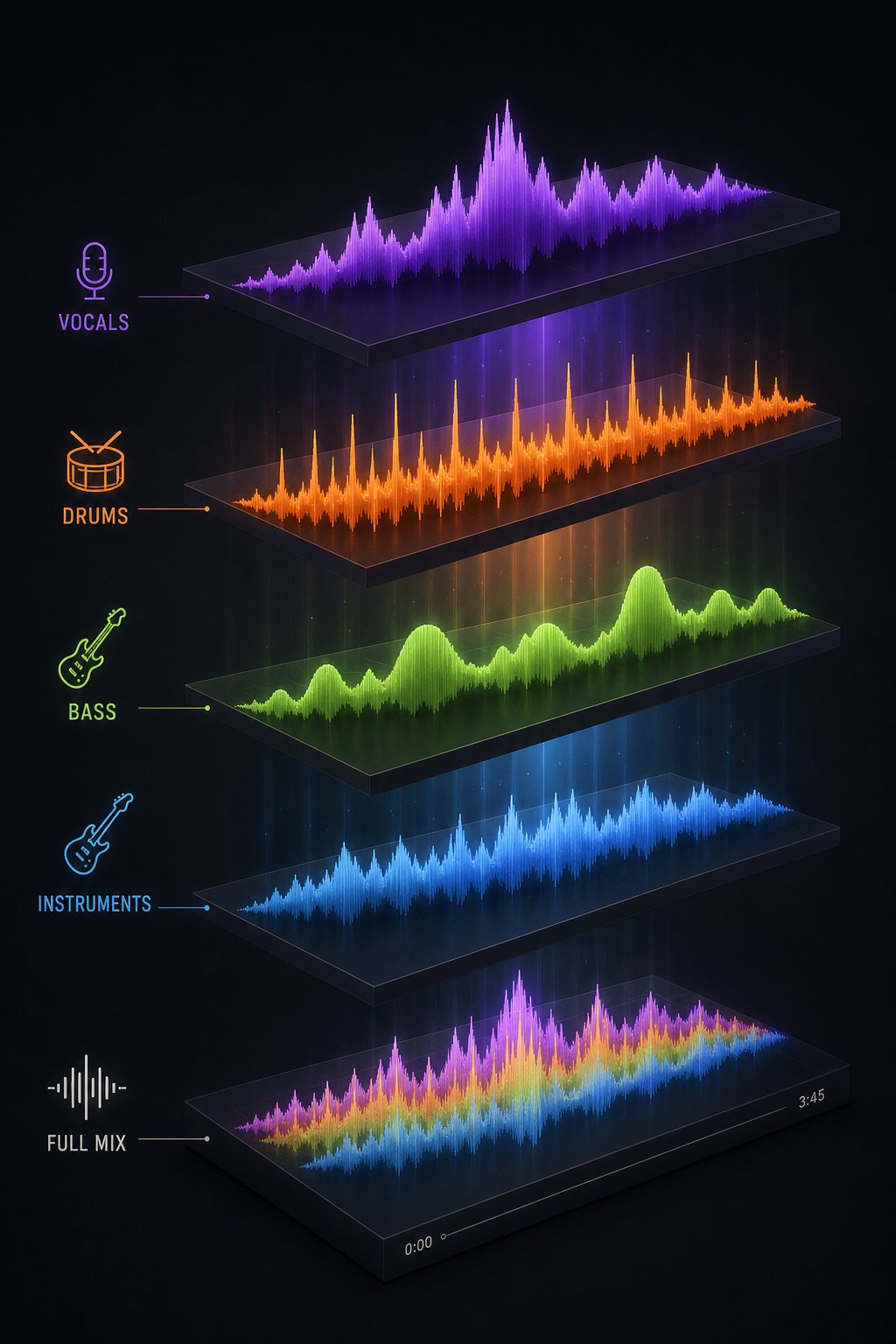
Automated detection tools analyze the full mix as a single entity. But a full mix is designed to hide imperfections. Instruments mask each other. Reverb smooths transitions. Compression glues disparate elements together. If you really want to expose what's happening inside a suspicious track, you need to pull it apart. Stem separation, the process of isolating vocals, drums, bass, and instruments into individual audio files, strips away the camouflage that a composite mix provides and reveals artifacts that would otherwise stay hidden.
Why Stem Separation Reveals Hidden Artifacts
Think of a finished mix like a group photo. Everyone looks fine at first glance. But zoom in on one face and you might notice something unsettling: an extra finger, a blurred ear, an eye that doesn't quite track. Stem separation is that zoom.
Modern AI stem separation works by converting a mixed track into a spectrogram, a visual map of frequencies over time, then using neural networks trained on millions of audio examples to predict which spectral patterns belong to vocals, which to drums, which to bass, and which to everything else. The AI reconstructs clean, separate audio files for each predicted source. This entire process happens in seconds to minutes depending on the tool and track complexity.
Once you have isolated layers, problems that the full mix concealed become obvious. A vocal track might reveal ghostly harmonic artifacts, faint phantom tones that ring between phrases where no human voice would produce sound. A drum stem might expose unnaturally consistent hit velocity, every snare strike landing at the exact same volume as if copied rather than performed. Instrument layers might sound like they exist in completely different acoustic spaces, one guitar sitting in a tight room while another floats in a cathedral, with no coherent recording environment connecting them.
Cross-correlation analysis between stems is particularly revealing. In organic human recordings, separated elements interact dynamically: the bass responds to the kick drum, the guitar reacts to vocal phrasing. AI-generated tracks sometimes show either zero correlation between stems, as if each was generated independently without awareness of the others, or hyper-lock, where stems are mathematically phase-locked in ways that are physically impossible in a real recording session.
What to Listen for in Isolated Layers
Each stem type has its own set of telltale signs. Once you've separated a track, here's what to check in each layer:
- Vocals: Ghostly harmonic ringing between phrases, breaths that appear at metronomic intervals, consonant smearing (especially on "s" and "t" sounds), phantom syllables where silence should be, and vibrato that maintains identical rate and depth throughout
- Drums: Hit velocity that never varies across an entire track, fills that maintain perfect tempo without the slight acceleration real drummers exhibit, hi-hat patterns with zero swing variation, and kick-snare relationships that feel mathematically locked rather than performed
- Bass: Notes that start and stop without the physical slide noise of fingers on strings, absent upper harmonics (the 3rd and 5th partials that give acoustic bass its warmth), identical attack profiles on every note regardless of rhythmic position, and no dynamic interaction with the drum pattern
- Melodic instruments (guitar, piano, synths): Sustain that holds at uniform volume before cutting off rather than decaying naturally, chord voicings that shift without any transition noise, reverb characteristics that don't match between instruments in the same supposed "room," and timbral consistency that never shifts as if the player's physical effort remains perfectly constant
You don't need to be an audio engineer to hear these things. Even casual listeners notice when a solo'd drum track sounds like the same hit pasted over and over, or when an isolated vocal reveals strange digital warbling that the full mix completely masked.
Using Audio Separation Tools for Detection
You don't need expensive studio software to split a track into stems. Several accessible tools make this practical for anyone investigating a suspicious song.
MakeBestMusic's Audio Separator is a strong option for this detection workflow. It lets you upload a track and quickly separate it into individual stems for closer inspection. For students analyzing song structure, creators verifying whether a sample is human-performed, or anyone trying to identify song from audio sample by isolating its components, the ability to split a mix into parts and listen critically to each one turns a guessing game into methodical investigation. You upload the file, the tool handles the AI-powered separation, and you get back individual layers ready for focused listening.
The workflow is simple: take the suspect track, run it through the separator, then listen to each stem in isolation using the checklist above. Pay special attention to the vocal and drum stems, as these tend to reveal the most obvious AI fingerprints. If you're using a song finder upload approach where you have the actual audio file rather than just a streaming link, you'll get the cleanest separation results since the tool works directly from the source material rather than a compressed stream.
For those comfortable with desktop software, tools like iZotope RX also offer stem separation through their Music Rebalance module, splitting audio into vocals, bass, percussion, and other instruments. Audacity users sometimes ask how to split audio in audacity for this purpose. While Audacity doesn't natively offer AI-powered stem separation, you can use free plugins like Demucs or route audio through a web-based separator first, then import the individual stems into Audacity for detailed spectral inspection.
The key insight is that stem separation isn't just for remixers and producers. It's a detection technique. When you use it as an mp3 song identifier of sorts, not identifying what the song is, but identifying what the song is made of, you gain access to evidence that no amount of full-mix listening can provide. A sample finder ai approach applied to isolated stems can also reveal whether specific layers were lifted from AI training data or generated wholesale.
Pulling a track into its component layers tells you what each element is doing in isolation. But there's a broader question that stem analysis alone can't fully answer: what if only some of those layers are AI-generated while others are genuinely human-performed? The line between "fully AI" and "AI-assisted" is where detection gets truly complex, and where the stakes for accurate assessment are highest.

Step 7 - Distinguish Fully AI From AI-Assisted Music
Here's the uncomfortable truth about detection: the binary question of "is this AI or not?" is increasingly the wrong question. Modern music production exists on a spectrum. A singer might write their own lyrics and perform their own vocals but use Suno to generate a backing track. A producer might compose an entire arrangement by hand but run the final mix through AI-powered mastering. A band might record live instruments in a studio and then use AI to synthesize a vocal harmony layer they couldn't perform themselves.
These hybrid workflows are exploding in popularity, and they create a detection challenge that's fundamentally different from spotting a fully synthetic track. When you separate stems and find that the drums pass every human-performance test while the vocals show clear AI signatures, you're not dealing with a simple yes-or-no situation. You're mapping degrees of AI involvement across a creative pipeline.
The Spectrum From Fully AI to Fully Human
The distinction matters more than most guides acknowledge. RouteNote's breakdown of AI in music draws a useful line: AI-assisted music keeps the human artist in control, using AI as a collaborator rather than a creator. AI-generated music, by contrast, is produced by AI with little or no human input beyond a text prompt or style selection. But real-world production increasingly sits between these poles rather than at either extreme.
Think of it as three distinct categories, each with its own detection profile:
| Category | What It Means | Typical Characteristics | Detection Difficulty |
|---|---|---|---|
| Fully AI-generated | Entire track created from prompt to finished audio with no human performance or substantive editing | Uniform AI artifacts across all stems; consistent spectral flatness; no variation in production approach between layers | Moderate. Current detectors catch these reliably when unprocessed. Gets harder after professional mastering. |
| AI-assisted (hybrid) | Human uses AI tools for specific elements while performing or composing others themselves | Some stems pass all human-performance tests while others show clear AI signatures; inconsistent artifact patterns across layers | High. Binary detectors often misclassify these as fully human or fully AI depending on which layer dominates the mix. |
| AI-enhanced | Human performance with AI post-processing (mastering, pitch correction, noise reduction, vocal restoration) | Underlying performance shows natural micro-timing and emotional variation; processing layer may add spectral smoothness but preserves organic feel | Very high. Functionally identical to standard modern production techniques. Often indistinguishable from non-AI processing. |
The Beatles' "Now and Then" is a clear example of the AI-enhanced category. AI-powered audio restoration isolated and improved John Lennon's vocals from decades-old demo tapes, but the creative performance itself was entirely human. The AI served the same function as any other studio tool: helping realize a human vision that already existed.
How to Spot Hybrid Human-AI Collaboration
Identifying hybrid tracks requires a different analytical approach than catching fully synthetic ones. Instead of asking "does this track show AI artifacts?" you need to ask "which specific layers show AI artifacts, and which don't?"
This is where your stem separation work from the previous step becomes essential. If you isolate four stems and find that vocals carry natural breath variation, dynamic phrasing, and emotional micro-expression while the instrumental backing shows perfectly quantized timing, zero noise floor, and unnaturally consistent timbral profiles, you're likely looking at a human vocalist over AI-generated instrumentation. That's a common workflow: artists using platforms like Suno or Udio to generate backing tracks, then recording their own vocals on top.
The pattern of artifacts tells the story. A fully AI-generated track from Suno or Udio tends to show consistent signatures across every element because the same model produced everything simultaneously. Hybrid tracks break that consistency. You'll hear one layer that feels alive and responsive alongside another that feels static and mathematically perfect. That mismatch is itself a detection signal.
Discussions in communities like Reddit frequently surface examples where listeners debate whether tracks are AI-generated. The ai generated music reddit threads reveal how difficult hybrid detection is even for trained ears: people argue endlessly because some elements genuinely sound human while others don't. They're often both right, just about different layers of the same track.
Research from the HAIM benchmark study confirms that current binary detection systems struggle significantly with hybrid content. Their evaluation found that when human engineers apply professional mastering to AI-generated tracks, or when AI vocals are placed over human instrumentals, existing detectors produce inconsistent results. The study's MuQ-FST model achieved 98.9% accuracy identifying AI vocal covers (human instrumentals with AI-synthesized voices) but dropped to 52% on AI-generated tracks with human mastering applied. The hybrid middle ground is genuinely harder to classify because it defies the binary assumption that most detectors are built on.
Why the Distinction Matters
Whether a track is fully AI, AI-assisted, or AI-enhanced changes what you should do with your detection findings, depending on your context.
For playlist curators, the question might be simple: does this track meet a threshold of human creative involvement that aligns with the playlist's purpose? A "new indie artists" playlist probably wants fully human performances. A "creative production" playlist might welcome AI-assisted work where the artist clearly shaped the final product.
For contest judges and award bodies, the distinction determines eligibility. A songwriter who writes their own lyrics and melody but uses AI backing tracks is in a fundamentally different position than someone who typed a prompt and submitted the raw output. Both involved AI, but the degree of human authorship is vastly different.
For copyright purposes, the distinction is legally consequential. The US Copyright Office's position is clear: prompts alone don't create copyrightable works, but human-authored elements within AI-assisted tracks, like original lyrics or melodies you compose yourself, retain their protection. An AI-enhanced track where the human wrote, performed, and produced the music retains full copyright even if AI tools handled the mastering. A fully AI-generated track from a text prompt? No copyright protection at all.
The practical framework: when your detection pipeline reveals mixed signals, don't force a binary conclusion. Map which production roles involved AI (composition, lyrics, vocals, engineering) and which involved human creative decisions. That granular assessment is far more useful than a simple label, and it reflects how music is actually being made in studios and bedrooms around the world right now.
Knowing where a track sits on this spectrum is the culmination of your detection work. But knowing isn't the endpoint. What you do with that knowledge, how confident you should be in your assessment, and what actions are appropriate given your level of certainty, requires its own framework for responsible decision-making.
Step 8 - Calibrate Your Confidence and Take Action
You've run the full pipeline: contextual checks, vocal analysis, rhythmic assessment, spectral listening, automated detection tools, stem separation, and hybrid classification. You likely have a collection of signals pointing in various directions. Some strong, some ambiguous, some contradictory. The question now isn't just "is this song ai?" It's "how sure am I, and what should I do about it?"
Confidence without a framework leads to either paralysis or reckless accusations. Neither helps. What you need is a structured way to weigh your evidence and match your response to your certainty level.
Building a Confidence Framework for Your Assessment
Not every detection result deserves the same response. A track that trips every step in your pipeline warrants different action than one that raises a single mild flag. Here's how to calibrate:
- High confidence (strong signals across three or more steps). Multiple independent detection methods agree. The artist profile shows contextual red flags, the vocals carry clear artifacts, the rhythm lacks human micro-timing, spectral analysis reveals telltale flatness, and at least one automated detector returns a score above 90%. At this level, you can act on your findings with reasonable certainty. Report the track, exclude it from curated playlists, or flag it for further review by platform teams.
- Moderate confidence (signals present but ambiguous or conflicting). Some steps flag the track while others don't. Maybe the automated detector scores it at 65%, or the vocals sound clean but the instrumental layers show quantization issues. This is the zone where how to tell ai music from human music gets genuinely difficult. Don't make public accusations. Instead, note the track for monitoring, cross-reference with additional tools, or reach out to the artist for clarification about their production process before drawing conclusions.
- Low confidence (track passes most checks or shows hybrid characteristics). The track clears contextual screening, shows natural vocal delivery, and automated detectors return low scores, or the track is clearly a hybrid where human creative involvement is substantial. At this level, treat the track as human-made or legitimately AI-assisted. No action is warranted beyond personal notation.
No single detection method is definitive. Confidence comes from convergence: multiple independent signals pointing the same direction. A high score from one tool means less than moderate scores from three different tools agreeing with what your ears already told you.
This layered approach mirrors how professional detection systems operate. As Roman Gebhardt of Cyanite explains, their detection outputs are scores rather than binary labels, reflecting signal strength rather than absolute verdicts. Very high scores are actionable. Very low scores are reassuring. Everything in between requires nuanced interpretation. The same principle applies to your personal assessment pipeline.
Reporting and Next Steps on Major Platforms
When your confidence is high and you believe a track is misrepresenting its origins, each major platform offers different mechanisms for action.
Spotify allows users to report tracks through the three-dot menu on any song, selecting "Report" and describing the issue. For playlist curators, removing a track from your playlist and noting the artist for future screening is the immediate practical step. Spotify's trust-and-safety team silently removed millions of AI-linked tracks over the past year, so reports feed into an active enforcement pipeline.
Apple Music introduced Transparency Tags that visibly label AI-assisted or AI-generated tracks for listeners. If you encounter a track you believe should carry this label but doesn't, Apple's feedback mechanisms allow you to flag the discrepancy.
YouTube's reporting system lets you flag content under misleading metadata or deceptive practices. For tracks uploaded without AI disclosure where the platform requires it, this is the appropriate channel.
A critical ethical note: false accusations carry real consequences. Labeling a human artist's work as AI-generated can damage their reputation, affect their streaming revenue, and create lasting professional harm. Cyanite's research found that over 70% of artists surveyed fear being wrongly labeled as AI-generated. Before reporting, ask yourself honestly whether your evidence meets the high-confidence threshold. If you're working from moderate confidence or a single tool's output, the responsible choice is to gather more evidence rather than act prematurely.
Keeping Your Detection Skills Current
Here's the reality that makes how to know if a song is ai a moving target rather than a fixed skill: AI music generation improves constantly. The artifacts you learn to hear today may be resolved in the next model update. Detection tools trained on current generators lose accuracy when new architectures emerge. Cyanite's team treats detection as an ongoing process rather than a fixed model, continuously evaluating new systems and updating their understanding of which signals remain reliable.
You should adopt the same mindset. Revisit your detection techniques every few months. Listen to fresh outputs from the latest versions of generation platforms so you know what current AI actually sounds like. Follow research communities and detection tool updates. The specific tells change, but the underlying approach, layering multiple independent methods and demanding convergent evidence, remains sound regardless of how good the generators get.
How to tell if a song is ai generated isn't a question with a permanent answer. It's an evolving practice. The pipeline you've built through this guide gives you a durable framework: start with context, move through increasingly technical analysis, verify with tools, separate for inspection, classify the type of AI involvement, and calibrate your confidence before acting. Each step compensates for the weaknesses of the others. Together, they give you the best possible foundation for making informed judgments in a landscape that will keep shifting under your feet.
