


What Best AI for Music Really Means Across Different Use Cases
Search for "what is the best AI for music" and you'll find dozens of listicles confidently ranking tools from first to last. The problem? That question is incomplete. It's like asking "what's the best vehicle?" without saying whether you need to haul lumber, commute downtown, or cross an ocean.
The best AI for musicians generating full songs from a text prompt is a completely different product than the best AI for stem separation, vocal cleanup, lyrics writing, or automated mastering. These categories barely overlap. A tool that excels at turning a sentence into a polished pop track may offer zero help when you need to isolate a vocal from a dense mix or transcribe audio into MIDI.
Here's what the AI music landscape actually looks like right now:
- Full song generation — platforms like Suno, Udio, and others that turn text prompts into complete tracks with vocals, instrumentation, and structure
- Stem separation — tools such as LALAL.AI and Moises that pull apart vocals, drums, bass, and instruments from finished recordings
- Production assistance — AI-powered plugins for vocal cleanup, noise removal, and audio restoration
- Mixing and mastering — automated mastering services that deliver polished output in minutes
- Vocal synthesis and cloning — platforms like ElevenLabs that replicate or transform vocal performances
- Lyrics and composition — dedicated tools that function as the top AI for lyrics for songs, helping writers draft, edit, and structure words to music
Why There Is No Single Best AI Music Tool
Each category relies on different underlying technology, solves a different creative problem, and serves a different type of user. A podcast producer looking for background beds has nothing in common with a guitarist who wants to transcribe a solo into MIDI. Lumping all these use cases under one "best" label misleads more than it helps. The best AI music tools are the ones matched to your specific task, skill level, and budget.
What This Guide Covers That Others Skip
Most top AI music rankings you'll find online share a common trait: they're published by the very companies selling the tools. Look closely and you'll spot self-promotion disguised as editorial content. This guide takes a different approach.
This is an independent analysis. No AI music company sponsored, reviewed, or influenced this content. Recommendations are based on transparent criteria, real workflow testing, and publicly available information about each platform's capabilities and limitations.
By the end, you won't just have a list of names. You'll understand how to evaluate the best AI music creators for your workflow, what free tiers actually deliver, where the legal boundaries sit, and how to chain multiple tools together for results no single platform can produce alone.
That evaluation starts with understanding what's happening under the hood when these tools generate audio from nothing but a text prompt.
How AI Music Generation Actually Works Under the Hood
When you type a prompt and a full song comes back thirty seconds later, something genuinely complex happened between those two moments. You don't need an engineering degree to understand it, but knowing the basics will help you pick tools more confidently and troubleshoot when results fall flat.
Every serious AI music composition tool in 2026 relies on one of three core architectures, or a combination of them. Each approach has distinct strengths that shape what you hear: warmth, structure, speed, and genre accuracy all trace back to this layer. Think of it as choosing between a grand piano, a synthesizer, and a full orchestra. Same goal, different mechanics, different results.
Transformer Models and How They Generate Music
Imagine writing a sentence one word at a time, where each new word depends on everything that came before it. Transformer models generate music the same way, except instead of words, they predict tiny slices of audio called tokens. One chunk leads to the next, which leads to the next, building a song sequentially from start to finish.
Google's research team published an early landmark called MusicLM, which uses hierarchical transformers that first predict the song's semantic structure and then fill in fine acoustic detail. This two-stage process helps the model remember where it is in the song. The chorus actually sounds like a chorus when it returns, not a slightly different section pasted in at random.
- Structural memory — transformers excel at long-range coherence, keeping a verse-chorus-verse arc intact over two or three minutes
- Sequential generation — audio is built token by token, making output predictable and editable in stages
- Genre flexibility — large-scale training on diverse datasets (up to 280,000 hours of audio for models like MusicLM) enables convincing output across styles
- Speed — generally faster than diffusion-based methods since each step produces usable output rather than requiring hundreds of refinement passes
The trade-off? Transformers can sound slightly clinical. Because they build audio one piece at a time, the resulting texture sometimes lacks the organic warmth of recordings captured in a real room. If you've ever used a composer AI tool and noticed the output felt technically correct but emotionally flat, you likely heard this limitation firsthand.
Diffusion Models vs Hybrid Approaches
Diffusion models take the opposite path. Instead of building audio sequentially, they start with pure noise, the audio equivalent of television static, and gradually remove randomness until coherent music emerges. Each refinement step nudges the sound closer to something that matches your prompt. It's the same family of technology behind image generators like Stable Diffusion, adapted for waveforms.
Systems like JEN-1 and Mustango operate in latent audio space, applying this forward-reverse diffusion process with text-conditioning modules that steer the denoising toward your described style. The FluxMusic model pushed this further using rectified flow training, achieving state-of-the-art audio fidelity scores.
- Timbral richness — diffusion produces warmer, more textured sound because the iterative refinement captures subtle harmonic detail
- Fine detail — nuances like room ambience, string resonance, and percussive transients benefit from the step-by-step denoising
- Computational cost — hundreds of denoising steps make generation slower and more expensive to run
- Structural drift — without strong guidance, diffusion models can wander, producing audio that sounds beautiful moment-to-moment but lacks clear song architecture
This is why most production-ready platforms in 2026 don't pick one approach exclusively. They use hybrid architectures, combining transformer logic for structural planning with diffusion-based synthesis for the final audio texture. The transformer keeps track of where the song is going. The diffusion model makes each moment sound rich and real. Research teams at Meta, Google, and various startups have converged on this pattern because it captures the strengths of both while compensating for their individual weaknesses.
Even tools marketed as a free ai piano music generator free of charge typically run some version of this hybrid pipeline behind the scenes, whether generating a solo piano piece or a full band arrangement. The architecture determines the output quality regardless of the instrument focus.
Why Architecture Affects What You Hear
This isn't academic trivia. The model architecture directly shapes your experience as a user:
- Genre accuracy — transformer-heavy tools tend to nail structural genres like pop and hip-hop where song form matters most. Diffusion-leaning tools often shine on ambient, electronic, and textural music where sonic detail matters more than verse-chorus conventions.
- Generation speed — if a platform returns results in under 20 seconds, it's likely leaning on transformer-based generation. If it takes 60 seconds or more for richer-sounding output, diffusion is doing more of the heavy lifting.
- Editing flexibility — tools built on transformer architectures often allow regenerating individual sections because the sequential token approach naturally supports segment-level control. Diffusion-only systems historically required generating the entire track from scratch.
- Vocal quality — hybrid models that dedicate separate attention to vocal synthesis tend to produce more natural singing, because the voice gets its own specialized processing path rather than being treated as just another instrument in the mix.
When you're comparing platforms and one consistently delivers better results for jazz but another handles electronic music more convincingly, architecture is usually the reason. An ai drum maker from sample might use a diffusion approach optimized for percussive transients, while a tool focused on creating piano arrangement from audio AI free of artifacts might lean on transformer-based symbolic processing for cleaner note separation.
Understanding these differences won't make you an engineer, but it gives you a framework for predicting which tools will serve your needs before you burn through free credits testing all of them. And those free credits matter, which is why the next step is seeing exactly how the leading platforms stack up when measured against transparent, consistent criteria.
Top AI Music Generators Compared With Transparent Criteria
Knowing how these models work under the hood is useful, but what matters most is what happens when you actually type a prompt and hit generate. So here's a direct comparison of the top AI music generation tools in 2026, evaluated on criteria that actually affect your workflow: audio fidelity, how closely the output follows your prompt, vocal quality, genre range, customization depth, and how quickly you can produce something worth keeping.
Rather than assigning arbitrary star ratings, this comparison explains what each platform does well, where it falls short, and what kind of creator it serves best. Every evaluation below reflects publicly available features, pricing, and output capabilities verified as of mid-2026.
Feature and Pricing Comparison Table
This table gives you the full picture at a glance. Scan it for the metrics that matter to your workflow, then read the detailed breakdowns below.
| Platform | Vocals | Free Tier | Paid From | Output Formats | Stem Export | Max Track Length | Commercial Rights (Paid) |
|---|---|---|---|---|---|---|---|
| MakeBestMusic | Yes | Daily credits | ~$9/mo | MP3, WAV | Yes | 4 min | Yes |
| Suno | Yes | 50 credits/day | $10/mo | MP3, WAV | Pro only | 8 min (Pro) | Yes (Pro+) |
| Udio | Yes | 10 credits/day | $10/mo | MP3, WAV, stems | Yes (Standard+) | Built in 30s increments | Yes (Standard+) |
| AIVA | No | 3 downloads/mo | $15/mo | MP3, WAV, MIDI, FLAC | N/A (MIDI tracks) | 5 min | Yes (Standard+) |
| Riffusion | Limited | Free generations | $10/mo | MP3, WAV | No | ~1 min | Paid plans |
| Mureka | Yes | 1 song/day | $10/mo | MP3, WAV, stems | Yes | 4 min | Yes (Basic+) |
| Boomy | Yes | 25 saves/mo | $9.99/mo | MP3 | No | ~3 min | Yes |
What Each Tool Does Best
Numbers in a table only tell part of the story. Here's what sets each platform apart when you're actually working with it.
MakeBestMusic delivers the most streamlined prompt-to-complete-song workflow in this comparison. You enter a text description, paste in lyrics if you have them, pick a style direction, and the platform handles the rest, returning a fully arranged track with vocals. There's no multi-step process to learn. For creators who want to turn an idea into a finished song without wrestling with settings panels, MakeBestMusic gets you from concept to playable track faster than any other option here. When comparing makebestmusic vs suno, the key difference is simplicity: MakeBestMusic prioritizes speed-to-result while Suno offers more generation credits and extended track lengths on paid plans.
Suno remains the best ai music generators choice for overall vocal quality and generation volume. Its v4.5 model produces emotionally nuanced singing across genres from country to metal. A prompt like "upbeat indie folk song about a road trip, male vocal, acoustic guitar and tambourine, verse-chorus-verse structure" reliably returns a coherent, catchy result. The free tier gives you roughly ten songs per day, which is generous enough for serious experimentation.
Udio appeals to producers who want to edit after generating. Its stem download feature lets you isolate vocals, drums, and bass separately, then pull those elements into a DAW for further processing. The inpainting feature, which regenerates just one section of a track while preserving the rest, gives a level of surgical control no other platform matches. Generation happens in 30-second increments that you extend and stitch together, so the workflow feels more hands-on.
The AIVA ai music generator occupies a unique position. It doesn't produce vocals at all, instead focusing entirely on instrumental and orchestral composition. If you're scoring a short film or need a cinematic underscore, AIVA's 250+ style presets and MIDI export make it the strongest option. You get full copyright ownership on the Pro plan, which matters for commercial licensing. It's also the only tool here registered as a composer with a music society (SACEM).
Mureka ai music has grown rapidly, reaching nearly 10 million users. Its standout feature is voice cloning: upload a vocal sample and generate new songs sung in that style. The MusiCoT technology plans song structure before generating audio, which produces more coherent compositions than platforms that generate linearly. It also integrates with Ableton for DAW-based editing.
Riffusion pioneered spectogram-based diffusion generation and still produces interesting short-form outputs. You'll find top riffusion ai songs circulating in online communities, mostly in lo-fi and electronic genres where the model's timbral strengths shine. However, its track length limitations and less developed vocal capabilities keep it positioned as an experimental tool rather than a full production platform.
Boomy prioritizes accessibility above all else. One click, one song, under 30 seconds. Its built-in distribution to Spotify and Apple Music lets you release tracks directly to streaming platforms without any third-party distributor.
Learning Curve and Time to First Quality Track
This is the metric that rarely appears in comparison articles, yet it's often the deciding factor. How long does it take a new user to produce something they'd actually want to share?
Here's a realistic breakdown based on workflow complexity:
- MakeBestMusic — 2 to 5 minutes. Enter a prompt with lyrics and style, generate, done. The interface guides you through each input without requiring prompt engineering knowledge.
- Suno — 5 to 15 minutes. Writing an effective prompt takes a few tries. The v4.5 model is forgiving, but getting specific vocal tones or structural preferences dialed in requires iteration.
- Udio — 20 to 45 minutes for a complete track. Building in 30-second segments, then stitching and potentially inpainting sections, demands patience. The payoff is more control over the final product.
- AIVA — 15 to 30 minutes. Navigating 250+ style presets and configuring instrumentation involves more upfront decisions. MIDI export adds downstream editing time if you plan to refine in a DAW.
- Mureka — 10 to 20 minutes. The voice cloning setup adds steps, but standard generation is straightforward. DAW integration extends the timeline if you use it.
- Boomy — Under 2 minutes. Fastest path from zero to finished track, but with the least control over what you get.
Which is the best ai music generator? It depends on whether you value speed, control, vocal quality, or instrumental depth. A content creator who needs background tracks daily will thrive with a different tool than a producer building stems for remix work. The comparison above gives you the criteria to decide, but there's one more factor that often tips the decision: what these platforms actually cost when you move past the free tier and start generating at volume.

Free Tier Breakdown and Real Cost Per Track
Every platform in the previous comparison offers some version of a free plan. That sounds generous until you realize "free" means something wildly different depending on where you sign up. One tool gives you 50 daily credits that reset every morning. Another gives you three songs, total, forever. A third lets you generate unlimited instrumentals but locks vocals behind a paywall. If you've browsed any best free ai music generator reddit thread, you've seen the confusion firsthand: users recommending tools based on outdated allowances or misunderstanding which limitations apply to which tier.
This section consolidates the actual free-tier details into one place so you can make a real comparison before creating accounts on six different platforms.
What You Get for Free on Each Platform
The table below reflects verified free-tier limits. Pay attention to the commercial use column, because that's the restriction most creators discover too late.
| Platform | Free Allowance | Resets? | Vocals Included | Max Track Length | Watermark | Commercial Use |
|---|---|---|---|---|---|---|
| Suno | 50 credits/day (~10 songs) | Daily | Yes | Up to 4 min | No audible watermark | No |
| Udio | 10/day, 100/month pool | Daily + monthly | Yes | Built in 30s segments | No audible watermark | No |
| ElevenLabs Music | Up to 7 songs/day | Daily | Yes | Full-length | No audible watermark | Limited (check terms) |
| AIVA | 3 downloads/month | Monthly | No (instrumental) | Up to 5 min | No audible watermark | No |
| MusicHero.ai | 3 songs total | Never | Yes | Standard | No audible watermark | Check terms |
| Boomy | Unlimited generation, 25 saves/mo | Monthly | Yes | ~3 min | No audible watermark | Yes (via distribution) |
| ACE-Step (open source) | Unlimited | N/A | No (instrumental) | No limit | None | Yes (MIT license) |
A few things jump out. Suno's daily reset is the most generous recurring allowance for vocal songs among the best free ai music generators 2026. You can generate roughly ten full tracks every single day without spending a dollar. ElevenLabs Music pushes this further with up to seven songs daily, making it competitive for creators who want volume. The music hero ai free option works as a zero-commitment test drive, three songs, no account needed, but it's not a sustainable workflow tool.
One important detail that surprises many users: free-tier audio quality is typically identical to paid-tier quality on major platforms. Suno and Udio don't degrade their output for non-paying users. The restrictions are about volume and licensing, not sound fidelity. If you've seen debates in ai music generator reddit communities about whether free outputs sound worse, the answer is generally no.
For creators who need instrumentals without any restrictions whatsoever, ACE-Step remains the only truly free option. Open source, MIT licensed, no caps. The catch is that it runs locally on your machine, requires a GPU, and produces no vocals. If you've been searching for a topmediai ai music generator free alternative with zero strings attached, open-source models are the only path that delivers on that promise completely.
Before committing to any free plan, verify these details:
- Does the free allowance reset daily, monthly, or never?
- Are generated tracks licensed for commercial use, or personal use only?
- Can you download in WAV format, or only compressed MP3?
- Does the platform retain ownership or partial rights to free-tier outputs?
- Is there an audible watermark or metadata tag identifying the track as AI-generated?
- Will upgrading later grant retroactive commercial rights to tracks made on the free tier?
That last question catches people off guard. On most platforms, tracks generated under a free plan remain non-commercial even if you upgrade afterward. You'd need to regenerate them on a paid plan to unlock commercial rights.
Credit Systems and Cost Per Track Explained
Once you hit the ceiling of a free tier, the question becomes: what does each additional song actually cost? Platforms use credit systems that obscure the real economics, so here's the math simplified.
Suno's Pro plan at $10/month gives you 2,500 credits. Each standard generation costs roughly 5 credits, translating to about 500 songs per month, or roughly $0.02 per track. Their Premier plan at $30/month bumps that to 10,000 credits (around 2,000 songs), dropping the per-track cost even further. For daily content creators who need volume, Suno's economics are hard to beat.
Udio's Standard plan at $10/month provides 2,400 credits. Its generation system builds in 30-second segments, so a full two-minute track consumes multiple credits. Realistically, you'll produce fewer complete songs per credit than on Suno, but you get stem exports and higher-fidelity audio at 48kHz, which matters if the output goes into a DAW for further editing.
ElevenLabs Music at $9.99/month offers 500 tracks, making it the cheapest high-quality text to music subscription for daily content creators who need both volume and vocal variety across languages. AIVA's pricing works differently: the Standard plan at roughly $15/month allows 15 downloads, which means each orchestral composition costs about $1.00. That's significantly more expensive per track, but AIVA's output is also more complex, more customizable via MIDI, and includes YouTube monetization rights at that tier.
When does upgrading make financial sense? A simple rule: if you're generating more than your free allowance allows three or more days per week, and you intend to use the output commercially, a paid plan pays for itself immediately. The alternative, regenerating tracks repeatedly hoping for a usable result before your daily credits expire, wastes creative momentum. Discussions in best ai music generator reddit threads consistently point to the same conclusion: the cheapest plan on any major platform costs less than a single stock music license from a traditional library.
The cost question is settled relatively easily. The harder question, and the one that trips up creators who skip the fine print, is what you're actually allowed to do with the music you've paid to generate.
Copyright and Commercial Licensing for AI-Generated Music
You've generated a track you love, downloaded it in WAV format, and you're ready to drop it into a YouTube video or release it on Spotify. Simple, right? Not quite. The gap between "I can download this file" and "I can legally profit from this file" is where most creators get blindsided. Scroll through any ai generated music reddit thread and you'll find creators discovering mid-project that the track they spent hours building content around can't be monetized, or worse, that someone else claimed it.
The legal landscape around AI-generated music is genuinely complex and actively shifting. No other section of this guide matters more to your wallet.
Commercial Rights by Platform and Plan Tier
Every AI music platform grants different rights depending on your subscription level. The critical distinction most creators miss: a commercial license is not the same as copyright ownership. A commercial license means the platform permits you to use the track in revenue-generating projects. Copyright ownership means you legally authored the work and can enforce rights against anyone who copies it.
Here's why that matters. Suno's own terms of service include a revealing admission: "Due to the nature of machine learning, Suno makes no representation or warranty to you that any copyright will vest in any Output." You're getting permission to use the audio commercially, but the platform itself acknowledges uncertainty about whether you'd actually own the copyright in a legal dispute.
The U.S. Copyright Office ruled definitively that 100% AI-generated content cannot be copyrighted and falls into the public domain. Writing a prompt, even a detailed one, does not constitute authorship under copyright law. This was confirmed in the Thaler v. Perlmutter case, establishing that copyright protection is reserved for works of human creation.
What does this mean practically? If someone copies your AI-generated track and uploads it elsewhere, you may have no legal mechanism to stop them. Your commercial license from the platform lets you use the track, but it doesn't give you exclusive rights to it.
Platform-specific rights break down roughly like this:
| Platform | Free Tier Rights | Paid Tier Rights | Copyright Ownership | Derivative Works |
|---|---|---|---|---|
| Suno | Personal, non-commercial | Commercial use permitted (Pro+) | Not guaranteed | Allowed |
| Udio | Personal, non-commercial | Commercial use (Standard+) | Not guaranteed | Allowed |
| AIVA | Must credit AIVA, no monetization | Full commercial, no credit needed (Pro) | Transferred on Pro plan | Allowed |
| Boomy | Commercial via distribution only | Full commercial | Shared ownership model | Platform-dependent |
| MakeBestMusic | Limited personal use | Commercial use permitted | Check current terms | Allowed |
| Mureka | Non-commercial | Commercial use (Basic+) | Not guaranteed | Allowed |
AIVA stands apart here. Because it's registered as a composer with SACEM (a music rights society), its Pro plan explicitly transfers copyright to you. This makes it the strongest option for creators who need enforceable ownership, particularly for film scoring or brand work where clients require proof of clear rights. Most other platforms offer a license to use but not a transferable ownership claim.
Monetizing AI Music on Streaming and Video Platforms
Can you actually earn money with AI-generated tracks on YouTube, Spotify, or in podcasts? The short answer: yes, if your platform's terms permit commercial use on your plan tier. YouTube's copyright rules apply regardless of how music was created. The platform cares about rights and ownership, not whether a human or algorithm composed the track.
In practice, YouTube treats properly licensed AI music like any other royalty-free track. If your AI tool grants commercial use rights, you can monetize videos containing that music and retain your full ad revenue share. No reduction, no special flags, no disclosure requirement for background music.
Spotify and Apple Music present a different challenge. Distributors like DistroKid, TuneCore, and services handling bandlab distribution have varying policies on AI-generated content. Some require disclosure. Others restrict pure AI tracks entirely. Deezer reports receiving over 30,000 fully AI-generated tracks daily, and Spotify removed 75 million "spammy" tracks in a single 12-month window. The platforms aren't banning AI music outright, but they're filtering aggressively for low-effort content flooding their catalogs.
For podcasters and commercial projects, the rules are simpler. If your plan includes commercial licensing, you can use the output in client work, advertisements, and podcast intros without additional clearance. The key question, and one that trips up many creators who ask about being a music ai creator without copyright restrictions, is whether your specific plan tier explicitly permits the specific use case. "Commercial use" on some platforms excludes resale of the music itself or distribution as standalone tracks.
Legal Risks and Evolving Copyright Questions
The legal ground beneath AI music is actively shifting. Several forces are reshaping what's safe today versus what might become problematic tomorrow.
Pending litigation. In June 2024, all three major labels, Universal, Sony, and Warner, launched coordinated lawsuits against Suno and Udio through the RIAA, accusing the companies of "mass infringement of copyrighted sound recordings on an almost unimaginable scale." Suno admitted to using copyrighted music for training and is arguing fair use. By late 2025, Udio settled with Warner Music under confidential terms. The question many users ask, are suno artists going to have to pay if the platform loses its case, remains unanswered. But the trajectory suggests licensing deals rather than shutdowns.
Government policy shifts. The UK government scrapped plans that would have allowed AI companies to train on copyrighted music without permission. Over 10,000 consultation submissions flooded in, with 95% opposing the AI-friendly opt-out approach. Artists including Elton John, Dua Lipa, and Thom Yorke campaigned publicly against unauthorized training. This regulatory momentum means the tools you use today might face training-data challenges that alter their capabilities or legal standing.
Content ID complications. YouTube's Content ID system can't distinguish between human and AI-composed music. If someone uploads an AI-generated track to a distributor and registers it with Content ID, your independently generated track, even one created earlier, can receive a fraudulent claim. Discussions in reddit ai music communities document this happening repeatedly. Creators receive claims on their own AI tracks from parties who generated something similar and registered it first. How do soundcloud artists clear their samples? They check databases and secure licenses. With AI music, no equivalent clearance mechanism exists because the same prompt can produce similar-sounding outputs for different users.
Platform policy evolution. YouTube updated policies in 2025 to address AI-generated content. Music without "clear human input" may face limited reach or blocked monetization. Streaming platforms are tightening requirements around disclosure and authenticity. These policies change without notice, meaning a track that's compliant today could trigger issues under updated rules.
If you're building a content strategy around AI music, or if you follow ai music reddit discussions where creators share real monetization experiences, you'll notice a consistent theme: the technology is reliable, but the legal framework lags behind it. The safest approach combines several protective habits.
Before publishing any AI-generated track commercially, verify these licensing terms in your platform's current TOS:
- Does your specific plan tier explicitly permit commercial use in your intended format (video, streaming, advertising, client work)?
- Does the platform retain any ownership, co-ownership, or revenue share in your generated output?
- Are there restrictions on distributing the audio as a standalone music release versus background use?
- Can the platform revoke or modify your license retroactively through TOS updates?
- What happens to your commercial rights if you downgrade or cancel your subscription?
- Does the platform indemnify you if a third party files a copyright claim against your output?
- Are there restrictions on using AI-generated tracks that reference specific artists or mimic identifiable styles?
That last point connects to a practice many creators overlook. Services like Rightsify specialize in AI music licensing compliance, offering catalogs of AI-generated tracks with pre-cleared rights specifically designed for commercial use. If navigating platform-specific terms feels overwhelming, pre-cleared libraries remove the ambiguity entirely, though at the cost of customization.
The legal landscape will continue evolving as courts resolve pending cases and governments finalize AI-specific copyright frameworks. Document your creative process, save your prompts, and keep records of your subscription tier at the time of generation. If a dispute arises months later, that documentation becomes your primary defense.
Legal compliance protects you from claims. But it doesn't tell you whether the track itself is actually good. Knowing your rights matters less if the output sounds robotic, glitchy, or structurally incoherent, which brings up an equally important skill: training your ears to judge AI music quality objectively.
How to Evaluate AI Music Quality With Your Own Ears
Reading comparison tables and platform specs gives you a starting point, but the only real test is what happens when you press play. Reviews can tell you a tool produces "professional quality" output, and you might even find an ai that listen to music and writes its opinion using spectral analysis. None of that replaces developing your own ability to hear what's working and what isn't. The skill of critical listening separates creators who settle for mediocre output from those who consistently produce the best ai generated music their tools are capable of.
You don't need expensive monitors or audio engineering training. You need a repeatable process and a clear sense of what to listen for. Here's how to build that.
Audio Artifacts and Quality Red Flags to Listen For
AI-generated audio has improved dramatically, with recent analysis suggesting 85% of outputs are commercially usable. That still leaves roughly one in seven tracks with problems worth catching before you publish. Artifacts are the easiest issues to identify because they sound wrong in a way that's immediately noticeable, even to untrained ears.
Listen for these specific red flags:
- Metallic ringing or shimmer — a synthetic, bell-like overtone that clings to instruments or vocals, especially in sustained notes. This happens when the model's spectral resolution can't fully reconstruct natural harmonic decay.
- Abrupt cuts or micro-silences — tiny gaps in the audio where the model failed to generate a smooth transition between tokens. These often appear at section boundaries or during vocal phrases.
- Phase distortion — a hollow, underwater quality that indicates conflicting frequency information. Common in tracks with dense layering where the AI stacked too many elements in the same frequency range.
- Clipping and digital distortion — harsh crackling on loud passages where peak levels exceeded safe thresholds during generation.
- Random clicks or pops — isolated impulse sounds that don't belong to any instrument, caused by audio generation errors where network layers misinterpret amplitude envelopes.
A quick test: listen to any generated track on earbuds at moderate volume. Earbuds expose upper-midrange artifacts that studio monitors sometimes smooth over. If you hear anything that sounds like it doesn't belong to an actual instrument, that's an artifact worth flagging.
Structural Coherence and Song Development
Artifacts are surface-level problems. Structural coherence is harder to spot but more important for whether a track actually holds a listener's attention. The question here is simple: does the song go somewhere, or does it loop?
Many AI-generated tracks sound impressive for the first 30 seconds and then reveal themselves as repetitive patterns without real development. A verse that repeats three times with identical instrumentation, a chorus that never builds, a bridge that's just the verse with one element removed. These are signs the model lacked long-range planning during generation.
Here's what genuine structural coherence sounds like:
- Section differentiation — verses feel distinct from choruses in energy, instrumentation density, or melodic contour, not just lyrics.
- Dynamic arc — the track builds and releases tension. Something changes between the start and the end. If you skip to the final chorus and it sounds identical to the first, the song lacks development.
- Natural transitions — section changes feel motivated rather than abrupt. A fill, a breath, a harmonic pivot. AI models with weaker compositional logic often just cut from one section to another without connective tissue.
- Melodic continuity — the vocal or lead melody follows a logical thread rather than introducing unrelated ideas with each new phrase.
Limited dynamic range is one of the most common weaknesses in current AI output. Tracks often feel "flat" because they maintain a consistent loudness and energy level throughout, as if every section received the same compression treatment. Human-produced music breathes: quiet moments make loud moments hit harder. If an AI track sits at the same intensity from start to finish, that's a coherence failure, even if no individual moment sounds bad in isolation.
Genre-Specific Strengths and Weaknesses
Not every AI platform handles every genre equally. Architecture choices, training data composition, and model design all create genre biases that show up clearly in the output. When you're asking what ai makes the best song lyrics or which tool produces the most convincing instrumental backing, the answer shifts depending on the style you need.
Here's where current models tend to excel and struggle:
- Pop and electronic — AI's strongest territory. These genres rely on repetition, synthesized timbres, and grid-based rhythms, all things models handle naturally. Clean production, predictable structures, and processed vocals play to AI's strengths.
- Jazz and blues — significantly harder. Swing feel, rhythmic looseness, call-and-response phrasing, and improvisational spontaneity require the kind of timing nuance that most models approximate rather than nail. A jazz track that doesn't swing simply isn't jazz.
- Orchestral and cinematic — depends heavily on the platform. AIVA excels here because of specialized training. General-purpose generators often produce orchestral output that sounds like a MIDI mockup rather than a real ensemble.
- Metal and heavy genres — vocal quality is the usual weak point. Screams, growls, and aggressive delivery push vocal synthesis models into uncanny territory. Instrumentally, distorted guitars and fast drumming are handled well.
- Acoustic and folk — exposed instrumentation reveals synthesis flaws. A single acoustic guitar with voice leaves nowhere to hide. Finger noise, string resonance, and breath timing all need to feel real, and AI often falls short on these microdetails.
The vocal uncanny valley deserves special attention. AI vocals have improved enormously, but certain telltale signs persist: overly perfect pitch (no human sings with 100% accuracy), mechanical breath placement, consonant sounds that smear rather than articulate cleanly, and emotional phrasing that stays static when the lyrics demand intensity shifts. If you're looking at the best audio mixer for vocals reviews and trying to fix an AI vocal in post-production, recognize that some problems stem from generation, not mixing. A vocal mixing ai free tool can clean up frequency balance, but it can't inject human expressiveness that wasn't there to begin with.
With all these dimensions in mind, here's a self-evaluation checklist you can apply to any AI-generated track before deciding to use it:
- Play the track on earbuds at moderate volume. Note any metallic artifacts, clicks, or unnatural tones in the first listen.
- Skip to the midpoint. Does the song feel like it has developed, or does it sound identical to the opening?
- Listen to the transitions between sections. Are they smooth and motivated, or do they feel like hard cuts between unrelated ideas?
- Focus on the vocals alone. Do consonants articulate clearly? Does breathing sound natural? Is the emotional delivery appropriate for the lyrics?
- Check the low end. Is the bass defined and punchy, or does it sound muddy and cluttered below 200Hz?
- Compare against a reference track in the same genre. Does the AI output feel like it belongs in the same playlist, or does something intangible separate it?
- Play the track on a second device, a phone speaker, car stereo, or laptop. Do the vocals and core elements translate, or do they disappear?
This process takes about three minutes per track. Run it consistently and you'll develop a reliable sense of which platforms deliver output that meets your standards, and which require extensive post-processing to get there. That post-processing, combining multiple tools into a production chain, is where genuinely professional results emerge from AI-generated starting points.
Combining Multiple AI Music Tools in One Workflow
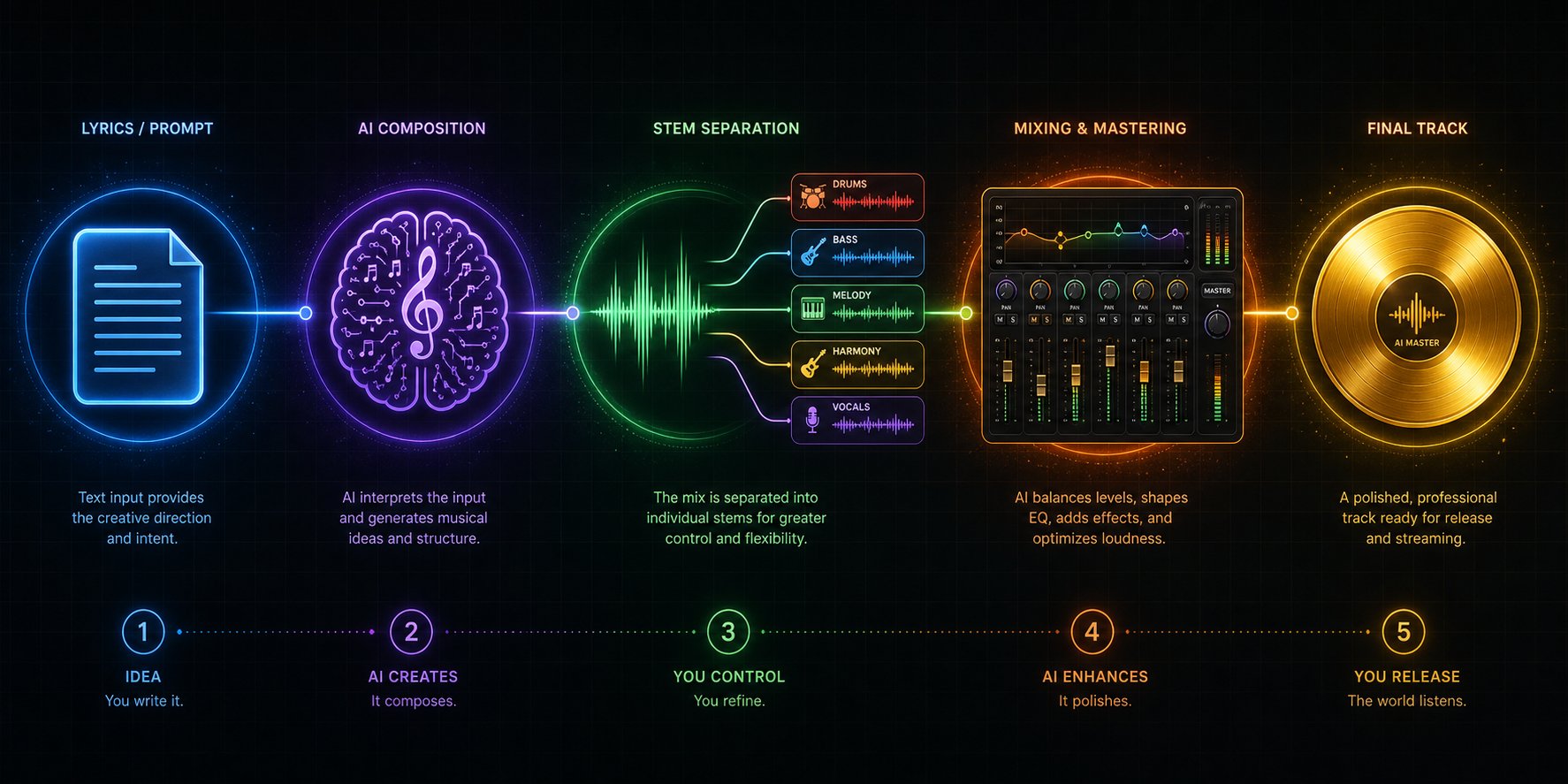
No single AI tool handles every stage of music production well. The creators getting genuinely professional results aren't relying on one platform. They're chaining multiple ai tools for music together, using each one where it's strongest and handing off to the next when it's not. This multi-tool approach is how you bridge the gap between "interesting AI demo" and "track I'd actually release."
Think of it like cooking. One tool grows the ingredients. Another preps them. A third handles the actual cooking. Asking one platform to do everything is like expecting a farm to also be a restaurant.
Building a Multi-Tool AI Music Production Pipeline
Here's a practical pipeline that takes you from a blank page to a polished track. Each step uses the best ai tool to create music at that specific stage:
- Generate lyrics with a dedicated AI writing tool. Start with a lyrics-focused platform like Somio, LyricStudio, or even ChatGPT to draft structured verses, choruses, and bridges. These tools understand song form better than general-purpose generators when you need precise control over phrasing and rhyme scheme.
- Feed lyrics into a prompt-based music generator. Take your polished lyrics into Suno, Udio, or MakeBestMusic. Add a style description and genre tags. Generate multiple variations. This gives you a complete arrangement with vocals, instrumentation, and structure built around your words.
- Separate stems using an AI stem splitter. Recent testing of 11 stem separation tools found Apple Logic Pro's Stem Splitter delivers the cleanest extraction across vocals, drums, bass, guitar, and piano. LALAL.AI excels at extended instrument recognition, and Steinberg SpectraLayers Pro offers the deepest editing control. Pull apart the generated track into individual elements you can manipulate independently.
- Refine individual parts in your DAW. Import the separated stems into Ableton, Logic, FL Studio, or your DAW of choice. Replace a weak drum part with a better loop. Adjust vocal timing. Layer in a real guitar take over the AI-generated bed. This is where the 50 stems mix edits music ai process ai powered approach transforms generic output into something personal.
- Apply AI-assisted mixing and mastering. Tools like iZotope Ozone, LANDR, or BandLab's mastering engine handle the final polish: EQ balancing, dynamic control, stereo width, and loudness optimization. These catch problems a generator might introduce, like muddy low end or harsh sibilance.
This pipeline means each tool handles what it's best at. The lyrics generator writes. The music generator composes. The stem splitter deconstructs. Your DAW rebuilds. The mastering AI polishes. No single platform in any best ai music production software list can match the results of this combined workflow.
When to Use AI for Ideas vs Final Output
Not every stage of this pipeline needs to end up in the final track. The smartest producers treat AI generation as ideation, not destination.
Use AI for final output when you need volume and speed: background music for content, placeholder tracks for video edits, quick demos to communicate ideas to collaborators. The generated track is the product.
Use AI for ideation when quality standards are higher: generate a track to hear how your lyrics sound sung, extract a chord progression that inspires a new direction, or use a midi music maker to capture a melodic idea you can then develop manually in your session. Here, the AI output is a starting point you'll transform beyond recognition.
Combining AI lyrics generators with music generators creates a complete songwriting workflow even for creators with no instrumental skills. Draft words in one tool, hear them performed in another, refine based on what sounds right, regenerate. This iterative loop, which producer-focused workflow guides describe as the standard 2026 approach, keeps creative decisions with you while AI handles execution.
Output Formats That Keep Your Options Open
Your format choices at each stage determine how much flexibility you retain downstream. Get this wrong and you'll hit dead ends when editing.
- WAV over MP3, always. MP3 compression permanently removes frequency information. If you plan any post-processing, stem separation, or mixing, download WAV files from your generator. The quality loss from MP3 compounds with each processing step.
- Stem exports save hours. Platforms offering stem downloads (Udio, Mureka, MakeBestMusic) eliminate the stem separation step entirely. You get vocals, drums, bass, and instruments as separate files ready to drop into a session.
- MIDI unlocks true editing freedom. AIVA's MIDI export lets you change every note, swap instruments, adjust tempo, and rearrange sections at will. If you're looking for a midi music maker workflow where you retain full compositional control, MIDI output is non-negotiable. A logic pro multitrack download of your MIDI stems gives you complete arranging power inside Apple's DAW.
- Sample rate matters for mixing. 44.1kHz is fine for streaming-only output. If you're mixing with live recordings or plan professional mastering, look for 48kHz options. Udio offers this on paid plans.
One workflow detail worth noting for Logic users: if you're building sessions from separated AI stems, search for a logic pro multitrack template download free to save setup time. Pre-routed templates with bus assignments for vocals, drums, bass, and instruments let you import stems and start mixing immediately rather than configuring routing from scratch each time. The best ai music creation tools 2025 and 2026 all produce output compatible with standard DAW session formats.
The multi-tool approach produces results that sound intentional rather than algorithmically generated. But it does require more time and skill than pressing one button. That trade-off raises an honest question: when does AI music production make sense versus when should you consider a completely different approach?
When AI Music Is Not the Right Fit for Your Project
AI music tools are powerful, fast, and increasingly capable. They're also not the answer to every music need. Pretending otherwise would undermine everything this guide has built so far. Certain projects, budgets, and long-term goals are genuinely better served by human composers, pre-made libraries, or learning traditional production yourself.
Knowing when to reach for a different solution saves you from forcing AI output into situations where it consistently underdelivers.
Scenarios Where a Human Composer Wins
A freelance composer typically costs $100 to $2,000+ per finished minute and takes days to weeks. That's expensive. But for certain projects, it's the only option that delivers what you actually need:
- Emotionally precise film scoring — when a cue needs to hit a specific emotional beat at an exact timecode, shifting from tension to relief in two bars, AI can't iterate with a director's feedback in real time. A composer watches the scene and responds to nuance that no prompt can describe.
- Brand-defining sonic identity — if your company needs a signature sound that's legally exclusive, enforceable, and unmistakably yours, AI-generated audio can't guarantee exclusivity. A commissioned work-for-hire composition gives you full ownership and uniqueness no algorithm can replicate or accidentally generate for someone else.
- Live performance requirements — AI generates audio files. It doesn't perform on stage, adapt to audience energy, or improvise when something goes wrong. Any project that ends in a live setting needs human musicians.
- Iterative creative collaboration — "make it warmer but keep the drive, and reference that thing we tried last Tuesday" is a conversation you can have with a composer. You can't have it with a text prompt.
The honest cost comparison: AI wins on speed and budget for volume work. A composer wins on originality, emotional precision, and full creative control. They're different tools for different jobs, not competitors.
When Royalty-Free Libraries Are the Smarter Choice
Sometimes the best solution isn't generating anything at all. Royalty-free music libraries like Epidemic Sound and Artlist cost roughly $10 to $30 per month and offer instant access to thousands of professionally recorded tracks. For creators who need reliable background music without spending time crafting prompts, iterating on outputs, or evaluating quality, a curated library is faster and simpler.
Libraries win when you need:
- Polished, human-performed tracks with zero generation effort
- Predictable quality without the one-in-seven artifact risk AI still carries
- Pre-cleared commercial licensing with established legal precedent
- Genre-specific catalogs curated by music supervisors who understand context
The trade-off is exclusivity. Your background track might appear in hundreds of other videos. But if uniqueness isn't critical, say for a tutorial voiceover or a product demo, libraries remain the path of least resistance. Many creators treat stock libraries and AI generators as bandlab alternatives for different stages of their content calendar, using libraries for routine episodes and AI for projects needing a custom sound.
Building Long-Term Skills vs Quick Output
Here's a question worth sitting with: do you want to make music, or do you want to have music made for you? The answer shapes which tools actually serve your goals.
If your ambition extends beyond content soundtracks into genuine music production, learning good music production software pays compounding returns that AI generation never will. A DAW teaches you arrangement, mixing, sound design, and audio engineering. These skills make you better at using AI tools too, because you can hear what's wrong and fix it.
The best software for music production in 2026 ranges from free to premium. Logic Pro, Ableton Live, and FL Studio dominate paid options. For zero-budget starting points, the best music-making software free options include Audacity, LMMS, GarageBand, and BandLab's browser-based DAW. These are legitimate best music creation apps that professional producers used early in their careers. If you're searching for the best free music recording and editing software or the best free music recording software to capture live instruments alongside AI-generated elements, Audacity and GarageBand handle both recording and basic editing without spending a dollar.
Free producing software has matured to the point where budget is no longer a valid excuse for not learning production fundamentals. The real cost is time, and that investment compounds. A creator who understands EQ, compression, and arrangement will outperform someone who only knows how to write prompts, every time, because they can take AI output and elevate it rather than accepting whatever comes out of the generator.
Match the tool to the goal. AI generators solve "I need music now." Composers solve "I need music that's precisely this." Libraries solve "I need music without thinking about it." DAWs solve "I want to become someone who makes music." No single answer fits every creator.
For those who've decided AI generation fits their current needs, the remaining question is practical: where exactly should you start, what should your first prompt look like, and how do you iterate toward results worth sharing?
How to Get Started and Create Your First AI Track Today
You've seen the landscape, compared the tools, and understand the trade-offs. The only thing left is doing something with that knowledge. The gap between reading about AI music and actually producing a track is exactly one prompt wide. Let's close it.
Matching Your Goal to the Right Starting Tool
Different goals demand different starting points. Rather than picking the most popular platform, pick the one aligned with what you actually need this week. Here's a use-case map across the top ai music generation tools 2026:
- Fastest path from idea to complete song — MakeBestMusic. Enter your prompt, paste lyrics if you have them, choose a style, and get a finished track with vocals. No multi-step generation, no segment stitching. If you want the best ai song creator experience with minimal friction, start here.
- High-volume content background music — Suno. The 50 daily free credits let you generate roughly ten songs before breakfast. Ideal for YouTubers, podcasters, and social media creators who burn through tracks weekly.
- Producer-level stem control — Udio. If you plan to import stems into a DAW and reshape the arrangement, Udio's segment-based workflow and stem exports give you surgical editing access.
- Orchestral and cinematic scoring — AIVA. MIDI export means you own every note and can rearrange freely. For film, games, and ads needing instrumental depth, nothing else matches its classical training.
- Quick jingles and brand audio — Boomy or MakeBestMusic. An ai jingle maker workflow works best when you can generate fast and iterate faster. Both platforms deliver sub-minute turnaround.
- Hobbyists exploring for fun — Suno or Udio's free tiers. Zero commitment, daily resets, and enough credits to experiment across genres without pressure.
A common question that comes up: can ChatGPT make songs? Not directly. ChatGPT can write lyrics and suggest structures, but it doesn't generate audio. Pair it with a dedicated music generator for the complete pipeline — use ChatGPT for lyric drafting, then feed those words into a platform that produces actual sound.
Your First Prompt and How to Iterate
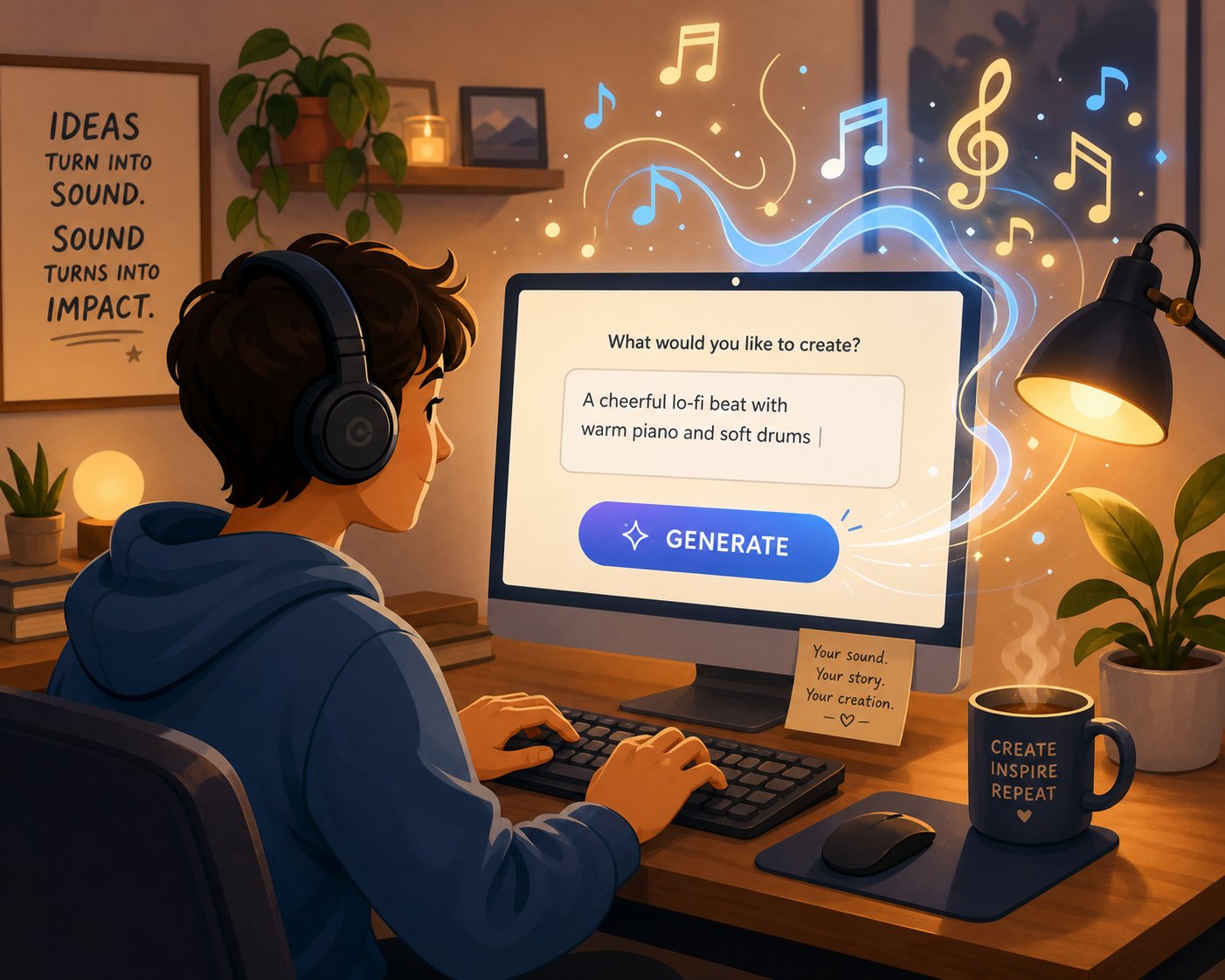
Your first prompt doesn't need to be perfect. It needs to be specific enough to steer the AI away from generic output. Based on prompt engineering best practices, effective prompts combine five elements: genre, mood, instrumentation, tempo, and purpose.
Here are starter prompts that reliably produce quality results across the best ai music generators 2026:
- Content creator: "Upbeat indie pop, acoustic guitar and light percussion, bright and optimistic, 110 BPM, background for lifestyle vlog"
- Songwriter: "Melancholic folk ballad, fingerpicked guitar and soft piano, reflective female vocal, slow tempo, verse-chorus-bridge structure"
- Hip-hop creator: "Dark trap beat, 808 bass, hi-hats with rolls, moody synth pads, 140 BPM, aggressive energy" — if you're searching for the best ai rap lyrics generator, draft your bars separately in a lyrics tool and paste them into your music generator's lyrics field for tighter results.
- Metal fan: "Heavy thrash metal, distorted guitars, double kick drums, aggressive male vocal, fast tempo, high energy" — the best ai metal music generator output comes from pairing genre-specific vocabulary with structural instructions like "breakdown at 1:30."
- Brand/jingle: "Cheerful corporate pop, clean electric guitar, claps, positive energy, 120 BPM, 15-second loop for product intro"
After your first generation, iterate based on what you hear rather than rewriting from scratch. If the mood is right but the tempo drags, adjust only the BPM. If the instruments work but vocals feel off, add specifics like "raspy male voice" or "breathy female delivery." Envato's prompting research confirms that small refinements outperform complete rewrites because they help you learn how each platform interprets language.
A Practical Next Step for Each Creator Type
Knowing which tool to open is half the battle. Here's what to do in your first 15 minutes with each, mapped to where you are right now:
- Content creators — Sign up for Suno's free tier and generate three tracks using the content creator prompt above. Download the best one in WAV. Drop it under your next video edit and see how it fits.
- Songwriters with lyrics ready — Open MakeBestMusic, paste your lyrics, select a genre direction, and generate. You'll hear your words performed within minutes. Iterate the style tag if the first result doesn't match your vision.
- Producers seeking creative sparks — Generate a track on any platform, then download stems (or run it through a stem splitter). Import into your DAW. Replace the weakest element with something you play or program yourself. That hybrid result will sound nothing like raw AI output.
- Hobbyists making music for fun — Pick any free tier. Write the weirdest, most specific prompt you can imagine. "70s space disco meets traditional Irish fiddle, sung by a deep baritone about lost socks." The stranger your input, the more you'll learn about what these models can do.
One final principle: don't commit to a single platform before testing at least three. Free tiers exist specifically for this. Spend one session with a prompt-to-song tool, another with a stem-based workflow, and a third with an instrumental-only generator. You'll discover which approach clicks with how you think creatively, and that alignment matters more than any feature comparison table.
The top ai music generation products 2026 are genuinely capable. They won't replace the full depth of human musicianship, but they've made the gap between having a musical idea and hearing it realized shorter than it's ever been. Your first track is one prompt away. Write it badly, listen, adjust, and write it better. That loop is the entire skill.
