

How AI Models and Architectures Power Music Generation
When you ask what AI is used to make music, you're really asking about a handful of neural network architectures doing very different things under the hood. Each one handles audio in its own way, and understanding the differences helps you pick the right tool for your workflow. The AI music market is expanding rapidly, with industry analysts projecting it will reach USD 38.7 billion by 2033, up from $3.9 billion in 2023. That tenfold leap is driven almost entirely by breakthroughs in these core architectures.
Transformer Models and Token-Based Generation
Imagine how a language model predicts the next word in a sentence. Transformer-based music generators do the same thing, except with audio tokens. They break sound into small discrete units, process them through layers of attention mechanisms, and predict what comes next in the sequence. This lets them capture long-range musical structure: recurring motifs, verse-chorus patterns, and harmonic progressions that actually make sense over time.
Platforms like Suno and Udio rely on transformer architectures to generate full songs, complete with vocals and instrumentation, from a simple text prompt. Google's Music Transformer was among the first to apply self-attention to musical sequences, and the approach has since become the dominant method for AI driven music composition at scale.
Diffusion Models for Audio Synthesis
Diffusion models take a completely different path. Instead of predicting tokens one by one, they start with pure random noise and gradually remove it, step by step, until coherent audio emerges. Think of it like sculpting sound out of static. Each denoising step adds more detail and structure, producing rich textures and realistic timbres.
Stable Audio 3.0 from Stability AI is the most prominent example. It uses a latent diffusion architecture to generate up to six minutes of instrumental music or sound effects from text prompts, with fine control over genre, mood, and instrumentation. Diffusion models excel at capturing subtle audio nuances that token-based systems sometimes miss, though they tend to be more computationally intensive.
Other Architectures Including GANs and RNNs
Beyond transformers and diffusion, several other ai music generation models play supporting roles:
- GANs (Generative Adversarial Networks) — Two neural networks compete against each other. A generator creates audio samples while a discriminator judges whether they sound real. This adversarial loop pushes output quality higher with each training cycle. GANs are often used for realistic sound synthesis and timbre transfer.
- RNNs (Recurrent Neural Networks) — Process audio sequentially, maintaining a memory of previous notes. Earlier AI composition tools like Google's Magenta used LSTM-based RNNs, though transformers have largely replaced them for long-form generation due to better handling of long-range dependencies.
- Variational Autoencoders (VAEs) — Compress audio into a compact latent space, then decode new variations from that space. VAEs are useful for generating smooth interpolations between styles and for creating controllable sound palettes.
So how does AI music generation work in practice? Most modern tools combine these architectures. A transformer might handle composition structure while a diffusion model renders the final audio waveform. Understanding how AI music generators work at this level reveals why different tools sound and behave so differently from one another.
Will AI get better at helping with making music? Given how quickly these architectures are evolving, and how hybrid systems are already merging their strengths, the answer is almost certainly yes. The real question shifts from the technology itself to how you put it to use, which starts with knowing exactly what kind of output you need.
Step 1. Define Your Music Goals and Output Type
Knowing the technology behind AI music is one thing. Knowing what you actually want out of it is another. The ai tools for music production available today range from dead-simple prompt boxes to full-blown AI-powered DAWs, and picking the wrong category wastes hours you could spend creating. Your first move is figuring out where you fall on the spectrum between "generate everything for me" and "give me smart suggestions while I drive."
Fully Generative vs AI-Assisted Composition Tools
Fully generative tools work like a vending machine for music. You type a text prompt describing genre, mood, tempo, and maybe paste in some lyrics. The AI returns a complete track, vocals and all, in under a minute. Suno and Udio are the clearest examples: zero musical knowledge required, instant output, minimal editing options. These are ideal when you need a finished piece fast and don't need granular control over every element.
AI-assisted composition tools sit on the opposite end. They live inside a production environment and augment your decisions rather than replacing them. Think of platforms like Veena Studio, which functions as a browser-based DAW with an AI CoProducer that builds tracks layer by layer, generates MIDI and audio contextually, and handles mixing, all while you retain creative control at every step. MIDI-focused assistants like muse.art and Delphos generate chord progressions or melody patterns you can import into your preferred DAW and reshape however you want.
The benefits of ai in music depend heavily on which category you choose. Generative tools prioritize speed and accessibility. Assisted tools prioritize depth and creative ownership. Neither is inherently better; they serve different goals.
Matching Your Use Case to the Right Tool Category
Before you start browsing feature lists, run through a quick decision checklist. These four questions cut through the noise and point you toward the right tool category:
- What genre do you need? Some generators excel at pop and electronic but struggle with jazz or classical. If you have a specific genre of the song in mind, check whether a tool handles it well before committing. A genre finder feature or style-tag system can help you narrow this down.
- Do you need stems or full mixes? Content creators often need a polished stereo mix ready to drop under a video. Producers typically want separated stems (drums, bass, melody, vocals) so they can remix and rearrange. This distinction alone eliminates half the options.
- Commercial use or personal? If you plan to monetize the output on streaming platforms, ads, or client projects, licensing terms matter more than any feature. Some tools grant full commercial rights on paid plans; others restrict usage or require attribution.
- How much creative control do you want? If you just need background music for a podcast, a fully generative tool gets you there in seconds. If you're a songwriter looking for melody ideas or a producer building layered arrangements, music production tools with ai technology that offer MIDI export and per-element editing will serve you better.
You might also want a similar songs finder to reference existing tracks that match your target sound. This helps you describe what you're after more precisely when you eventually write prompts or select style tags.
Clarity here saves real time. A content creator who accidentally picks a MIDI-only composition assistant ends up with raw note data and no way to turn it into a finished track without additional software. A producer who picks a fully generative tool gets a polished song but no way to isolate the bass line or swap out the drum pattern. Matching your use case to the right ai for music production category is the single most important decision before you ever hit "generate."
Step 2. Pick the Right AI Music Generator
With your goals and output type locked in, the next step is matching those needs to a specific platform. The landscape of best ai music generators has shifted dramatically since 2024. Tools that were experimental a year ago now produce release-ready tracks, and pricing models have settled into predictable tiers. What matters is finding the one that fits your workflow, not chasing the flashiest demo reel.
This comparison of the top ai music generators focuses on what actually affects your creative output: lyrics support, style customization, stem access, commercial licensing, and cost. Whether you landed on this page searching for the best ai music generation tools 2025 or looking ahead to the top ai music generation tools 2026, the fundamentals below will point you in the right direction.
Top AI Music Generators Compared
The table below organizes the leading platforms by the features that matter most for creators ready to generate and publish. Each tool is evaluated on real-world output, not marketing claims.
| Tool | Best For | Lyrics Input | Style Tags | Stem Export | Commercial Rights | Starting Price |
|---|---|---|---|---|---|---|
| MakeBestMusic | Fast prompt-to-song with lyrics | Yes | Yes | No | Yes (paid plans) | Free tier available |
| Suno | Full song generation, widest genre range | Yes | Yes | Yes (Premier plan) | Yes (paid plans) | $10/mo |
| Udio | High-fidelity stems for DAW producers | Yes | Yes | Yes (Pro plan, WAV) | Yes (post-UMG settlement) | $10/mo |
| Stable Audio | Instrumental beds, sound design | No | Yes | No | Yes (Creator tier+) | Free tier available |
| Mubert | Ambient, streaming, API integration | No | Mood/duration | MP3 | Yes (paid plans) | Free tier available |
| MusicGen (Meta) | Developers, open-source flexibility | No | Text prompt | No | Yes (open-source) | Free |
A few things jump out. MakeBestMusic stands out as the fastest path from idea to finished song for beginners and content creators. You paste in lyrics, pick a style direction, and get a complete track back without navigating complex interfaces or burning through credits on failed experiments. The lyrics-first workflow is a genuine differentiator if songwriting is part of your process.
Suno remains the best ai music generator 2025 carried forward, now boasting roughly 2 million paid subscribers and the widest genre coverage in the category, according to Chartlex's 2026 comparison. Its Premier plan adds Suno Studio with stem extraction and MIDI export, making it a near-complete production environment. Udio is the pick for producers who finish tracks in a DAW. Its stem export quality is among the cleanest available, and its licensing posture improved significantly after the Universal Music Group settlement in October 2025.
Stable Audio occupies a different lane entirely. No vocals, no full songs. Instead it delivers rich instrumental textures, ambient beds, and sound design elements trained on a licensed dataset from AudioSparx, giving it one of the clearest commercial-use frameworks in the space. Mubert works best for creators who need adaptive background audio at flexible durations, and its API makes it a practical choice for app developers building audio into products.
MusicGen is Meta's open-source option. It runs locally, carries no subscription cost, and has zero generation limits. The trade-off is that there's no user interface. You'll need a Python environment or API setup, which puts it out of reach for non-technical users but makes it the most flexible instrumental generator for developers.
Which Tool Fits Which Creator Type
If you're scanning for the best free ai music generators 2025 or the best free ai music generators 2026, your shortlist depends on what you're building:
- Content creators (YouTube, TikTok, podcasts) — MakeBestMusic for quick vocal tracks with lyrics, or Mubert for ambient backgrounds at any length.
- Songwriters and lyricists — MakeBestMusic or Suno. Both accept full lyrics input and return melodic interpretations you can iterate on.
- Producers who work in a DAW — Udio for stems, or MusicGen if you want local, unrestricted generation with full post-processing control.
- Sound designers and podcasters — Stable Audio for intros, beds, and textural elements that sit cleanly under voice.
- Hobbyists exploring for fun — Free tiers on MakeBestMusic or Suno let you generate complete songs without spending anything.
No single platform dominates every use case. The best ai music generation tools 2026 landscape rewards specificity: know what you need, pick the tool built for that job, and save yourself from wrestling with a platform designed for someone else's workflow. The real skill isn't choosing the most powerful generator. It's choosing the one whose strengths align with your creative intent, then learning how to talk to it effectively through prompts.
Step 3. Craft Prompts That Shape Your Sound
Talking to an AI music generator effectively is its own skill. You wouldn't walk into a recording studio and tell a session musician "play something cool," yet that's exactly what most people do when they type a prompt. The difference between a generic output and a track you'd actually use comes down to how precisely you communicate musical intent. Learning how to write a song lyrics section or describe an instrumental mood in terms the model understands is what separates throwaway demos from releasable music.
Anatomy of a High-Quality AI Music Prompt
AI models interpret prompts probabilistically, mapping your descriptive language to learned musical patterns. The first few words carry disproportionate weight because models prioritize early tokens during generation. That means structure matters. A reliable formula, based on Sonygram's prompt engineering research, follows this order:
Mood + Genre + Instrumentation + Key/Scale + Tempo/BPM + Arrangement + Production Style
Use 4 to 7 core descriptors. Fewer than that produces generic results. More than seven tends to dilute the signal, creating conflicting directions the model can't reconcile. Think of each element as a constraint that narrows the creative space, guiding the AI toward a single coherent output rather than leaving it guessing.
Here's where knowing the right words to describe music becomes essential. Instead of vague adjectives, use vocabulary with specific musical meaning: tempo terms like "allegro" or "andante," dynamic cues like "crescendo into the chorus," texture descriptors like "sparse" or "dense," and structural markers like "verse-chorus-bridge" or "build-drop-breakdown." Suno's official glossary lists over 100 musical terms their model responds to, from "syncopation" to "pedal point" to "melisma."
Genre Tags and Mood Descriptors That Work
Genre should come first in your prompt. When you lead with "house track at 124 BPM" rather than "energetic track with house elements," the model locks into the correct rhythmic and harmonic framework immediately. Mood descriptors refine from there. Words like "melancholic," "nostalgic," "tense," or "uplifting" shape harmonic direction and melodic phrasing in ways the model reliably interprets.
Instrumentation specificity matters just as much. Say "Rhodes electric piano" instead of "piano." Say "brushed drums" instead of "drums." Say "supersaw lead" instead of "synth." The more precise your instrument choices, the less randomness you'll hear in the output. If you're wondering how do I write a song that sounds like a specific genre, this layered specificity is the answer. An ai songwriter tool can only reflect the clarity you feed it.
Weak prompt: "Make a happy song." — Result: generic major-key loop with random instrumentation, no structure.
Strong prompt: "Upbeat indie pop, acoustic guitar lead, female vocals, bright piano chords, 120 BPM, G major, verse-chorus-verse structure, warm analog production." — Result: cohesive track with clear arrangement, identifiable genre, and consistent energy.
Genre-specific prompt: "Melancholic lo-fi hip-hop at 78 BPM in A minor, dusty swing drums with vinyl crackle, Rhodes piano chords, warm sub bassline, 16-bar seamless loop, soft analog saturation." — Result: studio-ready loop with genre-accurate texture and loopable structure.
Common Prompt Mistakes and How to Fix Them
Even experienced creators fall into patterns that sabotage output quality. Here are the most common issues and their fixes:
- Overly general language — Words like "cool," "nice," or "good vibes" convey zero musical direction. Replace them with specific mood and texture descriptors.
- Conflicting descriptors — Combining "dark, happy, energetic, slow" in one prompt degrades coherence. Pick a unified emotional direction.
- Missing tempo — Without a BPM value, the model estimates speed based on genre probability, leading to unstable grooves or unintended pacing. Always specify a number.
- No vocal definition — If you don't specify male or female, clean or raspy, verse-chorus placement, the model may add unexpected vocal textures or misplace chorus sections entirely.
- Instrument overload — Listing ten instruments creates cluttered compositions. Stick to 3 to 5 core instruments and let the AI fill supporting roles naturally.
If you're looking for the best ai for songwriting results, treat your prompt like a short production brief: concise but full of musical intent. The top ai platform for songs lyrics will still produce mediocre output if you hand it a vague instruction. Similarly, an ai rhyme finder or lyric tool only helps if the musical context around those lyrics is well-defined.
Precision directly improves genre accuracy and structural coherence. The more musically defined your instructions are, the more controlled and professional the final output becomes. That clarity also sets you up for the next phase: actually generating a track and knowing what to expect when you hit the button.
Step 4. Generate Your First Complete AI Track
You've defined your goals, picked your tool, and written a detailed prompt. Hitting "generate" feels like a leap of faith, but understanding what happens behind the button removes the mystery and helps you interpret results faster. The generation process follows a consistent logic across nearly every platform, so once you internalize the flow, you can work with any ai music gen ai tool confidently.
Submitting Your Prompt and Setting Parameters
When you submit a text prompt, the model doesn't hear words the way you do. It converts your language into numerical embeddings, dense vectors that represent musical concepts like tempo, timbre, harmonic character, and arrangement density. These embeddings condition the generation model, telling it what kind of audio to produce. If the system uses a transformer architecture, it begins predicting audio tokens one after another, building the track sequentially like sentences in a paragraph. If it uses a diffusion approach, it starts with a noise-filled spectrogram and iteratively removes randomness until a coherent piece of music emerges.
The practical steps you control happen before any of that math kicks in. Using MakeBestMusic as a walkthrough example, the flow looks like this:
- Enter your lyrics or prompt — In Simple Mode, you describe the song concept in a single line. In Custom Mode, you paste full lyrics or use the built-in AI Lyrics tool to generate them from a theme description.
- Select your style — Choose genre tags, mood descriptors, and vocal preferences. MakeBestMusic organizes these into categories: Genres, Moods, and Voices. You can pick a persona voice for a specific vocal character or opt for instrumental-only output.
- Set the tempo — Pick a rhythm that matches the energy level you defined in your prompt. Slow and intimate, mid-tempo groove, or high-energy drive.
- Add a title — Name your track. This doesn't affect generation quality, but it keeps your library organized as you iterate.
- Hit generate — The model processes your inputs and returns a complete track, typically within 30 to 90 seconds depending on server load and song length.
Most generators follow a similar flow. Suno and Udio condense style selection into a single text field where you combine genre and mood tags directly in the prompt. Stable Audio asks for a description plus duration. The core mechanic is identical: text in, audio out. MakeBestMusic's structured interface simply makes each decision explicit rather than requiring you to remember every tag format.
What to Expect from Your First Generated Track
Here's where realistic expectations save you frustration. Your first generation will rarely be the final version. Think of it as a rough draft, not a master. How are ai songs made in practice? Through iteration. Most creators generate three to five variations before landing on one worth keeping.
A few things to anticipate:
- Structural coherence varies — AI handles verse-chorus patterns well but sometimes stumbles on transitions, bridges, or outros. Tracks under two minutes tend to hold together better than longer pieces.
- Vocals may surprise you — The voice style might not match your mental image perfectly on the first try. Adjusting vocal tags or switching between persona voices often fixes this in one more generation.
- Instrumental balance shifts — One generation might bury the guitar under synths while the next foregrounds it. This randomness is a feature, not a bug. It gives you options to compare.
- Generation time is short but not instant — Expect 30 seconds to two minutes per track. Batch your attempts rather than agonizing over a single output. The best song creator app experience comes from treating generation as cheap and fast, then curating aggressively from the results.
If a result feels close but not quite right, regenerate with small prompt tweaks rather than rewriting from scratch. Swap one mood descriptor, shift the BPM by 5 to 10 beats, or change the vocal type. Small adjustments often land you on the version you want within two or three more tries.
Tools like the ai song generator based on artist Riffusion take a slightly different approach, generating spectrograms visually and converting them to audio. Others, like my tunes ai music generator platforms, emphasize personalization by learning from your previous outputs. Regardless of the specific tool, the feedback loop is the same: generate, listen, adjust, regenerate.
The best ai tool to create music isn't necessarily the one that nails it on the first attempt. It's the one whose iteration cycle feels fast and intuitive enough that you reach a great result before creative momentum fades. Once you have a track you're happy with, the raw output still benefits from refinement, which is where AI-powered editing and stem separation come into play.
Step 5. Refine the Mix with AI Editing and Stems
Raw AI output is a starting point, not a finish line. Even the strongest generators produce tracks with quirks: a vocal that sits too far forward, drums that lack punch, transitions that feel abrupt, or repetitive loops that overstay their welcome. The editing phase is where you turn a promising generation into something you'd actually put your name on. And the good news? AI handles much of this heavy lifting too.
Using AI Stem Separation to Isolate and Remix Elements
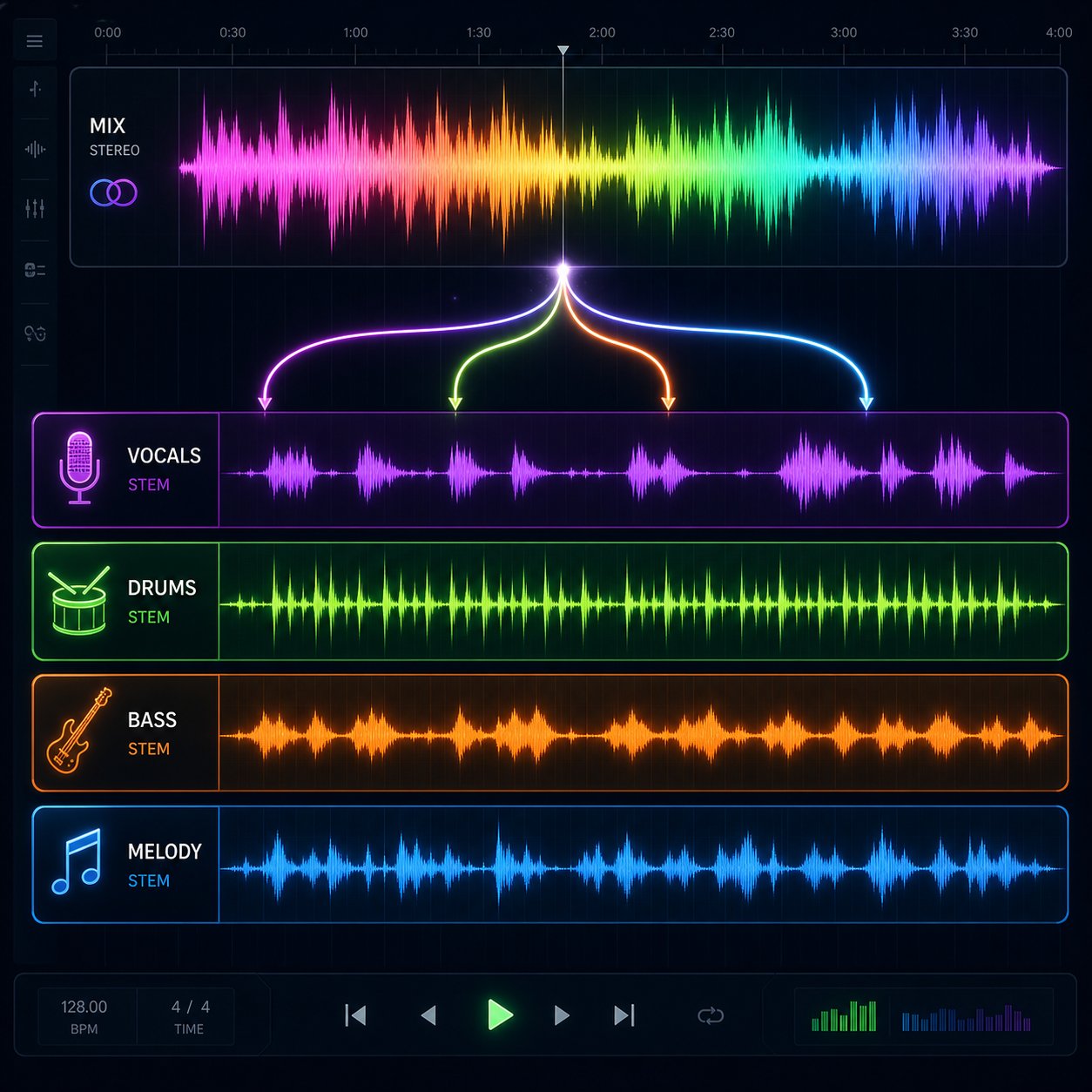
Stem separation is the single most useful post-generation technique. It breaks a stereo mix into individual components, typically vocals, drums, bass, and other instruments, giving you control over elements that were previously locked together. Want to lower the vocal, swap the drum pattern, or run a song through AI and extract the lyrics for a remix? Stem splitting makes all of it possible.
Not all separators are equal. Independent testing across 12 stem splitters revealed a massive quality gap between tools. Two clear winners emerged:
- UVR (Ultimate Vocal Remover) — Free, open-source, and scored the highest overall quality (8.05/10) in blind testing. The Kim Vocals 2 model produces the cleanest lead vocal extractions with reverb tails intact. The MDX 23xc model handles instrumental isolation best. Requires a download and minimal setup, but the algorithm library gives you more control than any web-based option.
- Moises — Best combination of quality and ease of use (secondary score: 8.3/10). Drag in a file, get stems back fast. Particularly strong at isolating background vocals and electronic drums. Available as a web app with no setup required.
- Your DAW's built-in separator — Logic, FL Studio, Ableton, and Cubase all include native stem splitting now. Quality is mid-tier, but it's free and instant. Ableton produces the cleanest results among DAW-native options, though it processes slower.
- LALAL.AI — Web-based with batch processing and a DAW plugin. Convenient but tested as mediocre in separation quality compared to UVR and Moises, despite its popularity.
One important caveat: bass separation is the weakest category across every tool tested. All AI stem separators lose high-end harmonic information from bass tracks, leaving you with mostly sub-frequency content. If you need a full-range bass stem, recreating the part yourself or requesting original stems from the source remains the best approach.
For vocal mixing ai free options, UVR is unbeatable. It runs locally, costs nothing, and lets you experiment with multiple separation algorithms until you find the cleanest extraction for your specific track. Think of it as a song mashup maker with surgical precision: isolate the vocal from one generation, the drums from another, the melody from a third, and combine them into something none of those individual outputs could deliver alone.
AI Mixing and Layering for a Polished Sound
Stem separation gives you raw material. The next step is shaping those stems into a cohesive mix. AI mixing tools analyze frequency balance, dynamics, and stereo imaging, then suggest or apply corrections automatically. This is where creating piano arrangement from audio ai free tools and melody layering platforms enter the workflow.
Here are the best ai tools for generating melody layers over existing beat and handling post-production tasks:
- iZotope Neutron 5 — AI-powered Mix Assistant recommends EQ curves, compression settings, and balance adjustments per track. The Unmask module identifies and resolves frequency conflicts between stems automatically. Genre-based presets provide solid starting points.
- Sonible smart:EQ 3 — Analyzes audio in real time and applies corrective EQ using profile matching. Cross-channel processing ensures stems don't compete for the same frequency space.
- Masterchannel — Automated mastering with loudness balancing optimized for streaming platforms. Upload your mix, get a mastered version back in seconds.
- Accusonus ERA Bundle — One-click noise removal, voice leveling, and reverb removal. Useful for cleaning up AI vocal stems that carry artifacts from the generation process.
- Suno Studio — Browser-based multitrack editor with BPM control, pitch adjustment, volume and panning per stem, and the ability to regenerate individual stems on the fly. Available on Premier plans.
The hybrid workflow that produces the best results right now, according to Born to Produce's complete guide, follows a clear pattern: use AI for generation and stem separation, then bring those stems into a proper DAW for EQ, compression, spatial effects, and mastering. The difference between a raw AI export and a properly mixed track is dramatic. AI-generated mixes often suffer from frequency build-up, muddy low-end, or unnatural stereo imaging that targeted processing resolves quickly.
Common issues in raw AI output and how editing fixes them:
- Repetitive structures — Trim or rearrange sections in your DAW. Cut a redundant verse, shorten an intro, or splice in a bridge from a separate generation.
- Audio artifacts — Digital glitches, metallic ringing, or phasing typically appear in cymbal transients and vocal sibilants. A de-esser or spectral repair tool (like iZotope RX) cleans these up without affecting the rest of the mix.
- Abrupt transitions — AI models sometimes drop energy suddenly between sections. Crossfades, reverb tails, and volume automation smooth these into natural progressions.
- Flat dynamics — AI tracks can sound uniformly loud from start to finish. Adding compression with slow attack times restores punch, and volume automation creates the dynamic arc a song needs to hold attention.
A music loop generator can also supplement your base track with additional rhythmic or melodic elements. Generate a complementary loop in a separate session, stem-separate it if needed, then layer it under your primary track for added depth. Similarly, if you want to experiment with how a track sounds in a different style, an ai that changes music genres can reinterpret your base material with new instrumentation and rhythmic patterns, giving you creative variations without starting from scratch.
The editing phase is where ownership happens. Raw generation is accessible to anyone with a keyboard. But knowing how to separate, clean, layer, and mix those outputs into a polished piece is what transforms AI-assisted creation into something genuinely yours. With your track refined and sounding right, the final practical question becomes format: how you export it, at what quality, and under what licensing terms.
Step 6. Export Your Music in the Right Format
A polished mix means nothing if you export it in the wrong format or discover you can't legally monetize it. These two decisions, file format and licensing, determine whether your AI-generated track actually reaches an audience or sits unused on your hard drive. Most guides skip this step entirely, but it's where real-world distribution either works or falls apart.
Audio Format and Quality Settings That Matter
Every AI music generator exports in at least one format, but the options vary widely. Choosing the right one depends on where the track ends up: a streaming platform, a video timeline, a podcast feed, or a live set. Here's how the main formats compare for AI music output:
| Format | Compression | File Size (per min) | Quality | Best Use Case |
|---|---|---|---|---|
| WAV | None (lossless) | ~10 MB | Identical to source | Mastering, distribution uploads, DAW editing |
| FLAC | Lossless | ~5-6 MB | Identical to source | Archiving, audiophile downloads, backup |
| MP3 (320 kbps) | Lossy | ~2.4 MB | Near-transparent | Sharing demos, podcast intros, social media |
| MP3 (128 kbps) | Lossy | ~1 MB | Noticeable artifacts | Quick previews only |
| AAC/M4A | Lossy | ~2 MB | Better than MP3 at same bitrate | Streaming platforms, Apple ecosystem |
The practical rule is simple: always export or download the highest quality format available from your generator, then convert down for specific uses. If a platform offers WAV, grab the WAV. You can always create an MP3 from a WAV later, but you can never recover detail lost in a lossy export. As MasteringBox's format guide puts it, converting a lossy file to another lossy format stacks compression artifacts like a photocopy of a photocopy.
Sample rate and bit depth add another layer. Most AI generators output at 44.1 kHz / 16-bit (CD standard) or 48 kHz / 24-bit (video and broadcast standard). Which one matters depends on your destination:
- Streaming platforms (Spotify, Apple Music) — Upload 16-bit or 24-bit WAV at 44.1 kHz. Distributors handle the encoding from there.
- Video editing (YouTube, TikTok, ads) — 48 kHz is the video-world standard. If your generator outputs at 44.1 kHz, most video editors handle the conversion, but starting at 48 kHz avoids sample-rate mismatches that can cause subtle timing drift.
- Podcast intros and spoken-word beds — 44.1 kHz MP3 at 192-256 kbps is sufficient. Podcast hosting platforms compress further anyway, so a text to mp3 export at a reasonable bitrate keeps file sizes manageable without audible degradation under voice.
- Live performance — WAV at 24-bit / 48 kHz for reliability. Lossy formats occasionally cause playback glitches on certain hardware, and the extra headroom in 24-bit files prevents clipping during PA system amplification.
The Udio AI music generator supported audio formats for direct use include WAV on paid plans, which gives producers high-quality stems ready for DAW import. Suno exports MP3 on free tiers and WAV on Pro/Premier. MakeBestMusic and Stable Audio similarly gate lossless exports behind paid plans. If format flexibility matters to your workflow, check export options before committing to a subscription.
Commercial Licensing and What You Can Monetize
Format gets your file onto a platform. Licensing determines whether you can earn from it once it's there. This is the area where creators get burned most often, because free tiers and paid tiers carry fundamentally different rights, and those rights vary platform by platform.
Here's the current licensing landscape based on Dynamoi's commercial distribution analysis and official platform documentation:
- Suno — Free tier: Suno owns the output, non-commercial use only. Pro ($10/mo) and Premier ($30/mo): you own the songs and hold a commercial use license. Suno's own help docs confirm that rights persist after cancellation for tracks made while subscribed.
- Stable Audio — Free tier: personal use. Creator tier and above: full commercial rights, streaming distribution allowed, rights persist after cancellation.
- Udio — Downloads were suspended following the October 2025 Universal Music Group settlement. A new licensed platform is expected in 2026. Pre-settlement downloads may retain original commercial terms, but new content cannot currently be distributed.
- Boomy — Built-in distribution to Spotify and Apple Music from $9.99/mo. Handles royalty collection automatically, though output quality trails competitors.
- Soundraw — Creator plan ($19.99/mo) grants royalty-free commercial music safe for YouTube, ads, and podcasts.
- MusicGen — Open-source under Meta's license, commercial use permitted with no subscription required.
One critical nuance: commercial rights and copyright protection are not the same thing. Even with a paid subscription granting monetization rights, AI-generated music may not qualify for copyright registration in jurisdictions requiring human authorship. In the US, writing the prompt alone does not constitute creating the song. However, if you wrote the lyrics yourself, those lyrics may be registrable, and some registrars may recognize the full song as eligible. This means you can monetize but may struggle to enforce exclusivity if someone copies your output.
For daily content creators hunting the cheapest high-quality text to music subscription for daily content creators, Suno Pro at $10/month offers the strongest value: roughly 500 songs per month with full commercial rights. Beatoven.ai pricing free tier 2025 provided limited non-commercial generations, but its paid plans target video creators specifically. If you're exploring a music ai creator without copyright restrictions reddit threads often recommend MusicGen for its open license, though it requires technical setup and produces instrumental-only output.
Before publishing or selling anything, check three things: your subscription tier at the time of creation, the platform's current terms of service (these change, as Udio's situation proved), and your distributor's AI disclosure requirements. Services like DistroKid, RouteNote, and Amuse accept AI-generated content but may ask you to confirm rights and disclose AI involvement during upload. Platforms with ai avatar services with royalty-free music libraries often bundle licensing into their subscription, but always verify the specific terms for music distribution versus internal platform use.
Format and licensing are unglamorous but non-negotiable. Get them right, and your track flows cleanly from generator to platform to listener. Get them wrong, and you're either uploading degraded audio or risking a takedown notice. With these logistics handled, the final piece of the puzzle is stringing multiple AI tools together into a production pipeline that delivers professional-grade results consistently.
Step 7. Combine AI Tools into a Professional Workflow
No single AI tool handles every stage of production well. The creators getting the best results treat each platform as a specialist and chain them together into a pipeline where each tool does what it's built for. This multi-tool approach is how to use ai for music production at a level that rivals traditional workflows in speed without sacrificing quality.
A Sample Multi-Tool AI Music Production Pipeline
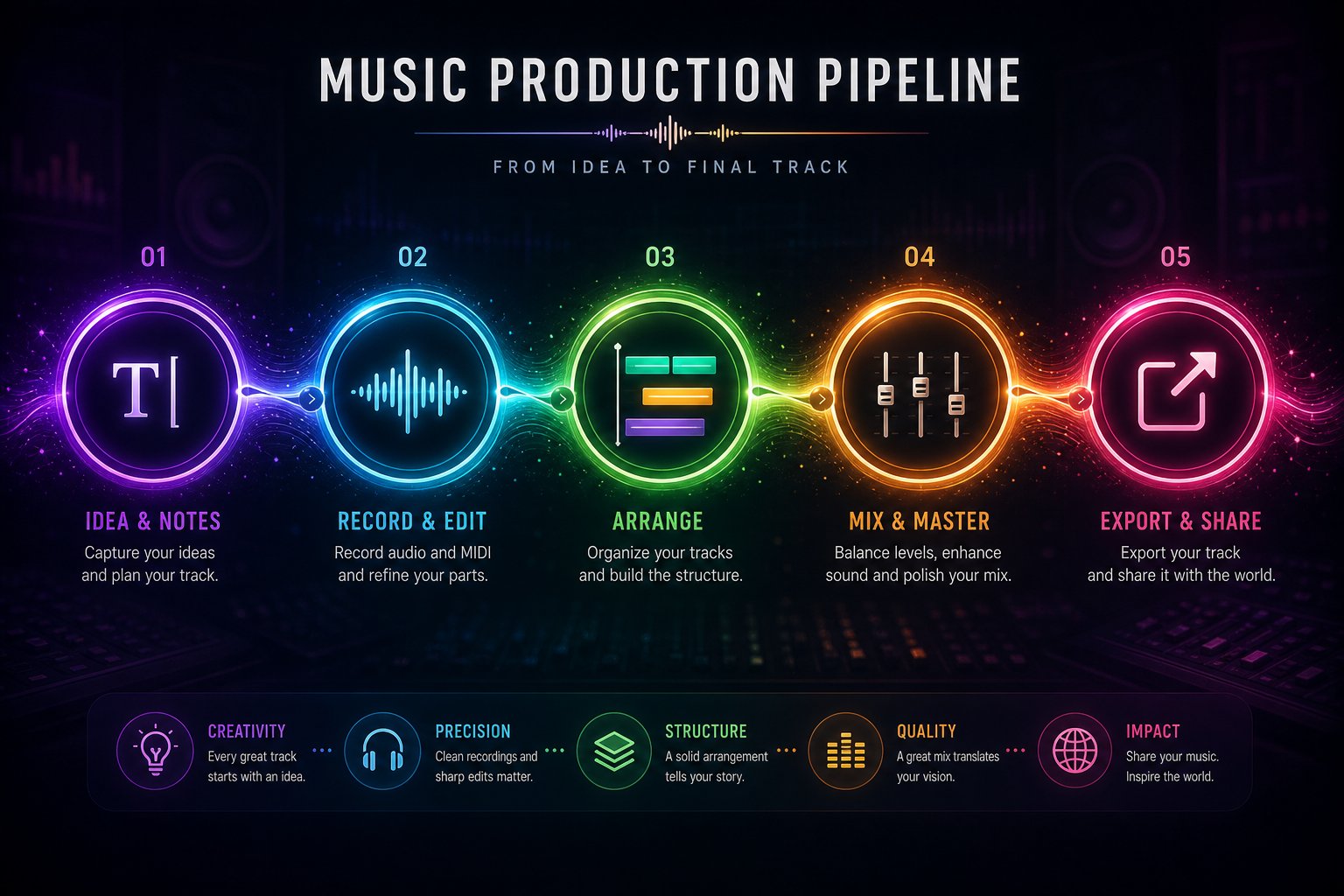
Imagine you want a complete, polished track ready for streaming distribution. Here's a concrete pipeline that experienced producers use for ai assisted music production:
- Generate the base track — Use Suno or MakeBestMusic to create a full song from a detailed prompt with lyrics, genre tags, and mood descriptors. Generate three to five variations and pick the strongest foundation.
- Separate stems — Run the chosen track through UVR or Moises to isolate vocals, drums, bass, and melodic instruments into individual files.
- Layer additional AI elements — Use Stable Audio or an open source ai music generator like MusicGen to create supplementary loops, textures, or melodic layers that complement the base track. MusicGen is the go-to music generation ai open source option here because you can generate unlimited instrumental material locally with zero cost or usage caps.
- Mix and arrange in a DAW — Import all stems and layers into Ableton, Logic, or FL Studio. Use iZotope Neutron for frequency balancing, apply volume automation, trim repetitive sections, and crossfade transitions that felt abrupt in the raw output.
- Master for distribution — Run the final mix through an AI mastering tool like Masterchannel, LANDR, or FL Studio's built-in AI mastering. Target -14 LUFS for streaming platforms or -16 LUFS for podcast and video use.
- Export and distribute — Export WAV at 44.1 kHz / 24-bit for streaming uploads. Convert to MP3 only for preview sharing.
This pipeline turns artificial intelligence for music production from a novelty into a legitimate creative system. Each tool compensates for the limitations of the others: generators handle composition, separators unlock remixability, DAWs provide surgical control, and AI mastering ensures loudness consistency.
Current Limitations and Realistic Expectations
Artificial intelligence in music production has come far, but honesty about its boundaries saves frustration. Based on We Rave You's 2026 analysis of every major platform, these constraints remain consistent across the category:
- Extended structures break down — Most generators lose coherence past three to four minutes. Sections start repeating, energy arcs flatten, and harmonic direction wanders. Keep initial generations under two minutes, then assemble longer pieces from multiple shorter outputs in your DAW.
- Emotional dynamics stay surface-level — AI handles "happy" and "sad" well but struggles with subtle emotional shifts within a single track: tension building across a verse, release at a chorus peak, or the quiet vulnerability of a bridge. These micro-dynamics still require human arrangement decisions.
- Genre blending is inconsistent — Ask for "jazz-infused drum and bass" and you'll get unpredictable results. Models trained on distinct genre clusters don't interpolate between them reliably. Sticking to a single genre per generation and blending manually through stems produces far better hybrid results.
- Stems aren't session-grade — Even the best ai music production tools produce stems with bleed, artifacts, and frequency gaps that wouldn't pass in a professional recording session. They're usable for remixing and layering, not for replacing tracked instruments on a major release.
- Vocals plateau below human performance — Generated vocals sound increasingly natural but still lack the micro-timing, breath control, and emotional nuance of a skilled vocalist. For vocal-driven genres, AI serves better as a demo tool than a final performance.
The best ai tools for music production right now are the ones that acknowledge these boundaries and work within them. Use AI for ideation, generation, and repetitive processing tasks. Reserve human judgment for arrangement decisions, emotional arc, and final creative sign-off. That division of labor, as Zeverb's production guide frames it, is straightforward: AI handles tasks, you make decisions.
The ceiling keeps rising. Transformer models get better at long-form coherence with each version. Stem separation quality improves quarterly. New architectures emerge that combine the strengths of diffusion and token-based approaches. The best ai music production tools of next year will likely resolve at least one or two of the limitations listed above. But today, the professional move is building a pipeline that routes around weaknesses rather than waiting for a single tool to do everything perfectly.
