


What Is Zona AI Song Generator and Why It Matters
What Is Zona AI Song Generator
Zona AI Song Generator is an AI-powered music creation tool developed by Manas AI Inc. that lets users generate complete songs — vocals, lyrics, beats, and instrumentals included — from simple text prompts or voice input. Available on the web, iOS, and Android, the platform is designed for people with zero musical training who want to create full, finished tracks without touching an instrument or learning music theory.
The core idea is refreshingly simple. You describe the kind of song you want in plain language, and the AI handles everything else. Want a melancholic indie ballad about losing a best friend? Type that in. Prefer an upbeat pop anthem for a road trip playlist? Just say so. Zona's system interprets your description and delivers a structured song, complete with verses, choruses, and production.
The platform operates through two primary modes. Custom Mode gives you hands-on control — you define the lyrics, style of music, and title, and the AI generates a track matching those preferences. Smart Mode strips things down even further: provide a brief song description, and the AI writes the lyrics, builds the melody, and assembles everything into a finished piece. For users who want granular control over song structure, Zona also supports meta tags — bracketed instructions like [Verse], [Chorus], and [Bridge] placed directly inside lyrics to guide the AI's arrangement.
Why Zona AI Is Getting Attention
AI generated songs were a novelty two years ago. Today, they're everywhere — soundtracking TikTok videos, filling podcast intros, and showing up in indie playlists. The song generator AI space has exploded, with dozens of platforms competing for the same audience. So why does Zona keep surfacing in conversations?
Part of the answer is accessibility. Most ai song generator tools still feel like they were built for people who already understand music production. Zona leans hard in the opposite direction, targeting hobbyists, content creators, and curious first-timers who just want to generate AI songs without a learning curve. Its multi-platform availability — browser, iPhone, and Android — removes another friction point that desktop-only competitors can't match.
Zona's real differentiator isn't raw audio quality or model sophistication — it's the low barrier to entry. In a market crowded with powerful but complex tools, the song ai generator that wins casual users is the one that requires the least effort to produce something shareable.
That said, a note of editorial honesty is warranted here. Zona markets itself as a leading AI song maker, but independent verification of that claim remains thin. There are no published user counts, no third-party benchmarks, and limited public reviews from professional musicians. This doesn't mean the tool lacks merit — it means you should evaluate it based on your own experience rather than marketing language alone.
The real question isn't whether Zona exists in a competitive space. It clearly does. The question is whether its behind-the-scenes technology actually delivers on the promise of natural-sounding, non-generic music — and that requires understanding how the system works under the hood.
How Zona AI Actually Works Behind the Scenes
Every AI song generator with vocals makes the same basic promise: type words in, get music out. But what actually happens between your text prompt and that finished track? Understanding the machinery — even at a high level — helps you write better prompts, troubleshoot underwhelming outputs, and decide whether the tool fits your creative needs. Zona doesn't publish detailed technical documentation, so let's break down what we can piece together from the general AI music generation pipeline and Zona's own product descriptions.
The AI Models and Approach Behind Zona
Modern AI song generation typically relies on a modular pipeline — multiple specialized models working in sequence rather than one monolithic system doing everything at once. A research paper published in IJRASET outlines a representative end-to-end architecture that mirrors what most commercial platforms use: a text-to-text model generates lyrics from a prompt, a text-to-speech model synthesizes vocals from those lyrics, a text-to-audio model produces instrumental backing, and a mixing stage layers everything together into a cohesive track.
Zona almost certainly follows a similar modular approach. Its Smart Mode accepts a brief text description and outputs a complete song with lyrics, vocals, and instrumentation — which strongly suggests separate generation stages for each component. Its Custom Mode, where users supply their own lyrics and style preferences, likely bypasses the lyric generation model and feeds directly into vocal synthesis and music generation.
Here's the honest caveat: Zona has not publicly disclosed which specific models power its system. We don't know if it uses proprietary architectures, fine-tuned open-source models, or some hybrid approach. This makes it a black-box system, which is common in commercial AI tools but worth acknowledging. You're trusting the platform's output quality without being able to inspect or modify the underlying engine.
The voice-to-song feature adds an interesting layer. According to Zona's App Store and Play Store listings, users can hum or sing a melody, and the AI interprets that audio input to build a finished track around it. Think of it as an ai voice song generator that uses your vocal sketch as a creative seed. In practice, this likely involves audio-to-MIDI conversion or a similar pitch-detection step, followed by the same instrumental and arrangement pipeline. The quality you can realistically expect depends heavily on how clearly you deliver the melody — a confident, on-pitch hum will give the AI far more to work with than a mumbled, off-key attempt.
Should you expect studio-grade fidelity from this feature? Probably not. Voice-to-song technology across the industry is still maturing, and even the best implementations struggle with complex melodic passages or unusual vocal timbres. Treat it as a creative starting point rather than a finished production tool.
How Zona Handles Lyrics and Music Together
The ai song lyrics generator component is where many users first interact with Zona's AI. In Smart Mode, you describe a theme — say, "a nostalgic summer love story with acoustic guitar vibes" — and the system writes complete lyrics structured with verses, choruses, and potentially a bridge. The AI draws on patterns learned from vast datasets of existing song lyrics to produce text that fits your specified genre and mood.
Zona reportedly handles a wide range of genres: pop, rock, country, hip-hop, R&B, electronic, and more. The workflow for going from text input to a full song follows a predictable sequence. You provide a prompt or your own lyrics, select a style, and the platform chains together its generation stages to deliver a track. When you use the ai song generator lyrics to music path — feeding in your own written words and letting the AI compose everything around them — you retain more creative control over the narrative while outsourcing the musical arrangement.
Here's a clear breakdown of the key components in Zona's generation pipeline:
- Text-to-Lyrics: Transforms a brief description or theme into structured song lyrics with verses, hooks, and choruses
- Text-to-Music: Generates instrumental arrangements — beats, melodies, harmonies, and production elements — based on genre and mood parameters
- Voice-to-Song: Accepts hummed or sung melodies as input and builds a full track around that vocal sketch, functioning as an ai song voice generator
- Style and Genre Selection: Lets users choose from preset genres and mood tags that shape the AI's compositional decisions across all generation stages
One detail worth noting: the coherence between lyrics and music remains one of the hardest challenges in AI song generation. Research consistently highlights occasional mismatches between a song's emotional tone and its instrumental backing — a melancholic lyric paired with an oddly upbeat arrangement, for example. Zona is unlikely to be immune to this issue. Understanding that limitation helps you set realistic expectations and lean into iteration when the first output doesn't quite land.
The real skill in using any tool like this isn't just knowing what buttons to press — it's knowing how to communicate with the AI effectively. And that starts with how you write your prompts.
Step-by-Step Guide to Making a Song With Zona AI
Knowing how the technology works is one thing. Actually sitting down and creating your first track is another. Zona's interface is designed to minimize friction, but a clear walkthrough still saves you from the trial-and-error guesswork that eats up your free generation credits. Here's exactly how to go from a blank screen to a finished song.
Getting Started With Zona AI
Zona is available across three platforms: the web app accessible from any browser, the iOS app on the App Store, and the Android app on Google Play. The web version provides the most screen real estate for writing and editing prompts, while the mobile apps offer convenience — especially the voice-to-song feature, which benefits from your phone's built-in microphone.
Signing up typically requires an email address or a social login. If you're hunting for an ai song generator free no sign up option, Zona may not fully fit that bill — most of its core features are gated behind account creation. That said, the sign-up process is quick, and the free tier lets you explore the platform's capabilities before committing any money. Once logged in, you'll land on the main creation screen, where the two primary modes — Custom and Smart — are front and center.
Creating Your First AI Song Step by Step
Imagine you want to create a chill lo-fi track about rainy evenings. Here's the exact process you'd follow:
- Choose your creation method. Decide between Smart Mode (just describe the song and let the AI handle everything) or Custom Mode (supply your own lyrics, style, and title). If you already have lyrics written, Custom Mode is your path — it functions as a powerful ai song generator from lyrics. If you're starting from scratch with only a vague idea, Smart Mode does the heavy lifting.
- Select genre and mood preferences. In Custom Mode, you'll specify the style of music directly. Think beyond single-word genres — combining descriptors like "lo-fi hip-hop, mellow, jazzy piano" gives the AI a sharper creative direction than just typing "chill."
- Write or refine your text prompt. This is the most important step. For Smart Mode, your song description is the AI's only guide. Be specific about theme, emotional tone, and instrumentation. For Custom Mode, enter your lyrics and use meta tags like [Verse], [Chorus], and [Bridge] to structure the arrangement exactly how you envision it.
- Generate the song. Hit the generate button and wait. Processing typically takes anywhere from thirty seconds to a couple of minutes depending on server load. The platform will produce a complete track with vocals, instrumentals, and lyrics synced together.
- Preview and iterate. Listen to the output critically. Does the vocal delivery match the mood? Do the lyrics flow naturally? If something feels off, you can regenerate with tweaked parameters rather than starting over completely. Most free ai song generator platforms — Zona included — allow multiple generations, though free-tier users may face daily limits.
- Download or share the final track. Once you're satisfied, download the audio file or share it directly from the platform. Check what file formats and quality levels are available on your current plan, as free tiers sometimes limit export options.
Navigating the Zona Interface
The interface stays relatively consistent across web and mobile, though you'll notice a few differences. The web version displays your prompt input, style options, and generation history in a more spacious layout — ideal for users who want to compare multiple outputs side by side. The mobile apps condense these elements into a scrollable, card-based design that prioritizes quick generation over detailed editing.
Key interface elements to look for include the mode selector (toggling between Custom and Smart), the lyrics editor (where meta tags come into play), and your song library — a running history of everything you've generated. The song library is particularly useful for iteration, since you can revisit older prompts and refine them without retyping everything.
For anyone exploring Zona as an ai free song generator, the free tier provides enough access to test both modes and get a genuine feel for the output quality. Just keep in mind that daily generation caps mean you'll want to make each attempt count by crafting thoughtful prompts — rather than burning through credits on vague descriptions like "make a cool song."
And that raises the obvious next question: what does a good prompt actually look like? The difference between a generic AI track and something that sounds intentional often comes down to how you phrase your request.
Prompt Writing Tips for Better Zona AI Results
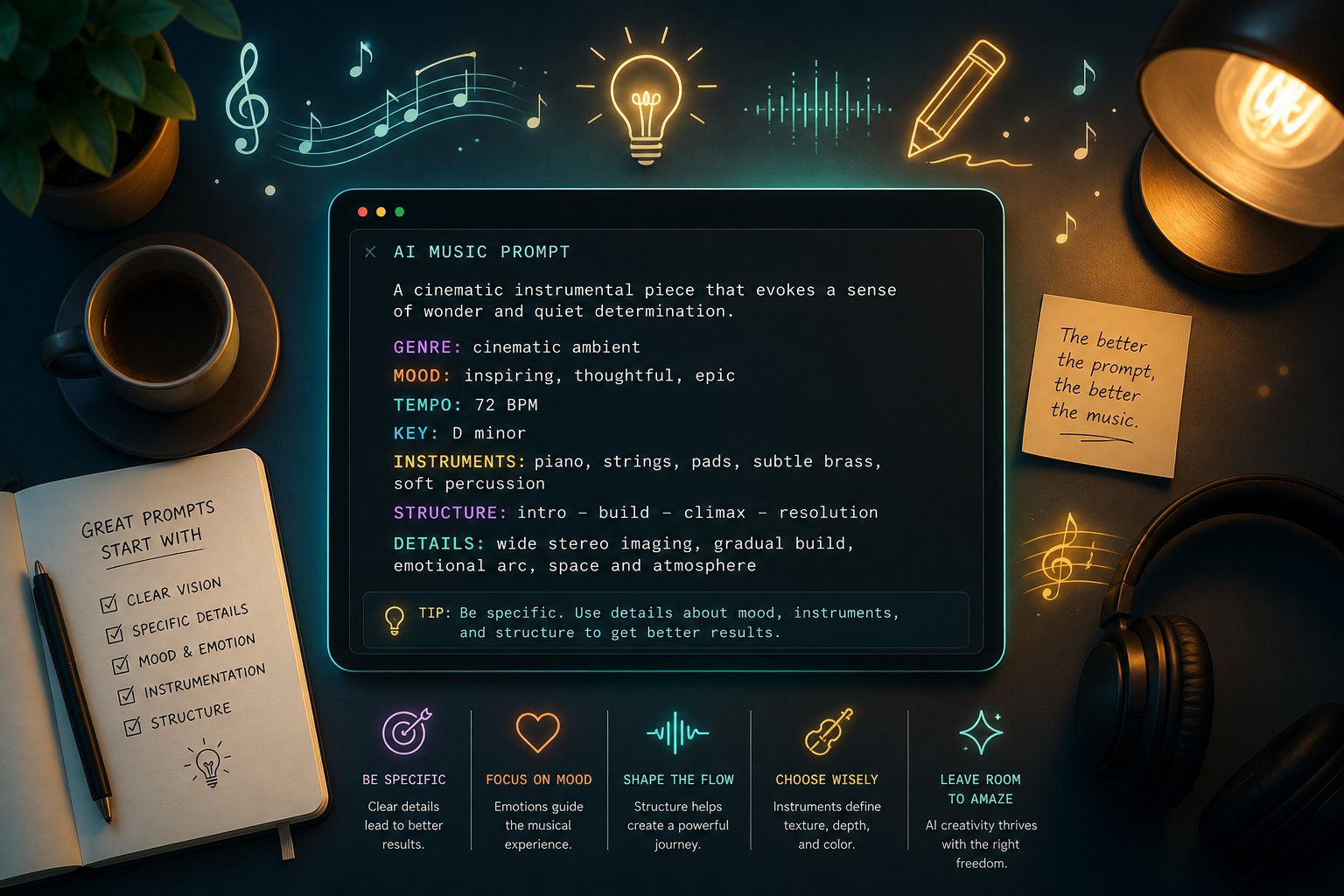
Here's a hard truth about every ai song generator from text on the market: the output is only as good as the input. A vague prompt like "make a good song" will produce exactly what you'd expect — something generic, forgettable, and unmistakably machine-generated. A detailed, well-structured prompt? That's the difference between a track you delete immediately and one you actually share.
No one talks about this. Most guides skip straight to features and pricing, leaving you to figure out prompt craft through expensive trial and error. Let's fix that.
Anatomy of an Effective Song Prompt
Think of your prompt as a creative brief for a session musician who's never met you. You wouldn't walk into a recording studio and say "play something nice." You'd describe the vibe, the genre, the instruments, and the feeling you're chasing. The same logic applies when writing prompts for Zona's AI.
A strong ai text to song generator prompt includes these core components:
- Genre: Be specific beyond single words. "Acoustic country with a modern pop production feel" gives the AI far more direction than just "country."
- Mood and emotional tone: Describe the feeling you want the listener to experience. "Bittersweet nostalgia" paints a sharper picture than "sad."
- Tempo: Even a rough indication helps. "Slow and contemplative" or "upbeat, around 120 BPM" narrows the output significantly. Testing by ImagineArt found that tempo specificity changed output quality more than any other variable in AI music generation.
- Instrumentation: Name two or three instruments you want to hear. "Fingerpicked acoustic guitar, soft piano, and brushed drums" creates a specific sonic identity the AI can target.
- Vocal style: Describe the voice's role — intimate storyteller, confident pop lead, raspy folk singer — rather than referencing famous artists.
- Theme or subject: Give the AI a story to tell. "A song about rebuilding after a breakup, focused on hope rather than heartbreak" produces more coherent lyrics than an open-ended emotional label.
- Use case: Where will this track live? A TikTok background song needs a different structure than a three-minute personal ballad. Mentioning the context helps the AI shape duration and arrangement.
Each of these elements eliminates ambiguity. The more open choices you leave for the AI, the more generic the result. You're not micromanaging — you're giving the system a clear target to hit.
Prompt Templates for Different Song Types
Theory is helpful, but templates are faster. Here are fill-in-the-blank frameworks you can copy, customize, and paste directly into Zona. Each one follows the six-part prompt framework used by experienced AI music creators: use case, subject, genre, mood, vocal direction, and ending.
Country Ballad: "Create a slow acoustic country ballad about [specific memory or theme]. Use fingerpicked guitar, pedal steel, and a warm [male/female] vocal. The mood should feel [emotional descriptor — e.g., nostalgic, longing, grateful]. End with a resolved, gentle fade." This template works especially well if you're exploring Zona as an ai country song generator — the key is layering genuine emotional specificity onto the genre tag.
Upbeat Pop Track: "Create an energetic pop song at around 120 BPM about [theme]. Bright synths, punchy drums, and a catchy chorus hook. [Male/female] vocal with confident delivery. Keep verses short and make the chorus instantly memorable. Clean ending."
Rap Verse: "Create a confident boom-bap rap track about [subject — e.g., late-night hustle, proving doubters wrong]. Punchy drums, warm bass, clear [male/female] flow. Four-line hook that hits hard. No celebrity voice references." If you're using Zona as an ai rap song generator, specificity about flow style and beat texture matters more than in any other genre.
Birthday Song: "Create a warm, playful pop birthday song for [name] turning [age]. Mention [specific detail — hobby, inside joke, personality trait]. Group-clap energy, sing-along chorus, [male/female] lead vocal. Big, joyful ending."
Parody Track: "Create a humorous [genre] song about [funny subject]. Exaggerated [vocal style], witty wordplay, and a catchy hook that's easy to remember. Keep the tone lighthearted and comedic. Clean ending." Anyone using an ai parody song generator will get dramatically better results by specifying the comedic angle rather than just saying "make it funny."
A strong prompt template: "Create a [duration] [genre] song for [use case] about [specific subject]. Use [2-3 instruments], a [vocal style] vocal, and a [mood] tone. [Structural instruction — e.g., short verses, memorable chorus]. End with [ending type]."
Notice what every template has in common: none of them say "make a good song." They all specify the job the song needs to do, the sonic palette, and the emotional destination. Swap in your own details, and you've got a prompt that actually communicates your vision.
Refining and Iterating on AI Song Outputs
Your first generation will rarely be your best. That's not a flaw in the tool — it's how AI music creation works across every platform. The goal of your first prompt isn't perfection. It's direction.
Listen to the initial output and ask yourself three diagnostic questions. Is the genre and tempo right? If yes, the foundation is solid — keep those elements and adjust everything else. Is the vocal delivery matching the mood? If the lyrics are melancholic but the vocal sounds oddly cheerful, tweak your mood descriptors or add explicit vocal direction like "subdued, intimate delivery." Are the lyrics coherent and on-theme? This is where the ai song lyrics generator free capabilities of any tool face their biggest test.
A practical iteration workflow looks like this: change only one element per regeneration. If you adjust the genre, the tempo, and the vocal style simultaneously, you can't isolate what improved or degraded. Modify the mood descriptor alone, regenerate, and compare. Then adjust instrumentation. This methodical approach — confirmed by testing across multiple AI music platforms — consistently produces better results than rewriting your entire prompt from scratch each time.
AI lyrics generation specifically improves when you provide concrete thematic anchors. Instead of "write a love song," try "write a love song about the nervous silence on a first date at a coffee shop." Scenes, sensory details, and specific emotional moments give the AI's language model richer material to draw from, which translates into lyrics that feel less like generic placeholders and more like something a human songwriter would draft.
When should you manually edit AI-generated lyrics versus regenerating entirely? A useful rule of thumb: if 70% or more of the lyrics work and you're fixing individual lines or word choices, edit by hand. If the lyrics miss the theme, tone, or narrative arc entirely, regenerating with a revised prompt is faster than a full rewrite. Zona's Custom Mode lets you take AI-generated lyrics, hand-edit them to your satisfaction, and then feed them back through the system with a fresh instrumental arrangement — combining AI speed with human judgment.
The templates and techniques in this section give you the vocabulary to communicate with the AI effectively. But prompts only control part of the equation — Zona's feature set determines what kinds of songs you can actually create. Some of those features, like voice-to-song and AI covers, open up creative possibilities that go well beyond basic text-to-music generation.
Key Features of Zona AI Song Generator Explored
Zona's App Store and Play Store listings advertise a long list of capabilities — voice-to-song, AI covers, lyrics generation, title suggestions, parody creation — but none of them are explained in any meaningful editorial detail anywhere online. You're left guessing what each feature actually does, how well it performs, and whether it's worth your time. Let's change that.
Voice-to-Song and AI Cover Features
Voice-to-song is arguably Zona's most distinctive creative feature, and it works differently from the standard text prompt pipeline covered earlier. Instead of typing a description, you hum, sing, or whistle a melody directly into your device's microphone. The AI captures that raw vocal input — pitch contour, rhythm, rough melodic shape — and uses it as the seed for a fully produced track.
In practical terms, you're giving the system a melodic skeleton. The AI interprets your pitch and timing, then builds instrumentation, arrangement, and production around that core idea. Think of it like handing a rough voice memo to a producer and saying "build something from this." The output includes generated vocals, backing instruments, and a structured song arrangement that references your original melody.
What should you realistically expect? Voice-to-song technology across the industry still has clear limitations. If you deliver a confident, on-pitch melody with a steady tempo, the AI has strong material to work with. Mumbled, off-key, or rhythmically inconsistent input will produce correspondingly weaker results. The feature shines as a creative capture tool — grabbing that melody stuck in your head before you forget it — rather than a replacement for deliberate composition.
The ai cover song generator functionality is a separate beast entirely. Zona reportedly lets users apply different vocal styles to tracks, creating alternate versions of songs with varied tonal qualities. This is worth distinguishing from the broader AI cover scene, where tools like RVC-based platforms take an existing copyrighted recording, strip out the original vocal, and re-sing it in a cloned celebrity voice. That pipeline — as detailed by Undetectr's analysis — stacks serious copyright problems because it transforms someone else's master recording rather than generating original material.
Zona's ai song cover generator approach appears more contained: applying style variations to tracks generated within the platform itself. This sidesteps some of the legal landmines associated with using copyrighted source material, though the exact scope of what Zona's cover feature allows — and whether users can import external audio for voice conversion — isn't fully documented. If you're looking for an ai song cover generator free no sign up solution for converting existing songs into different vocal styles, be aware that the legal risks around unauthorized covers remain significant regardless of which tool you use.
AI Lyrics Writer and Song Title Tools
Zona's lyrics engine does more than fill in words around a melody. It functions as a structured ai song lyrics generator that produces verses, choruses, bridges, and hooks organized around whatever thematic direction you provide. You'll encounter this most directly in Smart Mode, where a brief description — "a breakup song that's angry rather than sad, with sharp metaphors" — yields complete lyrical content the AI then sets to music.
Genre matters here more than you might expect. Pop and country lyrics tend to come out more coherently than complex rap verses or abstract indie poetry, simply because the AI's training data likely contains more conventional song structures in those genres. Hip-hop lyrics can feel formulaic if your prompt doesn't specify flow patterns, rhyme density, or subject-matter specificity. The iteration techniques from the previous section apply directly: the more precise your thematic input, the less generic the lyrical output.
The ai song title generator works as a supplementary creative tool rather than a standalone feature. When you generate a song in Smart Mode, Zona suggests titles that match the lyrical content and mood. You can also use it as an ai song name generator during brainstorming sessions — feed it a theme or a handful of keywords and get back title options that might spark a direction you hadn't considered. It's a small feature, but useful when you're stuck staring at a blank title field with no idea what to call the track you just created.
How coherent are the lyrics overall? Honest answer: variable. AI-generated lyrics across every platform still struggle with sustained narrative logic over multiple verses. You'll occasionally get lines that sound poetic in isolation but don't connect logically to the verse before or after them. The best approach is treating AI lyrics as a strong first draft — keep the lines that work, rewrite the ones that don't, and use Custom Mode to feed your edited version back through the music generation pipeline.
Parody and Specialty Song Creation
Here's a use case that flies under the radar but has genuine demand: parody songs. Birthday roasts, retirement send-offs, inside-joke anthems for friend groups, humorous tracks for social media — the ai song parody generator niche is surprisingly active, and Zona's combination of lyrics generation and genre flexibility makes it a natural fit.
Creating a parody on Zona follows the same prompt-driven workflow, but with comedic intent baked into your description. A prompt like "create a dramatic country ballad about someone who can never find matching socks" gives the AI a clear comedic target while leveraging a familiar genre structure. The humor comes from the contrast between the serious musical treatment and the absurd subject matter — and that contrast is something you control through your prompt, not something the AI invents on its own.
Specialty songs for occasions — weddings, graduations, anniversaries, corporate events — follow a similar pattern. The key is providing specific personal details in your prompt: names, inside references, particular achievements or memories. Generic prompts produce generic celebration songs. Specific prompts produce tracks that feel personalized enough to actually matter to the recipient.
Here's a consolidated view of the features discussed, based on available product listing information:
| Feature | Description | Availability |
|---|---|---|
| Text-to-Song (Smart Mode) | Generate a complete song — lyrics, vocals, instrumentals — from a brief text description | Free tier (with daily limits); expanded in paid tiers |
| Custom Mode | Supply your own lyrics, style tags, and title; AI generates music and vocals around your input | Free tier (with daily limits); expanded in paid tiers |
| Voice-to-Song | Hum or sing a melody; AI builds a full track around your vocal input | Available on mobile apps; tier-specific limits may apply |
| AI Cover / Style Variation | Apply different vocal styles or genre treatments to generated tracks | Availability may vary by plan |
| AI Lyrics Writer | Generate structured lyrics with verses, choruses, and bridges from thematic prompts | Included in Smart Mode; editable in Custom Mode |
| Song Title Generator | AI-suggested titles based on song content and mood | Included in Smart Mode generation |
| Parody / Specialty Songs | Create humorous or occasion-specific tracks using detailed comedic or personal prompts | No feature restriction — driven by prompt quality |
| Meta Tag Structuring | Use bracketed tags like [Verse], [Chorus], [Bridge] to control song arrangement | Available in Custom Mode across all tiers |
Note that specific feature availability and generation limits may shift between free and paid plans — Zona's pricing structure evolves, so check the current offerings on their platform before committing.
Features tell you what a tool can do. The more practical question — the one that actually determines whether Zona is worth your time — is whether those features align with what you specifically need. A content creator chasing quick background tracks has very different requirements than a hobbyist exploring songwriting for the first time, and both differ from a professional songwriter testing demo ideas.
Who Is Zona AI Best For
A feature list doesn't answer the question that actually matters: is this tool right for you? Zona packs text-to-song, voice-to-song, lyrics generation, and genre flexibility into a single platform — but not every user needs all of that, and some users need things it can't deliver. The fastest way to figure out where you land is to match your creative profile to the tool's strengths.
Content Creators and Social Media Users
If you're producing TikToks, YouTube Shorts, Instagram Reels, or podcast episodes, you already know the audio problem. Stock music sounds recycled because it is recycled — The Social Cat reports that creators regularly hear the same royalty-free tracks across multiple posts within a single scroll session. Original audio, on the other hand, feeds the algorithm: TikTok treats unique sounds as discoverable content, and Instagram's Reels algorithm consistently favors posts with distinctive audio over those riding overused tracks.
Zona fits this workflow because speed matters more than perfection. You need a 30-second intro jingle, a moody background loop for a product showcase, or an upbeat clip that matches your brand energy — and you need it in minutes, not days. The ai music song generator pipeline handles exactly that. Type a description, generate a track, drop it into your edit. No licensing anxiety, no browsing through libraries of tracks that almost-but-don't-quite fit.
The real advantage for creators isn't just convenience. It's ownership. When you generate original audio through a platform like Zona, that sound lives on your profile. Other users who repurpose it trace back to you — creating the kind of viral loop that licensed stock music can never deliver.
Hobbyists and Music Beginners
Ever had a melody stuck in your head but no way to turn it into an actual song? That's the frustration Zona targets most directly. You don't need to read sheet music, play an instrument, or understand chord progressions. You describe what you're imagining, and the AI translates that vision into something you can listen to, share, and iterate on.
This is where the best free ai song generator tier becomes genuinely valuable. Hobbyists aren't investing in monthly subscriptions to test a creative impulse — they want to experiment without financial commitment. Zona's free tier, along with similar offerings from competing platforms, lowers the barrier to musical experimentation in a way that wasn't possible even two years ago. You can explore country, hip-hop, lo-fi, or electronic production without learning a single piece of music software.
A songwriter and producer who reviewed a comparable AI tool noted that the biggest appeal for beginners is the sheer speed of going from idea to finished concept — something that traditionally required years of training or expensive studio time. The trade-off is creative depth. You'll produce songs that sound competent but rarely surprising. For hobbyists exploring songwriting as a creative outlet rather than a career, that trade-off is usually worth it.
Songwriters Seeking Demo Tools
Professional and aspiring songwriters occupy a different space entirely. You're not looking for a finished product — you're looking for a sketchpad. An AI-generated demo lets you hear how a lyrical concept sounds set to music before you invest hours in studio production or hire session musicians.
Zona's Custom Mode is particularly useful here. Write your lyrics, tag the structure with [Verse], [Chorus], and [Bridge] markers, select a genre direction, and generate a rough demo in under two minutes. That demo won't replace a polished studio recording, but it accomplishes something critical: it lets you evaluate whether the song works — whether the chorus lands, whether the verse-to-hook transition feels natural, whether the overall pacing holds attention. As one working songwriter put it after testing AI songwriting tools, think of them as "a co-writer that never sleeps" — useful for sparking ideas and testing directions, but not a substitute for the emotional depth that comes from lived experience.
The song lyrics generator ai capabilities also serve a specific function for writers experiencing creative blocks. Generate a few lyrical drafts around your theme, cherry-pick the strongest lines, discard the rest, and build from there. It's not ghostwriting — it's brainstorming at machine speed.
Here's a quick-scan breakdown of who benefits most — and how:
- TikTok / YouTube / Instagram creators: Quick original audio for content without licensing headaches or recycled stock tracks
- Podcast producers: Custom intro music, transition sounds, and episode-specific audio branding
- Music hobbyists: Low-pressure experimentation with songwriting across genres, no training required
- Aspiring songwriters: Rapid demo generation to test lyrics and song structures before committing to full production
- Small business owners: Branded jingles, hold music, or promotional audio created in-house rather than outsourced
- Event planners and gift-givers: Personalized birthday songs, wedding tracks, or retirement tributes with specific names and details
The right AI song tool isn't the one with the most features — it's the one whose free tier covers your actual use case. Casual creators rarely need paid plans. Songwriters prototyping demos might. Match the tier to the task before spending a dollar.
One pattern cuts across every user profile: AI-generated songs work best as starting points, not endpoints. Content creators layer them into edits. Hobbyists use them to learn what sounds good. Songwriters treat them as disposable drafts. The users who get disappointed are the ones expecting a free ai song generator with vocals to produce release-ready tracks on the first try — and that expectation gap matters when you're deciding between Zona and the growing list of alternatives competing for the same audience.
Zona AI vs. Other AI Song Generators Compared
Knowing what Zona can do and who it's built for only tells half the story. The other half? How it stacks up against the platforms you'll inevitably encounter while researching ai song generators. The comparison landscape for this keyword is shockingly thin — most content either ignores competitors entirely or lists tools without explaining meaningful differences. Let's fix that with an honest, editorially neutral breakdown.
Zona AI vs. Suno and Udio
Any serious conversation about the best ai song generator starts with two names: Suno and Udio. These are the heavyweights, and pretending otherwise would be dishonest.
Suno is the largest AI music platform by a significant margin. With over two million users and $250 million in funding, it operates at a scale no competitor currently matches. The suno ai song generator experience prioritizes speed and simplicity — type a prompt, get a complete song with vocals in seconds. The v5 model delivers noticeably improved vocal quality and lyric coherence over earlier versions, and Suno Studio adds browser-based multitrack editing that bridges the gap between AI generation and traditional production. Its free tier offers 50 credits per day — roughly 10 songs — making it one of the most generous free options available. Pro plans start at $10/month with full commercial rights.
Where does Zona differ? Suno doesn't offer voice-to-song functionality — you can't hum a melody and have the AI build around it. Zona's meta tag system for structuring songs is conceptually similar to Suno's Custom Mode, but Zona's mobile-first design and cross-platform availability (web, iOS, Android) give it an edge for users who want to create on their phones. On raw output quality and community size, though, Suno holds a clear lead based on available evidence.
The udio ai song generator takes a different approach entirely. Built by former Google DeepMind researchers, Udio renders audio at 48kHz — higher than most competitors — producing cleaner instrument separation and wider stereo imaging. Its inpainting feature lets you regenerate specific sections of a track without starting over, and timeline-style editing gives producers more surgical control over how a song develops. Vocal quality is frequently praised as slightly more natural than Suno's, particularly in phrasing and emotional delivery.
Udio's trade-off is complexity. The learning curve is steeper, and the platform builds tracks in 30-second increments rather than generating a complete song in one pass. For casual users who just want quick results, Zona's one-click Smart Mode is far more approachable. For producers willing to invest time in refining outputs, Udio rewards patience with higher fidelity. Free tier access is more limited — roughly 600 generations per month capped at 10 per day — and paid plans mirror Suno's pricing at $10-$30/month.
It's also worth mentioning the mureka ai song generator, which occupies a distinctive niche in this space. Mureka's standout features — melody idea input (humming to song), stem separation, and MIDI export — make it particularly appealing for producers who plan to refine AI-generated music inside a DAW. Zona shares the voice-to-song concept with Mureka, but Mureka's implementation includes MIDI output that Zona doesn't appear to offer. If your workflow involves taking AI output and processing it further in professional software, the mureka ai song generator pipeline may be more useful than either Zona or Suno for that specific task.
How Zona Compares to Other Free AI Song Generators
Beyond the big names, the market for free and freemium ai song generators is crowded — and growing fast. Where does Zona actually fit? The answer depends on what you prioritize: ease of use, vocal quality, customization depth, or specific use cases like personalized celebration tracks and business audio.
One platform worth highlighting is MakeBestMusic's AI Song Generator, which generates complete songs with vocals, lyrics, and music in a single workflow. Where it particularly shines is in use-case-specific creation — custom birthday songs, wedding tracks, business jingles, and parody tracks that require personal details baked into the lyrics. For users whose primary goal is a personalized, occasion-specific song rather than general music exploration, MakeBestMusic offers a more targeted experience than platforms designed for broad creative experimentation.
Here's a consolidated comparison of the best ai song generators based on publicly available product information:
| Platform | Key Strength | Free Tier Availability | Vocals Included | Best For |
|---|---|---|---|---|
| MakeBestMusic | Complete songs with vocals, lyrics, and music for specific occasions | Yes | Yes | Custom songs, birthday tracks, jingles, parody creation |
| Zona AI | Voice-to-song, mobile-first cross-platform access | Yes (daily limits) | Yes | Beginners, mobile creators, voice-melody capture |
| Suno | Largest platform, best overall output quality (v5), Suno Studio editing | Yes (50 credits/day) | Yes | General-purpose song creation, producers wanting editing control |
| Udio | Highest audio fidelity (48kHz), inpainting, fine-grained control | Yes (limited daily credits) | Yes | Producers prioritizing audio quality and surgical editing |
A few important caveats. Direct feature-by-feature comparison depends on each platform's current offerings, which evolve rapidly — pricing tiers shift, free allowances change, and new capabilities roll out monthly. Both Suno and Udio settled major copyright lawsuits with Warner Music Group and Universal Music Group respectively, which affects their commercial licensing terms in ways that are still playing out. Zona hasn't faced comparable legal scrutiny, partly because it operates at a smaller scale — whether that's an advantage or simply a function of market size is an open question.
The honest editorial take? If you're evaluating the best ai song generators purely on output quality and feature depth, Suno and Udio lead the field. If you want a mobile-friendly, low-friction entry point with voice-to-song capability, Zona delivers on that specific promise. And if your primary need is a personalized song for a celebration, event, or business use — where the lyrics need to reference specific names, details, and occasions — MakeBestMusic's AI Song Generator handles that workflow more directly than any general-purpose platform.
No single tool wins every category. The smarter approach is matching the platform to your specific output goal — which requires understanding not just what each tool does well, but where each one falls short. And that's exactly where most marketing-driven content stops being useful.
Honest Limitations and Strengths of Zona AI
Marketing pages will never tell you what's wrong with their product. That's their job. This section's job is different — to give you the balanced, editorial take that helps you decide whether this ai song generator app actually deserves space on your phone or a bookmark in your browser. Every tool has trade-offs, and Zona is no exception.
What Zona AI Does Well
Credit where it's earned. Zona gets several things genuinely right, and those strengths explain why it keeps showing up in conversations despite competing against better-funded platforms.
Accessibility is the headline win. Most ai song generator apps assume some baseline familiarity with music production — genre terminology, song structure, even basic audio concepts. Zona strips that assumption away. Smart Mode lets someone with zero musical vocabulary type "a happy song about my dog" and walk away with a complete track. That's not a trivial achievement. The gap between "I have a song idea" and "I have an actual song" has historically required years of training or thousands of dollars in studio time. Zona collapses that gap to minutes.
Multi-platform availability is a genuine differentiator. Having a consistent experience across web, iOS, and Android means you can capture a melody idea on your phone during a commute and refine it on your laptop later. Many competing platforms are still desktop-only or offer stripped-down mobile experiences. Zona's mobile apps feel like primary products rather than afterthoughts — especially for voice-to-song, which naturally benefits from the microphone you carry everywhere.
Voice-to-song as a creative entry point. This feature doesn't get enough credit. Humming a melody into your phone and hearing it transformed into a produced track is genuinely exciting for first-time users. It bypasses the blank-page problem entirely — you don't need to write a prompt or choose a genre. You just sing what's in your head. While the output quality varies, the creative experience itself is something text-only competitors can't replicate.
All-in-one convenience. Lyrics, vocals, instrumentals, and arrangement in a single generation — no switching between tools, no manual stitching. For users who want a finished product from a single input, the integrated pipeline delivers exactly that.
Where Zona AI Falls Short
Here's the part no product page will show you. These aren't deal-breakers for every user, but they're real limitations you should know about before investing time or money.
Repetitiveness in outputs. Generate five songs in the same genre with similar prompts, and you'll start hearing patterns — the same chord progressions recycled, similar drum patterns, melodic shapes that blur together. This isn't unique to Zona; it's a fundamental challenge across AI music generation. But it means your tenth country ballad will sound suspiciously like your second one. As Produce Like A Pro notes, when everyone uses the same tools to chase the same outcomes, uniqueness disappears — and that applies within a single user's output library just as much as it does across the broader market.
Vocal quality ceiling. AI-generated vocals have improved dramatically, but they still can't match the emotional nuance of a human singer. Listen carefully to any Zona output and you'll notice subtle tells: slightly unnatural breath placement, emotional delivery that doesn't quite match the lyrical content, or consonant sounds that blur together. Wondering how to tell if a song is ai generated? The vocals are almost always where the mask slips. Phrases that should carry emotional weight — a cracked voice on a heartbreak lyric, genuine joy bursting through a celebration track — land flat because the AI simulates emotion rather than feeling it.
Limited fine-grained control. Zona's meta tag system ([Verse], [Chorus], [Bridge]) gives you structural control, but you can't adjust individual instrument levels, change a specific chord in the progression, or tweak the vocal melody independently. Compare that to Udio's inpainting feature or Suno Studio's multitrack editing, and the gap becomes clear. If your creative process involves surgical adjustments — "keep everything but lower the piano in the second verse" — Zona's current toolset won't accommodate that.
Ai generated song lyrics coherence. Over extended tracks, the AI's lyrical logic can drift. A verse that starts with a strong metaphor might abandon it entirely by the chorus, or a narrative that sets up a specific story in verse one wanders into unrelated territory by verse two. The lyrics sound like song lyrics — they rhyme, they follow rhythmic patterns — but sustained storytelling across a full three-minute track remains inconsistent.
Transparency gaps in marketing. Zona's product pages include claims like "trusted by creators worldwide" without supporting data — no named users, no published user counts, no third-party endorsements. This is common in the ai song generator app space, but it makes informed evaluation harder. You're essentially trusting marketing copy without independent verification.
Pros
- Extremely low barrier to entry — no musical knowledge required
- Available on web, iOS, and Android with a consistent experience
- Voice-to-song captures melodic ideas instantly from a hum or whistle
- All-in-one generation: lyrics, vocals, instrumentals, and arrangement from a single prompt
- Meta tag system provides structural control for users who want it
- Free tier available for testing before committing financially
Cons
- Outputs can sound repetitive across multiple generations in the same genre
- Vocal quality lacks the emotional depth and nuance of human performances
- No fine-grained mixing or individual instrument control within generated tracks
- Lyrical coherence degrades over longer, narrative-driven songs
- Marketing claims lack independent verification or public user data
- No public documentation on underlying AI models or training data
- Content moderation boundaries aren't clearly defined — users searching for an ai song generator that allows explicit lyrics won't find clear guidance on what content restrictions apply until they encounter them during generation
Setting Realistic Expectations
The question isn't whether Zona produces perfect music. It doesn't — and neither does any other AI platform. The useful question, as MusicMake.ai's quality analysis framework puts it, is: "Is this specific track good enough for this specific use case, and can I fix it when the first version is not right?"
That framing changes everything. A TikTok background track has radically different quality requirements than a song you're pitching to a label. A personalized birthday jingle doesn't need studio-grade vocal fidelity — it needs to make the recipient smile. A demo for testing whether your lyric concept works as a song doesn't need polished production — it needs to communicate the structure and emotional arc.
For casual users — content creators grabbing quick audio, hobbyists exploring songwriting, gift-givers making personalized tracks — Zona's free tier likely provides enough functionality to accomplish the task. You'll get complete songs with vocals, iterate a handful of times per day, and download shareable files. That's sufficient for most non-commercial creative exploration.
Where the free tier starts feeling restrictive is in volume and iteration. If you're generating multiple songs daily, refining prompts across a dozen attempts, or building a library of tracks for ongoing content production, daily generation caps will slow you down. Paid tiers expand those limits, but whether the upgrade is worth it depends entirely on how central AI-generated music is to your workflow. A content creator who needs fresh audio weekly will extract real value from a subscription. A hobbyist who generates a few songs per month probably won't.
One more expectation worth calibrating: among ai song generator apps, none — including Zona — consistently produce tracks that pass as human-made under close listening. The technology is impressive for first drafts and functional audio, but the gap between "AI-generated" and "professionally produced" remains real. If your goal is music that genuinely doesn't sound AI-made, you'll need to treat AI output as raw material and invest human creativity in the editing, refinement, and production stages that follow.
That honest assessment matters because it shapes how you approach the final decision: whether to commit to Zona, explore alternatives, or combine multiple tools into a workflow that plays to each platform's strengths.
Final Verdict and Recommended Alternatives
You've read the feature breakdowns, the honest limitations, and the competitive comparisons. You don't need another paragraph of hedging. You need a clear answer: should you use Zona AI, and if not, what should you use instead?
The Bottom Line on Zona AI Song Generator
Zona earns its place as a solid entry-level tool for people who have never made a song before and want the fastest possible path from idea to finished track. Its voice-to-song feature is a genuinely creative differentiator that text-only competitors can't match, and its cross-platform availability — web, iOS, Android — means you can capture a musical idea wherever inspiration strikes. For hobbyists, casual content creators, and anyone treating AI music as a creative experiment rather than a production pipeline, Zona delivers enough value on its free tier to be worth trying.
Here's the opinionated take: Zona is a strong starting point, not a finishing line. If you're a beginner exploring what AI songwriting feels like, it removes every barrier between you and a completed track. If you're a content creator who needs quick, original audio without licensing headaches, it handles that job competently. But if you're evaluating the best ai song generator with vocals for serious creative work — producing demos that need to impress collaborators, building a catalog of tracks for commercial use, or chasing output quality that genuinely rivals human production — you'll likely outgrow Zona's feature set quickly. Suno's v5 model and Studio editing tools offer more depth. Udio's 48kHz rendering and inpainting give producers surgical control. And for specific use cases like personalized celebration tracks or business jingles, purpose-built alternatives handle those workflows more directly.
The users who will be happiest with Zona are the ones who value simplicity over sophistication and treat each generation as a creative spark rather than a finished product. The users who will be frustrated are those expecting a song ai generator free option to replace a production workflow. Neither reaction is wrong — it's a question of matching the tool to the task.
Recommended Next Steps for Different Users
Rather than leaving you with a vague "go explore," here's a concrete action plan based on your specific situation:
- Start with Zona's free tier to test basic functionality. Generate three to five songs using both Smart Mode and Custom Mode. Pay attention to vocal quality, lyrical coherence, and whether the genre selection produces results that match your expectations. This gives you a personal baseline — not a marketing claim, but actual output you can judge with your own ears.
- Experiment with detailed prompts using the templates from the earlier section. Your first generation will almost certainly sound generic. Your fifth one, using specific genre combinations, mood descriptors, instrumentation requests, and thematic anchors, will sound noticeably better. The gap between those two attempts tells you more about the platform's ceiling than any feature list ever could.
- Compare outputs with purpose-built alternatives for your specific use case. If your goal is a custom birthday song, a branded jingle, a parody track, or any occasion-specific creation, try MakeBestMusic's AI Song Generator alongside Zona. MakeBestMusic generates complete songs with vocals, lyrics, and music in a single workflow — and its strength lies in exactly the kind of personalized, detail-driven tracks where general-purpose platforms tend to produce generic results. For songwriters, beginners, creators, and small businesses who need a finished song that references specific names, events, or inside jokes, it's a workflow worth testing head-to-head. If you're looking for an ai lyrics to song generator free option for rapid creative exploration, both platforms offer free access that lets you evaluate output quality before spending anything.
- Invest in a paid tier only after validating the tool fits your workflow. This applies to every platform, not just Zona. Generate enough free-tier songs to understand the tool's strengths and blind spots for your specific needs. If you find yourself consistently hitting daily limits and wanting more iterations, that's a genuine signal that a paid plan adds value. If your free generations sit unlistened in your library, save your money.
For users hunting the best ai song generator free experience, the smartest approach isn't picking one platform and hoping for the best. It's testing two or three free tiers in parallel — Zona for mobile-first creation and voice-to-song experimentation, MakeBestMusic for complete, occasion-specific songs with vocals and lyrics, and Suno for sheer output quality and volume. Each platform reveals different aspects of what AI music generation can and can't do for your particular creative goals. A free ai song generator no sign up option would be ideal for frictionless testing, but most serious platforms require account creation — the trade-off is access to better models and more consistent results.
The best AI song generator isn't the one with the flashiest marketing or the longest feature list — it's the one whose output you actually use. Test with your real creative needs, not hypothetical ones. A tool that produces one song you share is worth more than a tool that produces fifty songs you delete.
AI music generation is moving fast. The tools available today are meaningfully better than what existed twelve months ago, and what arrives in the next twelve months will shift the landscape again. Zona occupies a useful niche right now — accessible, mobile-friendly, and genuinely fun for first-time creators. Whether it remains the right choice as your skills and expectations grow is a question only your own experience can answer. Start generating, start comparing, and let the output speak for itself.
