

Yes, AI Can Listen to Music and Here Is What It Hears
Is there an AI that can listen to music? Yes, and not just one. Dozens of AI systems process audio right now, each designed to hear something different. Some identify a song playing in a coffee shop. Others break a finished track into individual stems. A few can even tell you whether a piece of music was composed by a human or generated by another algorithm.
Imagine you catch a melody in passing but can't recall the title. Or maybe you're a producer who needs to know the exact BPM and key of a reference track. Perhaps you're a student trying to transcribe a piano solo by ear, or a content creator wondering what AI can listen to audio and flag copyright issues before you publish. Each of these scenarios points to a different category of AI music listening, and each has dedicated tools built for the job.
The Short Answer to AI Music Listening
AI does not listen the way you do. It converts sound waves into mathematical data, then runs that data through models trained on millions of labeled examples. The result is fast, consistent analysis that covers everything from song recognition to mood classification. What is ai-powered music discovery in practice? It is a collection of trained models working together to surface information about audio that would take a human listener hours to piece together manually.
Five Ways AI Processes Audio Today
Think of AI music listening as five distinct capabilities rather than one monolithic technology. Each serves a different purpose for a different user:
- Identification - Matching a short audio clip against a massive database to name the song, artist, and album in seconds.
- Analysis - Detecting tempo, key, time signature, chord progressions, genre, and mood from any audio file, acting as a full-featured song analyzer.
- Transcription - Converting performed audio into sheet music or MIDI notation so musicians can study or reproduce what they hear.
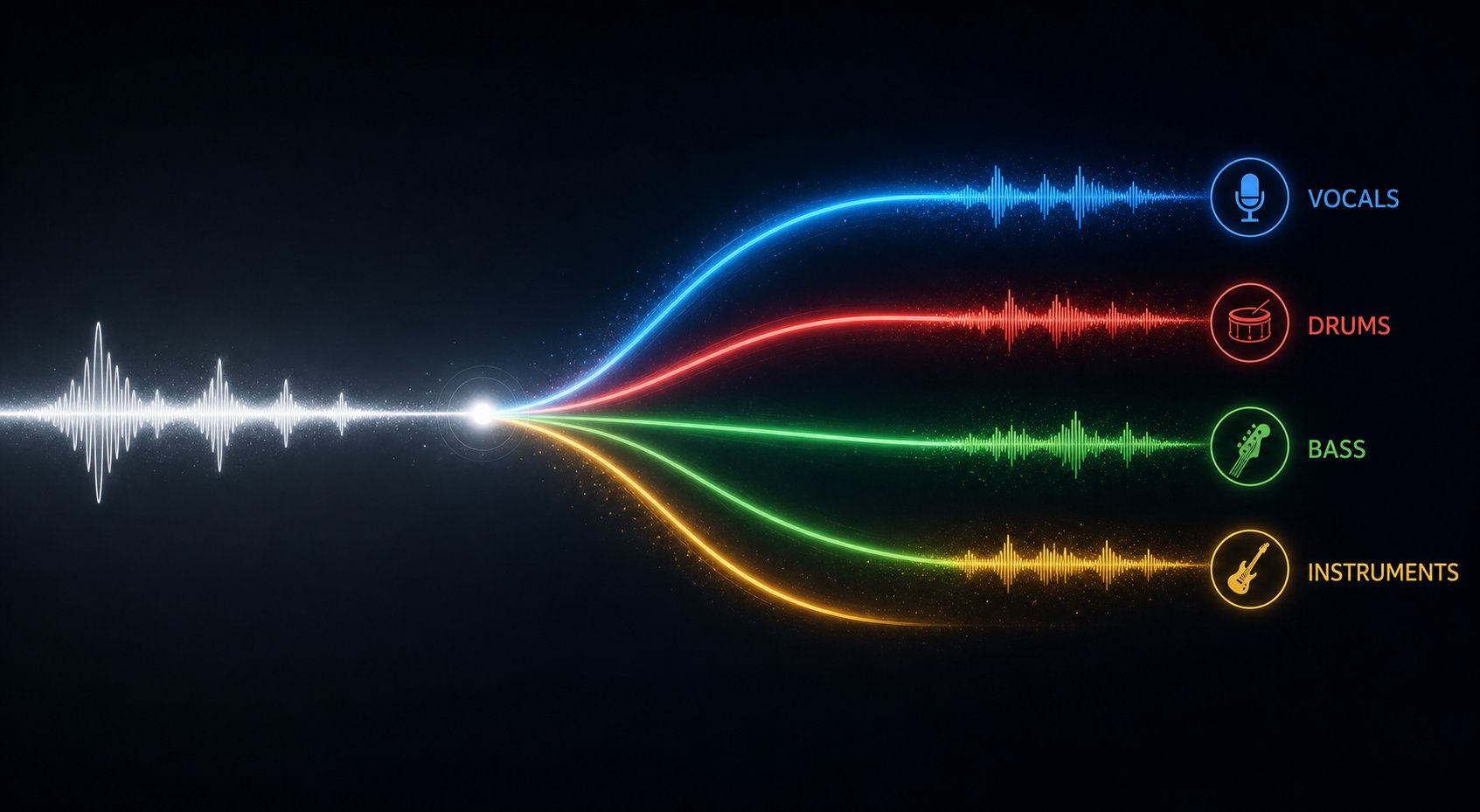
- Separation - Isolating individual stems like vocals, drums, bass, and instruments from a mixed track, a core function of any modern audio analyzer.
- Detection - Determining whether a piece of music was AI-generated by scanning for telltale statistical patterns invisible to the human ear.
These categories often overlap. A music detector online might combine identification with analysis, or a music analysis AI platform might bundle transcription with separation. But understanding them as separate capabilities helps you pick the right tool for your specific need.
The AI audio processing market reflects this breadth. Research from Market.us projects the sector will grow from $3.8 billion in 2023 to $18 billion by 2033, driven largely by these five use cases becoming standard across music production, streaming, and content creation.
Each of these capabilities relies on fundamentally different technology under the hood, from audio fingerprinting to deep neural networks trained on labeled datasets. Understanding how they actually process sound is where things get interesting.
How AI Actually Processes and Understands Sound
When you hear a song, your brain processes rhythm, melody, and emotion almost simultaneously. AI takes a completely different route. It translates audio into numbers, then searches for patterns in those numbers. Three foundational technologies make this possible, and each one handles audio analysis in its own way.
Audio Fingerprinting and Pattern Matching
Think of audio fingerprinting like facial recognition, but for sound. When a track enters the system, the algorithm extracts a compact digital summary of its acoustic characteristics, capturing elements like timbre, melody contour, and intensity. That summary becomes the track's unique signature, stored in a database alongside millions of others.
When you hold your phone up to a speaker, the app generates a fingerprint of whatever it captures and compares it against the stored signatures. A match happens in seconds. BMAT's fingerprinting system, for example, identifies audio against 72 million sound recordings daily, using specialized algorithms tuned for different scenarios like background noise, time-stretched DJ sets, or voice-over interference.
The challenge is defining the boundary where one recording becomes a different one. Slight tempo changes or compression artifacts shouldn't break a match, but major pitch shifts or heavy distortion might. Good fingerprinting systems learn to identify sound with the same sensitivity a human listener would, tolerating minor degradation while rejecting truly altered recordings.
Spectral Analysis and Neural Network Training
Fingerprinting works well for recognition, but analyzing music at a deeper level requires a different approach. This is where spectral analysis comes in. The system converts raw audio into a spectrogram, a visual map showing how frequencies change over time. Imagine reading sheet music, except instead of individual notes you're seeing every frequency playing simultaneously, with color intensity showing how loud each one is at any given moment.
Neural networks then learn to read these spectrograms the way you'd learn to read a language. As Cyanite's research explains, convolutional neural networks (CNNs) are trained on thousands of labeled spectrograms, each paired with metadata like genre, mood, or instrumentation. The model compares its predictions against correct labels, adjusting itself through repeated exposure until it can classify new tracks it has never encountered. This supervised learning process is how an ai audio analyzer develops the ability to tag tempo, detect instruments, or categorize genre from raw audio alone.
The quality of training data matters enormously. If labels are inconsistent, the model learns wrong patterns. Audio ai dynamics like energy levels, rhythmic density, and tonal shifts all become readable only when the training examples are diverse and accurately tagged.
Why AI Hearing Differs From Human Listening
AI does not experience music. It processes arrays of numerical values derived from pressure waves, finding statistical correlations between patterns in those numbers and the labels humans assigned during training.
This distinction matters more than it seems. A tone analyzer can detect whether a track is in a minor key and classify it as melancholic, but it has no emotional response to that key. It recognizes sadness as a pattern, not a feeling. Similarly, an audio ai dynamics music analyzer can measure energy shifts across a song's timeline without experiencing the tension and release a listener feels.
You process music through memory, context, and lived experience. AI processes it through matrix multiplication and pattern matching. Both approaches produce useful results, but they answer fundamentally different questions. The human ear asks "how does this make me feel?" while analyzing music through AI asks "what measurable properties does this audio contain?"
That gap between numerical output and human interpretation is exactly what makes AI tools so useful for the next step: identifying specific songs from incomplete information.
AI Song Identification From Shazam to Humming Recognition
Song identification is the most familiar form of AI music listening. You hear something, you want to know what it is, and you need an ai song finder that can deliver an answer in seconds. This single use case drives millions of daily queries and has shaped how most people think about AI and audio.
How Song Recognition Apps Match Audio Clips
When you tap "identify" in an app like Shazam, your phone captures a few seconds of audio and converts it into a spectrogram. The algorithm then strips away everything except the loudest frequency peaks in each time slice, creating a sparse constellation of dots. These dots are paired together to generate compact fingerprint hashes built from two frequencies and the time gap between them.
A single 3-minute song might produce thousands of these hashes, all stored in a massive inverted index. Your clip generates its own small set of hashes, and the system looks each one up like an address in a phone book. If enough hashes match a specific song and the timing between them aligns, you get a confident result. The entire lookup runs in fractions of a second across millions of indexed tracks, because the search operates at near-constant speed regardless of database size.
This shazam ai approach is elegant but narrow. It matches recordings to recordings. The system compares exact acoustic fingerprints, which means it works best when your clip closely resembles the original studio version.
Identifying Songs From Humming and Partial Melodies
What happens when you can't play the song, only hum it? Traditional fingerprinting fails here because your voice produces entirely different frequencies than the original recording. You're left wondering "what is that melody?" with no recording to match against.
Google's Hum to Search solves this with a neural network trained on pairs of sung audio and studio recordings. Instead of matching exact acoustic signatures, the model learns to produce embeddings where audio containing the same melody clusters together, regardless of instrumentation, voice timbre, or key. A hummed rendition and its polyphonic studio counterpart end up near each other in embedding space, even though their spectrograms look completely different.
The training process involved augmenting sung clips with random pitch and tempo variations, then generating simulated hummed melodies using pitch extraction models. This ai song recognition approach searches a database of over half a million songs and continues to grow, making it possible to identify song from audio sample even when that sample is just you humming into your phone.
Accuracy Factors That Affect Recognition
Not every query returns the right answer. Understanding why helps set realistic expectations when you use any ai music identifier:
- Clean recordings match easily. A direct line-in capture or a quiet room gives the algorithm clear peaks to work with.
- Background noise adds low-level energy across the spectrogram, but rarely overpowers the dominant peaks. Moderate cafe chatter usually won't break a match.
- Live performances introduce crowd noise, different arrangements, and tempo variations that can throw off fingerprint-based systems.
- Covers and remixes generate different hashes than the original because the frequencies and timing change. A cover is acoustically a different recording, even if the melody is identical.
- Humming accuracy depends on how closely your pitch contour matches the actual melody. Significant rhythmic or pitch drift reduces confidence.
If a song finder ai fails on your first attempt, try capturing a cleaner clip or humming a more distinctive section of the melody. The chorus typically contains the most recognizable melodic signature.
Identification tells you what a song is. But once you know the title, a different set of AI tools can tell you everything about how that song is built, from its tempo and key down to individual chord changes.
AI Music Analysis for Genre, Tempo, and Song Structure
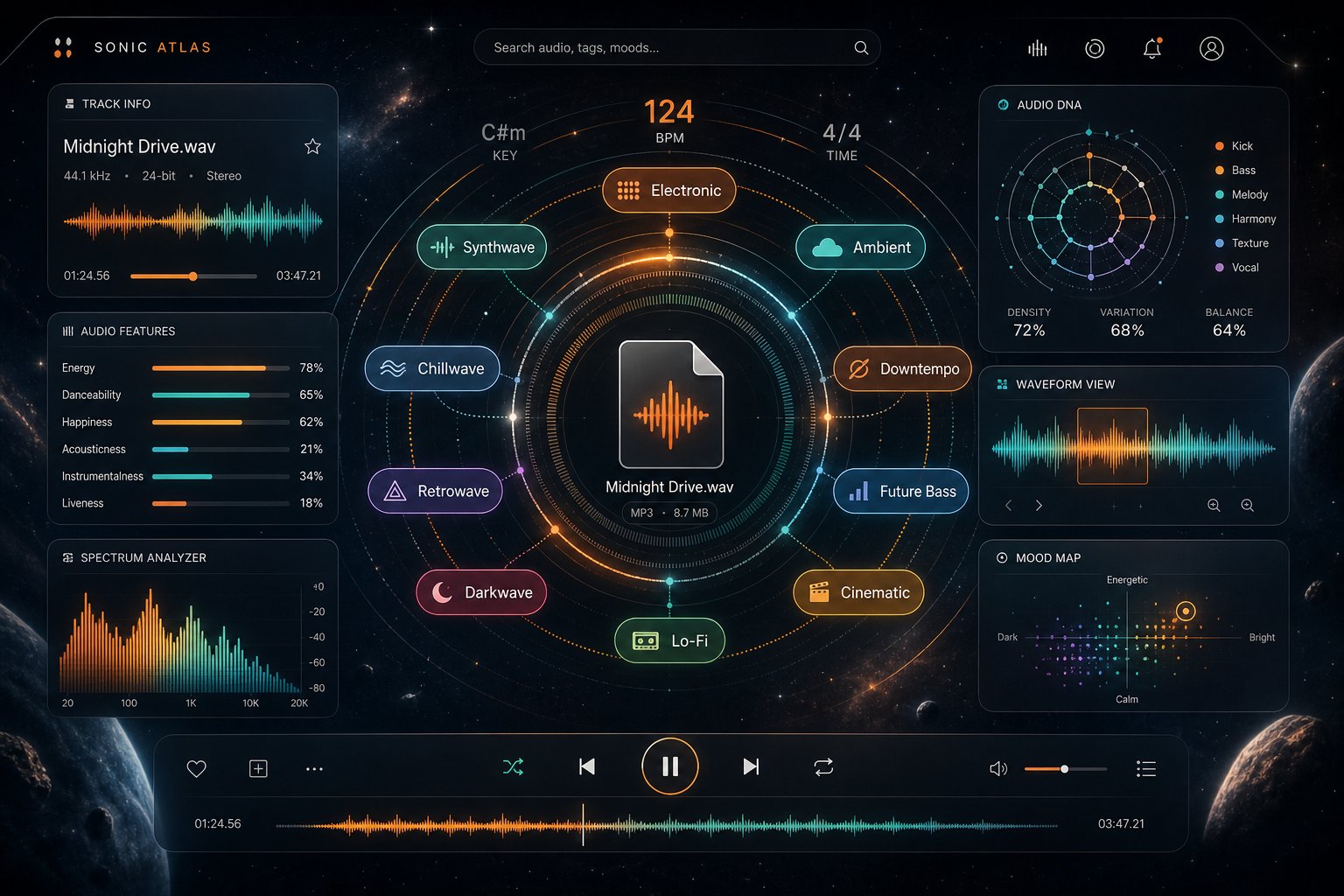
Knowing a song's title is one thing. Knowing it's in F# minor at 95 BPM with emo rap textures and drill influences is something else entirely. AI music analysis tools go far deeper than identification, extracting structural and stylistic data that would take a trained musician careful listening to determine manually.
BPM, Key, and Structural Analysis Tools
At the most fundamental level, an AI audio analyzer detects tempo, musical key, and time signature. These seem like simple data points, but they power critical workflows. A DJ needs accurate BPM to beatmatch two tracks. A producer needs the correct key to layer a sample over a chord progression without harmonic clash. A student studying arrangement needs to know where verses end and choruses begin.
Tools like Soundplate Analyzer handle quick BPM and key detection for free, returning results from an uploaded file or pasted link. More advanced platforms go further, detecting chord progressions, energy curves, and structural sections like intro, verse, chorus, and bridge. Remusic AI extracts rhythm patterns, melodies, and chord sequences, even exporting MIDI files for producers who want to study or rebuild a track's harmonic framework. If you need an ai key finder that also maps out the full harmonic landscape, these deeper analysis platforms deliver far more than a single number.
AI Genre Classification and How It Works
Genre detection is where AI analysis gets both powerful and contentious. A music genre identifier doesn't rely on artist metadata or playlist labels. It listens to the audio itself, scanning rhythmic patterns, instrumentation density, tonal characteristics, and vocal style to classify tracks into genres and subgenres.
The process works through multi-label classification. Neural networks trained on labeled catalogs learn that certain combinations of features, like heavy 808 bass patterns, rapid hi-hats, and pitched vocal samples, correlate with trap music, while sustained synth pads over four-on-the-floor kicks point toward house. A single track can carry multiple genre tags simultaneously because real music rarely fits one box.
Here's where it gets interesting: different AI systems often disagree. A 2026 benchmark by Soundcharts ran the same five tracks through three leading analyzers and found significant divergence. On an Ayra Starr track, one system tagged it as Afrobeats with Bongo Flava and Kizomba subtexts, another called it Afropop with dancehall elements, and the third flattened it into generic pop. A Fela Kuti classic was correctly labeled as Nigerian Afrobeat by one tool, classified as funk/jazz by another, and misidentified as Latin by a third.
These discrepancies happen because each genre detector is trained on different catalogs with different taxonomies. A song genre identifier built for Western pop markets may struggle with regional styles, while one trained on African catalogs captures those nuances accurately. If you're using AI to identify genre, running a track through multiple systems and comparing results often gives the most complete picture, functioning as a reliable music style finder rather than relying on a single opinion.
Who Uses Music Analysis AI and Why
The audience for these tools spans far beyond casual curiosity. Each user type pulls different value from the same underlying technology:
| Feature | What It Detects | Primary Users |
|---|---|---|
| BPM Detection | Tempo in beats per minute, tempo variations across sections | DJs, producers, playlist curators |
| Key Detection | Musical key and modality (major/minor) | Producers, musicians, remixers |
| Genre Classification | Primary genre, subgenres, and stylistic influences | Labels, distributors, sync teams, playlist editors |
| Mood Analysis | Emotional tone such as energetic, melancholic, aggressive, or romantic | Playlist curators, content creators, sync supervisors |
| Chord Recognition | Chord progressions, harmonic rhythm, and tonal movement | Students, songwriters, arrangers, producers |
Producers use analysis to check their own mixes against genre-specific benchmarks. TrackScore.AI, for instance, scores EDM tracks across frequency balance, dynamics, and stereo width, calibrated against nine electronic subgenre profiles. Labels and distributors use genre finder music tools to tag catalogs at scale, ensuring tracks surface in the right searches and recommendations. Students studying composition use chord and structure analysis to reverse-engineer songs they admire without relying purely on ear training.
The global AI music market, valued at $3.1 billion in 2025 and projected to grow at 28.6% annually through 2030, reflects how essential these capabilities have become. Release volume now outpaces what humans can manually tag. Missing or inconsistent metadata buries tracks entirely, making automated analysis not just convenient but commercially necessary.
Still, analysis only tells you about the finished mix as a whole. What if you need to hear individual instruments in isolation, or convert a performance into notation you can read on paper? That requires AI to do something even more demanding: pull a mixed recording apart into its separate pieces.
AI Transcription and Audio Separation Tools
Analysis tells you what a track contains. Transcription and separation let you extract it. These two capabilities represent the most technically demanding form of AI music listening, because the system isn't just labeling audio. It's converting a finished mix back into usable parts, whether that means printed notation or isolated stems you can manipulate independently.
AI Transcription From Audio to Sheet Music
Is there AI that can transcribe music into readable notation? Yes, and the options have matured significantly. Tools like Songscription AI, Klangio, and AnthemScore convert audio files into sheet music, MIDI, guitar tabs, or MusicXML. Upload a track, and the system generates ai sheet music you can edit, transpose, or print.
The underlying process works by analyzing a spectrogram and detecting pitch onsets, durations, and velocities. Neural networks trained on thousands of annotated performances learn to map frequency patterns to specific notes on a staff. For clean, monophonic material like a solo vocal or single-instrument melody, accuracy is high. A solo piano line or isolated guitar riff translates well because the model only needs to track one or two voices at a time.
Polyphonic material is where things get harder. Dense mixes with overlapping instruments, heavy reverb, or distortion introduce harmonics that confuse pitch detection. Practical testing across multiple tools shows that transcription accuracy drops sharply once you move from solo melodies to full arrangements. The realistic approach is to treat AI-generated notation as a fast first draft rather than a finished score, then clean up note lengths, quantization, and voicings manually.
Stem Separation and Track Isolation
Stem separation tackles something even more counterintuitive. Imagine trying to un-bake a cake back into eggs, flour, and sugar. That's essentially what source separation does with audio: it takes a finished mix and isolates individual stems like vocals, drums, bass, and other instruments into separate files.
How is this possible? Machine learning models trained on thousands of songs where the original individual stems were available learn the spectral fingerprints of each instrument type. A hi-hat's energy clusters around 10-15kHz. A bass guitar sits between 50-200Hz. As audio researchers explain, once a model understands these frequency patterns, it can apply learned filters to pick and choose which frequencies belong to which instrument in an unfamiliar mix.
Leading open-source models like Demucs and SCNet have pushed separation quality to the point where results are genuinely usable. The technology even powered the final Beatles song, "Now And Then," where AI extracted John Lennon's vocals from an old demo so Paul McCartney and Ringo Starr could complete the track decades later.
That said, separation isn't perfect. Tracks with lots of hard transients or components sharing the same frequency range still produce audible artifacts, ducking and bleed between stems. Quality improves each year, but expecting studio-grade isolation from every source remains unrealistic for now.
Practical Uses for Musicians, Students, and Creators
These two capabilities unlock workflows that were impossible just a few years ago:
- Learning parts by ear - Isolate a bass line or guitar part from a full mix so you can hear exactly what's being played without other instruments masking the detail. The AI works as an instrument identifier, revealing parts buried in the arrangement.
- Remixing and sampling - Extract vocals or instrumental sections for remix projects. Producers use separation as a sample finder ai to pull usable elements from reference tracks.
- Studying orchestration - Students can identify instruments individually within complex arrangements, hearing how each voice contributes to the whole.
- Karaoke and backing tracks - Remove lead vocals to create instrumental versions, or isolate vocals for a cappella study. An instrumental finder built on separation tech handles this in minutes rather than the hours manual isolation once required.
- Lyric and vocal analysis - Isolating the vocal stem makes it easier to understand what a singer is actually saying. Think of it as what is a song saying translator through sound, stripping away masking instrumentation so lyrics become clear. An ai voice analyzer can then process the isolated vocal for pitch accuracy, vibrato patterns, or tonal quality.
For creators who want a straightforward way to break tracks into stems, MakeBestMusic's Audio Separator offers a practical entry point. It lets you isolate vocals, drums, bass, and other instruments from any track without requiring a DAW setup or technical expertise. Musicians use it to learn difficult parts, students inspect orchestration choices, and remixers pull the specific elements they need. The accessibility matters because separation technology only delivers value when creators can actually reach it without a steep learning curve.
Transcription and separation share a common thread: both convert a passive listening experience into active, editable material. But there's a newer, more uncomfortable question AI music listening now addresses. Rather than asking what's inside a song, some tools ask whether a song was made by a human at all.
Detecting Whether a Song Was Made by AI
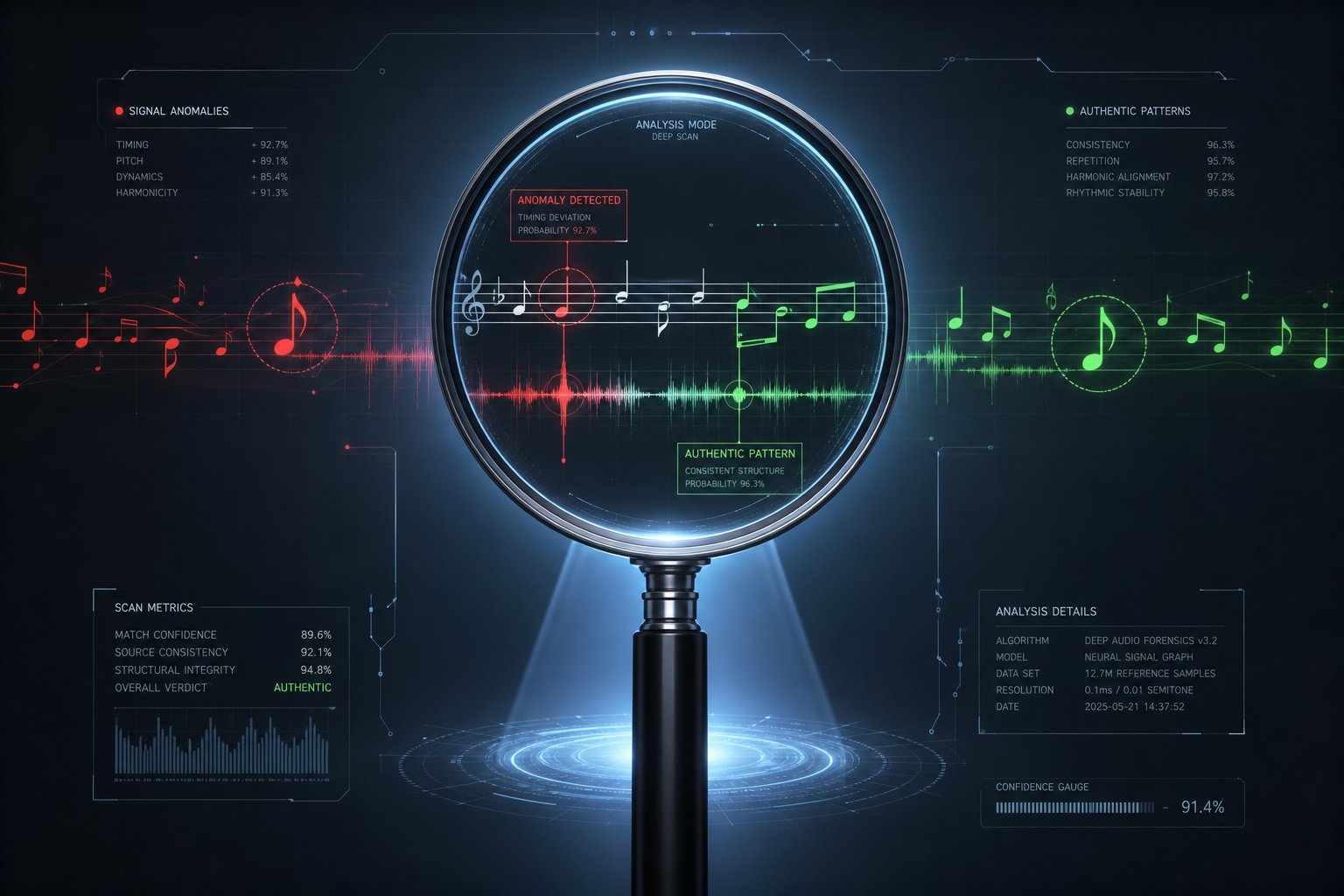
Separation and transcription ask what's inside a track. Detection asks something more fundamental: did a human actually create it? As platforms like Suno, Udio, and MusicGen produce increasingly convincing output, the ability to check music to see if its ai generated or not has become a real operational need rather than an academic curiosity.
How AI Detection Analyzes Generated Music
AI music detectors work by scanning audio for spectral signatures that generation platforms leave behind, artifacts invisible to the human ear but clearly visible under algorithmic analysis. Each generation platform produces its own telltale markers:
- Digital haze in high frequencies - Suno-generated audio shows characteristic patterns in the 8-16kHz range and 32kHz sampling signatures that differ from natural recording environments.
- Periodic spectral envelopes - Transformer-based generators like Udio create artificially uniform instrumental separation and periodic patterns that real recordings don't exhibit.
- Quantization artifacts - Autoregressive token generation at fixed rates produces visible stepping in the time-frequency domain, a byproduct of codec-based synthesis.
- Unnatural vocal production - Voice synthesis introduces formant transitions and micro-timing patterns that deviate from how a human larynx actually works.
The most effective ai music detectors use ensemble methods, running multiple specialized models in parallel rather than relying on a single classifier. Production-grade systems like authio's deploy 12 models simultaneously, including platform-specific classifiers trained on Suno, Udio, and MusicGen output, plus cross-validation layers that reduce false positives. This ensemble approach reportedly achieves 99.42% accuracy with a false positive rate under 0.6%.
Simpler approaches also work surprisingly well in controlled settings. Research published in TISMIR found that basic support vector machines operating on CLAP audio embeddings achieved precision above 95% when distinguishing Suno and Udio tracks from human-made music. Even the spectral centroid alone shows measurable differences: Suno tracks consistently produce lower values, suggesting reduced high-frequency content compared to commercial recordings.
Why Detecting AI Music Matters Now
Why does anyone need an ai music checker in the first place? The stakes extend far beyond curiosity:
- Copyright and legal compliance - Major labels have filed lawsuits against Suno and Udio for alleged training on copyrighted material. Distributors need to flag AI-generated uploads before they enter catalogs and trigger infringement claims.
- Streaming platform integrity - Deezer has already removed 26 million tracks as part of its shift toward catalog quality. Platforms need automated detection to prevent AI-generated content from flooding recommendation algorithms and displacing human artists.
- Music competitions and awards - Contests requiring original human authorship need verification tools. An AI-generated song reached the charts in Germany in 2024, raising questions about what counts as human creative output.
- Academic integrity - Music schools and composition programs face the same challenge universities faced with AI-written text. Students submitting AI-generated compositions as their own work need to be detectable.
A 2024 study commissioned by GEMA and SACEM found that the majority of surveyed music creators demanded that AI music be clearly identified, reflecting deep concern that AI-generated tracks could push human-made music to the margins. The practical question of how to tell if a song is ai generated has moved from theoretical to urgent.
Current Accuracy and Known Limitations
Here's where honesty matters. Detection accuracy varies significantly depending on what you're testing and which platform generated the audio. The technology is locked in a constant cycle where generation improves, detection adapts, and generation evolves again.
AI music detection is an arms race. Systems built to identify specific platforms at specific times must continuously adapt as those platforms release new versions, and detectors that perform perfectly in controlled experiments can fail entirely on unfamiliar generators.
The TISMIR research demonstrated this clearly. Detectors trained on Suno and Udio achieved high accuracy on those platforms but identified only 30-47% of tracks from Boomy, a different AI music platform not in the training set. Even the commercial IRCAM Amplify detector, which claims over 98% accuracy, was fooled by simply resampling audio to 22.05 kHz, a trivial transformation that shouldn't affect whether something sounds AI-generated.
Other critical limitations include:
- Hybrid content blind spots - No current ai song detector can reliably identify which specific portion of a track is AI-generated when only the vocals, backing, or percussion is synthetic. The binary "AI or not" framing breaks down for real production workflows.
- Shortcut learning - Some detectors may be exploiting file format artifacts like fixed bit rates and sampling rates rather than genuine musical signatures. Suno outputs at 128kbps and Udio at 320kbps, creating trivially detectable patterns unrelated to creative origin.
- Definitional ambiguity - When a producer uses AI to generate a chord progression, records live vocals over it, then masters the result with AI-assisted tools, is the track AI-generated? Binary classification cannot capture this spectrum.
For anyone wondering "is this song ai?" the honest answer is that current tools work well on known platforms under clean conditions, but struggle with novel generators, manipulated audio, and hybrid workflows. The technology is useful as a screening layer, not a definitive verdict.
Detection represents one side of a broader confusion that surrounds AI and music. Many people conflate tools that listen to music with tools that create it, but these are fundamentally different capabilities with different technical foundations.
AI Music Listening vs AI Music Generation
Search for anything related to AI and music, and you'll quickly notice generation tools like Suno, Udio, and even searches for "sunoi" or "sunoai.vn" dominating the results. This creates real confusion. People asking whether AI can listen to music end up on pages about AI that creates music, two capabilities that share almost nothing under the hood.
Listening AI vs Generation AI and Why It Matters
The distinction is straightforward once you see it. Listening AI takes audio as input and produces information as output: a song title, a BPM reading, a set of isolated stems, a genre tag. Generation AI works in the opposite direction. It takes text prompts or parameters as input and produces audio as output. You type suno prompts like "upbeat indie folk song about morning coffee" and get a finished track back.
These are fundamentally different engineering problems. A listening system analyzes what already exists. A generation system invents something new from statistical patterns. Some platforms blur the line by analyzing an input track to generate something stylistically similar, functioning as an ai that changes music genres by resynthesizing content. But the core capabilities remain distinct. Analyzing a song's key signature requires completely different models than producing a chord progression from scratch.
Why does this matter practically? Because if you need to identify a song, detect its tempo, or separate its stems, a rap song generator won't help you. And if you're wondering is Google AI Studio good at lyrics for songs, that's a generation question, not a listening one. Knowing which category your problem falls into saves you from downloading the wrong tool entirely.
What AI Still Cannot Do When Listening to Music
Even within genuine listening capabilities, significant gaps remain. AI processes audio as mathematical patterns, and that approach hits walls that no amount of training data has solved:
- Emotional interpretation - AI can label a track as "melancholic" based on tempo, key, and timbre patterns, but it cannot explain why a specific vocal inflection makes a listener cry. It recognizes emotion as a category, not as experience.
- Heavily layered compositions - Dense orchestral works, experimental noise music, and productions with extreme frequency overlap degrade analysis accuracy significantly. The more complex the arrangement, the less reliable the output.
- Niche and regional genres - Models trained primarily on Western commercial catalogs struggle with genres outside their training data. A system that confidently classifies pop and hip-hop may completely misidentify Tuvan throat singing or Congolese soukous.
- Poor audio quality - Low bitrate recordings, heavy compression artifacts, and extreme background noise all reduce accuracy across identification, analysis, and transcription tasks.
- Context and cultural meaning - AI cannot understand that a protest song carries political weight, that a sample references another artist's legacy, or that a tempo shift signals narrative tension. It reads numbers, not stories.
- Artistic originality - As music production analysts have noted, AI replicates existing patterns but fails to create or even fully recognize anything genuinely new. When a composer deliberately breaks conventions, listening AI often flags it as an error rather than innovation.
Generation tools face their own parallel limitations. Professional musicians consistently describe Suno's output as polished but hollow. Detailed testing by Production Expert found that generated tracks tick structural boxes like verse, chorus, and bridge, but lack genuine originality. The chord progressions are predictable, the lyrics read like "fridge magnet poetry," and every genre request tends to converge on a similar vocal style. The fundamental issue is that AI cant write songs with lived experience behind them. It simulates songwriting without understanding why certain choices resonate.
These limitations on both sides, listening and generation, point toward the same underlying truth: AI excels at pattern recognition and pattern reproduction, but struggles wherever meaning, context, or genuine novelty is required. The practical question then becomes not whether AI can do everything, but which specific task you actually need handled, and which tool handles it best for your situation.
Choosing the Right AI Listening Tool for Your Needs
Every capability discussed so far, identification, analysis, separation, transcription, and detection, exists in multiple tools with different price points, interfaces, and intended audiences. The challenge isn't finding an AI that can listen to music. It's matching the right tool to your actual workflow without paying for features you'll never touch.
Matching Your Goal to the Right Tool Category
Rather than comparing tools feature by feature, start with what you're trying to accomplish. A casual listener who just wants a song title needs something completely different from a producer analyzing frequency balance or a student dissecting chord voicings. Your goal determines which category of ai music finder matters, and which ones you can ignore entirely.
Here's how each user scenario maps to the right tool type:
| User Goal | Tool Type | Typical Features | Access Level |
|---|---|---|---|
| Separate and inspect individual stems | Audio Separator (MakeBestMusic Audio Separator) | Vocal, drum, bass, and instrument isolation; downloadable stems; no DAW required | Free / Paid tiers |
| Identify a song playing nearby | Song Recognition (Shazam, SoundHound) | Fingerprint matching, song metadata, streaming links | Free |
| Analyze BPM, key, and genre | Music Analysis (Soundplate, Remusic AI) | Tempo detection, key identification, genre tagging, mood classification | Free / Paid |
| Transcribe audio to sheet music | Transcription (AnthemScore, Klangio) | MIDI export, notation rendering, guitar tab generation | Free trial / Paid |
| Check if a track is AI-generated | AI Detection (authio, IRCAM Amplify) | Platform-specific classification, confidence scoring, batch scanning | Free tier / Paid / API |
| Get production feedback on a mix | Mix Analysis (Mix Check Studio, TrackScore.AI) | Loudness measurement, frequency balance, dynamic range, streaming readiness | Free / Paid |
Notice that separation sits at the top for a reason. It's one of the most versatile capabilities because isolated stems feed into nearly every other workflow. Once you have individual parts separated, you can transcribe them more accurately, analyze their tonal content independently, or simply hear details buried in a full arrangement. MakeBestMusic's Audio Separator works as a practical starting point here because it handles the extraction without requiring you to own a professional DAW or understand spectral processing. Upload a track, select what you want isolated, and download the stems. Musicians learning a bass line, remixers pulling vocals, and students studying instrumentation all start from the same place.
Free vs Professional Options for Every User Type
The free-versus-paid decision depends less on budget and more on how often you'll use the tool and what quality threshold you need to hit.
For casual identification, free works perfectly. Shazam and Google's Hum to Search cost nothing and handle the vast majority of song recognition queries without limitation. You won't hit a paywall for asking "what's this song?"
Analysis tools split more clearly. A free ai music analyzer like Soundplate gives you BPM and key from a link or uploaded file, which covers basic DJ prep and production reference checks. If you need deeper structural breakdown, chord progressions, or genre-specific scoring, paid tools like remusic ai music analyzer or TrackScore.AI offer the additional depth. The upgrade signal is simple: if you're running tracks through a free tool multiple times per week and wishing the output told you more, the paid tier is probably worth it.
Separation follows a similar pattern. Free tiers typically limit file length, number of monthly separations, or output quality. MusicRadar's testing of 11 stem separation tools found that quality varies enormously between platforms. Apple Logic Pro scored highest in their evaluation, but requires owning the DAW. Online services like LALAL.AI charge per minute of processing, which adds up fast if you're separating full albums. For users who need reliable separation without committing to expensive software, browser-based tools with clear free tiers offer the lowest-friction entry point.
Detection tools are the newest category and the least standardized in pricing. Some offer limited free scans, while enterprise-level API access runs on per-track pricing models. If you're an independent artist curious about a single track, free tiers work fine. Labels scanning thousands of submissions monthly need API-level access with batch processing.
One practical consideration that often gets overlooked: a music tester tool that gives you detailed feedback on your own productions, covering loudness, dynamics, and streaming platform readiness, can save you more money than it costs by eliminating revision cycles. As Roex Audio's guide to AI music tools puts it, the signal for upgrading is whether a tool consistently produces results you act on. If you're upgrading out of curiosity rather than demonstrated value, wait.
Getting Started With AI Music Listening Today
You don't need to master every category at once. Pick the one that solves your most immediate problem and expand from there:
- Heard a song you can't name? Open Shazam or hum into Google. This takes seconds and costs nothing.
- Need to learn a specific part from a recording? Run the track through a stem separator to isolate the instrument you're studying, then loop that isolated stem while you practice along.
- Producing a track and need reference data? Upload your mix to a free ai music analyzer for BPM and key, then compare against your reference tracks to confirm you're in the right harmonic neighborhood.
- Submitting music to a competition or distributor? Run it through an ai music detector online free tool to verify it doesn't accidentally trigger AI-generation flags, especially if you used any AI-assisted tools during production.
- Teaching or studying music theory? Combine separation with transcription. Isolate the part you want to analyze, then feed the clean stem into a transcription tool for more accurate notation than you'd get from a full mix.
The music feedback ai landscape will keep evolving. New models improve separation quality every few months, detection adapts to each new generation platform, and analysis tools expand their genre taxonomies as training data grows. But the core workflow stays the same: define what you need to know about a piece of audio, choose the tool category that answers that question, and start with a free tier to confirm it fits your process before committing budget.
The question was never really whether AI can listen to music. It can, in five distinct and powerful ways. The better question is which kind of listening you need right now, and how quickly you can put the results to work.
