

What Suno AI Is and Why It Matters
If you have been asking whats Suno and why it keeps appearing in music conversations, you are not alone. This platform has rapidly become one of the most talked-about tools in creative technology.
Suno AI is a generative music platform that transforms short text prompts into complete, fully produced songs featuring vocals, instrumentation, arrangement, and mixing, all generated in seconds without requiring any musical training or software downloads.
This article goes beyond surface-level explanations. Whether you are a curious beginner, a content creator evaluating the tool, or a technically-minded reader who wants to understand the machine learning systems driving it, you will find a clear breakdown of how the prompt-to-song engine actually works under the hood.
What Suno AI Actually Does
Imagine typing a short description like "upbeat indie folk song about road trips with male vocals and acoustic guitar" and receiving a fully mixed track 30 seconds later. That is the core experience of this suno ai music maker. You provide genre, mood, lyrical content, and stylistic direction. The system returns a produced recording complete with singing, harmonies, and instrumentation.
To appreciate why this matters, consider the traditional workflow. Producing a single song typically involves writing lyrics, composing melodies, arranging parts across multiple instruments, recording performances, mixing, and mastering. Even a simple demo can take hours in a digital audio workstation. Suno collapses that entire pipeline into a single text input. A Berklee College of Music study found that 33 percent of musicians already use AI to generate initial ideas and reference tracks that are later reworked, highlighting how quickly these tools have entered real creative workflows.
Who Uses Suno and Why
So what is suno app used for in practice? The use cases span a wide range:
- Hobbyists creating personalized songs for fun or gifts
- Content creators generating royalty-covered background tracks for videos and podcasts
- Musicians prototyping arrangements and exploring genre fusions before committing studio time
- Businesses producing commercial audio for ads, apps, and presentations
The platform runs entirely in a browser. No downloads, no plugins, no music theory prerequisites. For anyone wondering suno what is it at its core, it is accessibility: the ability to produce music without years of instrument practice or expensive software. That accessibility is precisely what makes the underlying technology so interesting to examine, particularly the AI architecture that translates a few words into a layered audio production.
The AI Architecture Powering Suno's Music
Typing a sentence and receiving a polished recording raises an obvious question: how does Suno AI work beneath that simple interface? Suno's exact architecture is proprietary, but the observable inputs, outputs, and capabilities reveal a multi-model system that handles language, composition, and audio rendering as interconnected stages.
Transformer Models and Neural Audio Codecs
Think of the system as three specialists collaborating on every song. A large language model acts as the lyricist, interpreting your text prompt, parsing genre cues, and generating or refining lyrics. A transformer-based music model serves as the composer, building melodic contour, harmonic progressions, and rhythmic patterns that match the requested style. Finally, a neural audio codec model functions as the recording studio, synthesizing realistic waveforms that sound like a mixed and mastered track rather than a raw demo.
When you ask how does Suno work at the technical level, each of these components operates on tokens. The language model tokenizes text. The music transformer tokenizes musical structure. And the audio codec compresses sound into discrete tokens a neural network can predict sequentially, then decodes those tokens back into high-fidelity audio. Research into neural audio codecs like LLM-Codec demonstrates how audio tokenizers can be optimized specifically for language-model prediction rather than just waveform reconstruction, improving coherence and reducing perplexity in generated outputs. This type of alignment between codec and language model is central to producing audio that sounds musically intentional rather than randomly assembled.
How Direct Audio Synthesis Differs From MIDI Generation
Older AI music tools worked with MIDI, a symbolic format that records note-by-note instructions like digital sheet music. A MIDI file tells a synthesizer which notes to play, at what velocity, and for how long. The result depends entirely on the quality of the separate sound engine interpreting those instructions. You might recognize the track meaning music producers assign to each instrument layer in a DAW, where every MIDI track feeds a different virtual instrument.
Suno skips that intermediate step entirely. Instead of generating instructions for a separate playback engine, it produces audio waveforms directly. The output is not sheet music waiting to be performed. It is a finished performance. This is why generated songs sound like produced recordings with room ambience, tonal variation, and blended mixing rather than robotic sequences with uniform dynamics.
The key innovation enabling this approach is neural codec language modeling. Audio is compressed into a sequence of learned tokens, a transformer predicts those tokens in order (much like predicting the next word in a sentence), and a decoder reconstructs the full audio signal. Three paradigms now define AI music generation:
- Symbolic MIDI generation — produces note instructions requiring a separate synthesizer for playback
- Direct audio synthesis — generates raw waveforms end-to-end using models like diffusion networks
- Neural codec language modeling — compresses audio into discrete tokens, predicts token sequences with a transformer, and decodes them back into sound
Suno's behavior aligns most closely with the third paradigm, which explains its ability to generate coherent vocal performances, layered instrumentation, and stylistic nuance within a single unified output. That unified quality raises a natural follow-up: what exactly happens between the moment you submit a prompt and the moment a finished song appears in your browser?
From Text Prompt to Finished Song
Picture this: you type "melancholic indie folk, fingerpicked acoustic guitar, breathy female vocals, autumn heartbreak, 90 BPM" into the Suno interface and press generate. Fifteen seconds later, a fully arranged song plays back with layered harmonies, a gentle rhythmic pulse, and lyrics about letting go. What happened in those fifteen seconds? The journey from text to finished audio involves a multi-stage pipeline where each word in your prompt steers a different musical decision.
How Suno Processes Your Text Input
When you learn how to use Suno AI, the experience feels deceptively simple: type, click, listen. But behind that interface, the system executes a complex sequence of operations that transforms your natural language description into a coherent audio file. Based on observable behavior and what we know about similar architectures, the pipeline likely follows these stages:
- Prompt tokenization and intent analysis — Your text is broken into tokens and analyzed for musical intent. The model identifies genre markers ("indie folk"), mood descriptors ("melancholic"), instrumentation requests ("fingerpicked acoustic guitar"), vocal direction ("breathy female vocals"), tempo anchors ("90 BPM"), and thematic content ("autumn heartbreak"). Each element is encoded into a conditioning vector that will guide every subsequent step.
- Musical plan generation — The system constructs a structural blueprint for the song. This includes deciding on song form (intro, verse, chorus, bridge, outro), selecting a harmonic progression that fits the genre and mood, establishing a rhythmic framework at the specified tempo, and planning dynamic contour so the track builds and releases energy across its duration. Think of this as the AI sketching an arrangement chart before recording begins.
- Vocal and lyrical synthesis — If your prompt includes lyrical themes or you have written custom lyrics, the model generates singing that matches both the textual content and the musical style. Vocal timbre, pitch range, and delivery style are all shaped by your conditioning signals. A request for "breathy female vocals" produces a fundamentally different synthesis path than "aggressive male rap."
- Audio rendering and mixing — All elements, vocals, instruments, ambience, and production effects, are rendered into a single mixed audio file. The neural codec decoder reconstructs continuous waveforms from the predicted token sequence, producing a stereo track that sounds like it went through a mixing console rather than being assembled from disconnected parts.
This entire sequence executes in seconds. For anyone following a suno tutorial for the first time, the speed can feel almost disorienting. You might expect such a complex output to require minutes of processing, but the efficiency of transformer inference on modern hardware makes near-instant generation possible.
Why Some Prompts Work Better Than Others
Here is where the experience of using Suno diverges sharply between beginners and power users. A vague prompt like "make a song" gives the model maximum creative latitude, which also means maximum unpredictability. The system has to fill in every musical decision on its own: genre, tempo, mood, instrumentation, vocal style, structure. The result might be pleasant, but it is unlikely to match whatever you were imagining.
Detailed prompts work better because they function as conditioning signals that constrain the generation space. Each specific descriptor narrows the range of options song generation can explore. When you specify "90s grunge, distorted guitars, 130 BPM, raw male vocals, angry energy," you have eliminated thousands of possible musical directions and focused the model on a much tighter target. The seven-element prompt formula tested by experienced users, combining genre, tempo, mood, instruments, vocal style, era, and reference artist, consistently produces more focused and higher-quality output than freeform descriptions.
The sweet spot appears to be four to seven descriptors. Fewer than four leaves too many decisions to chance. More than seven can introduce contradictions that confuse the model, producing muddy or incoherent results. Consider how each word adds a distinct dimension:
- Genre tags activate learned patterns for specific musical traditions (chord voicings, rhythmic feels, production aesthetics)
- Mood descriptors shape harmonic color, tempo feel, and dynamic range
- Instrumentation requests guide which timbres appear in the mix
- Vocal direction controls synthesis characteristics like breathiness, power, or pitch register
- Tempo values anchor rhythmic framework and energy level
- Structure tags in custom lyrics (like [Verse], [Chorus], [Bridge]) tell the model where to create contrast and repetition
Songs with steps clearly defined through structure tags develop natural dynamics: tension builds into a pre-chorus, releases in the hook, and resets for the next verse. Without these signals, generations often flatten into a monotone stream without the contrast that makes music feel alive.
Knowing how to use Suno effectively is less about musical expertise and more about communicative precision. You are not composing; you are directing. The clearer your direction, the closer the output lands to your intent. And when a single generation does not hit the mark, generating multiple variations with small tweaks, swapping "wistful" for "melancholic" or adjusting BPM by five, often surfaces a version that clicks. This iterative approach mirrors how the options song creators explore in any creative tool: produce variations, compare, select the strongest take.
Still, even the most precise prompt produces a single unified output. You cannot independently adjust the bass line or swap out the vocal take the way you would in a traditional multitrack session. That distinction between unified generation and separable layers reveals something fundamental about how Suno constructs music internally.

How Lyrics Melody and Vocals Come Together
When you generate a track in Suno, every element arrives as a single intertwined audio file. The vocals do not exist in one channel while the drums live in another. Everything is fused. This is not a limitation of the interface; it reflects how the model actually thinks about music.
Unified Generation vs Separate Layers
Based on Suno's observable behavior, the generation process appears to be largely unified. The model produces audio where vocals, melody, harmony, rhythm, and production effects are composed together rather than assembled from independently generated layers. Imagine a songwriter who hears a complete arrangement in their head before ever picking up an instrument. Every part, the bass groove, the vocal phrasing, the drum pattern, emerges as a cohesive whole rather than being stacked one at a time.
This holistic approach explains several things you will notice as a user. You cannot swap out just the vocals while keeping the instrumental intact. You cannot change a chord progression without regenerating the entire track. You cannot mute the drums and hear a clean version of everything else. The model did not build these elements as separable components; it generated them as a single interdependent sonic texture.
Research into multi-track music generation, such as the JEN-1 Composer framework, demonstrates how challenging it is to model individual tracks while maintaining inter-track coherence. Most current text-to-music models that generate directly to audio produce composite mixes precisely because modeling the relationships between parts (how a bass line locks with a kick drum, how vocal melody weaves through harmonic pads) is easier when everything is generated simultaneously. Separating those parts into independently controllable layers requires fundamentally different architectural choices that add complexity and computational cost.
For users, this means each generation is essentially a "take." You accept it, tweak the prompt, or regenerate. You do not surgically edit one instrument within the mix, at least not at the generation stage.
Understanding Tracks and Stems in AI-Generated Music
So what are stems in music production, and how do they fit into an AI workflow built on unified generation? In traditional production, stems are separated audio layers extracted from a finished mix. A mastering engineer might receive a vocal stem, a drum stem, a bass stem, and an instrumental stem to adjust relative levels or apply processing to specific elements.
Suno now offers stem separation as a post-generation feature, letting users isolate individual elements after the song is created. The distinction matters: these suno stems are not generated independently during composition. They are extracted afterward using AI-powered source separation, a technology that analyzes the mixed audio and predicts which frequencies and patterns belong to each instrument category.
If you are wondering how to get stems from a song you have already created, the process is straightforward. From your library or within a workspace, you click the More Actions icon, hover over Get Stems, and choose between a basic two-stem split (vocals plus instrumental) or a detailed 12-track extraction that isolates drums, bass, melody, and other layers individually. The suno stems download options include MP3, WAV, tempo-locked WAV, and even MIDI files, giving you flexibility depending on your next production step.
| Stem Type | Typical Content | Common Use Case |
|---|---|---|
| Vocal Stem | Lead vocals, harmonies, backing vocals | Remixing, karaoke versions, vocal sampling |
| Drum Stem | Kick, snare, hi-hats, cymbals, percussion | Rhythm editing, tempo adjustments, resampling |
| Bass Stem | Bass guitar, synth bass, sub-bass elements | Low-end mixing, frequency balancing |
| Instrumental/Other Stem | Guitars, keys, synths, pads, effects | Arrangement editing, layering with other projects |
The availability of multitrack stems transforms what you can do after generation. Producers can pull an isolated vocal into a DAW, layer it over a custom beat, or extract a drum groove for resampling. Musicians prototyping with stems AI separation can audition individual parts and decide which elements to keep, replace, or reimagine with live instruments.
The key takeaway: Suno generates holistically but lets you deconstruct afterward. The music stems you extract are a best-guess separation of a unified output, not pristine isolated recordings. Quality is generally high for vocals and drums but can introduce subtle artifacts on densely layered instruments where frequencies overlap. Understanding this distinction, generation is unified, separation is post-hoc, clarifies what the tool can and cannot offer at each stage of your creative process.
This post-generation flexibility is exactly where Suno has been expanding its toolkit. Beyond simple stem extraction, the platform now offers a full multitrack workspace designed to bridge the gap between one-click generation and hands-on production refinement.
Suno Studio and the Multitrack Workspace
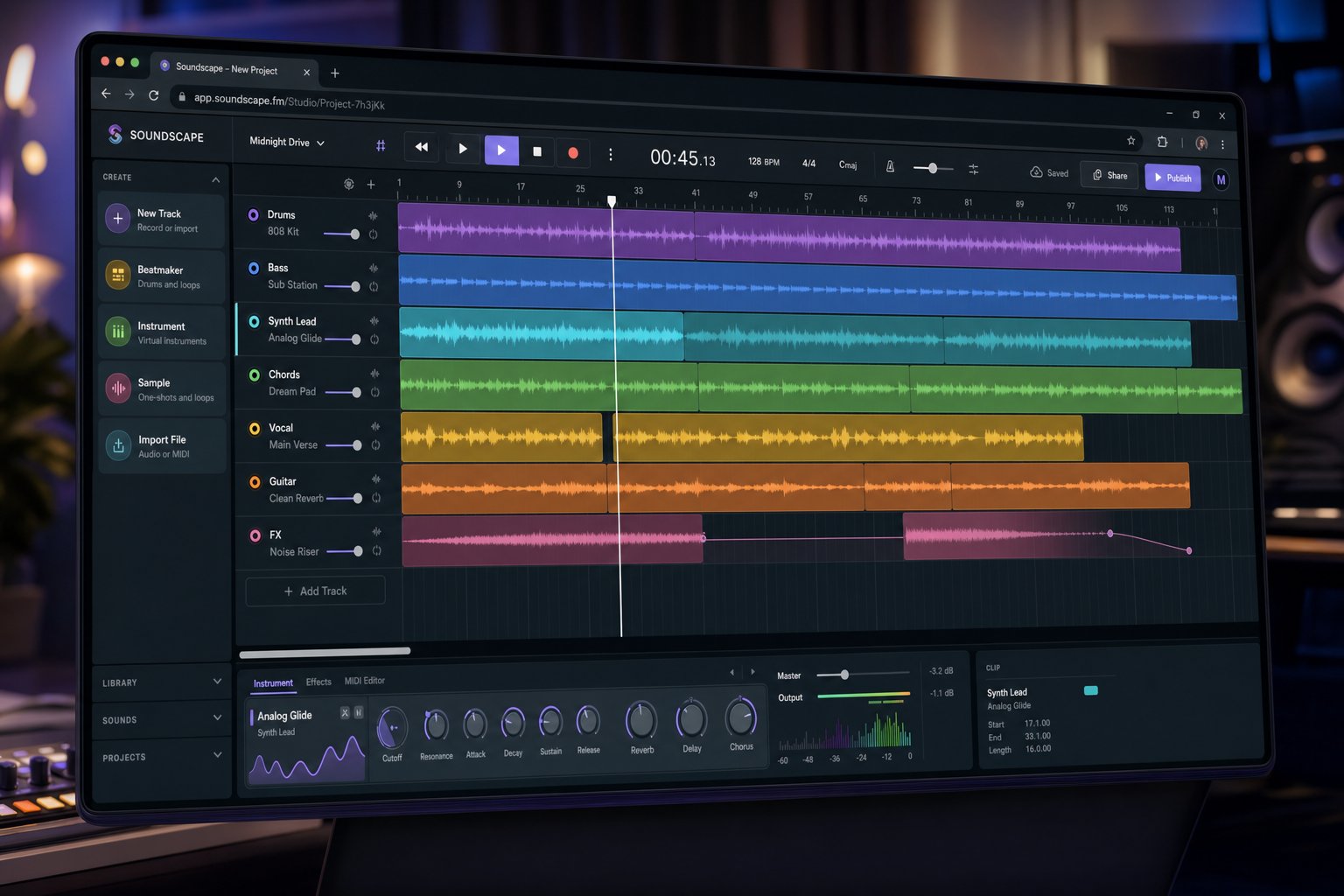
Generating a song in one click is impressive. Shaping that song into something truly yours requires a different set of tools. Suno recognized this gap and responded by building what it calls a Generative Audio Workstation, or GAW, a browser-based environment that merges traditional DAW functionality with AI-powered creation. If you have been wondering what is Suno Studio, it is essentially where the platform shifts from "generate and accept" to "generate and refine."
What Is Suno Studio and How It Extends Generation
Traditional digital audio workstations like Logic Pro or Ableton give producers granular control over every element in a session. The suno studio daw brings a similar philosophy to AI-generated music, letting you manipulate individual stems, rearrange sections on a timeline, regenerate specific parts, and layer new elements on top of existing tracks. Available with the Premier Plan, this suno workspace runs entirely in the browser without requiring any software installation.
The interface is organized around three core elements that any suno studio tutorial will walk you through:
- Create Panel — Where you write prompts, input lyrics, and generate new songs or individual instrument parts directly into the timeline. It works the same as the standard Suno creation interface but feeds output straight into your multitrack session.
- Context Bar — A dynamic toolbar at the bottom of the timeline that adapts to your current selection. It surfaces relevant actions like generating a new stem, opening your library, or initiating a song upload from your device.
- Timeline — The horizontal arrangement view where stems appear as individual tracks. You can split, move, trim, and layer audio regions. Volume, panning, and a six-band EQ are available per track for basic mixing.
One standout capability: you can highlight a specific section of your arrangement and generate a new instrumental part that listens to the surrounding context. Want an energetic saxophone solo over your bridge? Highlight the region, describe what you need, and the AI composes something that fits harmonically with the rest of the track. This is a fundamentally different workflow from prompting a full song and hoping for the best.
Working With Stems and Multitrack Editing
Inside the suno daw, any song from your library can be broken into stems and loaded onto separate timeline tracks. From there, you rearrange sections, mute elements you do not want, or replace a single layer with a freshly generated alternative. The platform also supports Take Lanes, where each generation produces two versions you can audition and comp together, selecting the best portions of each take to build a composite part.
For anyone figuring out how to merge extended and original song in Suno AI, Studio simplifies the process. You can use the Extend feature to generate a new ending or additional section, then stitch the pieces together on the timeline. The "Get Whole Song" option merges the extension with the original automatically, but Studio gives you finer control to trim, overlap, or crossfade the transition manually.
The song upload function opens another creative path entirely. You can import your own recordings, vocal takes, or instrument loops and generate AI parts around them. Record a rough vocal melody directly into Studio using your microphone, then convert it into a different instrument or let the AI build a full arrangement beneath it. This blending of human-created and AI-generated content is what positions Studio as a genuine creative tool rather than a novelty generator.
When your session is ready, the export button in the top-right corner offers three options: export the full song to your Suno library, export a selected time range, or download individual multitracks as separate files to your device. That last option is especially useful for producers who want to continue refining in a more powerful DAW like Logic Pro or Ableton.
- Stem separation — Split any generated or uploaded track into isolated layers for individual editing
- Audio-to-MIDI extraction — Convert melodic or harmonic stems into MIDI data for use with your own instruments
- Comping across takes — Select the best sections from multiple generations and combine them into one track
- Audio recording — Capture vocals or instruments directly into the timeline via microphone
- Persona voices — Create reusable vocal profiles and apply a consistent voice across multiple tracks
- Inspo playlists — Feed up to four reference tracks as inspiration for new generations
- Auto-save versioning — Every edit is saved automatically with timestamped versions you can revisit
Studio is still in beta, and rough edges remain. Stem separation occasionally assigns frequencies to the wrong instrument track, generated parts sometimes drift out of time with the existing arrangement, and the browser-based environment does not yet match the processing depth of a dedicated desktop DAW. But the trajectory is clear: Suno is evolving from a single-output generator into an iterative production environment where AI handles the heavy lifting and humans steer the creative direction.
That evolution has not happened overnight. Each version of Suno's underlying models has expanded what the platform can do, from short clips with audible artifacts to full-length songs with natural-sounding vocals and genre-aware production. Tracing that progression reveals how quickly the technology is advancing and what improvements are likely next.
How Suno's Models Have Evolved Over Time
Every leap in output quality you hear when comparing early Suno songs to recent ones reflects real changes in the underlying model architecture: larger training sets, better audio codecs, and more sophisticated conditioning mechanisms. Tracking the progression from V2 through current releases tells the story of how AI music generation matured from a novelty experiment into a production-capable system in under two years.
From Early Versions to Current Generation Models
When did Suno AI come out in a form the public could actually use? The company, Suno Inc., first launched music creation through Discord in 2023 before moving to its own web application at suno.com later that year. The initial public release landed on December 20, 2023, but the model powering it had already been iterated through internal versions. Here is how each release expanded the platform's capabilities:
- V2 (Fall 2023) — The first widely available model. Maximum generation length was just one minute and twenty seconds. Output quality was recognizably musical but carried noticeable artifacts: metallic vocal timbres, limited dynamic range, and a narrow set of genres the model handled convincingly. Think of it as a proof of concept demonstrating that text-to-song was possible, not yet practical for serious use.
- V3 (Spring 2024) — Generation length doubled to two minutes. More importantly, audio fidelity improved significantly. Vocal synthesis sounded less robotic, genre diversity expanded, and the model began producing coherent song structures with distinct verses and choruses rather than meandering loops. This was the version that went viral and put Suno on the map for mainstream audiences.
- V3.5 (Summer 2024) — Better song structure and a jump to four-minute first generations with the ability to extend up to two additional minutes per extension. The structural coherence improvement was the headline here: songs developed more naturally with proper builds, transitions, and endings rather than abruptly cutting off or repeating.
- V4 (November 2024) — Improved vocal quality became the defining upgrade. Singing sounded more natural, with better breath simulation, more expressive phrasing, and fewer of the uncanny-valley artifacts that plagued earlier versions. This release also introduced Cover and Persona features, letting users apply consistent vocal identities across multiple tracks.
- V4.5 (May 2025) — Maximum first-generation length jumped to eight minutes. Prompt adherence improved substantially, meaning the model followed stylistic instructions more faithfully rather than drifting toward generic outputs. Smarter style mashups allowed blending genres that previously confused the system.
- V5 (September 2025) — Superior audio quality and more authentic vocals. The gap between AI-generated and professionally recorded music narrowed further, with productions exhibiting more natural dynamics, cleaner mixes, and vocal performances that occasionally pass as human on casual listen.
What do these improvements tell us about the technology? Each version reflects specific engineering advances. Longer generation lengths suggest larger context windows in the transformer models, allowing the system to maintain musical coherence over extended durations. Better vocal quality points to improved neural audio codecs that capture finer spectral detail. Enhanced prompt adherence indicates more sophisticated conditioning mechanisms that translate text descriptors into tighter musical constraints. And broader genre diversity signals expanded training data covering more musical traditions.
The pace is striking. In roughly two years, the platform went from producing one-minute clips with obvious robotic qualities to generating eight-minute compositions with natural-sounding vocals and genre-aware production. If you are researching Suno AI wiki entries or company history, that timeline places the platform among the fastest-evolving consumer AI products in any domain.
What Training Data Likely Powers Suno
Every musical pattern Suno reproduces, from the swing feel of jazz drums to the vocal runs in R&B ballads, was learned from training data. The model absorbed vast quantities of music to internalize chord progressions, song structures, genre conventions, vocal techniques, and production aesthetics. Without that exposure, the system could not generate outputs that sound stylistically authentic across dozens of genres.
Suno does not publicly disclose the dataset used to train its models. What we know comes primarily from legal proceedings. In its own court filings, the company admitted that building its service "required showing the program tens of millions of instances of different kinds of recordings." That figure has become a central point of contention. UMG and Sony Music filed suit in June 2024, alleging widespread infringement of copyrighted sound recordings. The labels later used audio-fingerprinting technology to identify over 61,000 of their recordings within Suno's training data and sought to add those works to the case.
The copyright debate hinges on whether training an AI model on copyrighted music constitutes fair use. Suno has argued it is transformative, the model does not store or reproduce original recordings but learns generalized musical patterns from them. The labels counter that the scale of copying, tens of millions of recordings, goes far beyond what fair use permits, and that the generated outputs compete directly with the works used for training.
Warner Music Group took a different path entirely, settling with Suno in November 2025 and entering a licensing partnership that grants training access to its catalog. UMG and Sony remain as plaintiffs, with fact discovery ongoing. The outcome of this litigation will likely define the legal boundaries for all AI music companies going forward.
For users, the training data question matters because it directly shapes what the model can do. A system trained on tens of millions of diverse recordings develops nuanced understanding of how different genres sound, how producers layer elements, and how vocalists phrase melodies. That breadth of training is what enables Suno to generate convincing country, hip-hop, classical, electronic, and everything in between, all from the same model. Whether that training was legally obtained remains an open question the courts are actively working to resolve.
These evolving capabilities and their contested foundations raise a practical question for anyone evaluating the platform: where exactly does Suno deliver genuine value today, and where does it still fall short of professional human production?

What Suno Does Well and Where It Falls Short
Browse any ai song generator reddit thread and you will find wildly conflicting opinions. Some users post generated tracks they genuinely love. Others dismiss the outputs as "glossy apples that taste of nothing." Both perspectives contain truth. Understanding where Suno excels and where it stumbles helps you set realistic expectations and use the tool more effectively.
Where Suno Excels as a Music Generator
Speed is the most immediately obvious strength. A human producer needs hours to days to create a polished track. Suno generates a complete song in under thirty seconds. For applications where volume and turnaround time matter, background music for video content, placeholder tracks for presentations, rapid prototyping for songwriters, that speed advantage is transformative.
Cost follows naturally from speed. A custom track from a human composer runs $200 to $2,000 or more depending on complexity. Suno generates comparable quality for a few dollars at most. For creators who need dozens of tracks per month, the economics are overwhelming.
Beyond speed and cost, several other strengths stand out:
- Accessibility — Anyone can generate music regardless of musical training, equipment, or studio access. No instruments, no software, no theory knowledge required.
- Genre versatility — The model handles everything from lo-fi hip-hop to orchestral film scores, country ballads to death metal. Few human producers work competently across that many styles.
- Batch iteration — Generating songs in once-click batches lets you produce multiple variations quickly. You might generate ten versions of a concept, compare them, and find a take that clicks on the third or seventh try.
- Consistency — The model reliably produces genre-accurate output every time. If you need twenty lo-fi beats that all feel cohesive, Suno delivers uniformity that would require extensive briefing with a human producer.
- Vocal naturalness — Recent model versions produce singing with breath sounds, vibrato, and emotional inflection that casual listeners frequently cannot distinguish from human demos in blind listening tests.
If you have ever searched is suno down right now or wondered why is suno not working during peak hours, that frustration itself signals something: the platform has become a daily tool for enough people that server load is a real concern. That level of adoption reflects genuine utility, not just novelty.
Musical Limitations and Quality Gaps
Honesty matters here. Suno produces music that sounds like music, but trained musicians and producers can still identify AI output by subtle tells. A Production Expert review captured this perfectly: the tracks tick every structural box, verse, chorus, middle eight, but listening closely reveals everything is "drenched in cliche." Chord progressions arrive so predictably you can sing the next line before it lands.
Several specific shortcomings persist across current model versions:
- Limited dynamic range — AI generations tend toward a consistent loudness level. Human performers naturally swell and retreat, whisper and shout. Suno's outputs often feel dynamically flat by comparison.
- Harmonic predictability — The model gravitates toward safe, conventional chord progressions. Ask for something harmonically adventurous and you typically get standard pop changes dressed in different instrumentation.
- Repetitive structures in longer tracks — Extended generations often loop back to similar melodic ideas rather than developing genuinely new material. The model struggles to sustain novelty across four or more minutes.
- Vocal artifacts on certain styles — Rapid vocal runs, extreme registers, and non-English pronunciation still produce occasional uncanny distortions. That modern country flavor bleeds into genres where it does not belong.
- Complex time signatures — Ask for 7/8 or 5/4 and the model frequently defaults to 4/4 anyway. Unconventional rhythmic frameworks remain outside its comfort zone.
- No genuine improvisation — Jazz solos, guitar improvisations, and spontaneous musical decisions sound formulaic because the model predicts the statistically likely next token rather than making an artistic choice.
What is comping in traditional production? It is the process of combining the best moments from multiple takes into one composite performance. Comping in music production requires a human ear to judge which phrase carries the most emotional weight, which timing feels most alive. This judgment, selecting one take over another based on feel rather than technical correctness, highlights exactly where AI falls short. Suno can generate many takes, but it cannot tell you which one has soul.
| Quality Criteria | AI-Generated (Suno) | Professional Human Production |
|---|---|---|
| Dynamic Range | Consistent but flat; limited crescendo and diminuendo | Wide expressive range; natural breathing between sections |
| Harmonic Complexity | Predictable progressions; gravitates toward common patterns | Unexpected modulations, substitutions, and voice leading |
| Vocal Expressiveness | Improving rapidly; still lacks spontaneous inflection | Genuine emotional delivery shaped by lived experience |
| Structural Originality | Follows learned templates; safe formal choices | Innovative arrangements that break conventions intentionally |
| Rhythmic Variation | Steady and quantized; limited swing or push/pull | Subtle timing variations that create groove and feel |
| Production Depth | Competent mixing; limited spatial creativity | Intentional use of space, silence, and textural contrast |
To be fair, the gap is closing rapidly. What was immediately recognizable as AI in 2023 now passes casual listening tests. The trajectory suggests that within another model generation or two, many of these limitations will soften further. But the fundamental challenge remains: AI generates within learned patterns. It does not innovate beyond them. Every musical revolution, from jazz improvisation to punk energy to electronic sound design, came from artists deliberately breaking conventions. Suno produces competent, even excellent work within established styles, but it does not invent new ones.
For most practical applications, content creation, prototyping, background music, personal projects, these limitations barely matter. The output quality is more than sufficient. For artistic expression that demands genuine originality, emotional depth, or complex long-form narrative, human production still leads. The right choice depends entirely on what you need the music to do, which brings us to how you evaluate whether Suno or a different AI music tool best fits your specific workflow.
Choosing the Right AI Music Tool for Your Needs
Knowing how the technology works gives you a sharper lens for evaluating whether Suno actually fits your creative situation or whether a different platform would serve you better. The AI music landscape has fragmented into specialized tools, and your studio selection should reflect your specific priorities rather than hype.
Factors to Consider When Selecting an AI Music Tool
Before committing to any platform, run your decision through these practical criteria:
- Commercial licensing terms — Can you monetize what you generate? Suno's free tier restricts commercial use, while the suno premier plan grants general commercial rights. Other platforms offer full copyright transfer or require attribution depending on subscription level.
- Audio quality requirements — Background music for social clips has different fidelity standards than a podcast theme or ad placement. Some tools export lossless WAV and separated stems; others cap at compressed MP3.
- Level of creative control — Do you want one-click generation, or do you need per-instrument parameter adjustment? Suno online offers prompt-based control with Studio for refinement. Other platforms let you tweak tempo, key, and individual instruments before generation even begins.
- Pricing structure — Wondering how much is Suno Studio? It is bundled with the Premier tier at $24 per month billed annually. Competitors range from fully free unlimited generation to enterprise pricing with API access.
- Genre specialization — Some platforms excel at cinematic orchestral scores but struggle with vocal pop. Others dominate electronic genres but sound thin on acoustic material. Match the tool to the genres you actually need.
- Workflow integration — Do you need a desktop application, or is browser-based sufficient? Suno runs entirely in-browser with no suno for windows installer. If your workflow demands DAW plugins or API endpoints, that narrows your options differently.
- Ethical and legal standing — Training data transparency and licensing clarity matter, especially for commercial projects where copyright disputes could surface later.
Pull up your suno library and look at what you have actually generated over the past month. If most tracks needed significant post-processing or missed your creative intent, that pattern tells you something about fit.
Exploring Suno Alternatives for Different Needs
Understanding Suno's architecture, from its unified generation approach to its neural codec backbone, helps you appreciate what other platforms may do differently. Some competitors offer more granular control over individual parameters before generation. Others focus on producing commercial-ready output with clearer licensing. Still others specialize in instrumental loops, adaptive game audio, or ethically sourced training data.
The right tool depends on which tradeoffs matter to you. Speed versus control. Vocal songs versus instrumental beds. One-click simplicity versus deep customization. No single platform dominates every use case, which is why comparing options side by side before committing to a paid plan saves both time and money.
For readers who want a structured breakdown of how different platforms stack up across these criteria, MakeBestMusic's curated comparison of Suno AI alternatives provides detailed evaluations of multiple tools, covering commercial licensing, audio quality, creative flexibility, and pricing. It complements the technical understanding you have gained from this article by mapping those architectural differences to practical outcomes: which platforms give you more control, which deliver cleaner commercial output, and which workflows align with specific creative goals.
The AI music space is evolving fast enough that revisiting your tool choice every few months makes sense. What fell short six months ago may have shipped three model updates since. What works today may be outpaced tomorrow. The technical foundation you now have, understanding prompt conditioning, unified generation, neural codec synthesis, and multitrack refinement, equips you to evaluate any new tool that emerges with clarity rather than guesswork.
