Why You Need AI Music Detection Skills on YouTube
You search for a chill study playlist or a nostalgic remix on YouTube, hit play, and everything sounds... fine. Maybe even good. But something nags at you: is this song AI? That instinct is worth paying attention to, because YouTube is filled with AI remixes, fake artist profiles, and entire lofi streams generated by software in seconds.
Why AI Music Is Everywhere on YouTube
The scale is staggering. Tools like Suno and Udio let anyone type a few text prompts and receive a finished track within moments. The debate around udio vs suno often centers on quality differences, but both platforms have made music generation effortless. According to a Deezer and Ipsos study, roughly 75,000 fully AI-generated tracks now get uploaded to streaming platforms every single day. Fake artist channels churn out dozens of songs per week, and AI-generated ambient streams run 24/7 with no human musician involved. Platforms like remusic.ai continue to expand what's possible, adding to the flood.
What This Guide Will Help You Detect
If you've ever tried to check music to see if its ai generated or not, you know it's harder than it sounds. That same Deezer-Ipsos survey found that 97% of listeners couldn't distinguish AI tracks from human-made music in a blind test. That's not a small failure rate. It tells us casual listening alone won't cut it.
When 97% of listeners fail to identify AI-generated tracks in blind tests, the problem isn't a lack of taste. It's that AI music has become convincingly generic, producing songs that sound correct without ever sounding personal.
The Decision-Tree Approach to Detection
This guide takes a layered approach to figuring out how to tell if music is ai generated. Rather than relying on a single trick, you'll move through a decision tree: start with the fastest platform-level checks (labels, channel behavior), then escalate to audio-level listening techniques and dedicated detection tools. Each step either confirms your suspicion or pushes you deeper into analysis. The combination of YouTube-specific signals with hands-on sonic inspection is what makes this method reliable and repeatable.
The first and fastest check takes less than ten seconds, and it starts right on the video page itself.
Step 1: Check for YouTube AI Disclosure Labels
YouTube actually has a built-in mechanism for flagging ai music on youtube, and most people scroll right past it. In 2024, the platform introduced a disclosure tool in Creator Studio requiring creators to label content made with altered or synthetic media, including generative AI. As of 2026, YouTube has also begun automatically detecting and labeling photorealistic AI content even when creators skip the disclosure. This is your quickest check, but it comes with major caveats.
Where to Find AI Disclosure Labels on YouTube Videos
The label doesn't jump out at you. For most videos, it sits tucked inside the expanded description area, meaning you need to click "Show more" beneath the video to see it. For content touching sensitive topics like news, health, elections, or finance, YouTube places a more prominent label directly on the video player itself.
Here's where to look:
- Expanded description: Click "Show more" below the video title and metadata. Look for a disclosure statement about altered or synthetic content.
- Video player overlay: On sensitive-topic videos, a label appears on the player itself, visible without expanding anything.
- Channel About page: Some creators note their use of AI tools in their channel description, though this is rare and entirely voluntary.
What the Labels Actually Say
YouTube's label language is specific. It doesn't say "this is AI music." Instead, you'll see phrasing like "Altered or synthetic content: Sound or visuals were significantly edited or digitally generated." The wording covers a range of synthetic media, from deepfake voices to entirely generated tracks. For ai songs on youtube, this label applies when realistic-sounding vocal performances or lifelike instrument recordings were synthetically created. Content that's clearly unrealistic, animated, or uses AI only for scripting and captions doesn't require the disclosure.
Why Missing Labels Do Not Mean Human-Made
Here's the critical limitation: creators self-report. If someone uploads a fully AI-generated track and simply doesn't check the disclosure box, no label appears. YouTube's automatic detection systems are improving, but they primarily target photorealistic visual content rather than music specifically. The platform has stated it may apply labels even without creator disclosure when content could "confuse or mislead people," but enforcement gaps remain wide in the youtube ai music news landscape.
Think of this step as a five-second screening, not a verdict. A present label confirms synthetic content, but a missing label tells you nothing definitive. That's exactly why you need to look beyond the video page and examine the channel itself.
Step 2: Investigate Channel Behavior and Upload Patterns
A missing disclosure label doesn't clear a channel of suspicion. It just means you need to dig one level deeper. The channel page itself is packed with behavioral signals that separate a real musician building an audience from a content farm cranking out AI tracks at scale. Knowing how to tell if a youtube channel is ai generated often comes down to patterns no human artist could realistically sustain.
Red-Flag Upload Patterns That Signal AI Generation
Human musicians have physical limits. Writing, recording, mixing, and mastering a single track takes days or weeks. When you see a channel publishing multiple finished songs per day, every day, that's a clear warning sign. YouTube's own detection systems now flag this behavior. As milx.app reported, YouTube evaluates channels holistically in 2026, and upload frequency combined with format similarity stacks up as a major risk signal under its inauthentic content policy.
Check the upload timestamps on the Videos tab. If you see three to five new tracks appearing daily, or dozens uploaded within a single week with identical video lengths and static thumbnail styles, you're likely looking at one of the many youtube ai music channels operating today. Also compare channel age to catalog size. A channel that's six months old with 400 uploads? That math doesn't work for a solo artist.
Channel Metadata Clues to Investigate
Beyond upload frequency, look at the details surrounding the content:
- Video descriptions: AI music farms often use boilerplate text, sometimes identical across every upload. Look for generic filler like "relaxing beats for study and sleep" repeated verbatim.
- Channel branding: Generic AI-generated artwork, no artist photo, no social media links, and no About section explaining who makes the music.
- Style rotation: Real artists have a recognizable sound. Channels that jump from jazz to EDM to lo-fi hip-hop to city pop within the same week are likely generating tracks across prompts rather than performing them.
- Engagement gaps: Zero community posts, no replies to comments, no live streams, no behind-the-scenes content, and no evidence of performance gear or a studio environment.
The table below breaks down what to look for side by side:
| Dimension | Human Artist Channel | AI Music Channel |
|---|---|---|
| Upload frequency | 1-4 tracks per month | Multiple tracks per day or week |
| Description quality | Unique context, credits, collaborators | Boilerplate text copied across uploads |
| Social presence | Links to Instagram, Spotify, live shows | No external links or cross-platform identity |
| Visual branding | Consistent artist identity, real photos | Generic AI art, rotating anime/lofi imagery |
| Community interaction | Replies to comments, community posts | No engagement beyond uploads |
| Genre consistency | Focused style with gradual evolution | Jumps between unrelated genres |
Using Community Knowledge to Verify Suspicions
You don't have to investigate alone. Community-driven efforts have already cataloged hundreds of suspected AI music channels. One notable example is surasshu.com's blocklist, which documents over 300 channels identified as AI-generated, many of them lofi, city pop, and ambient streams. The list includes channels with names like "Suno Music," "Voice AI SUNO," "AiMusicCover," and "Automated Sounds," giving you concrete examples to compare against.
Reddit communities are equally valuable here. Threads tagged with reddit ai music discussions regularly surface new channels and compare notes on detection. Search for reddit suno ai conversations, and you'll find users documenting channels that openly reference Suno in their names or descriptions. The ai generated music reddit community often maintains running lists of confirmed and suspected channels, making them a practical cross-reference when a channel feels off but you can't pinpoint why.
Channel-level investigation filters out obvious content farms quickly. But what about channels that do a better job of disguising their output? That's where your ears become the primary tool, and where specific audio artifacts start to matter.
Step 3: Listen for Telltale Audio Artifacts and Vocal Glitches
Channel metadata can expose content farms, but plenty of AI-generated tracks live on channels that look perfectly normal. When platform signals don't give you a clear answer, your ears become the most reliable ai voice detector you have. The trick is knowing exactly what to listen for, because AI music doesn't fail randomly. It fails in predictable, repeatable ways.
Vocal Artifacts That Betray AI Generation
AI vocals break down at the points where human speech is most physically complex. Think about what your mouth, tongue, and throat actually do when you sing. Vowel transitions, consonant attacks, and sustained notes all require precise biomechanical coordination that AI algorithms approximate rather than replicate. Sonarworks' research on AI voice artifacts identifies several core failure modes: robotic-sounding voices caused by over-quantized vocal characteristics, pitch inconsistencies where notes waver or jump unexpectedly between frequencies, and formant-shifting errors that make voices sound unnaturally processed.
In practice, here's what these artifacts sound like on a YouTube track: words that blur into each other without clean consonant boundaries, sustained notes that wobble in pitch rather than holding steady with natural vibrato, and vowel sounds that shift in a way no human throat would produce. Forensic audio analysis has confirmed that AI-synthesized speech often exhibits abrupt pitch modulations and displaced formant frequencies that are physically incompatible with a natural vocal tract.
How to Listen for Unnatural Timbre and Breathing
If you're wondering how to define timbre in music, think of it as the unique tonal color that makes a piano sound different from a guitar playing the same note. Every human voice has a distinct timbre shaped by the physical dimensions of the singer's mouth, nasal cavities, and chest. AI can imitate the general character of a voice, but it often fails to reproduce the natural resonance shifts that occur when humans change vowel shapes and mouth positions during a phrase.
Breathing is equally revealing. Real singers inhale before phrases, exhale audibly on certain consonants, and take micro-pauses between lines. AI-generated vocals frequently have no breath sounds whatsoever. As forensic analysts documented in a 2025 court case involving suspected AI audio, the complete absence of inhalation or exhalation traces before and after spoken words is "an impossibility in real human speech." When you listen to a suspicious track and the vocalist never seems to breathe, that silence is itself a signal.
The mixing also tells a story. Human recordings capture room ambience, subtle microphone proximity effects, and the natural interaction between a voice and its environment. AI-generated tracks often sound like they exist in a vacuum: overly clean instrument separation, no sense of physical space, and a sterile precision that real studio recordings never quite achieve.
Playback Tricks That Make Artifacts Easier to Hear
You can dramatically improve your detection accuracy with a few simple adjustments. First, use headphones. Laptop speakers and phone speakers mask subtle artifacts in the mid-frequency range where most vocal glitches live. Second, slow the playback to 0.75x speed using YouTube's built-in speed controls. This stretches out the moments where AI stumbles, making unnatural vowel transitions and pitch jumps far more obvious. Third, focus your attention on consonants and sibilance. Listen to how the singer handles "S" sounds, "T" sounds, and the transitions between syllables. AI often exaggerates sibilance in the 5-8 kHz range or softens consonants in ways that sound disconnected from the rest of the vocal performance.
Here's a structured checklist to work through as you listen, organized by what any ai audio detector would flag:
- Vocals: Unnatural vowel transitions, words blurring together, pitch wobble on sustained notes, absent or mechanical-sounding breath, overly perfect timing with no natural rushing or dragging, sibilance that sounds harsh or inconsistent.
- Instruments: Identical-sounding repeated notes with no dynamic variation, guitar or piano tones that lack natural decay, drum hits with perfectly uniform transients, and string sounds without realistic bow articulation.
- Mixing and space: No audible room tone or ambience, instruments that feel disconnected from each other spatially, overly clean separation between layers as if each element exists in its own sterile bubble, and an absence of the subtle harmonic interactions that occur in real recordings.
Training your ear to catch these artifacts takes practice, but once you hear them, you can't unhear them. The patterns repeat across tracks and tools because they stem from fundamental limitations in how current AI models understand sound production. Still, some artifacts hide deeper than surface-level listening can reach. The structural choices a song makes, its compositional DNA, often reveal what individual sonic moments cannot.
Step 4: Examine Musical Structure and Repetition Patterns
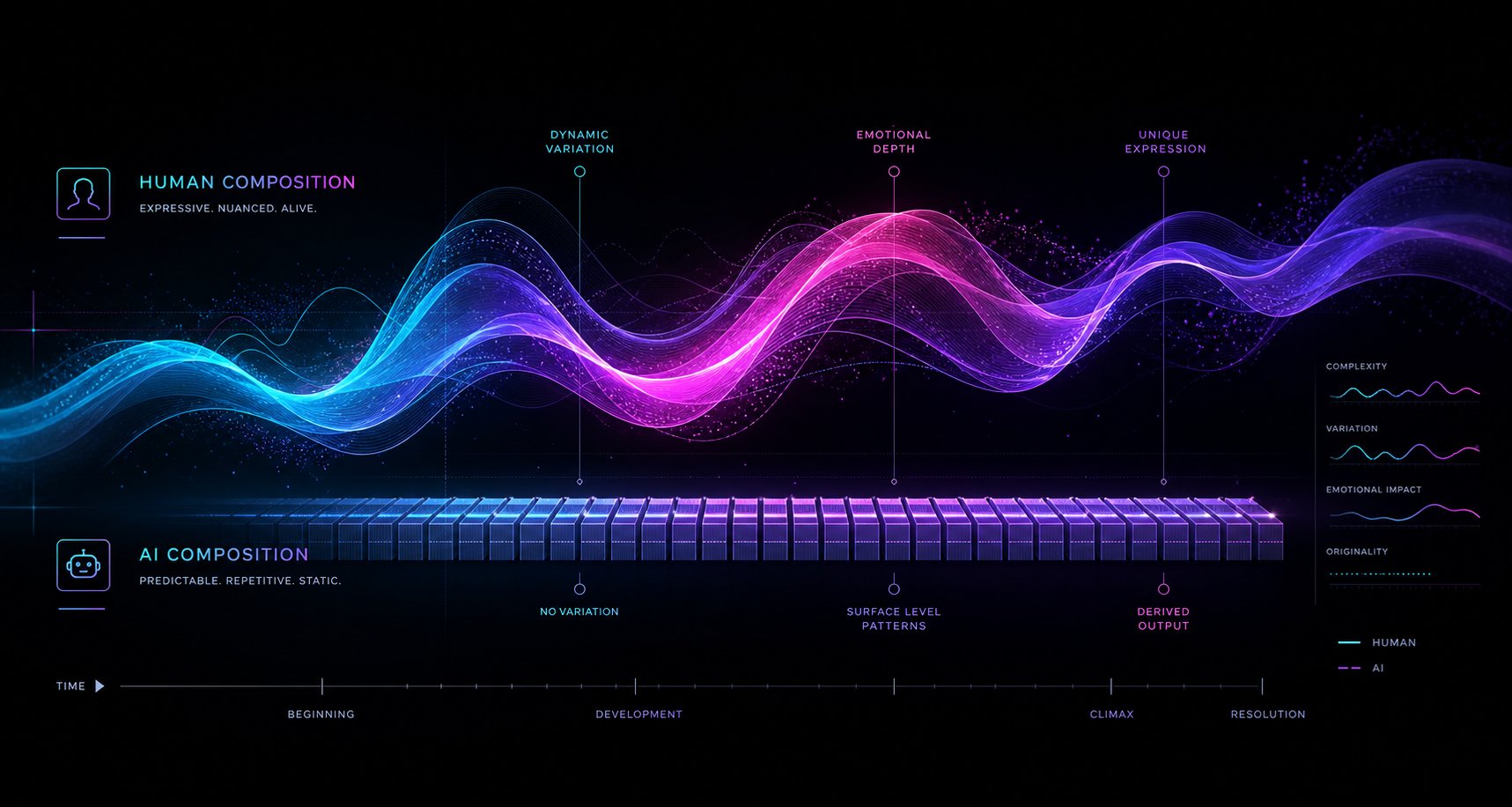
Individual audio artifacts are one layer of the puzzle, but zoom out and the song's architecture tells an even bigger story. AI-generated music tends to be structurally correct in the way a grammar textbook is linguistically correct: it follows the rules without ever saying anything interesting. This step shifts your focus from how individual sounds behave to how the entire composition moves, develops, and resolves. Think of it as moving from a microscope to an X-ray. You're now looking at the skeleton of the track.
Spotting Repetitive Loops and Flat Dynamics
Human musicians repeat themselves, of course. Choruses come back, riffs recur, and hooks are designed to stick. The difference is variation. A real drummer subtly changes the hi-hat pattern on the third chorus. A guitarist adds a slight bend to a familiar riff when it returns after the bridge. A vocalist delivers the same lyric with different emotional weight the second time around. These micro-variations aren't random. They reflect a performer responding to the energy of the song in real time.
AI-generated music struggles here because it treats repetition as literal copy-paste rather than thematic return. Listen for a chorus that sounds byte-for-byte identical each time it appears, with no added harmonies, no shift in vocal intensity, and no instrumental embellishment. A song analyzer mindset helps: track whether the energy actually builds across sections or just restarts at the same level every time. AI models generate music that matches the statistical patterns of a genre, but as detection research notes, they struggle to generate genuine emotional arc. A ballad that doesn't build, a climax that doesn't feel earned, or a verse with the same energy as the chorus are common signs.
Quantization is another giveaway. Human timing is expressive. Musicians rush slightly into a downbeat when excitement builds, or drag behind the beat during a laid-back groove. This push-and-pull is called rubato in classical music and "feel" in everything else. AI-generated tracks often have machine-precise timing across every instrument, especially in genres like folk, jazz, or soul where human imperfection is a defining characteristic. If a supposedly acoustic performance sounds like it was locked to a grid at the millisecond level, that mechanical precision is itself a tell.
Analyzing Lyrics for Semantic Coherence
Pull up the lyrics. Read them as text, separate from the melody. AI-generated lyrics have a specific flavor of failure: they rhyme correctly but say nothing particular. You'll find heavy reliance on abstract emotional language ("heart," "fire," "dreams," "falling," "soul") without the specific, personal imagery that makes a lyric memorable. Verses that could belong to any song in the genre, bridges that restate the chorus without development, and refrains assembled from interchangeable cliches all point toward generation rather than writing.
Research from MIT Technology Review on AI lyric generation highlighted this issue early: machines can fill structural slots with grammatically valid words, but the results lack narrative coherence. Lines like "you have my second estate / you suit your high origin" are technically English but semantically hollow. Modern AI tools produce far more polished output than those early experiments, yet the underlying problem persists. AI lyrics tend to achieve surface-level coherence without internal logic. A verse might mention rain, fire, and the ocean in three consecutive lines with no connecting thread.
A practical lyric detector approach: ask yourself whether the lyrics contain a single concrete, specific image that couldn't be swapped into a different song. Does the writer reference a particular place, moment, or sensory detail? Human songwriters ground emotion in specificity. AI defaults to the universal and the vague.
The Uncanny Valley of Musical Structure
This is where the concept of musical uncanny valley comes in. A song can hit every expected mark: intro, verse, pre-chorus, chorus, bridge, outro. The chord progressions resolve properly. The melody stays in key. Nothing is technically wrong. Yet the song feels emotionally flat, like it was assembled from a template rather than composed with intent.
Research into AI music dynamics explains why: AI systems interpret emotional expression through data correlation, inferring that softer volumes equal sadness and higher energy equals joy. But emotional expression can't be reduced to intensity variables alone. A human composer might write a quiet section that's tense rather than sad, or a loud passage that's joyful rather than aggressive. AI models average emotional data rather than interpreting intention, which is why dynamic transitions between sections often feel linear and predictable.
The bridge is often the most revealing section. In human-written songs, bridges serve a purpose: they introduce a new perspective, shift the harmonic landscape, or build tension before the final chorus. AI-generated bridges frequently just restate existing material in a slightly different register or repeat the same chord structure with minor surface variation. If the bridge doesn't take you anywhere new, the song may not have a human hand guiding its architecture.
Use this comparison as a quick reference when running your own ai song analyzer evaluation on a suspicious track:
| Composition Element | Human-Made Music | AI-Generated Music |
|---|---|---|
| Timing and rhythm | Expressively variable, push-and-pull feel | Metronomically precise, grid-locked quantization |
| Dynamic range | Builds, releases, responds to narrative arc | Consistent volume and energy across sections |
| Melodic development | Motifs evolve, return with variation, lead somewhere | Loops repeat identically, melodies meander without resolution |
| Chord progressions | Genre-aware but capable of surprise and deviation | Generic progressions that never leave expected territory |
| Lyrical content | Specific imagery, narrative coherence, personal detail | Abstract cliches, thematic vagueness, interchangeable lines |
| Bridge and transitions | Introduces new perspective or harmonic shift | Restates existing material with superficial variation |
| Song form | Deliberate structural choices serving emotional intent | Template-following without meaningful deviation |
Structural analysis like this is something you can practice with any music analyzer mindset. The more songs you compare, the faster you'll recognize when a track is technically correct but compositionally hollow. And when your ears and your structural instincts still leave you uncertain, the next step brings in tools that can measure what human perception might miss.
Step 5: Run the Track Through AI Music Detection Tools
Your ears and structural instincts are powerful, but they have limits. Udio's output has fooled 70% of listeners in blind tests, and that number only climbs as models improve. This is where dedicated AI music detector tools come in. They analyze audio at a level of granularity that human perception simply can't match, scanning for mathematical fingerprints invisible to even trained musicians.
How AI Music Detection Tools Work
Every ai song detector on the market relies on some combination of three core methods. Understanding them helps you interpret the results rather than treating any tool as an infallible oracle.
Spectral analysis is the most common approach. AI music generators produce audio through neural vocoders that leave distinctive patterns in the frequency domain, particularly above 12kHz. A 2025 study in Transactions of the International Society for Music Information Retrieval found that even a simple logistic regression model achieved over 99% accuracy detecting these spectral artifacts from both open-source and commercial generators like Suno and Udio. The signature is invisible to your ears but lights up like a neon sign on a spectrogram.
Statistical feature analysis extracts numerical measurements from the audio, including mel-frequency cepstral coefficients, chroma vectors, micro-timing deviations, zero-crossing rates, and spectral centroids. These features get fed into a trained classifier that compares the track's statistical profile against patterns learned from thousands of known AI and human recordings. Some tools analyze as many as 72 features per track.
Multi-model ensemble detection takes a committee approach. Instead of relying on one classifier, tools like authio run each song through 12 separate neural networks, each trained to recognize a different AI generator's fingerprint. A meta-classifier tallies the votes and produces a final verdict. This method is particularly effective at identifying which specific platform generated the audio.
Think of it this way: spectral analysis catches how the audio was rendered, statistical features catch how it was composed, and ensemble methods catch who made it. The best ai song checker tools combine all three.
Step-by-Step Process for Scanning a YouTube Track
You can't paste a YouTube link directly into most detection tools. You'll need to extract the audio first, then upload it for analysis. Here's the complete workflow to detect song online from a YouTube video:
- Copy the YouTube video URL from your browser's address bar.
- Extract the audio using a YouTube-to-MP3 tool or browser extension. Choose the highest available quality (320kbps MP3 or WAV if possible) since compression can degrade detection accuracy.
- Choose your detection tool. For a quick free check, use SubmitHub's AI Song Checker or LetSubmit. For deeper analysis, use ACRCloud's trial or a paid tool like authio.
- Upload the extracted audio file. Most tools accept MP3, WAV, and FLAC. Some also let you paste a SoundCloud or Spotify link directly.
- Wait for analysis. Most consumer tools return results within 5-30 seconds. Enterprise tools like IRCAM Amplify process at scale (250,000+ tracks per hour) but aren't available to individual users.
- Review the confidence score and any platform attribution. The tool will return a probability percentage and, in some cases, identify the likely generator (Suno, Udio, MusicGen, etc.).
- Cross-reference with a second tool. No single detector is definitive. Running the same file through two or three different tools gives you a more reliable signal.
If you're looking for an ai music finder approach that doesn't require downloading files, the AHA Music browser extension runs detection on any audio playing in your browser tab, including YouTube videos. It uses ACRCloud's engine and analyzes the full track, isolated vocals, and accompaniment separately.
Interpreting Detection Scores and Their Limitations
Detection tools typically return a probability score on a 0-100% scale. Here's how to read those numbers:
| Score Range | Interpretation | Recommended Action |
|---|---|---|
| 80-100% | Strong evidence of AI generation | Treat as AI-generated; high confidence |
| 40-79% | Possible AI involvement or hybrid production | Investigate further with manual listening and a second tool |
| 0-39% | Low evidence of AI generation | Likely human-made, but not guaranteed |
Now, the honest part. Top detectors claim 99%+ accuracy in controlled lab conditions against known AI platforms. Real-world accuracy on professionally produced or post-processed tracks drops to 85-93%. That gap matters. Here's why detection tools fall short in certain situations:
- Post-processing defeats most detectors. Running AI output through a DAW, adding EQ, compression, reverb, or layering with live instruments smooths out the spectral artifacts detectors look for.
- New models break old detectors. Detection tools are trained on output from known generators. When a new model launches or an existing one updates, there's always a gap before detectors catch up.
- False positives hit real artists. Heavily auto-tuned vocals, synthetic drum samples, and digital production techniques produce frequency patterns that overlap with AI signatures. A false positive rate of 0.6% sounds negligible until it's applied to millions of tracks.
- No two tools agree on everything. Testing by independent reviewers who ran identical tracks through eight detectors found that no two tools produced matching results across all test files.
The comparison below maps the most accessible tools by what they offer, their claimed accuracy, and cost, so you can pick the right ai music detector for your situation:
| Tool | Method | Claimed Accuracy | Platforms Detected | Cost |
|---|---|---|---|---|
| SubmitHub AI Song Checker | Random Forest classifier (21 features) | ~90%+ (honest about limitations) | Suno, Udio | Free |
| LetSubmit | 72-feature statistical analysis | 90%+ | Suno, Udio, ElevenLabs | Free (unlimited web checks) |
| authio | 12-model ensemble | 99.42% | 9 platforms (Suno, Udio, MusicGen, etc.) | From 12 EUR/month (14-day trial) |
| IRCAM Amplify | Multi-model spectral analysis | 99% | 5+ platforms | Enterprise (contact sales) |
| ACRCloud | Neural network + segment analysis | High (segment-level) | 8 platforms | ~$32/10K requests (14-day trial) |
| AHA Music | ACRCloud engine (3-layer scan) | High | Suno, Udio | Free (5 checks/day) |
| Beatstorapon | Spectral haze + phase entropy veto | Moderate | Suno, Udio, Stable Audio | Free |
For anyone looking for a reliable a.i. detector for music free of charge, SubmitHub, LetSubmit, and Beatstorapon form a solid trio. The ircam amplify ai music detector remains the industry benchmark for enterprise-scale scanning, but it's not accessible to individual listeners. Use it as a reference point for what professional-grade detection looks like, not as a tool you'll personally access.
The bottom line: no single tool delivers a guaranteed verdict. Treat detection scores as one data point in your decision tree, not the final word. A high score from multiple tools combined with the audio artifacts and structural patterns you identified in previous steps gives you strong confidence. A borderline score on its own means you need to go deeper, and the next step offers a way to do exactly that by pulling the track apart layer by layer.
Step 6: Separate and Inspect Individual Track Layers
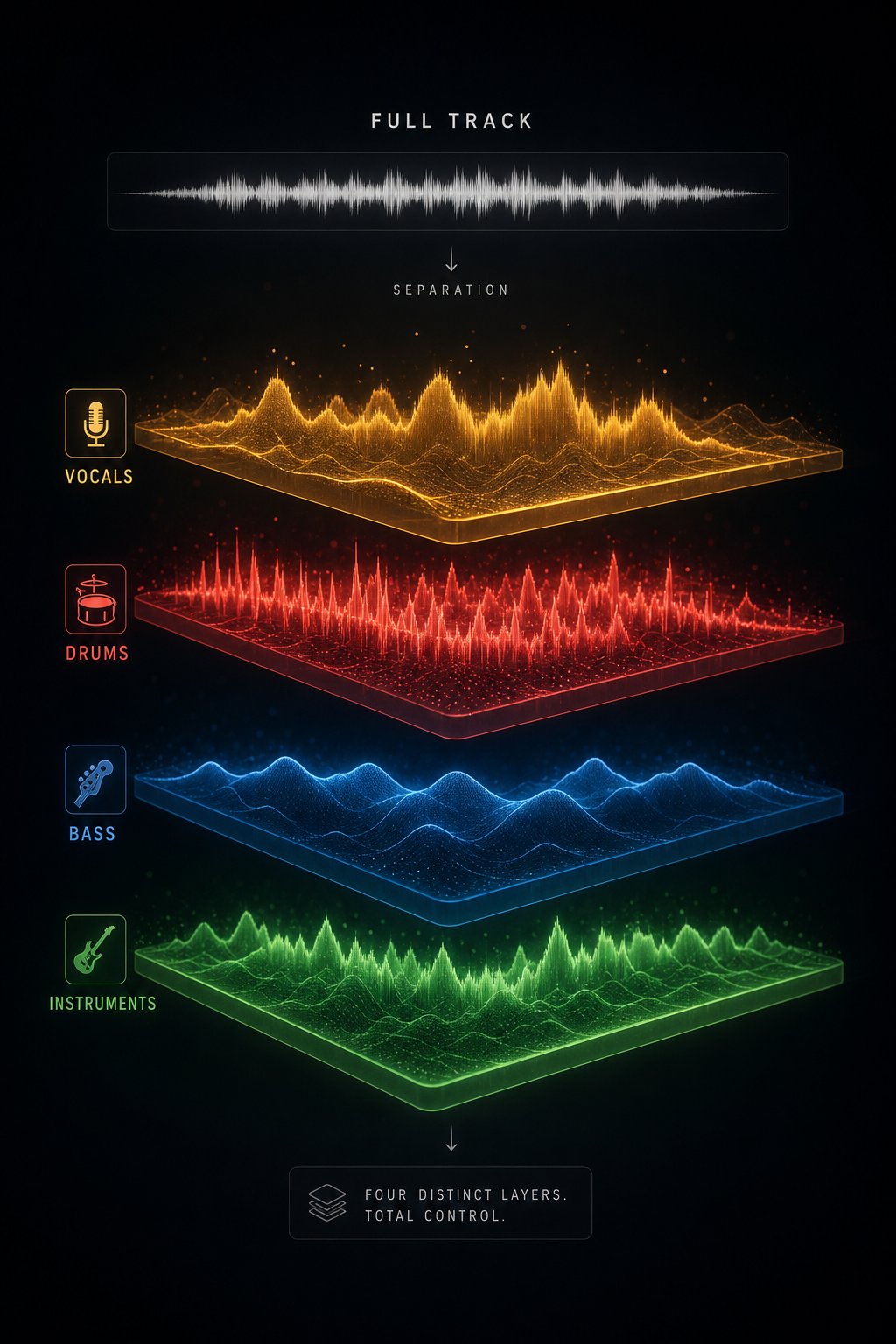
Detection tools give you a probability score, but they can't tell you exactly where the AI fingerprints live inside a track. Stem separation can. By splitting a mixed song into its individual components, vocals, drums, bass, and instruments, you expose artifacts that the full mix was hiding. It's the difference between scanning a building's exterior and opening up the walls to check the wiring.
Why Stem Separation Reveals Hidden AI Artifacts
When all the elements of a song play together, they mask each other's flaws. A slightly plasticky synth pad gets buried under drums and vocals. A robotic vocal wobble disappears beneath heavy reverb and dense instrumentation. But solo any one of those layers, and flaws that were inaudible in context suddenly jump out.
This works because of how AI generates music. As detection researchers have documented, AI-generated stems often exhibit telltale signs: drums with velocities that are too uniform, bass lines with unnatural phase relationships, and vocals completely lacking the breath variability and formant shifts of a real singer. In a full mix, these issues blend into a convincing composite. Isolated, they're exposed.
Modern AI-powered stem separation uses deep neural networks trained on thousands of multitrack recordings. Models like HTDemucs process audio through both time-domain and frequency-domain streams simultaneously, producing isolated vocals, drums, bass, and other instruments from a single stereo file. The technology has improved dramatically. Current models achieve vocal separation quality scores roughly 35% higher than tools available just a few years ago, making isolated stems clean enough to reveal subtle artifacts rather than introducing new ones.
How to Separate and Solo Individual Track Layers
You don't need a recording studio or engineering degree to split a track into stems. The process is straightforward: upload a file, choose your separation settings, and download the isolated layers. Tools like MakeBestMusic's Audio Separator let you upload a track and isolate vocals, drums, bass, and instruments separately, making hidden artifacts audible without any technical expertise. It's a practical option for anyone trying to identify song from mp3 files pulled from YouTube.
Here's the workflow. First, extract the audio from the YouTube video the same way you would for a detection tool (use the highest quality available, ideally 320kbps MP3 or WAV). Then upload the file to a stem separator. Think of it like a song finder upload process: you provide the file, and the tool returns isolated components. Once you have your separated stems, open them in any audio player and solo each one individually. Listen with headphones at moderate volume, giving each layer 30-60 seconds of focused attention.
Separating stems is particularly useful for detecting AI vocals versus human vocals. When a vocal track is stripped of its backing instruments, you hear every breath (or lack thereof), every transition between syllables, and every micro-variation in pitch. This is where AI detection becomes most intuitive, because even ears untrained in music production can hear when a voice sounds "off" once everything else is removed.
What to Listen for in Each Isolated Stem
Each stem type has its own set of AI red flags. Once you've separated the track, work through each layer using this as your audio identifier checklist:
- Vocals: Listen for absent breath sounds between phrases, vowel transitions that smear rather than articulate clearly, vibrato that sounds mathematically regular rather than organically variable, and a complete lack of room ambience or microphone proximity effect. AI vocals often sound like they exist in a vacuum with no sense of physical space around them.
- Drums: Check whether every snare hit has an identical transient shape and volume. Human drummers naturally vary the force and angle of every hit, producing micro-differences in tone and attack. AI-generated drums tend to have perfectly uniform transients, as if the same sample was triggered at the same velocity each time. Also listen for hi-hats and cymbals that decay in exactly the same way on every hit.
- Bass: AI bass lines frequently exhibit unnatural phase behavior, a subtle wavering or phasing quality that doesn't correspond to any real performance technique. Listen for notes that sustain with zero variation in timbre, lacking the natural harmonic movement that comes from a finger or pick interacting with a string, or from an analog synth oscillator drifting slightly.
- Melody and instruments: Solo the "other" stem (guitars, keys, synths, strings) and listen for a plasticky, overly smooth quality. Real instruments have physical resonance, finger noise on guitar strings, hammer noise on piano keys, and subtle interactions with their acoustic environment. AI-generated instrument layers often sound like a high-quality sample library on autopilot: technically correct but lacking the imperfections that signal a living performer.
One advanced technique: compare the phase relationship between stems. In a real recording, all the instruments share a common acoustic environment and have natural phase interactions. AI-generated tracks, where each element is synthesized independently, sometimes exhibit what detection researchers call "hyper-lock," an unnaturally perfect alignment between stems that no live performance would produce. If the kick drum and bass line feel mathematically phase-locked with zero variance across the entire track, that's a strong signal.
Stem separation functions as both an mp3 song identifier technique and a deeper investigative tool. It doesn't just tell you whether something sounds like AI. It shows you where the AI signatures live. For listeners who want to identify this sound online without relying solely on automated scores, pulling stems apart and listening critically offers the most visceral, convincing evidence. You're not reading a confidence percentage. You're hearing the absence of humanity in the isolated vocal, one breath at a time.
Knowing what to listen for in isolated stems is powerful, but detection difficulty varies wildly depending on what genre you're analyzing. A lo-fi ambient track and a jazz improvisation demand completely different approaches, and the next step addresses exactly those genre-specific challenges.
Step 7: Apply Genre-Specific Detection Strategies
Everything you've learned so far applies broadly, but here's what trips most people up: detection difficulty isn't uniform. A pop vocal track and a lo-fi ambient stream require completely different listening strategies because AI generators don't fail equally across genres. Their weaknesses shift depending on the musical conventions they're imitating. Your confidence in a verdict should scale accordingly.
Genre-level detection research confirms this quantitatively. Pop tracks can be identified with roughly 96% accuracy, while electronic and lo-fi material drops to around 88%. Jazz sits at approximately 87%. Those numbers aren't just trivia. They tell you where to trust your instincts, where to lean harder on tools, and where a single analysis might not be enough. Whether you're using an ai song recognition tool or your own trained ears, genre context changes the game.
Detecting AI in Vocal and Pop Tracks
Pop is where AI detection is most accessible, and the reason is simple: vocals are the hardest thing for AI to fake convincingly. Human singing involves complex biomechanics, and pop music puts the voice front and center with minimal room to hide.
Focus on melisma, those rapid vocal runs where a singer moves through multiple notes on a single syllable. Think of it like a controlled vocal slide. Human melisma has natural acceleration and deceleration, with subtle pitch variations driven by breath support and muscle memory. AI-generated melisma tends to sound either too smooth (like an autotune effect applied to every note evenly) or subtly glitchy, with notes that jump between pitches in quantized steps rather than flowing organically. This is particularly evident in R&B-influenced pop where vocal agility is a defining feature.
The other major tell in pop: emotional dynamics across the song. A real pop vocalist delivers the third chorus differently from the first. There's accumulated energy, slight strain in the upper register, breath that gets shorter. AI pop vocals often sound identical in every repetition, delivering technically correct notes without the physiological evidence of a performance that's been building for three minutes.
Why Lo-Fi and Ambient Genres Are Hardest to Verify
Lo-fi and ambient music occupy the detection blind spot. The reason is almost ironic: these genres deliberately embrace imperfection. Vinyl crackle, low-pass filtering, sidechain ducking, and looped four-bar phrases are genre conventions that real producers choose on purpose. They also happen to be artifacts that AI generators produce naturally due to architectural limitations like restricted context windows and lower-bandwidth training data.
This structural overlap is exactly why detection accuracy on electronic and lo-fi hovers around 88% with a false positive rate of 3.6%, the highest among mainstream genres. The signals that reliably separate AI from human in pop and rock, like over-smooth energy envelopes and too-perfect timing, are features lo-fi producers intentionally build into their music.
So what do you look for instead? Shift your attention from sound quality to structural behavior. Does the four-bar loop repeat with zero variation across the entire track, or does the producer change a single drum hit, adjust a filter sweep, or introduce a new element every few cycles? Real lo-fi producers, even when building deliberately repetitive music, inject micro-variation because they're making active creative decisions each measure. AI generators repeat loops identically because their context window resets. That distinction, subtle as it is, becomes audible over a two- or three-minute stretch if you're listening for it.
If you're trying to use any online song identifier or ai song finder tool on a lo-fi track that scores in the ambiguous range, don't treat that result as a failure. It's the genre working against the tool's training data. Cross-reference with stem separation and structural repetition analysis before making a judgment.
Genre-Specific Red Flags for Jazz, Electronic, and AI Covers
Jazz exposes AI's deepest creative limitation: improvisation. Research into AI jazz generation identifies three core barriers that current models cannot overcome. First, temporal dynamics: jazz is conversational, with musicians responding to each other in split seconds. AI systems generate asynchronously and cannot adapt to real-time ensemble energy. Second, emotional depth: when a human soloist plays "outside" the chord changes, they're making a deliberate artistic statement. AI produces out-of-key notes that sound random rather than intentional. Third, data dependency: a model trained on bebop reproduces bebop patterns but cannot invent new approaches or transcend its training set the way a living musician would.
When evaluating a jazz track, listen for the swing feel. Human swing is never metronomically even. The ratio between long and short eighth notes fluctuates throughout a performance based on tempo, energy, and interaction with other players. AI-generated swing tends to apply a fixed mathematical ratio (like 2:1 or 3:1) uniformly across an entire track. Also listen for call-and-response patterns between instruments. In real jazz, the bass player reacts to a piano phrase with a complementary rhythmic figure. AI-generated jazz often has instruments that sound technically competent in isolation but indifferent to each other, as if each part was generated separately.
Electronic and EDM present the opposite problem from jazz. Since production is already entirely digital, the usual "too clean" signals don't apply. Every human EDM producer uses quantized drums, synthesized sounds, and pristine mixing. The detection angle here isn't sonic authenticity but arrangement creativity. Does the track develop its ideas across its runtime, or does it rely on predictable eight-bar build-and-drop cycles without variation? Does the sound design feel like it evolved from deliberate experimentation, or does it sound like a preset library assembled by algorithm? Real electronic producers tend to introduce at least one moment of genuine surprise: an unexpected rhythmic break, an unconventional sound, a transition that doesn't follow the formula. AI-generated EDM hits every expected structural beat without ever deviating.
AI covers require a different approach entirely. When you suspect you're hearing an AI-generated cover of a known song, the detection method is comparison. Find the original song on YouTube or any streaming platform and play them side by side. AI covers expose themselves through timing and pitch anomalies relative to the source. The vocal phrasing will follow the original's melodic contour but miss the expressive timing choices: a real cover artist interprets, adding their own phrasing decisions. An AI cover maps the melody mechanically, often nailing the pitch while missing the rhythmic swing of the original delivery. You'll also hear timbral inconsistencies where the cloned voice briefly drops its character, especially on held notes or at phrase endings.
Use the table below as a quick-reference when you need to ai identify this song's origin based on its genre. Each row maps what to prioritize, how hard the task is, and which detection method works best:
| Genre | Primary Detection Signals | Difficulty Level | Recommended Inspection Method |
|---|---|---|---|
| Pop / Vocal | Unnatural melisma, identical chorus delivery, absent breath dynamics | Moderate | Slow playback to 0.75x, isolate vocal stem |
| Lo-fi / Ambient | Zero micro-variation in loops, identical four-bar repetition, no evolving elements | Hard | Structural repetition analysis over full track length |
| Jazz | Fixed swing ratio, no inter-instrument responsiveness, improvisation that never takes risks | Moderate-Hard | Listen for call-and-response and rhythmic flexibility |
| Electronic / EDM | Predictable arrangement, no sound design surprises, formulaic builds and drops | Very Hard | Focus on arrangement creativity and transitions |
| AI Covers | Mechanical phrasing vs. original, timbral drops on sustained notes, pitch-perfect but rhythmically stiff | Moderate | Side-by-side comparison with original recording |
| Rock / Country | Missing room reverb, overly regular pick/stick transients, synthetic amp tone | Easy | Standard artifact listening plus detection tools |
| R&B | Phase coherence issues in vocals, too-perfect pitch quantization beyond normal auto-tune | Moderate | Vocal stem isolation, cross-reference with detection tool |
The core takeaway: adjust your confidence based on genre. A pop track flagged by both your ears and a detection tool? High confidence it's AI. A lo-fi track that scores ambiguously and sounds repetitive but uses genre-appropriate conventions? You need more evidence before reaching a conclusion. Genre awareness doesn't change the detection steps. It changes how much weight you give each result.
With genre-specific strategies in hand, you now have a complete toolkit: platform checks, channel analysis, audio artifacts, structural patterns, detection tools, stem separation, and genre context. The final question is what to do with all of this once you've made your determination.
What to Do After Spotting AI Music on YouTube
You've worked through the full detection pipeline and you're confident a track is AI-generated. Now what? Identifying the music is only half the equation. Acting on that knowledge, whether by reporting undisclosed content, cleaning up your playlists, or supporting the human artists being crowded out, closes the loop and makes the effort worthwhile.
How to Report Undisclosed AI Music on YouTube
YouTube's disclosure policy requires creators to label AI-generated music, and creators who consistently fail to disclose face penalties including content removal and suspension from the YouTube Partner Program. When you find a track that's clearly synthetic but carries no label, you can flag it directly.
Click the three-dot menu beneath the video, select "Report," and choose the option related to misleading content or altered/synthetic media. In the description field, note that the audio appears AI-generated and no disclosure label is present. YouTube uses both automated detection and manual review to evaluate these reports. Your report won't trigger instant removal, but it contributes to the enforcement signal YouTube uses when evaluating channels holistically.
Content ID adds another layer here. AI-generated tracks that closely mimic copyrighted material can trigger automatic claims from rights holders, but original AI compositions that don't infringe existing works pass through Content ID undetected. The system was built to fingerprint every ai song to identify it against a database of registered works, not to distinguish human from machine. Reporting remains the primary mechanism for flagging undisclosed synthetic content specifically.
Building a Repeatable Detection Checklist
Consistency matters more than perfection. No single step gives you certainty, and as discussions on are ai detectors accurate reddit threads confirm, even the best tools produce ambiguous results on edge cases. The power is in layering. Here's your condensed quick-reference workflow combining all seven steps:
- Check for AI disclosure labels in the expanded video description and player overlay.
- Investigate channel behavior: upload frequency, branding, genre consistency, and community engagement.
- Listen for audio artifacts: vocal glitches, absent breathing, sterile mixing. Slow playback to 0.75x with headphones.
- Examine musical structure: repetitive loops, flat dynamics, vague lyrics, predictable song form.
- Run the track through ai music detectors: use at least two tools (SubmitHub, LetSubmit, or authio) and cross-reference scores.
- Separate stems using a tool like MakeBestMusic's Audio Separator and solo each layer to expose hidden artifacts in vocals, drums, and instruments.
- Apply genre-specific strategies: adjust your confidence threshold based on whether the track is pop, lo-fi, jazz, electronic, or a cover.
Treat this as a decision tree, not a mandatory seven-step process for every track. If step one or two gives you a definitive answer, you can stop there. Reserve the deeper analysis for tracks that remain ambiguous after the quick checks.
Supporting Human Artists and Filtering AI Content
Beyond reporting, you can actively shape what YouTube serves you. Remove suspected AI tracks from your playlists and avoid engagement (likes, shares, watch time) that signals the algorithm to recommend more of the same. Think of this as running your own playlist checker: periodically auditing what's accumulated in your saved music and filtering out channels that match the AI content farm profile from Step 2.
Supporting human artists is the flip side of the same coin. Subscribe to channels that show real studio footage, credit collaborators, and maintain a consistent artistic identity. Share their work. Comment. The algorithm responds to engagement signals, and every interaction with a verified human creator reduces the relative visibility of AI-generated filler.
Knowing how to tell if a song is ai generated is a skill that improves with repetition. The more tracks you evaluate, the faster your instincts sharpen and the less time each assessment takes. Whether you're a casual listener protecting the quality of your feed or a musician tracking how AI content affects your genre, the ai music checker workflow above gives you a structured, repeatable method that scales from a five-second label check to a full forensic teardown. Use it consistently, and you'll rarely be fooled twice.